
[Solution] Microsoft Windows 服务(2) 使用Topshelf创建Windows服务
除了通过.net提供的windows服务模板外,Topshelf是创建Windows服务的另一种方法。
官网教程:http://docs.topshelf-project.com/en/latest/configuration/quickstart.html
优点:
1.可以直接调试运行。
2.命令更方便。
3.Topshelf是一个开源的跨平台的宿主服务框架,支持Windows和Mono

下载:
Install-Package Topshelf
开发:
0.创建服务 1.安装 2.启动 3.停止 4.卸载 5.调试服务 6.监控服务
创建服务:
1.使用Topshelf创建服务非常简单。构建任何一个class ,提供一个启动和停止的方法即可。
2.本节使用System.Timers.Timer做定时任务处理
class MyService

    {

        readonly Timer timer = new Timer();

        public MyService()

        {

            timer.Interval = ;

            timer.Elapsed += (s, e) => File.AppendAllText("d:\\1.txt",DateTime.Now.ToLongTimeString()+"\r\n");

        }

        public void Start()

        {

            timer.Start();

        }

        public void Stop()

        {

            timer.Stop();

        }

    }
当创建完一个服务后,需要配置指定服务和指定启动停止的方法。
class Program

    {

        static void Main(string[] args)

        {

            HostFactory.Run(x =>

            {

                //要配置的服务

                x.Service<MyService>(c =>

                {

                    c.ConstructUsing(name => new MyService());

                    c.WhenStarted(s => s.Start());

                    c.WhenStopped(s => s.Stop());

                });

                //服务的运行身份

                x.RunAsLocalSystem();

                x.SetDescription("服务描述");

                x.SetDisplayName("显示名称");

                x.SetServiceName("服务名称");

            });

        }

    }
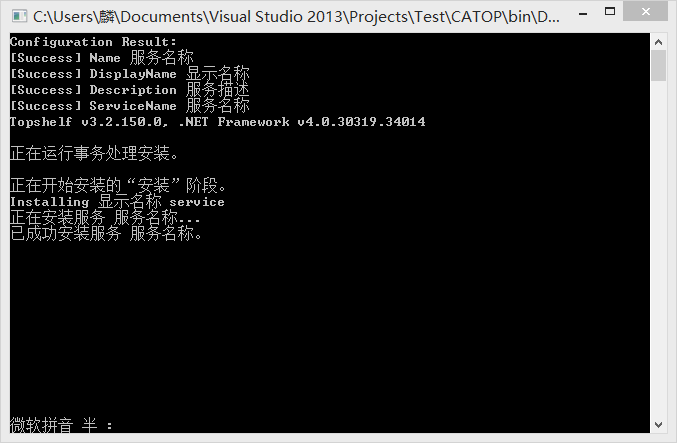
安装:
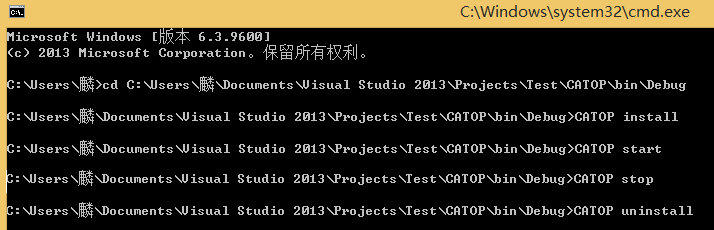
a.cd 定位到程序目录. b.程序以管理员身份运行 c.程序名 install
启动:
start 程序名
停止:
stop 程序名
卸载:
uninstall 程序名
调试服务:
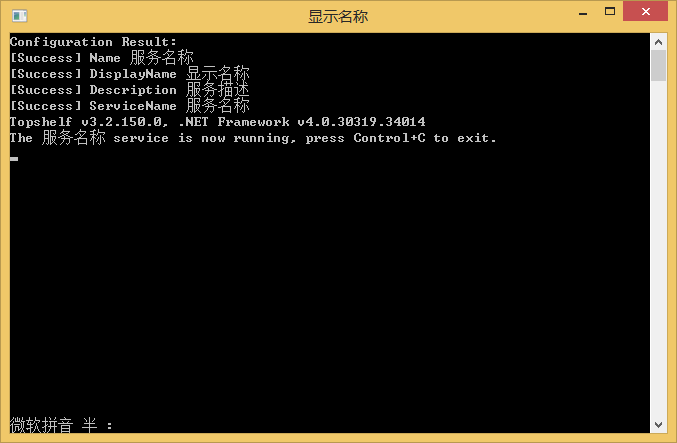
直接运行,即可调试
监控:
使用ServiceController来获取服务状态或对服务进行控制。
这个类可以获取服务的状态,属性,对服务也可以进行启动,停止操作
代码下载:点击下载
[Solution] Microsoft Windows 服务(2) 使用Topshelf创建Windows服务的更多相关文章
- 使用Topshelf创建Windows服务
概述 Topshelf是创建Windows服务的另一种方法,老外的一篇文章Create a .NET Windows Service in 5 steps with Topshelf通过5个步骤详细的 ...
- Topshelf创建Windows服务
使用Topshelf创建Windows服务 概述 Topshelf是创建Windows服务的另一种方法,老外的一篇文章Create a .NET Windows Service in 5 steps ...
- C#/.NET基于Topshelf创建Windows服务程序及服务的安装和卸载(极速,简洁)
本文首发于:码友网--一个专注.NET/.NET Core开发的编程爱好者社区. 文章目录 C#/.NET基于Topshelf创建Windows服务的系列文章目录: C#/.NET基于Topshelf ...
- 【第三方插件】使用Topshelf创建Windows服务
概述 Topshelf是创建Windows服务的另一种方法,老外的一篇文章Create a .NET Windows Service in 5 steps with Topshelf通过5个步骤详细的 ...
- C#/.NET基于Topshelf创建Windows服务的守护程序作为服务启动的客户端桌面程序不显示UI界面的问题分析和解决方案
本文首发于:码友网--一个专注.NET/.NET Core开发的编程爱好者社区. 文章目录 C#/.NET基于Topshelf创建Windows服务的系列文章目录: C#/.NET基于Topshelf ...
- 使用Topshelf创建Windows服务[转载]
概述 Topshelf是创建Windows服务的另一种方法,老外的一篇文章Create a .NET Windows Service in 5 steps with Topshelf通过5个步骤详细的 ...
- 使用Topshelf创建Windows 服务
本文转载: http://www.cnblogs.com/aierong/archive/2012/05/28/2521409.html http://www.cnblogs.com/jys509/p ...
- 使用 Topshelf 创建 Windows 服务
Ø 前言 C# 创建 Windows 服务的方式有很多种,Topshelf 就是其中一种方式,而且使用起来比较简单.下面使用 Visual Studio Ultimate 2013 演示一下具体的使 ...
- windows + SQL Server环境,创建ArcSDE服务
ArcGIS for Server启用FeatureService需要ArcSDE和Geodatabase. 使用ArcSDE需要创建windows服务,ArcSDE只有命令行,所以只好阅读文档,找合 ...
随机推荐
- centos7开启3306端口,liunx查看防火墙是否开启
Can't connect to MySQL server on localhost (10061)这个就属于下面要说的情况 启动服务 systemctl start mariadb.service ...
- ubuntu bless 16字节每行
打开Preferences配置 输入路径:/usr/share/bless/bless-16-bytes-per-row.layout 或者使用以下配置 cat /home/scue/.config/ ...
- Initialize the Storage Emulator by Using the Command-Line Tool
http://msdn.microsoft.com/en-us/library/azure/gg433132.aspx To initialize the storage emulator Click ...
- 在ps中画两个同心圆并且把两个同心圆进行任意角度切割
在工作中遇到要在ps中画如图两个同心圆,并且进行6等分.查找资料加自己摸索,可以通过以下方式实现: 1.新建一画布.并用通过标尺画出两条水平和垂直参考线,选择椭圆工具,并在选项设置中选择圆和从中心两个 ...
- Make it run, make it right, make it fast
如果问我工作十多年后相比刚毕业参加的时候,学到了哪些重要的经验,那么"Make it work, make it right, make it fast"一定是其中最重要的经验之一 ...
- Unity中Mesh分解与边缘高亮加上深度检测
一个比较简单的需求,不过遇到些坑,记录下. 房间有多个模型,每个模型可能多个SubMesh,点击后,需要能具体到是那个SubMesh,并且在这个SubMesh上显示边缘高光,以及能个性这单个SubMe ...
- SQL Server Profiler:使用方法和指标说明
SQL Server Profiler的中文意思是SQL Server事件探查,一个Sql的监视工具,可以具体到每一行Sql语句,每一次操作,和每一次的连接.感觉这个工具的作用还是很大的,给大家分享一 ...
- 我的web框架
我的web框架 ========================================================== 前端:css(bootstrap,自己的代码片段),js(jque ...
- Win7 64位 Visio反向工程(MySQL)
1 看Office的版本,我安装的是32位的版本,故要去MySQL的官网下载对应32位的ODBC驱动: http://dev.mysql.com/downloads/connector/odbc/ 2 ...
- Spark源码系列(七)Spark on yarn具体实现
本来不打算写的了,但是真的是闲来无事,整天看美剧也没啥意思.这一章打算讲一下Spark on yarn的实现,1.0.0里面已经是一个stable的版本了,可是1.0.1也出来了,离1.0.0发布才一 ...