
IntelliJ IDEA 2017版开发SpringBoot之fastJsonHttpMessageConvert使用
继承WebMvcConfigurerAdapter,改写成自己的json转换工具的写法
1、建立实体类
 package com.fastjson;

 import com.alibaba.fastjson.annotation.JSONField;

 import java.util.Date;

 /**

  * Created by liuya on 2018-01-17.

  */

 public class UserPoJo

 {

     private int userId;

     private String userName;

     @JSONField(format="yyyy-MM-dd HH:mm:ss")

     private Date createTime;

     public Date getCreateTime() {

         return createTime;

     }

     public void setCreateTime(Date createTime) {

         this.createTime = createTime;

     }

     public int getUserId() {

         return userId;

     }

     public void setUserId(int userId) {

         this.userId = userId;

     }

     public String getUserName() {

         return userName;

     }

     public void setUserName(String userName) {

         this.userName = userName;

     }

     @Override

     public String toString() {

         return "UserPoJo{" +

                 "userId=" + userId +

                 ", userName='" + userName + '\'' +

                 ", createTime=" + createTime +

                 '}';

     }

 }
注意:
@JSONField(format="yyyy-MM-dd HH:mm:ss")的使用是自定义格式
2、建立模拟服务器程序
 package com.fastjson;

 import com.alibaba.fastjson.serializer.SerializerFeature;

 import com.alibaba.fastjson.support.config.FastJsonConfig;

 import com.alibaba.fastjson.support.spring.FastJsonHttpMessageConverter;

 import org.springframework.boot.SpringApplication;

 import org.springframework.boot.autoconfigure.SpringBootApplication;

 import org.springframework.http.MediaType;

 import org.springframework.http.converter.HttpMessageConverter;

 import org.springframework.web.servlet.config.annotation.WebMvcConfigurerAdapter;

 import java.util.ArrayList;

 import java.util.List;

 /**

  * 模拟开启的服务器

  */

 @SpringBootApplication

 public class SpringboothelloApplication extends WebMvcConfigurerAdapter{

     /**

      //     * 在这里我们使用 @Bean注入 fastJsonHttpMessageConvert

      //     * @return

      //     */

     @Override

     public void configureMessageConverters(List<HttpMessageConverter<?>> converters) {

         // 1、需要先定义一个 convert 转换消息的对象;

         FastJsonHttpMessageConverter fastConverter = new FastJsonHttpMessageConverter();

         //2、添加fastJson 的配置信息,比如:是否要格式化返回的json数据;

         FastJsonConfig fastJsonConfig = new FastJsonConfig();

         fastJsonConfig.setSerializerFeatures(SerializerFeature.PrettyFormat);

         //处理中文乱码

         List<MediaType> fastMediaTypes = new ArrayList<>();

         fastMediaTypes.add(MediaType.APPLICATION_JSON_UTF8);

         fastConverter.setSupportedMediaTypes(fastMediaTypes);

         //3、在convert中添加配置信息.

         fastConverter.setFastJsonConfig(fastJsonConfig);

         HttpMessageConverter<?> converter = fastConverter;

         converters.add(fastConverter);

     }

     public static void main(String[] args) {

         SpringApplication.run(SpringboothelloApplication.class, args);

     }

 }
注意:测试程序测试前启动
3、测试用的Controller
 package com.fastjson;

 import org.springframework.web.bind.annotation.RequestMapping;

 import org.springframework.web.bind.annotation.RestController;

 import java.util.Date;

 /**

  * Created by liuya on 2018-01-16.

  *

  *  测试用的一个helloworld例子

  */

 @RestController

 public class ControllerJson {

     @RequestMapping("user")

     public UserPoJo hello(){

         //实体类赋值

         UserPoJo userPoJo  = new UserPoJo();

         userPoJo.setUserId(111);

         userPoJo.setUserName("王小二");

         userPoJo.setCreateTime(new Date());

         //返回实体类

         return userPoJo;

     }

 }
4、测试结果
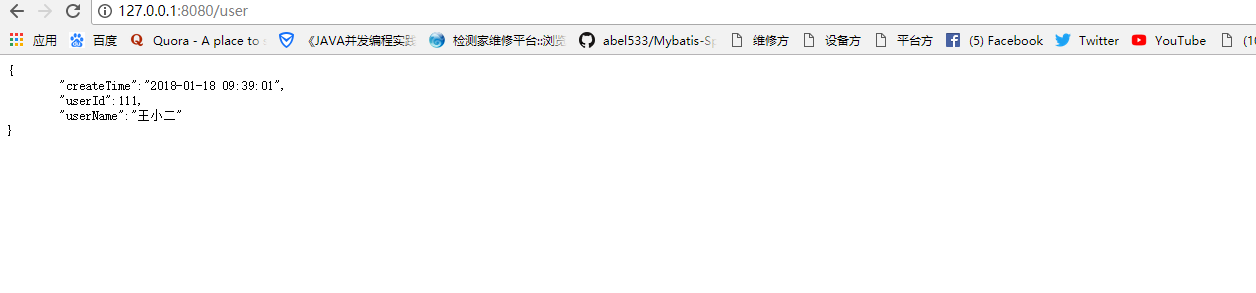
5、遇到问题字符编码错误
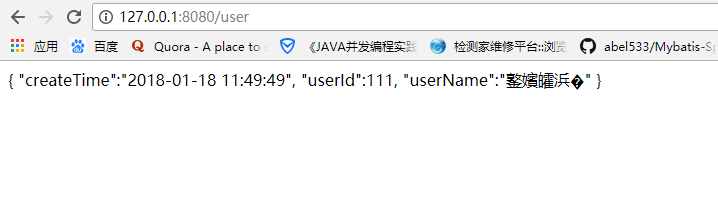
6、解决在SpringboothelloApplication中加入如下代码解决
             //处理中文乱码

         List<MediaType> fastMediaTypes = new ArrayList<>();

              fastMediaTypes.add(MediaType.APPLICATION_JSON_UTF8);

          fastConverter.setSupportedMediaTypes(fastMediaTypes);
IntelliJ IDEA 2017版开发SpringBoot之fastJsonHttpMessageConvert使用的更多相关文章
- IntelliJ IDEA 2017版 开发SpringBoot的全局配置文件使用
一.全局配置文件 描述: Spring Boot项目使用一个全局的配置文件application.properties或者是application.yml,在resources目录下或者类路径 ...
- Mac IntelliJ IDEA 2017(java开发集成环境)附注册码和破解教程 v2017.3.5破解版
原文:http://www.orsoon.com/Mac/155938.html 原文中含有软件下载地址 软件介绍 IntelliJ IDEA 2017 Mac激活版是Mac平台上的一款java开发集 ...
- IntelliJ IDEA 2017版 spring-boot 2.0.3 邮件发送搭建,概念梳理 (二)
第二部分 邮件发送历史 一.第一封邮件 1.1969年10月,世界上的第一封电子邮件 1969年10月世界上的第一封电子邮件是由计算机科学家Leonard K.教授发给他的同事的一条简短 ...
- IntelliJ IDEA 2017版 SpringBoot的web项目补充
一.注解 @SpringBootApplication:Spring Boot项目的核心注解,主要目的是开启自动配置. @Configuration:这是一个配置Sprin ...
- IntelliJ IDEA 2017版 spring-boot基础补充,原理详解
一.Spring发展史 1.Spring1.x 版本一时代主要是通过XML文件配置bean,在java和xml中不断切换,在学习java web 初期的时候经常使用 2.Spring2 ...
- IntelliJ IDEA 2017版 spring-boot与Mybatis简单整合
一.编译器建立项目 参考:http://www.cnblogs.com/liuyangfirst/p/8372291.html 二.代码编辑 1.建立数据库 /* Navicat MySQL Data ...
- IntelliJ IDEA 2017版 spring-boot加载jsp配置详解(详细图文实例)
一.创建项目 (File--->New-->Project) 2.项目配置内容 3.选择配置项目的Group包名,Artifact项目名称 4.选择项目类型为web类型 5.创建成功,点击 ...
- IntelliJ IDEA 2017版 spring-boot 2.0.5 邮件发送简单实例 (三)
一.搭建SpringBoot项目 详见此文:https://www.cnblogs.com/liuyangfirst/p/8298588.html 注意: 需要添加mail依赖的包,同时还添加了lom ...
- IntelliJ IDEA 2017版 spring-boot 2.0.3 邮件发送搭建,概念梳理 (一)
邮件发送功能总结 第一部分 背景 一.使用场景 (1)注册验证 注册各大网站,通常需要输入邮件地址,在注册成功后,会发送一封邮箱验证的邮件,点击确认,证明这个邮箱是用户自己的 ...
随机推荐
- log4net 极简配置
log4net的配置详解 分类: C#2013-10-01 22:45 5335人阅读 评论(4) 收藏 举报 log4net日志框架 前言:没买到1号回家的票,所以在祖国64岁生日之 ...
- nohup 后台运行命令
在Linux上部署zipkin,在SSH客户端执行java -jar zipkin-server-1.21.0-exec.jar,启动成功,在关闭SSH客户端后,运行的程序也同时终止了,怎样才能保证在 ...
- thinkPHP volist标签循环输出多维数组
<volist name="company" id="vo">{$vo.company_name}<volist name="vo[ ...
- 读java并发编程笔记
同步策略:在共享资源上面加锁 java监视器模式:class对象-与之对应的锁(内置锁)[对象锁与class锁] 执行策略: 取消策略: =============================== ...
- jquery文件的引入
上节课说到,一般情况下,是库的文件,该库中都会抛出来构造函数或者对象 ,如果是构造函数,那么创建对象,如果是对象直接调用属性和方法 使用jquery第一步,先引入jquery,然后再写相应的jquer ...
- MongoDB 生态 – 可视化管理工具
工欲善其事,必先利其器,我们在使用数据库时,通常需要各种工具的支持来提高效率:很多新用户在刚接触 MongoDB 时,遇到的问题是『不知道有哪些现成的工具可以使用』,本系列文章将主要介绍 MongoD ...
- SpringBoot入门(1)
一.初始 ①.首先还是要创建一个maven工程 ②.然后编写Controller 让SpringBoot跑起来并不需要太多的代码,就能实现了我们平时要配置很多的功能,这是怎么做到的呢?我们就下面一个入 ...
- 常用的ubantu操作命令
Ubuntu软件操作的相关命令 sudo apt-get update 更新源 sudo apt-get install package 安装包 sudo apt-get remove package ...
- MyEclipse 生成APK文件
MyEclipse 生成APK文件 Android Tools>Export Signed Application Packages. http://jingyan.baidu.com/ar ...
- Firefox 被Snap.do 劫持
Firefox IE 被劫持 windows的控制面板,卸载程序, 找任何跟「Snap.do」有关的软件,找到後先移除「Snap.Do Engine」再移除「Snap.Do」. 注册表里查找 Snap ...