
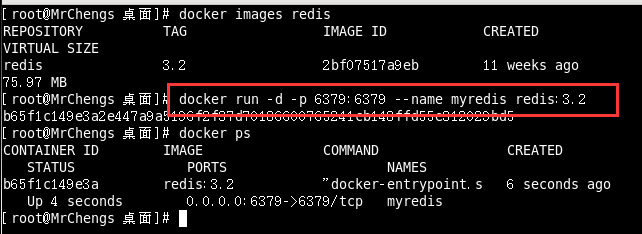
25、springboot与缓存整合Redis


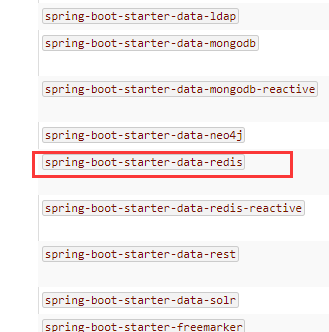
<dependency>

    <groupId>org.springframework.boot</groupId>

    <artifactId>spring-boot-starter-data-redis</artifactId>

</dependency>
public class RedisAutoConfiguration {

    public RedisAutoConfiguration() {

    }

    @Bean

    @ConditionalOnMissingBean(

        name = {"redisTemplate"}

    )

    public RedisTemplate<Object, Object> redisTemplate(RedisConnectionFactory redisConnectionFactory) throws UnknownHostException {

        RedisTemplate<Object, Object> template = new RedisTemplate();

        template.setConnectionFactory(redisConnectionFactory);

        return template;

    }

    @Bean

    @ConditionalOnMissingBean

    public StringRedisTemplate stringRedisTemplate(RedisConnectionFactory redisConnectionFactory) throws UnknownHostException {

        StringRedisTemplate template = new StringRedisTemplate();

        template.setConnectionFactory(redisConnectionFactory);

        return template;

    }

}
在配置文件中引入redis的地址:

//操作kv键值对的

@Autowired

RedisTemplate redisTemplate;

//操作kv都是字符串

@Autowired

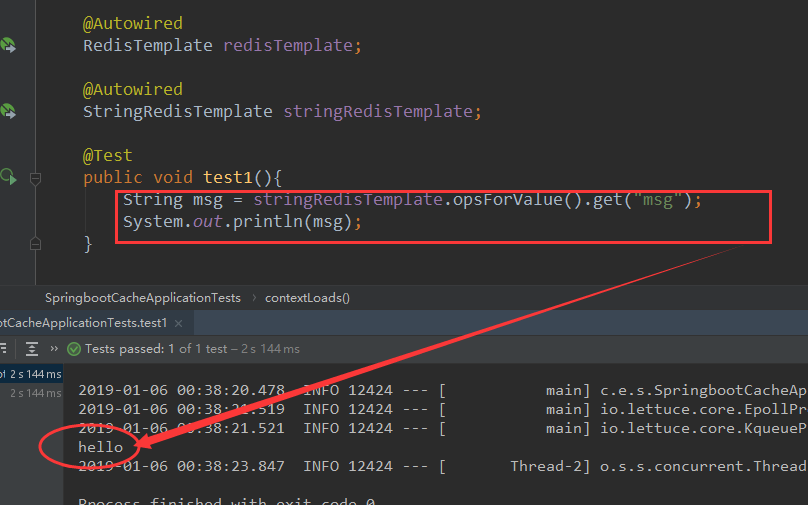
StringRedisTemplate stringRedisTemplate;

测试:
public class Employee implements Serializable {
//测试保存对象

@Test

public  void test2(){

    //保存的是emp的对象

    Employee emp = employeeMapper.getEmpById();

    //保存的是employee的对象

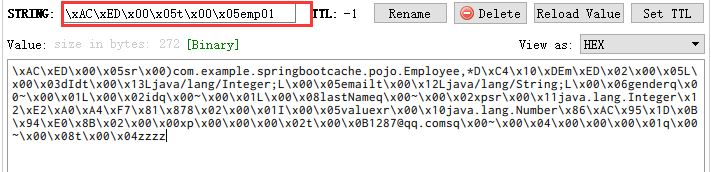
    //默认如果使用保存对象,使用jdk序列化机制,序列化后的数据保存在redis中

    redisTemplate.opsForValue().set("emp01",emp);

}
@Configuration

public class redisConfig {

    //专门序列化Employee

    @Bean

    public RedisTemplate<Object, Employee> redisTemplateEmp(RedisConnectionFactory redisConnectionFactory) throws UnknownHostException {

        RedisTemplate<Object, Employee> template = new RedisTemplate();

        template.setConnectionFactory(redisConnectionFactory);

        Jackson2JsonRedisSerializer<Employee> json = new Jackson2JsonRedisSerializer<Employee>(Employee.class);

        template.setDefaultSerializer(json);

        return template;

    }

}
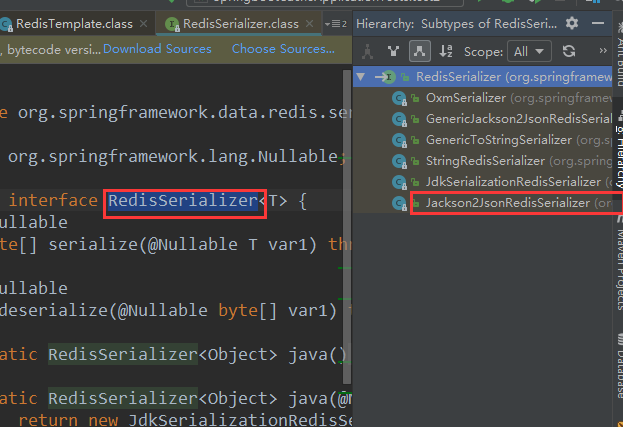
@Autowired

RedisTemplate redisTemplateEmp;

//测试保存对象

@Test

public  void test2(){

    //保存的是emp的对象

    Employee emp = employeeMapper.getEmpById();

    //将数据以json的方式

    //实现redisTemplate默认的序列化规则,改变默认的序列化规则

    redisTemplateEmp.opsForValue().set("emp1",emp);

}
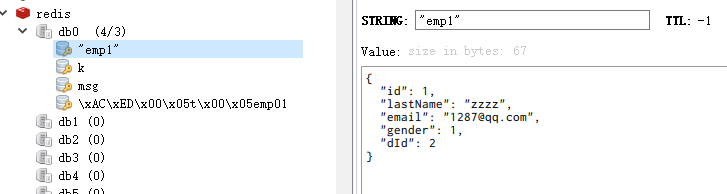
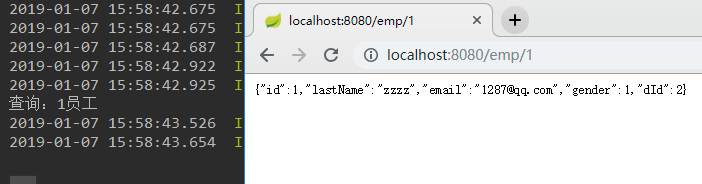
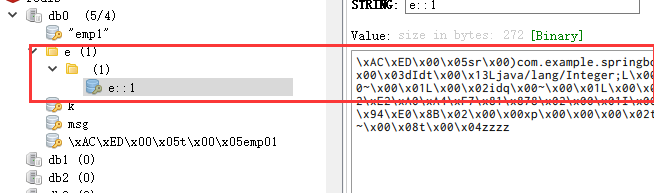
测试缓存:
RedisCacheConfiguration.class

@Bean

public RedisCacheManager cacheManager(RedisConnectionFactory redisConnectionFactory, ResourceLoader resourceLoader) {

    RedisCacheManagerBuilder builder = RedisCacheManager.builder(redisConnectionFactory).cacheDefaults(this.determineConfiguration(resourceLoader.getClassLoader()));

    List<String> cacheNames = this.cacheProperties.getCacheNames();

    if (!cacheNames.isEmpty()) {

        builder.initialCacheNames(new LinkedHashSet(cacheNames));

    }

    return (RedisCacheManager)this.customizerInvoker.customize(builder.build());

}
protected Collection<RedisCache> loadCaches() {

    List<RedisCache> caches = new LinkedList();

    Iterator var2 = this.initialCacheConfiguration.entrySet().iterator();

    while(var2.hasNext()) {

        Entry<String, RedisCacheConfiguration> entry = (Entry)var2.next();

        caches.add(this.createRedisCache((String)entry.getKey(), (RedisCacheConfiguration)entry.getValue()));

    }

    return caches;

}
@Bean

public RedisCacheManager cacheManager(RedisConnectionFactory redisConnectionFactory, ResourceLoader resourceLoader) {

    RedisCacheManagerBuilder builder = RedisCacheManager.builder(redisConnectionFactory).cacheDefaults(this.determineConfiguration(resourceLoader.getClassLoader()));

    List<String> cacheNames = this.cacheProperties.getCacheNames();

    if (!cacheNames.isEmpty()) {

        builder.initialCacheNames(new LinkedHashSet(cacheNames));

    }

    return (RedisCacheManager)this.customizerInvoker.customize(builder.build());

}
public class RedisAutoConfiguration {

    @Bean

    @ConditionalOnMissingBean(

        name = {"redisTemplate"}

    )

    public RedisTemplate<Object, Object> redisTemplate(RedisConnectionFactory redisConnectionFactory) throws UnknownHostException {

        RedisTemplate<Object, Object> template = new RedisTemplate();

        template.setConnectionFactory(redisConnectionFactory);

        return template;

    }
RedisTemplate.java

public void afterPropertiesSet() {

    super.afterPropertiesSet();

    boolean defaultUsed = false;

    if (this.defaultSerializer == null) {

        this.defaultSerializer = new JdkSerializationRedisSerializer(this.classLoader != null ? this.classLoader : this.getClass().getClassLoader());

    }

}

25、springboot与缓存整合Redis的更多相关文章
- MyBatis功能点一应用:二级缓存整合redis
Mybatis提供了默认的cache实现PerpetualCache,那为什么还要整合第三方的框架redis?因为Mybatis提供的cache实现为单机版,无法实现分布式存储(即本机存储的数据,其他 ...
- 【快学springboot】11.整合redis实现session共享
前言 这里都是基于前面的项目基础上的.springboot整合redis非常的方便,这也是springboot的宗旨,简化配置.这篇文章就教大家如何使用springboot整合redis来实现sess ...
- springboot 2.x整合redis,spring aop实现接口缓存
pox.xml: <dependency> <groupId>org.springframework.boot</groupId> <artifactId&g ...
- SpringBoot + MySQL + MyBatis 整合 Redis 实现缓存操作
本地安装 Redis Redis 安装:https://www.cnblogs.com/oukele/p/11373052.html 项目结构: SpringBootRedis 工程项目结构如下: ...
- redis(Springboot中封装整合redis,java程序如何操作redis的5种基本数据类型)
平常测试redis操作命令,可能用的是cmd窗口 操作redis,记录一下 java程序操作reids, 操作redis的方法 可以用Jedis ,在springboot 提供了两种 方法操作 Red ...
- SpringBoot学习:整合Redis
项目下载地址:http://download.csdn.NET/detail/aqsunkai/9805821 pom.xml添加对redis的依赖: <!-- https://mvnrepos ...
- springboot笔记10——整合Redis
依赖 <dependencies> <!--web依赖--> <dependency> <groupId>org.springframework.boo ...
- SpringBoot:Shiro 整合 Redis
前言 前段时间做了一个图床的小项目,安全框架使用的是Shiro.为了使用户7x24小时访问,决定把项目由单机升级为集群部署架构.但是安全框架shiro只有单机存储的SessionDao,尽管Shrio ...
- 【快学springboot】13.操作redis之String数据结构
前言 在之前的文章中,讲解了使用redis解决集群环境session共享的问题[快学springboot]11.整合redis实现session共享,这里已经引入了redis相关的依赖,并且通过spr ...
随机推荐
- nodejs设置服务端允许跨域
//设置跨域访问 app.all('*', function(req, res, next) { res.header("Access-Control-Allow-Origin", ...
- 三、synchronized同步锁
一.简介 在Java多线程中,我们要实现同步串行最早接触的就是synchronized关键字. 基本语法如下: synchronized(锁) { // 代码块 } sychronized关键字的锁主 ...
- Google Voice号码使用说明及用途
Google Voice号码使用说明及用途 号码 已不能网页注册获取,直接向TB购买,搜Google Voice就行了.很便宜的. 一. Google Voice介绍 Google Voice首先是一 ...
- Mybatis之简单注解
Mybatis使用注解实现主键自增长: oracle: @SelectKey(statement="select my_seq.nextval from dual",resultT ...
- JavaWeb学习总结(十一):Session解决form表单重复提交
在平时开发中,如果网速比较慢的情况下,用户提交表单后,发现服务器半天都没有响应,那么用户可能会以为是自己没有提交表单,就会再点击提交按钮重复提交表单,我们在开发中必须防止表单重复提交. 一.表单重复提 ...
- Maven学习总结(八):Myecplise中配置maven
第一步:下载maven安装包,配置环境变量M2_HOME;变量值为maven的解压目录. 第二步:在eclipse4.0之前的版本需要安装maven插件,方法即:将maven插件包复制到eclipse ...
- JS 写入到文件
//js写文件 function doSave(value, type, name) { var blob; if (typeof window.Blob == "function" ...
- css3怎么分清伪类和伪元素
伪类用于向某些选择器添加特殊的效果. 伪元素用于将特殊的效果添加到某些选择器. 伪类有::first-child ,:link:,vistited,:hover,:active,:focus,:lan ...
- C++学习笔记(2)----模板
1. 与其他任何类相同,我们既可以在类模板内部,也可以在类模板外部为其定义成员函数,且定义在类模板内的成员函数被隐式声明为内联函数. 2. 默认情况下,对于一个实例化了的类模板,其成员只有在使用时才被 ...
- javascript的时间描述图怎么写
在gis系统中往往需要在一个时间间隔内把图形动态播放出来,比如2000年到现在地震变化啊,海啸的变化,在flex中这种展现方式需要后台rest服务相结合,要建立有时间点的图层,arcgis发布要选ti ...