
DataGridView的单元格如何嵌入多个按钮控件
前段时间我有一个朋友面试公司的时候遇到这个面试题,他也给了份原题给我瞧瞧,并没有什么特别的要点,关于这一类问题,如何在网格上的单元格嵌入多个控件(如按钮、超链接等)问题,我在网上搜索了下这类问题,发现很多解答但是都杂乱,本篇文章帮助大家了解如何应对这类问题。
微软提供的DataGirdView网格控件可通过GetCellDisplayRectangle()方法将需要的控件嵌入单元格中,如:
this.Load += Form1_Load;
void Form1_Load(object sender, EventArgs e)
{
MulAutoBtnEdit();
}
private void MulAutoBtnEdit()
{
this.dataGridView1.Columns.Add("ColBtnEdit", "嵌入操作按钮");
this.dataGridView1.Columns["ColBtnEdit"].Width = 150;
int index = this.dataGridView1.Columns["ColBtnEdit"].Index;
this.dataGridView1.Columns["ColBtnEdit"].Resizable = DataGridViewTriState.False;
Button btnAdd = GetBtnByType("BtnAdd","新增");
Button btnEdit = GetBtnByType("BtnEdit", "修改");
Button btnDel = GetBtnByType("BtnDel", "删除");
this.dataGridView1.Controls.Add(btnAdd);
this.dataGridView1.Controls.Add(btnEdit);
this.dataGridView1.Controls.Add(btnDel);
Rectangle rectangle = this.dataGridView1.GetCellDisplayRectangle(index, 0, true);//获取当前单元格上的矩形区域
btnAdd.Size = btnEdit.Size = btnDel.Size = new Size(rectangle.Width / 3 + 1, rectangle.Height);
btnAdd.Location = new Point(rectangle.Left, rectangle.Top);
btnEdit.Location = new Point(rectangle.Left + btnAdd.Width, rectangle.Top);
btnDel.Location = new Point(rectangle.Left + btnAdd.Width + btnDel.Width, rectangle.Top);
}
private Button GetBtnByType(string strBtnName,string strBtnText)
{
Button btn = new Button();
btn.Name = strBtnName;
btn.Text = strBtnText;
btn.Click += btn_Click;
return btn;
}
private void btn_Click(object sender, EventArgs e)
{
if(sender is Button)
{
Button btn = (Button)sender;
MessageBox.Show(string.Format("点击按钮:{0}",btn.Text));
}
}
效果图:
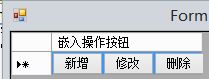
通过以上的操作即可将多个按钮嵌入到单元格中,不考虑维护性、效率问题,只在于给予大家思路,对于“超链接”控件等都可用类似的方法处理,类似网址如下:
https://bbs.csdn.net/topics/340208660
在网上发行另一种方式,思路差不多,地址我也贴出来:
https://blog.csdn.net/linzi1015910507/article/details/52595863
关于第三方DevExpress组件上的网格如GridView等,本人并没有找到好的解决上面问题的方法,有不足之处,知情人事可在留言板上赐教。
A young idler ~ an old beggar !
DataGridView的单元格如何嵌入多个按钮控件的更多相关文章
- WinForm中DataGridView验证单元格输入的是数字
转载:http://www.cnblogs.com/ganqiyin/archive/2013/02/18/2915491.html 事件:DataGridView验证单元格输入的是数字,DataGr ...
- 当前线程不在单线程单元中,因此无法实例化 ActiveX 控件
“/”应用程序中的服务器错误. 当前线程不在单线程单元中,因此无法实例化 ActiveX 控件“c552ea94-6fbb-11d5-a9c1-00104bb6fc1c”. 说明: 执行当前 Web ...
- DataGridView 的单元格的边框、 网格线样式的设定【转】
1) DataGridView 的边框线样式的设定DataGridView 的边框线的样式是通过 DataGridView.BorderStyle 属性来设定的. BorderStyle 属性设定值是 ...
- DataGridView合并单元格
昨天一个同事问我DataGridView单元格合并的问题,一开始按照我的设想是算出两个单元格的Rectangle,然后直接使用e.Graphics.FillRectangle(backColorBru ...
- DataGridView的单元格控制只能输入数字
主要是应用DataGridView的EditingControlShowing事件.当单元格进入编辑模式时,可以处理执行该编辑控件的自定义初始化的此事件. public DataGridViewTex ...
- 如何通过DataGridView 实现单元格合并和二维表头
先看下实现出来的效果(这里随便写了几组数据,用来测试) 先初始一个DataGridView 设置哪几列 DataGridView 里男女这两列的 AutoSizeMode 可以设置Fill. publ ...
- DataGridView合并单元格(多行多列合并)
一.点击在拖入的显示控件(TreeList)右上方的箭头,在Treelist任务中选择数据源,添加项目数据源,依次选择数据库.数据集,新建连接,浏览选择数据库(*.mdb),依次点击 下一步,选择“表 ...
- DataGridView合并单元格(一列或一行)
#region"合并单元格的测试(一列或一行)" // int?是搜索一种类型(可空类型),普通的int不能为null,而用int?,其值可以为null //private int ...
- DataGridView 的单元格的边框、 网格线样式的设定
1) DataGridView 的边框线样式的设定DataGridView 的边框线的样式是通过 DataGridView.BorderStyle 属性来设定的. BorderStyle 属性设定值是 ...
随机推荐
- php(curl请求)测试接口案例
请求测试接口,如下: $data = [']; $result = curlrequest($apiUrl,$data); ){ echo json_encode($result); }else{ e ...
- PHP取得json前面有乱码(去除文件头部BOM)
curl请求接口时,返回结果如下: {} 想把json转换成数组或者对象,但是用json_decode返回是空的,然后用var_dump打印了一下返回结果,发现结果如下: ) 发现前面多了两个字符,因 ...
- Android--UI之ListView
前言 今天讲解一下Android平台下ListView控件的开发,在本篇博客中,将介绍ListView的一些常用属性.方法及事件,还会讲解ListView在开发中常用的几种方式,以及使用不通用的适配器 ...
- border-image属性把边框的背景设置为图片
一.浏览器对它的支持Firefox3.5-Firefox15 需要加-moz-前缀Firefox15以上 同样支持-moz-前缀的css代码,但是必须在css代码中加 ...
- Python快速学习10: 循环的对象及设计 (生活的规律)
前言 系列文章:[传送门] 生活逐渐规律,按时睡觉.今天写博客,明天补时间看会书.慢慢的时间很珍惜 我很喜欢! 时钟就像个循环体,我们将它融入生活. 正文 循环对象的并不是随着Python的诞生就存在 ...
- Netty源码分析(二):服务端启动
上一篇粗略的介绍了一下netty,本篇将详细介绍Netty的服务器的启动过程. ServerBootstrap 看过上篇事例的人,可以知道ServerBootstrap是Netty服务端启动中扮演着一 ...
- SpringBoot2.0源码分析(四):spring-data-jpa分析
SpringBoot具体整合rabbitMQ可参考:SpringBoot2.0应用(四):SpringBoot2.0之spring-data-jpa JpaRepositories自动注入 当项目中存 ...
- 【转载】浅谈38K红外发射接受编码
转自Doctor_A 坛友的笔记! 之前做接触过一次红外遥控器,现在有空想用简单的话来聊一聊,下面有错误的地方欢迎改正指出: 1:红外的概念不聊,那是一种物理存在.以下聊38K红外发射接收,主要讲可编 ...
- 小型音乐播放器插件APlayer.js的简单使用例子
本篇博客将会给出一个小型音乐播放器插件APlayer.js的使用例子.关于APlayer.js的具体介绍和Github地址,可以参考: https://github.com/MoePlayer/A ...
- Winform系列——好看的DataGridView折叠控件
来园子几年了,第一次写博客.以前看到别人的博客就在想:这些人怎么能有这么多时间整理这么多知识,难道他们不用工作.不用写代码.不用交付测试?随着工作阅历的增加,发现其实并不是时间的问题,关键一个字:懒. ...