
新建的web工程找不到javax.servlet.http.httpservlet
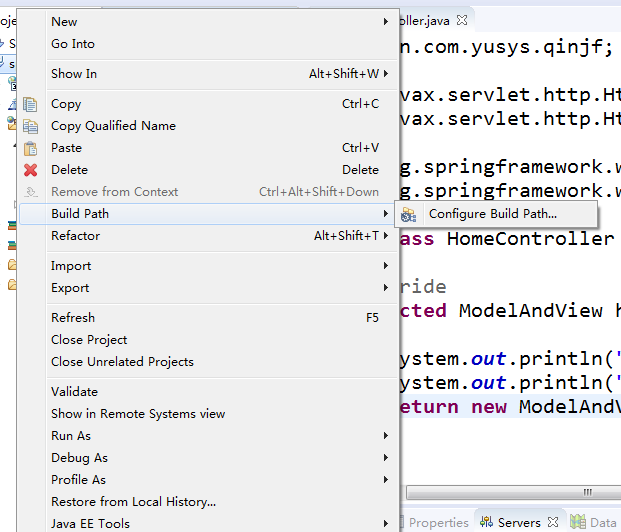
1.在出现此错误的项目上右键-->Build Path --> Configure Build Path
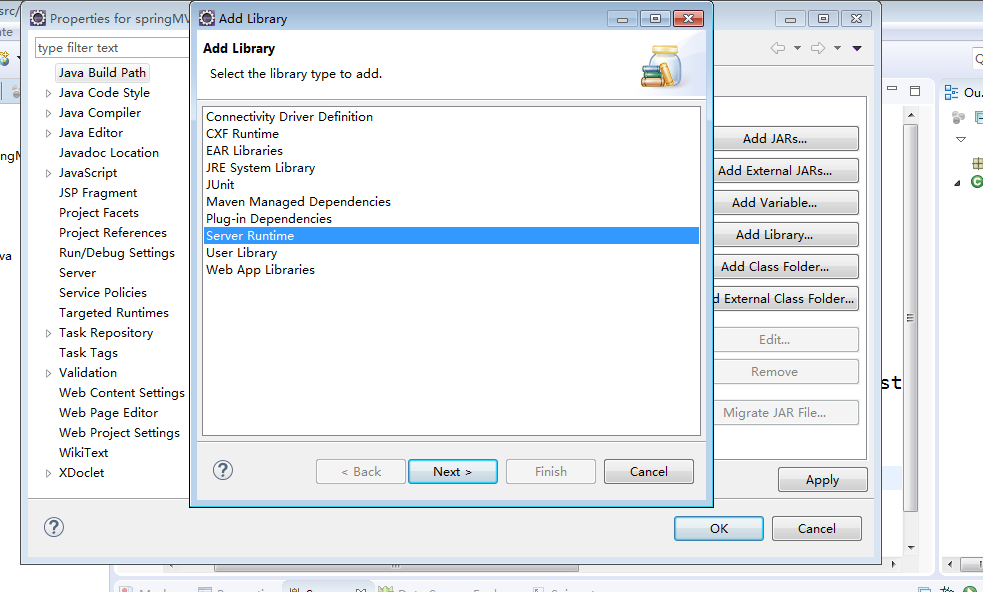
2.点击右边的 ADD Library

3.选中“Server Runtime”,然后 Next
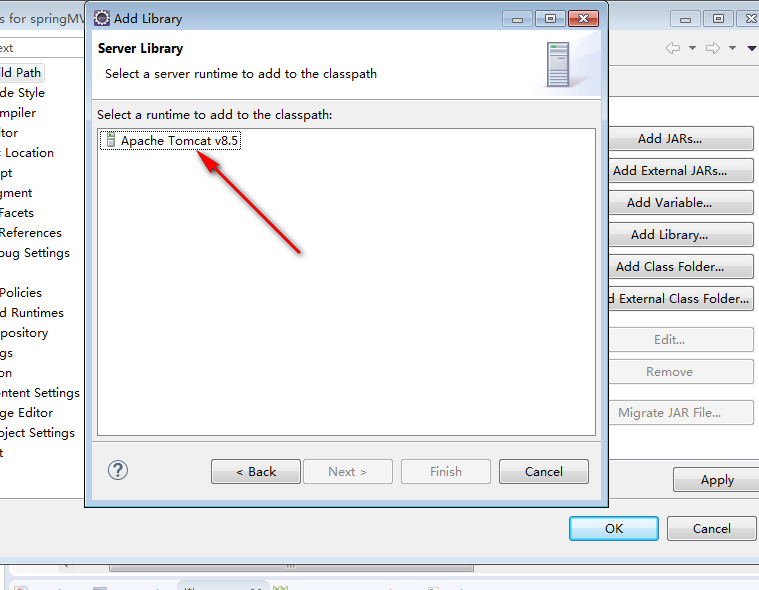
4.选择"Apache Tomcat v8.5",然后Finish
5.然后点击上面的“Order and Export”,选中“Apache Tomcat v8.5 [Apache Tomcat v8.5]”,点击“Apply”,最后点击“OK”

问题就解决了。
新建的web工程找不到javax.servlet.http.httpservlet的更多相关文章
- maven新建web项目提示The superclass "javax.servlet.http.HttpServlet" was not found on the Java Build Path
maven新建web项目提示The superclass "javax.servlet.http.HttpServlet" was not found on the Java Bu ...
- eclipse中web工程新建jsp文件报错:The superclass "javax.servlet.http.HttpServlet" was not found on the Java Build Path
web工程中新建jsp文件提示:The superclass "javax.servlet.http.HttpServlet" was not found on the Java ...
- 关于eclipse新建web项目,提示:"The superclass "javax.servlet.http.HttpServlet" was not found on the Java"解决办法
新建jsp页面老提示: Multiple annotations found at this line: - The superclass "javax.servlet.http.HttpS ...
- 新建maven指定jdk版本-eclipse新建maven项目报错The superclass "javax.servlet.http.HttpServlet" was not found on the Java Build Path的解决方案
具体表现为: 使用Eclipse+Maven建立了一个Javaweb工程,JSP页面顶端出现“红色”的报错信息:The superclass "javax.servlet.http.Http ...
- Eclipse中新建Maven Web项目报错:The superclass "javax.servlet.http.HttpServlet" was not found on the Java Build Path
在maven web项目中的index.jsp中的错误信息如下: The superclass "javax.servlet.http.HttpServlet" was not f ...
- java web 工程找不到tomcat类 java.lang.ClassNotFoundException: com.mysql.jdbc.Driver
ava.lang.ClassNotFoundException: com.mysql.jdbc.Driverat org.apache.catalina.loader.WebappClassLoade ...
- 新建的 web 工程 有红色的惊叹号
新建的 web 工程 有红色的感叹号问题: 在eclipse 中新建一个web工程,但是工程上有红色的感叹号.解决: 1.右键工程,选择Build Path-->Configur ...
- Java Web报错:The superclass "javax.servlet.http.HttpServlet" was not found on the Java Build Path
问题描述: 我们在用Eclipse进行Java web开发时,可能会出现这样的错误:The superclass javax.servlet.http.HttpServlet was not foun ...
- java web(jsp)-The superclass "javax.servlet.http.HttpServlet" was not found on the Java Build Path
在静态项目上新建 jsp文件的时候,报错:The superclass "javax.servlet.http.HttpServlet" was not found on the ...
随机推荐
- python文件操作笔记
一.python中对文件.文件夹操作时经常用到的os模块和shutil模块常用方法. 1.得到当前工作目录,即当前Python脚本工作的目录路径: os.getcwd() 2.切换工作目录: os.c ...
- socket.io websocket
不能不知道的事: 在Http协议中,客户端向服务器端发送请求,服务器端收到请求再进行回应,整个过程中,服务器端是被动方,客户端是主动方: websoket是H5的一种基于TCP的新通信协议,它与Htt ...
- 在vs2012中使用installShield2015打包程序
环境:vs2012,installShield2015 vs2012下写了一个小工具,winform的程序,在内部使用,网上搜索说是打包的话需要installShield,折腾之. installSh ...
- 手写自己的ThreadLocal(线程局部变量)
ThreadLocal对象通常用于防止对可变的单实例变量或全局变量进行共享. 精简版: public class MyThreadLocal<T> { private Map<Thr ...
- windows内核情景分析之—— KeRaiseIrql函数与KeLowerIrql()函数
windows内核情景分析之—— KeRaiseIrql函数与KeLowerIrql()函数 1.KeRaiseIrql函数 这个 KeRaiseIrql() 只是简单地调用 hal 模块的 KfRa ...
- Win8设计——现代设计,可使你的应用脱颖而出的元素
Microsoft 设计准则 Windows 在现代设计方面遥遥领先.它采用了“真实数字”原则并从瑞士风格和交通枢纽的寻路系统中汲取灵感. 阅读详细信息 设计元素 动态磁贴 动态磁贴向你提供了一个独特 ...
- java框架---->lucene的使用(一)
Lucene是一个全文检索的框架,apache组织提供了一个用Java实现的全文搜索引擎的开源项目.这里我们对apache的lucene的框架做一个简单的介绍.心甘情愿这四个字,透着一股卑微,但也有藏 ...
- Karma和Jasmine自动化单元测试
从零开始nodejs系列文章,将介绍如何利Javascript做为服务端脚本,通过Nodejs框架web开发.Nodejs框架是基于V8的引擎,是目前速度最快的Javascript引擎.chrome浏 ...
- JavaScript 浮点数陷阱及解法
众所周知,JavaScript 浮点数运算时经常遇到会 0.000000001 和 0.999999999 这样奇怪的结果,如 0.1+0.2=0.30000000000000004.1-0.9=0. ...
- Elasticsearch学习之深入搜索三 --- best fields策略
1. 为帖子数据增加content字段 POST /forum/article/_bulk { "} } { "doc" : {"content" : ...