
Dynamics CRM通过定制应用程序功能区为符合条件的实体表单增加按钮
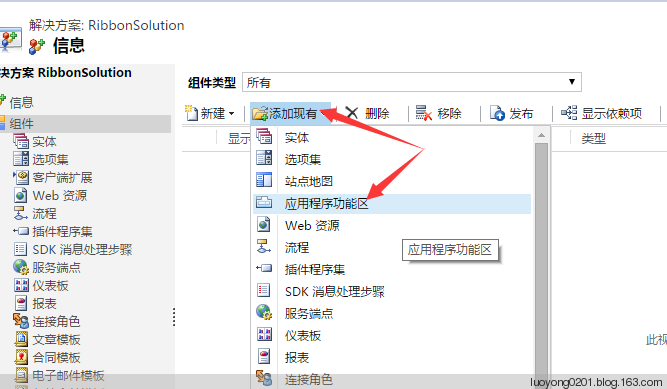
<ImportExportXml xmlns:xsi="http://www.w3.org/2001/XMLSchema-instance">

  <Entities></Entities>

  <Roles></Roles>

  <Workflows></Workflows>

  <FieldSecurityProfiles></FieldSecurityProfiles>

  <Templates />

  <RibbonDiffXml>

    <CustomActions />

    <Templates>

      <RibbonTemplates Id="Mscrm.Templates"></RibbonTemplates>

    </Templates>

    <CommandDefinitions />

    <RuleDefinitions>

      <TabDisplayRules />

      <DisplayRules />

      <EnableRules />

    </RuleDefinitions>

    <LocLabels />

  </RibbonDiffXml>

  <EntityMaps />

  <EntityRelationships />

  <OrganizationSettings />

  <optionsets />

  <Languages>

    <Language>2052</Language>

    <Language>1033</Language>

  </Languages>

</ImportExportXml>
    <LocLabels>

      <LocLabel Id="LuoYong.Common.LikeIt.LabelText">

        <Titles>

          <Title languagecode="2052" description="点赞" />

          <Title languagecode="1033" description="Like it"/>

        </Titles>

      </LocLabel>

      <LocLabel Id="LuoYong.Common.LikeIt.ToolTip">

        <Titles>

          <Title languagecode="2052" description="喜欢就点赞吧!"/>

          <Title languagecode="1033" description="I like it!" />

        </Titles>

      </LocLabel>

    </LocLabels>

  </RibbonDiffXml>
    <RuleDefinitions>

      <TabDisplayRules />

      <DisplayRules>

        <DisplayRule Id="LuoYong.Common.DisplayRules.EntityPropertyHasNotes">

          <EntityPropertyRule AppliesTo="PrimaryEntity" PropertyName="HasNotes" PropertyValue="true"/>

        </DisplayRule>

      </DisplayRules>

      <EnableRules>

        <EnableRule Id="LuoYong.Common.EnableRules.FormStateExisting">

          <FormStateRule State="Existing"/>

        </EnableRule>

      </EnableRules>

    </RuleDefinitions>
    <CommandDefinitions>

      <CommandDefinition Id="Mscrm.Form.{!EntityLogicalName}.MainTab.Save.LikeIt.Command">

        <EnableRules>

          <EnableRule Id="LuoYong.Common.EnableRules.FormStateExisting"/>

        </EnableRules>

        <DisplayRules>

          <DisplayRule Id="LuoYong.Common.DisplayRules.EntityPropertyHasNotes"/>

        </DisplayRules>

        <Actions>

          <JavaScriptFunction FunctionName="LikeIt" Library="$webresource:new_/common/js/RibbonScript.js">

            <CrmParameter Value="PrimaryEntityTypeName" />

            <CrmParameter Value="FirstPrimaryItemId" />

          </JavaScriptFunction>

        </Actions>

      </CommandDefinition>

    </CommandDefinitions>
      <CustomAction Id="Mscrm.Form.{!EntityLogicalName}.MainTab.Save.LikeIt.CustomAction" Location="Mscrm.Form.{!EntityLogicalName}.MainTab.Save.Controls._children" Sequence="10">

        <CommandUIDefinition>

          <Button Id="Mscrm.Form.{!EntityLogicalName}.MainTab.Save.LikeIt" Command="Mscrm.Form.{!EntityLogicalName}.MainTab.Save.LikeIt.Command" Sequence="48" LabelText="$LocLabels:LuoYong.Common.LikeIt.LabelText" ToolTipTitle="$LocLabels:LuoYong.Common.LikeIt.ToolTip" Image16by16="/_imgs/ribbon/Entity16_8006.png" Image32by32="/_imgs/ribbon/Entity32_8006.png" />

        </CommandUIDefinition>

      </CustomAction>
 <RibbonDiffXml>

    <CustomActions>

      <CustomAction Id="Mscrm.Form.{!EntityLogicalName}.MainTab.Save.LikeIt.CustomAction" Location="Mscrm.Form.{!EntityLogicalName}.MainTab.Save.Controls._children" Sequence="10">

        <CommandUIDefinition>

          <Button Id="Mscrm.Form.{!EntityLogicalName}.MainTab.Save.LikeIt" Command="Mscrm.Form.{!EntityLogicalName}.MainTab.Save.LikeIt.Command" Sequence="48" LabelText="$LocLabels:LuoYong.Common.LikeIt.LabelText" ToolTipTitle="$LocLabels:LuoYong.Common.LikeIt.ToolTip" Image16by16="/_imgs/ribbon/Entity16_8006.png" Image32by32="/_imgs/ribbon/Entity32_8006.png" />

        </CommandUIDefinition>

      </CustomAction>

    </CustomActions>

    <Templates>

      <RibbonTemplates Id="Mscrm.Templates"></RibbonTemplates>

    </Templates>

    <CommandDefinitions>

      <CommandDefinition Id="Mscrm.Form.{!EntityLogicalName}.MainTab.Save.LikeIt.Command">

        <EnableRules>

          <EnableRule Id="LuoYong.Common.EnableRules.FormStateExisting"/>

        </EnableRules>

        <DisplayRules>

          <DisplayRule Id="LuoYong.Common.DisplayRules.EntityPropertyHasNotes"/>

        </DisplayRules>

        <Actions>

          <JavaScriptFunction FunctionName="LikeIt" Library="$webresource:new_/common/js/RibbonScript.js">

            <CrmParameter Value="PrimaryEntityTypeName" />

            <CrmParameter Value="FirstPrimaryItemId" />

          </JavaScriptFunction>

        </Actions>

      </CommandDefinition>

    </CommandDefinitions>

    <RuleDefinitions>

      <TabDisplayRules />

      <DisplayRules>

        <DisplayRule Id="LuoYong.Common.DisplayRules.EntityPropertyHasNotes">

          <EntityPropertyRule AppliesTo="PrimaryEntity" PropertyName="HasNotes" PropertyValue="true"/>

        </DisplayRule>

      </DisplayRules>

      <EnableRules>

        <EnableRule Id="LuoYong.Common.EnableRules.FormStateExisting">

          <FormStateRule State="Existing"/>

        </EnableRule>

      </EnableRules>

    </RuleDefinitions>

    <LocLabels>

      <LocLabel Id="LuoYong.Common.LikeIt.LabelText">

        <Titles>

          <Title languagecode="2052" description="点赞" />

          <Title languagecode="1033" description="Like it"/>

        </Titles>

      </LocLabel>

      <LocLabel Id="LuoYong.Common.LikeIt.ToolTip">

        <Titles>

          <Title languagecode="2052" description="喜欢就点赞吧!"/>

          <Title languagecode="1033" description="I like it!" />

        </Titles>

      </LocLabel>

    </LocLabels>

  </RibbonDiffXml>
function LikeIt(EntityName, EntityId) {

    Xrm.Utility.alertDialog("感谢用户 " + Xrm.Page.context.getUserName() + " 对实体逻辑名称为" + EntityName + ",Id为" + EntityId + ",主要属性值为" + Xrm.Page.data.entity.getPrimaryAttributeValue() + "的记录点赞!");

}

去自定义的一个启用了注释的测试实体看看,也有:
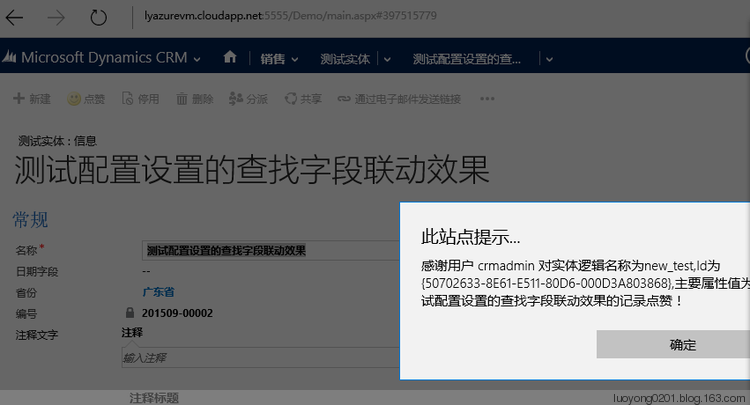
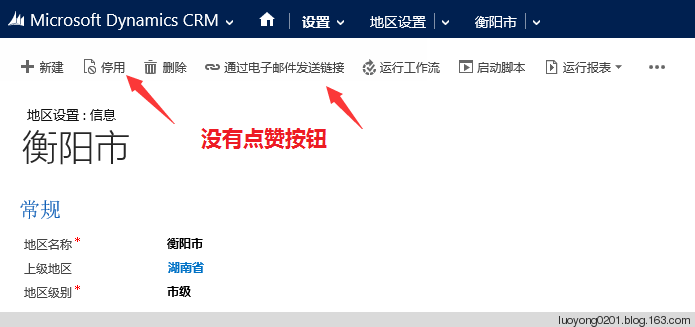
但是我如果去一个我没有启用注释功能的实体看看,则是没有这个按钮的,当然新建记录时候也是没有的。
Dynamics CRM通过定制应用程序功能区为符合条件的实体表单增加按钮的更多相关文章
- Dynamics CRM 依赖组件类型为应用程序功能区导致的无法删除实体问题的解决方法
看到有人问到这个问题,这边就简单描述下解决方法,主要是针对第一次碰到这个问题云里雾里的朋友,错误如下 在我们建lookup关联的时候有下图中的这么个设置,对于很多新手默认就是下图这样不会去做改动,因为 ...
- Dynamics CRM命令栏定制基础知识及手动编辑customization.xml实例
关注本人微信和易信公众号: 微软动态CRM专家罗勇 ,回复166或者20151028可方便获取本文,同时可以在第一时间得到我发布的最新的博文信息,follow me! 前面的博文:Dynamics C ...
- Dynamics CRM 客户端程序开发:在实体的列表界面添加按钮
关注本人微信和易信公众号: 微软动态CRM专家罗勇 ,回复114或者20140312可方便获取本文,同时可以在第一时间得到我发布的最新的博文信息,follow me! 如果没有安装Ribbon Wor ...
- Dynamics CRM定制子网格添加按钮实例之一
关注本人微信和易信公众号: 微软动态CRM专家罗勇 ,回复221或者20160430可方便获取本文,同时可以在第一间得到我发布的最新的博文信息,follow me!我的网站是 www.luoyong. ...
- 控制台程序(C#)不弹出认证窗口连接到Dynamics CRM Online的Web API
摘要: 本人微信和易信公众号: 微软动态CRM专家罗勇 ,回复271或者20180602可方便获取本文,同时可以在第一间得到我发布的最新的博文信息,follow me!我的网站是 www.luoyon ...
- Microsoft Dynamics CRM4.0 JScript 过滤lookup 出现 Microsoft Dynamics CRM 窗口无法打开,可能已被弹出窗口阻止程序所阻止。
一.现象:JScript过滤lookup字段,选择lookup字段出现下图的情况: 出现:Microsoft Dynamics CRM 窗口无法打开,可能已被弹出窗口阻止程序所阻止.请将这台Micro ...
- 定制Dynamics CRM标准导出功能:不能导出指定列的值
关注本人微信和易信公众号: 微软动态CRM专家罗勇 ,回复239或者20161203可方便获取本文,同时可以在第一间得到我发布的最新的博文信息,follow me!我的网站是 www.luoyong. ...
- 控制台程序(C#)不弹出登录窗口连接到Dynamics CRM Online的Web API
微软动态CRM专家罗勇 ,回复331或者20190505可方便获取本文,同时可以在第一间得到我发布的最新博文信息,follow me! 我之前的文章 控制台程序(C#)不弹出认证窗口连接到Dynami ...
- Dynamics CRM - 解决无法使用 Ribbon Workbench 2016 定制 Sub-Grid View Button 的问题(SubGrid MainTab 消失之谜)
发现问题: 在 Dynamics CRM 开发中,会经常使用 Ribbon Workbench 工具来定制 Button 或者对已有 Button 进行自定义功能开发,比如隐藏 SubGrid 的 A ...
随机推荐
- Ubuntu 18.04.3 LTS Virtualbox提示“Kernel driver not installed (rc=-1908)”问题修复一例
前两天Ubuntu升级了,重启后启动virtualbox保存 从错误报告上反映出来的问题原因是因为某些内核驱动程序没有经过编译,所以Virtualbox无法正常运行.事实上,在Ubuntu上处理这个问 ...
- 用C在GBA上写光线追踪(0)配置开发编译环境
前段时间用C#写了一个光线追踪程序,可以渲染圆球,平面这种基本图形,反射,光照,阴影,都大致尝试做了一下. ↑ C#实现的光线追踪 ↑ GBA上C实现的光线追踪 然而,在我打算继续深入优化的时 ...
- luogu P1832 A+B Problem
题目背景 ·题目名称是吸引你点进来的 ·实际上该题还是很水的 题目描述 ·1+1=? 显然是2 ·a+b=? 1001回看不谢 ·哥德巴赫猜想 似乎已呈泛滥趋势 ·以上纯属个人吐槽 ·给定一个正整数n ...
- HTML <input> placeholder 属性
css ::-webkit-input-placeholder { /* WebKit, Blink, Edge */ color: #909; } :-moz-placeholder { /* Mo ...
- Codeforces-501b
Misha hacked the Codeforces site. Then he decided to let all the users change their handles. A user ...
- UVA-10391 Compoud Words
You are to find all the two-word compound words in a dictionary. A two-word compound word is a word ...
- zabbix系列-Grafana4.6.3+Zabbix 的安装部署
zabbix系列(五) Grafana4.6.3+Zabbix 的安装部署 伟创享 2019-07-31 11:27:18 使用了一段时间Grafana,感觉还挺好用的.部分效果图如下: zabb ...
- 每周一练 之 数据结构与算法(Stack)
最近公司内部在开始做前端技术的技术分享,每周一个主题的 每周一练,以基础知识为主,感觉挺棒的,跟着团队的大佬们学习和复习一些知识,新人也可以多学习一些知识,也把团队内部学习氛围营造起来. 我接下来会开 ...
- win10配置git SSH
1.安装的过程就不说了,直接去官网下载git for windows 安装便可 安装完了,无非就是像用它,就想从github上clone项目下来,仅仅是安装了git还不能直接从远程下载项目下来哦,还需 ...
- 【Eureka】服务端和客户端
[Eureka]服务端和客户端 转载:https://www.cnblogs.com/yangchongxing/p/10778357.html Eureka服务端 1.添加依赖 <?xml v ...