
Ubuntu 18.04.3 LTS Virtualbox提示“Kernel driver not installed (rc=-1908)”问题修复一例
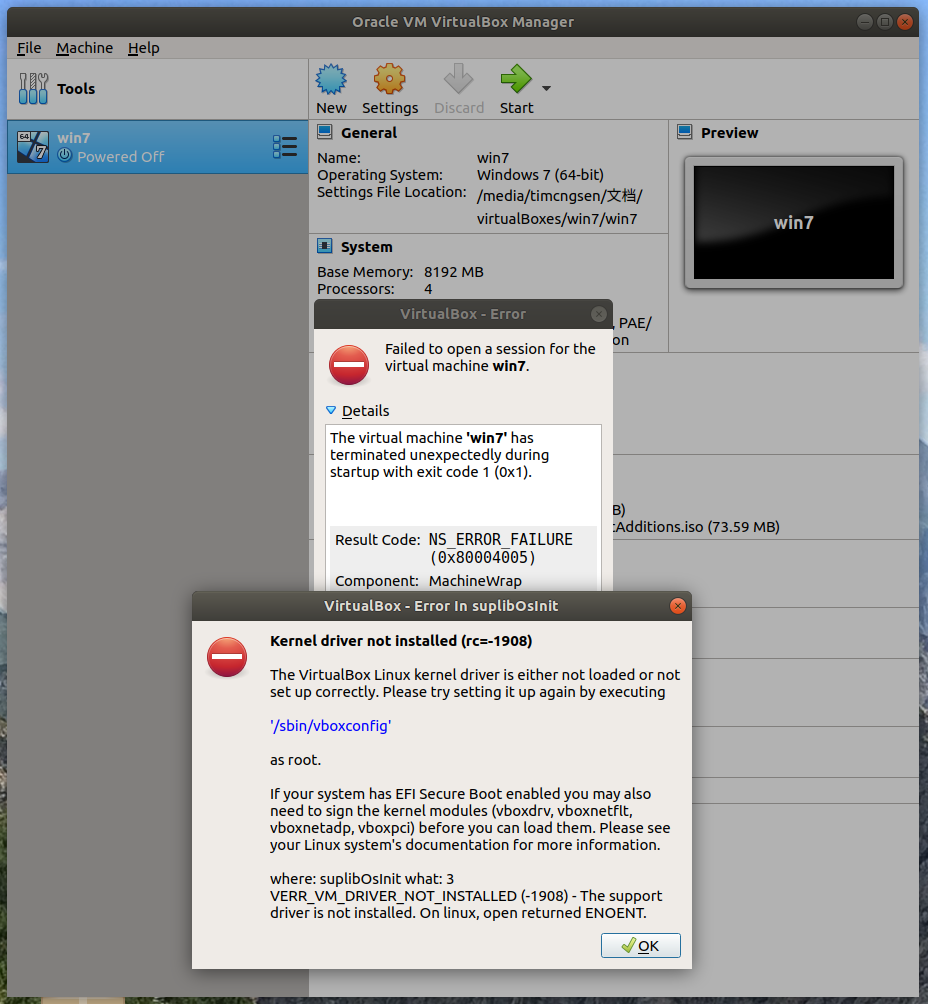
前两天Ubuntu升级了,重启后启动virtualbox报错
从错误报告上反映出来的问题原因是因为某些内核驱动程序没有经过编译,所以Virtualbox无法正常运行。事实上,在Ubuntu上处理这个问题并不难,以下是解决这个问题的几个步骤:
首先,安装内核的头文件和构建工具。
$ sudo apt-get install build-essential module-assistant
$ sudo m-a prepare
接着,编译先前在错误报告中所提到的那个virtualbox内核驱动程序命令。
$ sudo /sbin/vboxconfig
root@timcngsen-All-Series:~# virtualbox

WARNING: The vboxdrv kernel module is not loaded. Either there is no module

         available for the current kernel (5.0.0-37-generic) or it failed to

         load. Please recompile the kernel module and install it by

           sudo /sbin/vboxconfig

         You will not be able to start VMs until this problem is fixed.

No protocol specified

Qt WARNING: QXcbConnection: Could not connect to display :0

Qt CRITICAL: Could not connect to any X display.

root@timcngsen-All-Series:~# sudo /sbin/vboxconfig

vboxdrv.sh: Stopping VirtualBox services.

depmod: WARNING: could not open /lib/modules/5.0.0-32-generic/modules.order: No such file

or directory

depmod: WARNING: could not open /lib/modules/5.0.0-32-generic/modules.builtin: No such file or directory

^C

root@timcngsen-All-Series:~# sudo apt-get install build-essential module-assistant

Reading package lists... Done

Building dependency tree

Reading state information... Done

build-essential is already the newest version (12.4ubuntu1).

build-essential set to manually installed.

The following packages were automatically installed and are no longer required:

  liblua5.1-0 libpyzy-1.0-0v5 python-xdg

Use 'sudo apt autoremove' to remove them.

The following NEW packages will be installed:

  module-assistant

0 upgraded, 1 newly installed, 0 to remove and 12 not upgraded.

Need to get 90.3 kB of archives.

After this operation, 399 kB of additional disk space will be used.

Do you want to continue? [Y/n] y

Get:1 http://cn.archive.ubuntu.com/ubuntu bionic/universe amd64 module-assistant all 0.11.9 [90.3 kB]

Fetched 90.3 kB in 1s (65.9 kB/s)

Selecting previously unselected package module-assistant.

(Reading database ... 195889 files and directories currently installed.)

Preparing to unpack .../module-assistant_0.11.9_all.deb ...

Unpacking module-assistant (0.11.9) ...

Setting up module-assistant (0.11.9) ...

Processing triggers for man-db (2.8.3-2ubuntu0.1) ...

root@timcngsen-All-Series:~# sudo m-a prepare

Getting source for kernel version: 5.0.0-37-generic

Kernel headers available in /usr/src/linux-headers-5.0.0-37-generic

Creating symlink...

apt-get install build-essential

Reading package lists... Done

Building dependency tree

Reading state information... Done

build-essential is already the newest version (12.4ubuntu1).

The following packages were automatically installed and are no longer required:

  liblua5.1-0 libpyzy-1.0-0v5 python-xdg

Use 'sudo apt autoremove' to remove them.

0 upgraded, 0 newly installed, 0 to remove and 12 not upgraded.

Done!

root@timcngsen-All-Series:~#  sudo /etc/init.d/vboxdrv setup

sudo: /etc/init.d/vboxdrv: command not found

root@timcngsen-All-Series:~# sudo /sbin/vboxconfig

vboxdrv.sh: Stopping VirtualBox services.

vboxdrv.sh: Starting VirtualBox services.

vboxdrv.sh: Building VirtualBox kernel modules.
参考博文:https://www.linuxidc.com/Linux/2017-11/148871.htm 中 对应的Ubuntu版本较老 /etc/init.d/vboxdre setup 命令不存在
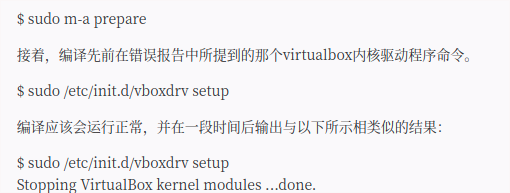
直接执行保存提示的命令即可sudo /etc/init.d/vboxdrv setup
再运行Virtualbox就会变得正常了。
Ubuntu 18.04.3 LTS Virtualbox提示“Kernel driver not installed (rc=-1908)”问题修复一例的更多相关文章
- ubuntu中使用virtualbox遇到Kernel driver not installed (rc=-1908)错误
百度之后得到解决,再此做个笔记 错误提示 Kernel driver not installed (rc=-1908) The VirtualBox Linux kernel driver (vbox ...
- VirtualBox,Kernel driver not installed (rc=-1908)
http://hi.baidu.com/spt_form/item/316d6207b47b8ee03499020a VirtualBox,Kernel driver not installed (r ...
- CentOS VirtualBox启动虚拟及报错:VirtualBox error: Kernel driver not installed (rc=1908)
VirtualBox error: Kernel driver not installed (rc=1908) Hi all, Let me first say that this is my fin ...
- mac系统升级导致VirtualBox报Kernel driver not installed (rc=-1908)
一.背景 最近将我的Mac升级成了Monterey版本,结果发现之前的安装的VirtualBox虚拟机无法启动,报了如下错误. Kernel driver not installed (rc=-190 ...
- Ubuntu 14 中 VirtualBox发生错误Kernel driver not installed (rc=-1908)
宿主系统是Ubuntu 14,在VirtualBox中安装 CentOS 6.5 时,提示如下错误: Kernel driver not installed (rc=-1908) 网友提供的解决方案: ...
- Fedora安装VirtualBox时出现错误Kernel driver not installed (rc=-1908)的解决办法
新建虚拟机后启动时出现如下错误: Kernel driver not installed (rc=-1908) The VirtualBox Linux kernel driver (vboxdrv) ...
- Ubuntu 升级VisualBox后无法启动 Kernel driver not installed (rc=-1908)
VisualBox之所以在Linux上比传统的VMware快得多,关键一点就是它和Linux内核的结合比较紧密,这也是开源的优点. 不过Linux内核更新很频繁,每次更新内核后启动VirtualBox ...
- ubuntu18.04 VirtualBox 开启虚拟机出错 Kernel driver not installed (rc=-1908)
写的很明白了 提示缺少GCC PERL MAKE,安装 重试..... 重启VM 搞定....
- VBox on 14.04: Kernel driver not installed (rc=-1908) [duplicate]
这几天刚刚装上Ubuntu的系统开始写Android代码,真心是流畅了很多,但是也出现了很多的问题. 还好 有大神护佑,童鞋博客首页,点击查看吧. 刚刚又遇到了一个新的问题,那就是我想用genymot ...
随机推荐
- 使用Typescript重构axios(二十二)——请求取消功能:收尾
0. 系列文章 1.使用Typescript重构axios(一)--写在最前面 2.使用Typescript重构axios(二)--项目起手,跑通流程 3.使用Typescript重构axios(三) ...
- python机器学习——随机梯度下降
上一篇我们实现了使用梯度下降法的自适应线性神经元,这个方法会使用所有的训练样本来对权重向量进行更新,也可以称之为批量梯度下降(batch gradient descent).假设现在我们数据集中拥有大 ...
- python经典算法题目:找出这两个有序数组的中位数
题目:找出这两个有序数组的中位数 给定两个大小为 m 和 n 的有序数组 nums1 和 nums2. 请你找出这两个有序数组的中位数,并且要求算法的时间复杂度为 O(log(m + n)). 你可以 ...
- tp5验证码的使用
<div><img id="verify_img" src="{:captcha_src()}" alt="验证码" on ...
- MySQL的安装+可视化工具+JDBC的增删改查
1.Mysql和可视化工具的安装 安装包网上有很多资源.这里推荐一个我一直在用的学习网站,上面有提供安装包和详细的说明. http://how2j.cn/k/mysql/mysql-install/3 ...
- 给大家整理了几个开源免费的 Spring Boot + Vue 学习资料
最近抽空在整理前面的文章案例啥的,顺便把手上的几个 Spring Boot + Vue 的学习资料推荐给各位小伙伴.这些案例有知识点的讲解,也有项目实战,正在做这一块的小伙伴们可以收藏下. 案例学习 ...
- Nginx Linux和Windows安装教程
前言 本篇文章主要介绍的是Nginx Linux环境和Windows的安装教程. Nginx 介绍 Nginx("engine x")是一款是由俄罗斯的程序设计师Igor Syso ...
- nyoj 99-单词拼接 (euler, dfs)
99-单词拼接 内存限制:64MB 时间限制:3000ms 特判: No 通过数:7 提交数:14 难度:5 题目描述: 给你一些单词,请你判断能否把它们首尾串起来串成一串. 前一个单词的结尾应该与下 ...
- 【dp】Bone Collector II
题目链接:http://acm.hdu.edu.cn/showproblem.php?pid=2639 题意: 01背包第k优解, 背包九讲原题.“ 对于求次优解.第K优解类的问题,如果相应的最优解问 ...
- Java描述设计模式(23):访问者模式
本文源码:GitHub·点这里 || GitEE·点这里 一.生活场景 1.场景描述 电竞是游戏比赛达到"竞技"层面的体育项目.利用电子设备作为运动器械进行的.人与人之间的智力对抗 ...