
(五十四)c#Winform自定义控件-仪表盘
官网
前提
入行已经7,8年了,一直想做一套漂亮点的自定义控件,于是就有了本系列文章。
GitHub:https://github.com/kwwwvagaa/NetWinformControl
码云:https://gitee.com/kwwwvagaa/net_winform_custom_control.git
如果觉得写的还行,请点个 star 支持一下吧
欢迎前来交流探讨: 企鹅群568015492 
麻烦博客下方点个【推荐】,谢谢
NuGet
Install-Package HZH_Controls
目录
https://www.cnblogs.com/bfyx/p/11364884.html
用处及效果
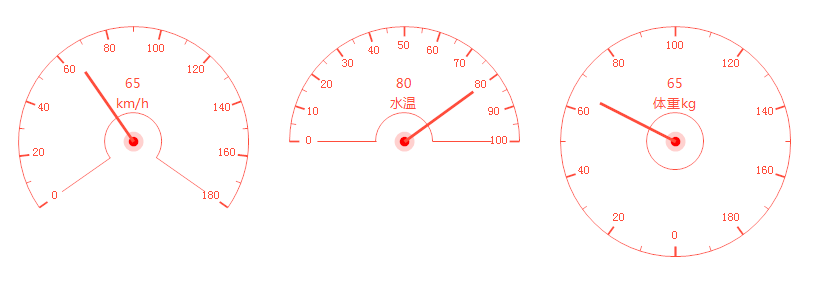
准备工作
依然使用GDI+画的,不懂的话就百度一下吧
另外主要用到了三角函数,如果不懂,可以向初中的数学老师再问问(你也可以百度一下)
开始
添加一个类UCMeter 继承 UserControl
首先添加一个需要控制的属性
 private int splitCount = ;

         /// <summary>

         /// Gets or sets the split count.

         /// </summary>

         /// <value>The split count.</value>

         [Description("分隔刻度数量,>1"), Category("自定义")]

         public int SplitCount

         {

             get { return splitCount; }

             set

             {

                 if (value < )

                     return;

                 splitCount = value;

                 Refresh();

             }

         }

         private int meterDegrees = ;

         /// <summary>

         /// Gets or sets the meter degrees.

         /// </summary>

         /// <value>The meter degrees.</value>

         [Description("表盘跨度角度,0-360"), Category("自定义")]

         public int MeterDegrees

         {

             get { return meterDegrees; }

             set

             {

                 if (value >  || value <= )

                     return;

                 meterDegrees = value;

                 Refresh();

             }

         }

         private decimal minValue = ;

         /// <summary>

         /// Gets or sets the minimum value.

         /// </summary>

         /// <value>The minimum value.</value>

         [Description("最小值,<MaxValue"), Category("自定义")]

         public decimal MinValue

         {

             get { return minValue; }

             set

             {

                 if (value >= maxValue)

                     return;

                 minValue = value;

                 Refresh();

             }

         }

         private decimal maxValue = ;

         /// <summary>

         /// Gets or sets the maximum value.

         /// </summary>

         /// <value>The maximum value.</value>

         [Description("最大值,>MinValue"), Category("自定义")]

         public decimal MaxValue

         {

             get { return maxValue; }

             set

             {

                 if (value <= minValue)

                     return;

                 maxValue = value;

                 Refresh();

             }

         }

         /// <summary>

         /// 获取或设置控件显示的文字的字体。

         /// </summary>

         /// <value>The font.</value>

         /// <PermissionSet>

         ///   <IPermission class="System.Security.Permissions.EnvironmentPermission, mscorlib, Version=2.0.3600.0, Culture=neutral, PublicKeyToken=b77a5c561934e089" version="1" Unrestricted="true" />

         ///   <IPermission class="System.Security.Permissions.FileIOPermission, mscorlib, Version=2.0.3600.0, Culture=neutral, PublicKeyToken=b77a5c561934e089" version="1" Unrestricted="true" />

         ///   <IPermission class="System.Security.Permissions.SecurityPermission, mscorlib, Version=2.0.3600.0, Culture=neutral, PublicKeyToken=b77a5c561934e089" version="1" Flags="UnmanagedCode, ControlEvidence" />

         ///   <IPermission class="System.Diagnostics.PerformanceCounterPermission, System, Version=2.0.3600.0, Culture=neutral, PublicKeyToken=b77a5c561934e089" version="1" Unrestricted="true" />

         /// </PermissionSet>

         [Description("刻度字体"), Category("自定义")]

         public override Font Font

         {

             get

             {

                 return base.Font;

             }

             set

             {

                 base.Font = value;

                 Refresh();

             }

         }

         private decimal m_value = ;

         /// <summary>

         /// Gets or sets the value.

         /// </summary>

         /// <value>The value.</value>

         [Description("值,>=MinValue并且<=MaxValue"), Category("自定义")]

         public decimal Value

         {

             get { return m_value; }

             set

             {

                 if (value < minValue || value > maxValue)

                     return;

                 m_value = value;

                 Refresh();

             }

         }

         private MeterTextLocation textLocation = MeterTextLocation.None;

         /// <summary>

         /// Gets or sets the text location.

         /// </summary>

         /// <value>The text location.</value>

         [Description("值和固定文字显示位置"), Category("自定义")]

         public MeterTextLocation TextLocation

         {

             get { return textLocation; }

             set

             {

                 textLocation = value;

                 Refresh();

             }

         }

         private string fixedText;

         /// <summary>

         /// Gets or sets the fixed text.

         /// </summary>

         /// <value>The fixed text.</value>

         [Description("固定文字"), Category("自定义")]

         public string FixedText

         {

             get { return fixedText; }

             set

             {

                 fixedText = value;

                 Refresh();

             }

         }

         private Font textFont = DefaultFont;

         /// <summary>

         /// Gets or sets the text font.

         /// </summary>

         /// <value>The text font.</value>

         [Description("值和固定文字字体"), Category("自定义")]

         public Font TextFont

         {

             get { return textFont; }

             set

             {

                 textFont = value;

                 Refresh();

             }

         }

         private Color externalRoundColor = Color.FromArgb(, , );

         /// <summary>

         /// Gets or sets the color of the external round.

         /// </summary>

         /// <value>The color of the external round.</value>

         [Description("外圆颜色"), Category("自定义")]

         public Color ExternalRoundColor

         {

             get { return externalRoundColor; }

             set

             {

                 externalRoundColor = value;

                 Refresh();

             }

         }

         private Color insideRoundColor = Color.FromArgb(, , );

         /// <summary>

         /// Gets or sets the color of the inside round.

         /// </summary>

         /// <value>The color of the inside round.</value>

         [Description("内圆颜色"), Category("自定义")]

         public Color InsideRoundColor

         {

             get { return insideRoundColor; }

             set

             {

                 insideRoundColor = value;

                 Refresh();

             }

         }

         private Color boundaryLineColor = Color.FromArgb(, , );

         /// <summary>

         /// Gets or sets the color of the boundary line.

         /// </summary>

         /// <value>The color of the boundary line.</value>

         [Description("边界线颜色"), Category("自定义")]

         public Color BoundaryLineColor

         {

             get { return boundaryLineColor; }

             set

             {

                 boundaryLineColor = value;

                 Refresh();

             }

         }

         private Color scaleColor = Color.FromArgb(, , );

         /// <summary>

         /// Gets or sets the color of the scale.

         /// </summary>

         /// <value>The color of the scale.</value>

         [Description("刻度颜色"), Category("自定义")]

         public Color ScaleColor

         {

             get { return scaleColor; }

             set

             {

                 scaleColor = value;

                 Refresh();

             }

         }

         private Color scaleValueColor = Color.FromArgb(, , );

         /// <summary>

         /// Gets or sets the color of the scale value.

         /// </summary>

         /// <value>The color of the scale value.</value>

         [Description("刻度值文字颜色"), Category("自定义")]

         public Color ScaleValueColor

         {

             get { return scaleValueColor; }

             set

             {

                 scaleValueColor = value;

                 Refresh();

             }

         }

         private Color pointerColor = Color.FromArgb(, , );

         /// <summary>

         /// Gets or sets the color of the pointer.

         /// </summary>

         /// <value>The color of the pointer.</value>

         [Description("指针颜色"), Category("自定义")]

         public Color PointerColor

         {

             get { return pointerColor; }

             set

             {

                 pointerColor = value;

                 Refresh();

             }

         }

         private Color textColor = Color.FromArgb(, , );

         /// <summary>

         /// Gets or sets the color of the text.

         /// </summary>

         /// <value>The color of the text.</value>

         [Description("值和固定文字颜色"), Category("自定义")]

         public Color TextColor

         {

             get { return textColor; }

             set

             {

                 textColor = value;

                 Refresh();

             }

         }

         Rectangle m_rectWorking;
重绘
  protected override void OnPaint(PaintEventArgs e)

         {

             base.OnPaint(e);

             var g = e.Graphics;

             g.SetGDIHigh();

             //外圆

             float fltStartAngle = - - (meterDegrees) /  + ;

             var r1 = new Rectangle(m_rectWorking.Location, new Size(m_rectWorking.Width, m_rectWorking.Width));

             g.DrawArc(new Pen(new SolidBrush(externalRoundColor), ), r1, fltStartAngle, meterDegrees);

             //内圆

             var r2 = new Rectangle(m_rectWorking.Left + (m_rectWorking.Width - m_rectWorking.Width / ) / , m_rectWorking.Top + (m_rectWorking.Width - m_rectWorking.Width / ) / , m_rectWorking.Width / , m_rectWorking.Width / );

             g.DrawArc(new Pen(new SolidBrush(insideRoundColor), ), r2, fltStartAngle, meterDegrees);

             //边界线

             if (meterDegrees != )

             {

                 float fltAngle = fltStartAngle - ;

                 float intY = (float)(m_rectWorking.Top + m_rectWorking.Width /  - ((m_rectWorking.Width /  - m_rectWorking.Width / ) * Math.Sin(Math.PI * (fltAngle / 180.00F))));

                 float intX = (float)(m_rectWorking.Left + (m_rectWorking.Width /  - ((m_rectWorking.Width /  - m_rectWorking.Width / ) * Math.Cos(Math.PI * (fltAngle / 180.00F)))));

                 float fltY1 = (float)(m_rectWorking.Top + m_rectWorking.Width /  - (m_rectWorking.Width /  * Math.Sin(Math.PI * (fltAngle / 180.00F))));

                 float fltX1 = (float)(m_rectWorking.Left + (m_rectWorking.Width /  - (m_rectWorking.Width /  * Math.Cos(Math.PI * (fltAngle / 180.00F)))));

                 g.DrawLine(new Pen(new SolidBrush(boundaryLineColor), ), new PointF(intX, intY), new PointF(fltX1, fltY1));

                 g.DrawLine(new Pen(new SolidBrush(boundaryLineColor), ), new PointF(m_rectWorking.Right - (fltX1 - m_rectWorking.Left), fltY1), new PointF(m_rectWorking.Right - (intX - m_rectWorking.Left), intY));

             }

             //分割线

             int _splitCount = splitCount * ;

             float fltSplitValue = (float)meterDegrees / (float)_splitCount;

             for (int i = ; i <= _splitCount; i++)

             {

                 float fltAngle = (fltStartAngle + fltSplitValue * i - ) % ;

                 float fltY1 = (float)(m_rectWorking.Top + m_rectWorking.Width /  - ((m_rectWorking.Width / ) * Math.Sin(Math.PI * (fltAngle / 180.00F))));

                 float fltX1 = (float)(m_rectWorking.Left + (m_rectWorking.Width /  - ((m_rectWorking.Width / ) * Math.Cos(Math.PI * (fltAngle / 180.00F)))));

                 float fltY2 = ;

                 float fltX2 = ;

                 if (i %  == )

                 {

                     fltY2 = (float)(m_rectWorking.Top + m_rectWorking.Width /  - ((m_rectWorking.Width /  - ) * Math.Sin(Math.PI * (fltAngle / 180.00F))));

                     fltX2 = (float)(m_rectWorking.Left + (m_rectWorking.Width /  - ((m_rectWorking.Width /  - ) * Math.Cos(Math.PI * (fltAngle / 180.00F)))));

                     if (!(meterDegrees ==  && i == _splitCount))

                     {

                         decimal decValue = minValue + (maxValue - minValue) / _splitCount * i;

                         var txtSize = g.MeasureString(decValue.ToString("0.##"), this.Font);

                         float fltFY1 = (float)(m_rectWorking.Top - txtSize.Height /  + m_rectWorking.Width /  - ((m_rectWorking.Width /  - ) * Math.Sin(Math.PI * (fltAngle / 180.00F))));

                         float fltFX1 = (float)(m_rectWorking.Left - txtSize.Width /  + (m_rectWorking.Width /  - ((m_rectWorking.Width /  - ) * Math.Cos(Math.PI * (fltAngle / 180.00F)))));

                         g.DrawString(decValue.ToString("0.##"), Font, new SolidBrush(scaleValueColor), fltFX1, fltFY1);

                     }

                 }

                 else

                 {

                     fltY2 = (float)(m_rectWorking.Top + m_rectWorking.Width /  - ((m_rectWorking.Width /  - ) * Math.Sin(Math.PI * (fltAngle / 180.00F))));

                     fltX2 = (float)(m_rectWorking.Left + (m_rectWorking.Width /  - ((m_rectWorking.Width /  - ) * Math.Cos(Math.PI * (fltAngle / 180.00F)))));

                 }

                 g.DrawLine(new Pen(new SolidBrush(scaleColor), i %  ==  ?  : ), new PointF(fltX1, fltY1), new PointF(fltX2, fltY2));

             }

             //值文字和固定文字

             if (textLocation != MeterTextLocation.None)

             {

                 string str = m_value.ToString("0.##");

                 var txtSize = g.MeasureString(str, textFont);

                 float fltY = m_rectWorking.Top + m_rectWorking.Width /  - txtSize.Height / ;

                 float fltX = m_rectWorking.Left + m_rectWorking.Width /  - txtSize.Width / ;

                 g.DrawString(str, textFont, new SolidBrush(textColor), new PointF(fltX, fltY));

                 if (!string.IsNullOrEmpty(fixedText))

                 {

                     str = fixedText;

                     txtSize = g.MeasureString(str, textFont);

                     fltY = m_rectWorking.Top + m_rectWorking.Width /  + txtSize.Height / ;

                     fltX = m_rectWorking.Left + m_rectWorking.Width /  - txtSize.Width / ;

                     g.DrawString(str, textFont, new SolidBrush(textColor), new PointF(fltX, fltY));

                 }

             }

             //画指针

             g.FillEllipse(new SolidBrush(Color.FromArgb(, pointerColor.R, pointerColor.G, pointerColor.B)), new Rectangle(m_rectWorking.Left + m_rectWorking.Width /  - , m_rectWorking.Top + m_rectWorking.Width /  - , , ));

             g.FillEllipse(Brushes.Red, new Rectangle(m_rectWorking.Left + m_rectWorking.Width /  - , m_rectWorking.Top + m_rectWorking.Width /  - , , ));

             float fltValueAngle = (fltStartAngle + ((float)(m_value - minValue) / (float)(maxValue - minValue)) * (float)meterDegrees - ) % ;

             float intValueY1 = (float)(m_rectWorking.Top + m_rectWorking.Width /  - ((m_rectWorking.Width /  - ) * Math.Sin(Math.PI * (fltValueAngle / 180.00F))));

             float intValueX1 = (float)(m_rectWorking.Left + (m_rectWorking.Width /  - ((m_rectWorking.Width /  - ) * Math.Cos(Math.PI * (fltValueAngle / 180.00F)))));

             g.DrawLine(new Pen(new SolidBrush(pointerColor), ), intValueX1, intValueY1, m_rectWorking.Left + m_rectWorking.Width / , m_rectWorking.Top + m_rectWorking.Width / );

         }
还有一个显示文字位置的枚举
 /// <summary>

     /// Enum MeterTextLocation

     /// </summary>

     public enum MeterTextLocation

     {

         /// <summary>

         /// The none

         /// </summary>

         None,

         /// <summary>

         /// The top

         /// </summary>

         Top,

         /// <summary>

         /// The bottom

         /// </summary>

         Bottom

     }
代码就这么多了,看完整代码
// ***********************************************************************
// Assembly : HZH_Controls
// Created : 2019-09-03
//
// ***********************************************************************
// <copyright file="UCMeter.cs">
// Copyright by Huang Zhenghui(黄正辉) All, QQ group:568015492 QQ:623128629 Email:623128629@qq.com
// </copyright>
//
// Blog: https://www.cnblogs.com/bfyx
// GitHub:https://github.com/kwwwvagaa/NetWinformControl
// gitee:https://gitee.com/kwwwvagaa/net_winform_custom_control.git
//
// If you use this code, please keep this note.
// ***********************************************************************
using System;
using System.Collections.Generic;
using System.Linq;
using System.Text;
using System.Windows.Forms;
using System.Drawing;
using System.Drawing.Drawing2D;
using System.ComponentModel; namespace HZH_Controls.Controls
{
/// <summary>
/// Class UCMeter.
/// Implements the <see cref="System.Windows.Forms.UserControl" />
/// </summary>
/// <seealso cref="System.Windows.Forms.UserControl" />
public class UCMeter : UserControl
{
private int splitCount = ;
/// <summary>
/// Gets or sets the split count.
/// </summary>
/// <value>The split count.</value>
[Description("分隔刻度数量,>1"), Category("自定义")]
public int SplitCount
{
get { return splitCount; }
set
{
if (value < )
return;
splitCount = value;
Refresh();
}
} private int meterDegrees = ;
/// <summary>
/// Gets or sets the meter degrees.
/// </summary>
/// <value>The meter degrees.</value>
[Description("表盘跨度角度,0-360"), Category("自定义")]
public int MeterDegrees
{
get { return meterDegrees; }
set
{
if (value > || value <= )
return;
meterDegrees = value;
Refresh();
}
} private decimal minValue = ;
/// <summary>
/// Gets or sets the minimum value.
/// </summary>
/// <value>The minimum value.</value>
[Description("最小值,<MaxValue"), Category("自定义")]
public decimal MinValue
{
get { return minValue; }
set
{
if (value >= maxValue)
return;
minValue = value;
Refresh();
}
} private decimal maxValue = ;
/// <summary>
/// Gets or sets the maximum value.
/// </summary>
/// <value>The maximum value.</value>
[Description("最大值,>MinValue"), Category("自定义")]
public decimal MaxValue
{
get { return maxValue; }
set
{
if (value <= minValue)
return;
maxValue = value;
Refresh();
}
}
/// <summary>
/// 获取或设置控件显示的文字的字体。
/// </summary>
/// <value>The font.</value>
/// <PermissionSet>
/// <IPermission class="System.Security.Permissions.EnvironmentPermission, mscorlib, Version=2.0.3600.0, Culture=neutral, PublicKeyToken=b77a5c561934e089" version="1" Unrestricted="true" />
/// <IPermission class="System.Security.Permissions.FileIOPermission, mscorlib, Version=2.0.3600.0, Culture=neutral, PublicKeyToken=b77a5c561934e089" version="1" Unrestricted="true" />
/// <IPermission class="System.Security.Permissions.SecurityPermission, mscorlib, Version=2.0.3600.0, Culture=neutral, PublicKeyToken=b77a5c561934e089" version="1" Flags="UnmanagedCode, ControlEvidence" />
/// <IPermission class="System.Diagnostics.PerformanceCounterPermission, System, Version=2.0.3600.0, Culture=neutral, PublicKeyToken=b77a5c561934e089" version="1" Unrestricted="true" />
/// </PermissionSet>
[Description("刻度字体"), Category("自定义")]
public override Font Font
{
get
{
return base.Font;
}
set
{
base.Font = value;
Refresh();
}
} private decimal m_value = ;
/// <summary>
/// Gets or sets the value.
/// </summary>
/// <value>The value.</value>
[Description("值,>=MinValue并且<=MaxValue"), Category("自定义")]
public decimal Value
{
get { return m_value; }
set
{
if (value < minValue || value > maxValue)
return;
m_value = value;
Refresh();
}
} private MeterTextLocation textLocation = MeterTextLocation.None;
/// <summary>
/// Gets or sets the text location.
/// </summary>
/// <value>The text location.</value>
[Description("值和固定文字显示位置"), Category("自定义")]
public MeterTextLocation TextLocation
{
get { return textLocation; }
set
{
textLocation = value;
Refresh();
}
} private string fixedText;
/// <summary>
/// Gets or sets the fixed text.
/// </summary>
/// <value>The fixed text.</value>
[Description("固定文字"), Category("自定义")]
public string FixedText
{
get { return fixedText; }
set
{
fixedText = value;
Refresh();
}
} private Font textFont = DefaultFont;
/// <summary>
/// Gets or sets the text font.
/// </summary>
/// <value>The text font.</value>
[Description("值和固定文字字体"), Category("自定义")]
public Font TextFont
{
get { return textFont; }
set
{
textFont = value;
Refresh();
}
} private Color externalRoundColor = Color.FromArgb(, , );
/// <summary>
/// Gets or sets the color of the external round.
/// </summary>
/// <value>The color of the external round.</value>
[Description("外圆颜色"), Category("自定义")]
public Color ExternalRoundColor
{
get { return externalRoundColor; }
set
{
externalRoundColor = value;
Refresh();
}
} private Color insideRoundColor = Color.FromArgb(, , );
/// <summary>
/// Gets or sets the color of the inside round.
/// </summary>
/// <value>The color of the inside round.</value>
[Description("内圆颜色"), Category("自定义")]
public Color InsideRoundColor
{
get { return insideRoundColor; }
set
{
insideRoundColor = value;
Refresh();
}
} private Color boundaryLineColor = Color.FromArgb(, , );
/// <summary>
/// Gets or sets the color of the boundary line.
/// </summary>
/// <value>The color of the boundary line.</value>
[Description("边界线颜色"), Category("自定义")]
public Color BoundaryLineColor
{
get { return boundaryLineColor; }
set
{
boundaryLineColor = value;
Refresh();
}
} private Color scaleColor = Color.FromArgb(, , );
/// <summary>
/// Gets or sets the color of the scale.
/// </summary>
/// <value>The color of the scale.</value>
[Description("刻度颜色"), Category("自定义")]
public Color ScaleColor
{
get { return scaleColor; }
set
{
scaleColor = value;
Refresh();
}
} private Color scaleValueColor = Color.FromArgb(, , );
/// <summary>
/// Gets or sets the color of the scale value.
/// </summary>
/// <value>The color of the scale value.</value>
[Description("刻度值文字颜色"), Category("自定义")]
public Color ScaleValueColor
{
get { return scaleValueColor; }
set
{
scaleValueColor = value;
Refresh();
}
} private Color pointerColor = Color.FromArgb(, , );
/// <summary>
/// Gets or sets the color of the pointer.
/// </summary>
/// <value>The color of the pointer.</value>
[Description("指针颜色"), Category("自定义")]
public Color PointerColor
{
get { return pointerColor; }
set
{
pointerColor = value;
Refresh();
}
} private Color textColor = Color.FromArgb(, , );
/// <summary>
/// Gets or sets the color of the text.
/// </summary>
/// <value>The color of the text.</value>
[Description("值和固定文字颜色"), Category("自定义")]
public Color TextColor
{
get { return textColor; }
set
{
textColor = value;
Refresh();
}
} Rectangle m_rectWorking;
public UCMeter()
{
this.SetStyle(ControlStyles.AllPaintingInWmPaint, true);
this.SetStyle(ControlStyles.DoubleBuffer, true);
this.SetStyle(ControlStyles.ResizeRedraw, true);
this.SetStyle(ControlStyles.Selectable, true);
this.SetStyle(ControlStyles.SupportsTransparentBackColor, true);
this.SetStyle(ControlStyles.UserPaint, true);
this.SizeChanged += UCMeter1_SizeChanged;
this.AutoScaleMode = System.Windows.Forms.AutoScaleMode.None;
this.Size = new Size(, );
} void UCMeter1_SizeChanged(object sender, EventArgs e)
{
m_rectWorking = new Rectangle(, , this.Width - , this.Height - );
} protected override void OnPaint(PaintEventArgs e)
{
base.OnPaint(e);
var g = e.Graphics;
g.SetGDIHigh(); //外圆
float fltStartAngle = - - (meterDegrees) / + ;
var r1 = new Rectangle(m_rectWorking.Location, new Size(m_rectWorking.Width, m_rectWorking.Width));
g.DrawArc(new Pen(new SolidBrush(externalRoundColor), ), r1, fltStartAngle, meterDegrees);
//内圆
var r2 = new Rectangle(m_rectWorking.Left + (m_rectWorking.Width - m_rectWorking.Width / ) / , m_rectWorking.Top + (m_rectWorking.Width - m_rectWorking.Width / ) / , m_rectWorking.Width / , m_rectWorking.Width / );
g.DrawArc(new Pen(new SolidBrush(insideRoundColor), ), r2, fltStartAngle, meterDegrees); //边界线
if (meterDegrees != )
{
float fltAngle = fltStartAngle - ; float intY = (float)(m_rectWorking.Top + m_rectWorking.Width / - ((m_rectWorking.Width / - m_rectWorking.Width / ) * Math.Sin(Math.PI * (fltAngle / 180.00F))));
float intX = (float)(m_rectWorking.Left + (m_rectWorking.Width / - ((m_rectWorking.Width / - m_rectWorking.Width / ) * Math.Cos(Math.PI * (fltAngle / 180.00F))))); float fltY1 = (float)(m_rectWorking.Top + m_rectWorking.Width / - (m_rectWorking.Width / * Math.Sin(Math.PI * (fltAngle / 180.00F))));
float fltX1 = (float)(m_rectWorking.Left + (m_rectWorking.Width / - (m_rectWorking.Width / * Math.Cos(Math.PI * (fltAngle / 180.00F))))); g.DrawLine(new Pen(new SolidBrush(boundaryLineColor), ), new PointF(intX, intY), new PointF(fltX1, fltY1));
g.DrawLine(new Pen(new SolidBrush(boundaryLineColor), ), new PointF(m_rectWorking.Right - (fltX1 - m_rectWorking.Left), fltY1), new PointF(m_rectWorking.Right - (intX - m_rectWorking.Left), intY));
} //分割线
int _splitCount = splitCount * ;
float fltSplitValue = (float)meterDegrees / (float)_splitCount;
for (int i = ; i <= _splitCount; i++)
{
float fltAngle = (fltStartAngle + fltSplitValue * i - ) % ;
float fltY1 = (float)(m_rectWorking.Top + m_rectWorking.Width / - ((m_rectWorking.Width / ) * Math.Sin(Math.PI * (fltAngle / 180.00F))));
float fltX1 = (float)(m_rectWorking.Left + (m_rectWorking.Width / - ((m_rectWorking.Width / ) * Math.Cos(Math.PI * (fltAngle / 180.00F)))));
float fltY2 = ;
float fltX2 = ;
if (i % == )
{
fltY2 = (float)(m_rectWorking.Top + m_rectWorking.Width / - ((m_rectWorking.Width / - ) * Math.Sin(Math.PI * (fltAngle / 180.00F))));
fltX2 = (float)(m_rectWorking.Left + (m_rectWorking.Width / - ((m_rectWorking.Width / - ) * Math.Cos(Math.PI * (fltAngle / 180.00F)))));
if (!(meterDegrees == && i == _splitCount))
{
decimal decValue = minValue + (maxValue - minValue) / _splitCount * i;
var txtSize = g.MeasureString(decValue.ToString("0.##"), this.Font);
float fltFY1 = (float)(m_rectWorking.Top - txtSize.Height / + m_rectWorking.Width / - ((m_rectWorking.Width / - ) * Math.Sin(Math.PI * (fltAngle / 180.00F))));
float fltFX1 = (float)(m_rectWorking.Left - txtSize.Width / + (m_rectWorking.Width / - ((m_rectWorking.Width / - ) * Math.Cos(Math.PI * (fltAngle / 180.00F)))));
g.DrawString(decValue.ToString("0.##"), Font, new SolidBrush(scaleValueColor), fltFX1, fltFY1);
}
}
else
{
fltY2 = (float)(m_rectWorking.Top + m_rectWorking.Width / - ((m_rectWorking.Width / - ) * Math.Sin(Math.PI * (fltAngle / 180.00F))));
fltX2 = (float)(m_rectWorking.Left + (m_rectWorking.Width / - ((m_rectWorking.Width / - ) * Math.Cos(Math.PI * (fltAngle / 180.00F)))));
}
g.DrawLine(new Pen(new SolidBrush(scaleColor), i % == ? : ), new PointF(fltX1, fltY1), new PointF(fltX2, fltY2));
} //值文字和固定文字
if (textLocation != MeterTextLocation.None)
{
string str = m_value.ToString("0.##");
var txtSize = g.MeasureString(str, textFont);
float fltY = m_rectWorking.Top + m_rectWorking.Width / - txtSize.Height / ;
float fltX = m_rectWorking.Left + m_rectWorking.Width / - txtSize.Width / ;
g.DrawString(str, textFont, new SolidBrush(textColor), new PointF(fltX, fltY)); if (!string.IsNullOrEmpty(fixedText))
{
str = fixedText;
txtSize = g.MeasureString(str, textFont);
fltY = m_rectWorking.Top + m_rectWorking.Width / + txtSize.Height / ;
fltX = m_rectWorking.Left + m_rectWorking.Width / - txtSize.Width / ;
g.DrawString(str, textFont, new SolidBrush(textColor), new PointF(fltX, fltY));
}
} //画指针
g.FillEllipse(new SolidBrush(Color.FromArgb(, pointerColor.R, pointerColor.G, pointerColor.B)), new Rectangle(m_rectWorking.Left + m_rectWorking.Width / - , m_rectWorking.Top + m_rectWorking.Width / - , , ));
g.FillEllipse(Brushes.Red, new Rectangle(m_rectWorking.Left + m_rectWorking.Width / - , m_rectWorking.Top + m_rectWorking.Width / - , , ));
float fltValueAngle = (fltStartAngle + ((float)(m_value - minValue) / (float)(maxValue - minValue)) * (float)meterDegrees - ) % ;
float intValueY1 = (float)(m_rectWorking.Top + m_rectWorking.Width / - ((m_rectWorking.Width / - ) * Math.Sin(Math.PI * (fltValueAngle / 180.00F))));
float intValueX1 = (float)(m_rectWorking.Left + (m_rectWorking.Width / - ((m_rectWorking.Width / - ) * Math.Cos(Math.PI * (fltValueAngle / 180.00F)))));
g.DrawLine(new Pen(new SolidBrush(pointerColor), ), intValueX1, intValueY1, m_rectWorking.Left + m_rectWorking.Width / , m_rectWorking.Top + m_rectWorking.Width / );
}
} /// <summary>
/// Enum MeterTextLocation
/// </summary>
public enum MeterTextLocation
{
/// <summary>
/// The none
/// </summary>
None,
/// <summary>
/// The top
/// </summary>
Top,
/// <summary>
/// The bottom
/// </summary>
Bottom
}
}
最后的话
如果你喜欢的话,请到 https://gitee.com/kwwwvagaa/net_winform_custom_control 点个星星吧
(五十四)c#Winform自定义控件-仪表盘的更多相关文章
- (五十)c#Winform自定义控件-滑块
前提 入行已经7,8年了,一直想做一套漂亮点的自定义控件,于是就有了本系列文章. GitHub:https://github.com/kwwwvagaa/NetWinformControl 码云:ht ...
- 第三百五十四节,Python分布式爬虫打造搜索引擎Scrapy精讲—数据收集(Stats Collection)
第三百五十四节,Python分布式爬虫打造搜索引擎Scrapy精讲—数据收集(Stats Collection) Scrapy提供了方便的收集数据的机制.数据以key/value方式存储,值大多是计数 ...
- “全栈2019”Java第五十四章:多态详解
难度 初级 学习时间 10分钟 适合人群 零基础 开发语言 Java 开发环境 JDK v11 IntelliJ IDEA v2018.3 文章原文链接 "全栈2019"Java第 ...
- 孤荷凌寒自学python第五十四天使用python来删除Firebase数据库中的文档
孤荷凌寒自学python第五十四天使用python来删除Firebase数据库中的文档 (完整学习过程屏幕记录视频地址在文末) 今天继续研究Firebase数据库,利用google免费提供的这个数据库 ...
- (三十)c#Winform自定义控件-文本框(三)
前提 入行已经7,8年了,一直想做一套漂亮点的自定义控件,于是就有了本系列文章. 开源地址:https://gitee.com/kwwwvagaa/net_winform_custom_control ...
- abp(net core)+easyui+efcore实现仓储管理系统——出库管理之五(五十四)
abp(net core)+easyui+efcore实现仓储管理系统目录 abp(net core)+easyui+efcore实现仓储管理系统--ABP总体介绍(一) abp(net core)+ ...
- (二十)c#Winform自定义控件-有后退的窗体
前提 入行已经7,8年了,一直想做一套漂亮点的自定义控件,于是就有了本系列文章. 开源地址:https://gitee.com/kwwwvagaa/net_winform_custom_control ...
- (四十)c#Winform自定义控件-开关-HZHControls
官网 http://www.hzhcontrols.com 前提 入行已经7,8年了,一直想做一套漂亮点的自定义控件,于是就有了本系列文章. GitHub:https://github.com/kww ...
- 五十四、SAP中LVC表格每列的宽度自适应
一.之前我们的LVC表格输出的界面,有些列太宽余留空白区块太多,有些列则显示不全还带省略号等 二.我们来到'REUSE_ALV_GRID_DISPLAY_LVC'的模块中,查看他的属性 三.我们查看L ...
随机推荐
- IIS短文件名漏洞复现
IIS短文件名漏洞复现 一.漏洞描述 此漏洞实际是由HTTP请求中旧DOS 8.3名称约定(SFN)的代字符(~)波浪号引起的.它允许远程攻击者在Web根目录下公开文件和文件夹名称(不应该可被访问). ...
- Java NIO DirectByteBuffer 的使用与研究
一.结论 DirectByteBuffer 与 ByteBuffer 最大区别就在于缓冲区内存管理的方式.ByteBuffer使用的是堆内存,DirectByteBuffer 使用的是堆外内存,堆外内 ...
- C++ 过滤出字符串的中文(GBK,UTF-8)
最近在处理游戏敏感词之类的东西,为了加强屏蔽处理,所以需要过滤掉字符串中的除汉字之外的是其他东西如数字,符号,英文字母等. 首先我查阅资料并写了个函数: 示例:返回输入字符串中汉字的个数: std:: ...
- iis8 php-cgi.exe - FastCGI 进程意外退出 500错误解决办法
今天iis服务环境下的网站突然显示200错误php-cgi.exe - FastCGI 进程意外退出,昨天还好好的网站正常,这个问题一直偶尔出现几次,不是很频繁,但是偶尔会出现: 这是由于某些加载库加 ...
- ES 22 - Elasticsearch中如何进行日期(数值)范围查询
目录 1 范围查询的符号 2 数值范围查询 3 时间范围查询 3.1 简单查询示例 3.2 关于时间的数学表达式(date-math) 3.3 关于时间的四舍五入 4 日期格式化范围查询(format ...
- python传递参数
1.脚本 # -*- coding: utf-8 -*- from sys import argvscript, first,second = argv #将命令中输入的参数解包后传递给左边 age ...
- springboot-权限控制shiro(二)
目录 1. 场景描述 2. 解决方案 1. 场景描述 (1)最近有点小忙,公司真实项目内容有点小多以及不想只介绍理论,就使用springboot单独部署了个shiro的demo项目,还是理论和实际项结 ...
- 一道看似简单的go程序的深入分析
先上代码: func main() { var a [10]int for i := 0; i < 10; i++ { go func(i int) { for { a[i]++ } }(i) ...
- java在src/test/resourse下读取properties文件
package com.jiepu; import java.io.File; import java.net.URISyntaxException; import java.util.Map; im ...
- 前端笔记之微信小程序(三)GET请求案例&文件上传和相册API&配置https
一.信息流小程序-GET请求案例 1.1服务端接口开发 一定要养成接口的意识,前端单打独斗出不来任何效果,必须有接口配合,写一个带有分页.关键词查询的接口: 分页接口:http://127.0.0.1 ...