
(二十四)c#Winform自定义控件-单标题窗体
官网
前提
入行已经7,8年了,一直想做一套漂亮点的自定义控件,于是就有了本系列文章。
GitHub:https://github.com/kwwwvagaa/NetWinformControl
码云:https://gitee.com/kwwwvagaa/net_winform_custom_control.git
如果觉得写的还行,请点个 star 支持一下吧
欢迎前来交流探讨: 企鹅群568015492 idkey=6e08741ef16fe53bf0314c1c9e336c4f626047943a8b76bac062361bab6b4f8d">
目录
https://www.cnblogs.com/bfyx/p/11364884.html
准备工作
这个窗体继承子基类窗体FrmBase,如果你对FrmBase还不了解,请移步 (十七)c#Winform自定义控件-基类窗体 查看
开始
添加Form,命名FrmWithTitle,继承自FrmBase
代码较少,直接全部代码
 // 版权所有  黄正辉  交流群:568015492   QQ:623128629

 // 文件名称:FrmWithTitle.cs

 // 创建日期:2019-08-15 16:05:30

 // 功能描述:FrmWithTitle

 // 项目地址:https://gitee.com/kwwwvagaa/net_winform_custom_control

 using System;

 using System.Collections.Generic;

 using System.ComponentModel;

 using System.Data;

 using System.Drawing;

 using System.Linq;

 using System.Text;

 using System.Windows.Forms;

 namespace HZH_Controls.Forms

 {

     [Designer("System.Windows.Forms.Design.ParentControlDesigner, System.Design", typeof(System.ComponentModel.Design.IDesigner))]

     public partial class FrmWithTitle : FrmBase

     {

         [Description("窗体标题"), Category("自定义")]

         public string Title

         {

             get

             {

                 return lblTitle.Text;

             }

             set

             {

                 lblTitle.Text = value;

             }

         }

         private bool _isShowCloseBtn = false;

         [Description("是否显示右上角关闭按钮"), Category("自定义")]

         public bool IsShowCloseBtn

         {

             get

             {

                 return _isShowCloseBtn;

             }

             set

             {

                 _isShowCloseBtn = value;

                 btnClose.Visible = value;

                 if (value)

                 {

                     btnClose.Location = new Point(this.Width - btnClose.Width - , );

                     btnClose.BringToFront();

                 }

             }

         }

         public FrmWithTitle()

         {

             InitializeComponent();

         }

         private void btnClose_MouseDown(object sender, MouseEventArgs e)

         {

             this.Close();

         }

         private void FrmWithTitle_Shown(object sender, EventArgs e)

         {

             if (IsShowCloseBtn)

             {

                 btnClose.Location = new Point(this.Width - btnClose.Width - , );

                 btnClose.BringToFront();

             }

         }

         private void btnClose_MouseDown_1(object sender, MouseEventArgs e)

         {

             this.Close();

         }

         private void FrmWithTitle_VisibleChanged(object sender, EventArgs e)

         {

         }

     }

 }
 namespace HZH_Controls.Forms

 {

     partial class FrmWithTitle

     {

         /// <summary>

         /// Required designer variable.

         /// </summary>

         private System.ComponentModel.IContainer components = null;

         /// <summary>

         /// Clean up any resources being used.

         /// </summary>

         /// <param name="disposing">true if managed resources should be disposed; otherwise, false.</param>

         protected override void Dispose(bool disposing)

         {

             if (disposing && (components != null))

             {

                 components.Dispose();

             }

             base.Dispose(disposing);

         }

         #region Windows Form Designer generated code

         /// <summary>

         /// Required method for Designer support - do not modify

         /// the contents of this method with the code editor.

         /// </summary>

         private void InitializeComponent()

         {

             System.ComponentModel.ComponentResourceManager resources = new System.ComponentModel.ComponentResourceManager(typeof(FrmWithTitle));

             this.lblTitle = new System.Windows.Forms.Label();

             this.ucSplitLine_H1 = new HZH_Controls.Controls.UCSplitLine_H();

             this.btnClose = new System.Windows.Forms.Panel();

             this.SuspendLayout();

             //

             // lblTitle

             //

             this.lblTitle.BackColor = System.Drawing.Color.Transparent;

             this.lblTitle.Dock = System.Windows.Forms.DockStyle.Top;

             this.lblTitle.Font = new System.Drawing.Font("微软雅黑", 17F);

             this.lblTitle.Location = new System.Drawing.Point(, );

             this.lblTitle.Name = "lblTitle";

             this.lblTitle.Size = new System.Drawing.Size(, );

             this.lblTitle.TabIndex = ;

             this.lblTitle.Text = "标题";

             this.lblTitle.TextAlign = System.Drawing.ContentAlignment.MiddleCenter;

             //

             // ucSplitLine_H1

             //

             this.ucSplitLine_H1.BackColor = System.Drawing.Color.FromArgb(((int)(((byte)()))), ((int)(((byte)()))), ((int)(((byte)()))));

             this.ucSplitLine_H1.Dock = System.Windows.Forms.DockStyle.Top;

             this.ucSplitLine_H1.Location = new System.Drawing.Point(, );

             this.ucSplitLine_H1.Name = "ucSplitLine_H1";

             this.ucSplitLine_H1.Size = new System.Drawing.Size(, );

             this.ucSplitLine_H1.TabIndex = ;

             this.ucSplitLine_H1.TabStop = false;

             //

             // btnClose

             //

             this.btnClose.Anchor = ((System.Windows.Forms.AnchorStyles)((System.Windows.Forms.AnchorStyles.Top | System.Windows.Forms.AnchorStyles.Right)));

             this.btnClose.BackgroundImage = global::HZH_Controls.Properties.Resources.dialog_close;

             this.btnClose.BackgroundImageLayout = System.Windows.Forms.ImageLayout.Zoom;

             this.btnClose.Location = new System.Drawing.Point(, );

             this.btnClose.MaximumSize = new System.Drawing.Size(, );

             this.btnClose.Name = "btnClose";

             this.btnClose.Size = new System.Drawing.Size(, );

             this.btnClose.TabIndex = ;

             this.btnClose.Visible = false;

             this.btnClose.MouseDown += new System.Windows.Forms.MouseEventHandler(this.btnClose_MouseDown_1);

             //

             // FrmWithTitle

             //

             this.AutoScaleMode = System.Windows.Forms.AutoScaleMode.None;

             this.BackColor = System.Drawing.Color.White;

             this.ClientSize = new System.Drawing.Size(, );

             this.Controls.Add(this.btnClose);

             this.Controls.Add(this.ucSplitLine_H1);

             this.Controls.Add(this.lblTitle);

             this.Icon = ((System.Drawing.Icon)(resources.GetObject("$this.Icon")));

             this.IsFullSize = false;

             this.IsShowMaskDialog = true;

             this.IsShowRegion = true;

             this.Name = "FrmWithTitle";

             this.Redraw = true;

             this.ShowIcon = false;

             this.ShowInTaskbar = false;

             this.Text = "FrmWithTitle";

             this.Shown += new System.EventHandler(this.FrmWithTitle_Shown);

             this.VisibleChanged += new System.EventHandler(this.FrmWithTitle_VisibleChanged);

             this.ResumeLayout(false);

         }

         #endregion

         private System.Windows.Forms.Label lblTitle;

         private Controls.UCSplitLine_H ucSplitLine_H1;

         private System.Windows.Forms.Panel btnClose;

     }

 }
用处及效果
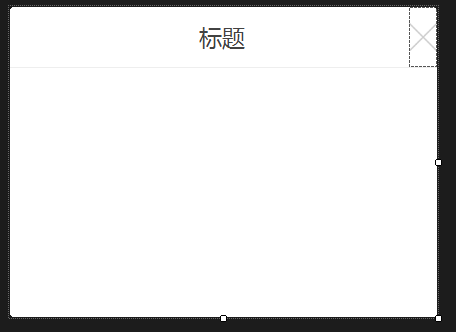
最后的话
如果你喜欢的话,请到 https://gitee.com/kwwwvagaa/net_winform_custom_control 点个星 星吧
(二十四)c#Winform自定义控件-单标题窗体的更多相关文章
- (二十)c#Winform自定义控件-有后退的窗体
前提 入行已经7,8年了,一直想做一套漂亮点的自定义控件,于是就有了本系列文章. 开源地址:https://gitee.com/kwwwvagaa/net_winform_custom_control ...
- (二十七)c#Winform自定义控件-多输入窗体
前提 入行已经7,8年了,一直想做一套漂亮点的自定义控件,于是就有了本系列文章. 开源地址:https://gitee.com/kwwwvagaa/net_winform_custom_control ...
- Bootstrap<基础二十四> 缩略图
Bootstrap 缩略图.大多数站点都需要在网格中布局图像.视频.文本等.Bootstrap 通过缩略图为此提供了一种简便的方式.使用 Bootstrap 创建缩略图的步骤如下: 在图像周围添加带有 ...
- (C/C++学习笔记) 二十四. 知识补充
二十四. 知识补充 ● 子类调用父类构造函数 ※ 为什么子类要调用父类的构造函数? 因为子类继承父类,会继承到父类中的数据,所以子类在进行对象初始化时,先调用父类的构造函数,这就是子类的实例化过程. ...
- 学习笔记:CentOS7学习之二十四:expect-正则表达式-sed-cut的使用
目录 学习笔记:CentOS7学习之二十四:expect-正则表达式-sed-cut的使用 24.1 expect实现无交互登录 24.1.1 安装和使用expect 24.2 正则表达式的使用 24 ...
- 二十四、Struts2中的UI标签
二十四.Struts2中的UI标签 Struts2中UI标签的优势: 数据回显 页面布局和排版(Freemark),struts2提供了一些常用的排版(主题:xhtml默认 simple ajax) ...
- WCF技术剖析之二十四: ServiceDebugBehavior服务行为是如何实现异常的传播的?
原文:WCF技术剖析之二十四: ServiceDebugBehavior服务行为是如何实现异常的传播的? 服务端只有抛出FaultException异常才能被正常地序列化成Fault消息,并实现向客户 ...
- VMware vSphere 服务器虚拟化之二十四 桌面虚拟化之手动池管理物理机
VMware vSphere 服务器虚拟化之二十四 桌面虚拟化之手动池管理物理机 VMwareView手动池可以管理物理计算机 说明: 环境基于实验二十三 1.准备一台Windows 7的物理计算机名 ...
- Bootstrap入门(二十四)data属性
Bootstrap入门(二十四)data属性 你可以仅仅通过 data 属性 API 就能使用所有的 Bootstrap 插件,无需写一行 JavaScript 代码.这是 Bootstrap 中的一 ...
随机推荐
- I/O:Writer
Writer: Writer append(char c) :将指定字符添加到此 writer. Writer append(CharSequence csq) :将指定字符序列添加到此 writer ...
- 基于百度EasyDL定制化图像识别平台的海洋鱼类识别方法
[目的]鱼类识别对渔业资源的开发利用有着重要的意义.针对海底环境恶劣.拍摄环境亮度低.场景模糊的实际情况导致海底观测视频品质差,视频中的鱼类识别难的问题以及现有鱼类识别方法存在的鱼类标注数据集过少导致 ...
- [笨方法学Python]ImportError"No module named bin.app"【笔记】
运行nosetests时,出现:ImportError"No module named bin.app" 解决方法: 1.检查路径是否是bin/app.py 2.检查是否创建bin ...
- Vmware centos7无法联网的问题解决
VMware三种网络连接方式的区别 : 1) bridge : 默认使用VMnet0,不提供DHCP服务 在桥接模式下,虚拟机和宿主计算机处于同等地位,虚拟机就像是一台真实主机一样存在于局域网中.因此 ...
- spring全局异常抓取validation校验信息
@ControllerAdvicepublic class GlobalExceptionHandler { @ExceptionHandler({Exception.class}) @Respons ...
- 2019年7月20日 - LeetCode0003
https://leetcode-cn.com/problems/longest-substring-without-repeating-characters/submissions/ 我的解法: c ...
- win10 安装mysql(图文详情)避免卡在最后一步
win10 安装mysql 本人安装mysql一般都是在镜像文件夹中下载(http://mirrors.sohu.com/),最近系统重做了之后安装mysql5.5.msi,可以安装成功.但是在最后的 ...
- maven install时跳过测试
xl_echo编辑整理,欢迎转载,转载请声明文章来源.欢迎添加echo微信(微信号:t2421499075)交流学习. 百战不败,依不自称常胜,百败不颓,依能奋力前行.--这才是真正的堪称强大!! - ...
- 《VR入门系列教程》之22---GearVR SDK代码剖析
GearVR SDK代码剖析 接下来我们来了解一下GearVR开发包的底层代码,它底层的代码和之前在第三章中讲的桌面SDK代码非常类似,当然,也有许多不同的地方. 首先,我们看看如何构 ...
- Redis(四)--- Redis的命令参考
1.简述 数据类型也称数据对象,包含字符串对象(string).列表对象(list).哈希对象(hash).集合对象(set).有序集合对象(zset). 2.String数据类型命令 string ...