
Python小项目之五子棋
1.项目简介
在刚刚学习完python套接字的时候做的一个五子棋小游戏,可以在局域网内双人对战,也可以和电脑对战
2.实现思路
- 局域网对战
对于局域网功能来说,首先建立连接(tcp),然后每次下棋时将棋子的坐标发送给对方,当接收到坐标后实例化成棋子对象,这个接收时用了select函数,因为pygame需要循环渲染图片,所以要用非阻塞方式接收消息
select()的机制中提供一fd_set的数据结构,实际上是一long类型的数组, 每一个数组元素都能与一打开的文件句柄(不管是Socket句柄,还是其他文件或命名管道或设备句柄)建立联系,建立联系的工作由程序员完成, 当调用select()时,由内核根据IO状态修改fd_set的内容,由此来通知执行了select()的进程哪一Socket或文件可读或可写,主要用于Socket通信当中
主要代码如下:
         # 接收cli的消息

         if is_people:

             rs, ws, es = select.select(inputs, [], [], 0)

             for r in rs:

                 if r is tcpclisock:

                     try:

                         data = r.recv(BUFSIZ)

                         islink = True

                         print(data.decode('utf8'))

                         if data.decode('utf8') == 'again':

                             is_recieve1 = True

                         if data.decode('utf8') == 'yes':

                             is_playagain = True

                             is_play = True

                         if data.decode('utf8') == 'no':

                             is_recieve2 = True

                             islink = False

                         if not is_play and not result:

                             me = storn.Storn_Black(eval(data))

                             black_chesses.append(me)

                             chesses.append(me)

                             is_play = True

                     except error:

                         islink = False
- 电脑对战
电脑对战的思路也很简单,用了应该是最常见的也是最简单的方法,就是循环遍历棋盘的每一个点,判断该点的价值,选取价值最大的点落子,这个需要对五子棋的棋型有一定了解,这里介绍几种常见的棋型(约定1为己方棋子,2为对方棋子,0为空)
- 活四(011110):这时候四颗棋子相连,同时两端为空,已经阻止不了一方的胜利了,此时价值应该设置最高
- 死四(011112|10111|11011):四颗棋子,只有一个地方能形成连五,如果是自己的棋可以赢,是对方的也可以阻止对方赢棋,此时价值次高
。。。
就这样把每种棋型判断一下,获得该点的价值,主要代码如下:
 # 判断每个点的价值

 def point_value(pos, white_chesses, black_chesses, identify1, identify2):

     value = 0

     for i in range(1,9):

         # *1111_ 活四

         if get_point(pos, i, 1, white_chesses, black_chesses) == identify1 and \

             get_point(pos, i, 2, white_chesses, black_chesses) == identify1 and \

             get_point(pos, i, 3, white_chesses, black_chesses) == identify1 and \

             get_point(pos, i, 4, white_chesses, black_chesses) == identify1 and \

             get_point(pos, i, 5, white_chesses, black_chesses) == 0:

             value += 40000

         # *11112 死四1

         if get_point(pos, i, 1, white_chesses, black_chesses) == identify1 and \

             get_point(pos, i, 2, white_chesses, black_chesses) == identify1 and \

             get_point(pos, i, 3, white_chesses, black_chesses) == identify1 and \

             get_point(pos, i, 4, white_chesses, black_chesses) == identify1 and \

             get_point(pos, i, 5, white_chesses, black_chesses) == identify2:

             value += 30000

         # 1*111 死四2

         if get_point(pos, i, -1, white_chesses, black_chesses) == identify1 and \

             get_point(pos, i, 1, white_chesses, black_chesses) == identify1 and \

             get_point(pos, i, 2, white_chesses, black_chesses) == identify1 and \

             get_point(pos, i, 3, white_chesses, black_chesses) == identify1:

             value += 30000

         # 11*11 死四3

         if get_point(pos, i, -2, white_chesses, black_chesses) == identify1 and \

             get_point(pos, i, -1, white_chesses, black_chesses) == identify1 and \

             get_point(pos, i, 1, white_chesses, black_chesses) == identify1 and \

             get_point(pos, i, 2, white_chesses, black_chesses) == identify1:

             value += 30000

         # *111_ 活三1

         if get_point(pos, i, 1, white_chesses, black_chesses) == identify1 and \

             get_point(pos, i, 2, white_chesses, black_chesses) == identify1 and \

             get_point(pos, i, 3, white_chesses, black_chesses) == identify1 and \

             get_point(pos, i, 4, white_chesses, black_chesses) == 0:

             value += 20000

         # *1_11_ 活三2

         if get_point(pos, i, 1, white_chesses, black_chesses) == identify1 and \

             get_point(pos, i, 2, white_chesses, black_chesses) == 0 and \

             get_point(pos, i, 3, white_chesses, black_chesses) == identify1 and \

             get_point(pos, i, 4, white_chesses, black_chesses) == identify1 and \

             get_point(pos, i, 5, white_chesses, black_chesses) == 0:

             value += 20000

         # *1112 死三1

         if get_point(pos, i, 1, white_chesses, black_chesses) == identify1 and \

             get_point(pos, i, 2, white_chesses, black_chesses) == identify1 and \

             get_point(pos, i, 3, white_chesses, black_chesses) == identify1 and \

             get_point(pos, i, 4, white_chesses, black_chesses) == identify2:

             value += 15000

         # _1_112 死三2

         if get_point(pos, i, 1, white_chesses, black_chesses) == identify1 and \

             get_point(pos, i, 2, white_chesses, black_chesses) == 0 and \

             get_point(pos, i, 3, white_chesses, black_chesses) == identify1 and \

             get_point(pos, i, 4, white_chesses, black_chesses) == identify1 and \

             get_point(pos, i, 5, white_chesses, black_chesses) == identify2:

             value += 15000

         # _11_12 死三3

         if get_point(pos, i, 1, white_chesses, black_chesses) == identify1 and \

             get_point(pos, i, 2, white_chesses, black_chesses) == identify1 and \

             get_point(pos, i, 3, white_chesses, black_chesses) == 0 and \

             get_point(pos, i, 4, white_chesses, black_chesses) == identify1 and \

             get_point(pos, i, 5, white_chesses, black_chesses) == identify2:

             value += 15000

         # 1__11 死三4

         if get_point(pos, i, -1, white_chesses, black_chesses) == identify1 and \

             get_point(pos, i, 1, white_chesses, black_chesses) == 0 and \

             get_point(pos, i, 2, white_chesses, black_chesses) == identify1 and \

             get_point(pos, i, 3, white_chesses, black_chesses) == identify1:

             value += 15000

         # 1_1_1 死三5

         if get_point(pos, i, -1, white_chesses, black_chesses) == identify1 and \

             get_point(pos, i, 1, white_chesses, black_chesses) == identify1 and \

             get_point(pos, i, 2, white_chesses, black_chesses) == 0 and \

             get_point(pos, i, 3, white_chesses, black_chesses) == identify1:

             value += 15000

         # 2_111_2 死三6

         if get_point(pos, i, -1, white_chesses, black_chesses) == identify2 and \

             get_point(pos, i, 1, white_chesses, black_chesses) == identify1 and \

             get_point(pos, i, 2, white_chesses, black_chesses) == identify1 and \

             get_point(pos, i, 3, white_chesses, black_chesses) == identify1 and \

             get_point(pos, i, 4, white_chesses, black_chesses) == 0 and \

             get_point(pos, i, 5, white_chesses, black_chesses) == identify2:

             value += 15000

         # __11__ 活二1

         if get_point(pos, i, -1, white_chesses, black_chesses) == 0 and \

             get_point(pos, i, 1, white_chesses, black_chesses) == identify1 and \

             get_point(pos, i, 2, white_chesses, black_chesses) == identify1 and \

             get_point(pos, i, 3, white_chesses, black_chesses) == 0 and \

             get_point(pos, i, 4, white_chesses, black_chesses) == 0:

             value += 1000

         # _1_1_ 活二2

         if get_point(pos, i, 1, white_chesses, black_chesses) == identify1 and \

             get_point(pos, i, 2, white_chesses, black_chesses) == 0 and \

             get_point(pos, i, 3, white_chesses, black_chesses) == identify1 and \

             get_point(pos, i, 4, white_chesses, black_chesses) == 0:

             value += 1000

         # *1__

         if get_point(pos, i, 1, white_chesses, black_chesses) == identify1 and \

             get_point(pos, i, 2, white_chesses, black_chesses) == 0 and \

             get_point(pos, i, 3, white_chesses, black_chesses) == 0:

             value += 30

         # *1_

         if get_point(pos, i, 1, white_chesses, black_chesses) == identify1 and \

             get_point(pos, i, 2, white_chesses, black_chesses) == 0:

             value += 20

         # *1

         if get_point(pos, i, 1, white_chesses, black_chesses) == identify1:

             value += 10

     return value
电脑选择落子位置时,要判断是进攻还是防守,需要两次遍历棋盘,获取进攻时的最大价值和防守的最大价值,主要代码如下:
 # 电脑选取落子的位置

 def ai(white_chesses, black_chesses, chesses):

     value = max1 = max2 = 0

     pos1 = pos2 = ()

     # 进攻时

     for i in range(0,15):

         row = 28 + i * 40

         for j in range(0,15):

             col = 28 + j * 40

             pos = (row,col)

             if is_empty(pos, chesses):

                 continue

             value = point_value(pos, white_chesses, black_chesses, 1, 2)

             if value > max1:

                 max1 = value

                 pos1 = (row,col)

     # 防守时

     for i in range(0,15):

         for j in range(0,15):

             row = 28 + i * 40

             col = 28 + j * 40

             if is_empty((row,col), chesses):

                 continue

             value = point_value((row,col), white_chesses, black_chesses, 2, 1)

             if value > max2:

                 max2 = value

                 pos2 = (row,col)

     if max1 > max2:

         return pos1

     else:

         return pos2
3.游戏截图
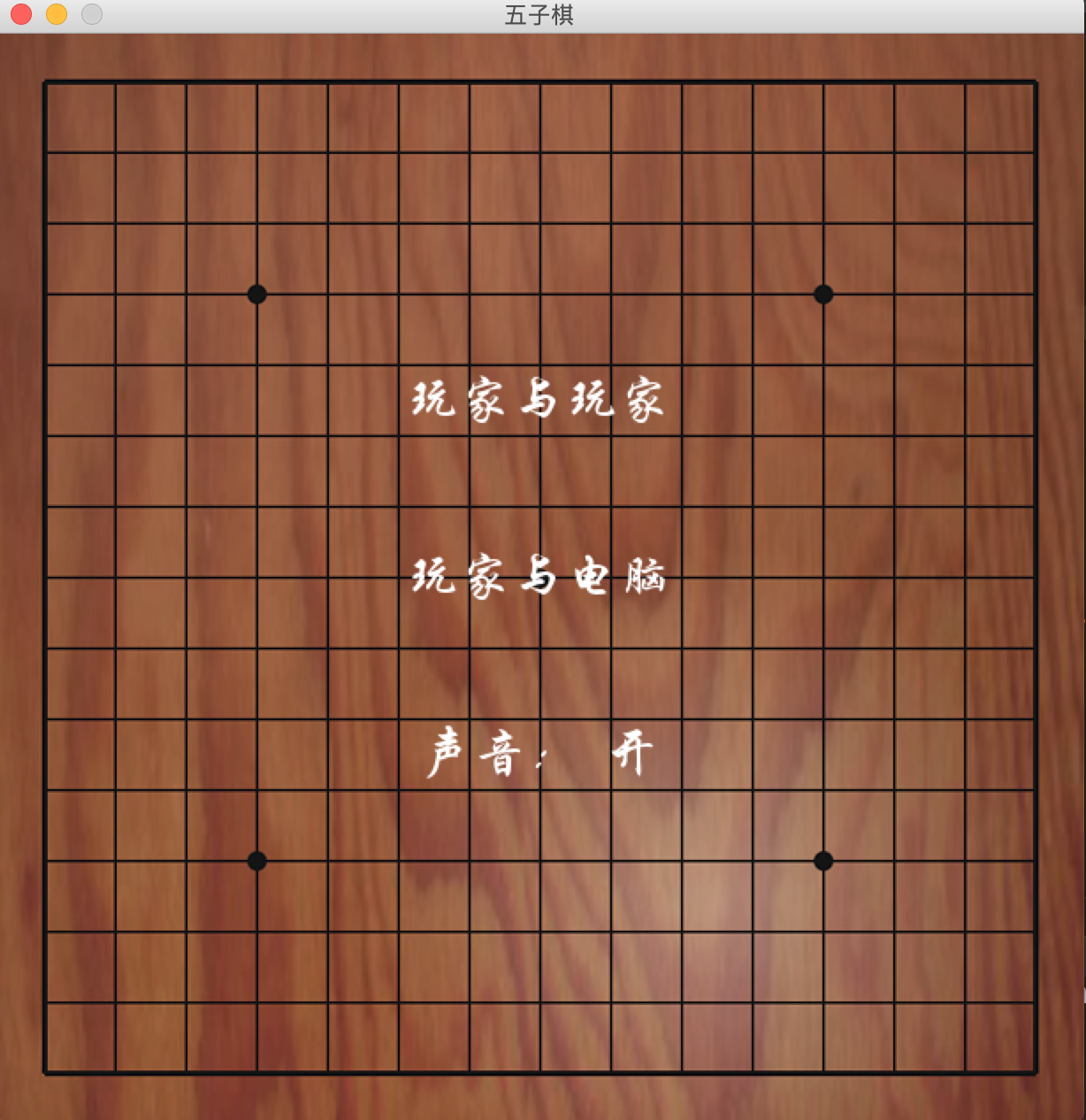
源代码地址:https://github.com/tctctctctc/python- 欢迎star
有不足之处还请指正
Python小项目之五子棋的更多相关文章
- Python小项目四:实现简单的web服务器
https://blog.csdn.net/u010103202/article/details/74002538 本博客是整理在学习实验楼的课程过程中记录下的笔记形成的,参考:https://www ...
- 第一个Python小项目:图片转换成字符图片
实现的效果: ...
- python小项目之微信远程控制
前两天接触了一个有趣的python模块--itchat,这个模块可以非常方便的操作微信,今天就来使用这个模块来实现微信远程控制. 环境准备 itchat模块不是python标准模块(内置模块),是一个 ...
- 给大家推荐:五个Python小项目,Github上的人气很高的
1.深度学习框架 Pytorch https://github.com/pytorch/pytorch PyTorch 是一个 Torch7 团队开源的 Python 优先的深度学习框架,提供两个高级 ...
- [IT学习]Python 小项目 通讯录 思路
建立一个通讯录查询软件,暂时只支持按姓名检索.出发点:无需登录企业门户,即可检索.要注意保护员工手机号,除非他自己同意显示. 欢迎您访问www.cnblogs.com/viphhs.转载请联系作者授权 ...
- python小项目之文本编辑器
高考完后这么久才想起这系列教程,实在抱歉,现在该来继续教程了. 本节利用前面所学知识,来完成一个小工具--文本编辑器! tkinter 在实现文本编辑器之前,先来了解下tkinter这个python库 ...
- 【计算机视觉】OpenCV篇(4) - Pycharm+PyQt5+Python小项目实战
1.下载安装 (1)Pycharm:下载链接 (2)推荐使用Qt Designer来设计界面,如果你装的是Anaconda的话,就已经自带了designer.exe,我这里使用的是Pycharm的虚拟 ...
- JAVA小项目之五子棋
五子棋V1.0 功能: 人人对战,人机对战(初级) 记录双方分数: 主要知识点: 二维坐标系中,各方向坐标的关系及规律. 效果图: 主框架类: package com.gxlee.wzq; /** * ...
- python小项目练习之转换像素图片为字符图
实例来源实验楼网站,没事可以多逛逛,在此多谢实验楼的无私分享 from PIL import Image import argparse """ description: ...
随机推荐
- css 设置table样式
<style type="text/css" > table tr td{height:39px; font-size: 13px; line-height: ...
- No lease on /目录: File does not exist. [Lease. Holder: DFSClient_NONMAPREDUCE_-2059237550_1, pendingcreates: 8]错误及解决方法
感觉程序员的世界真是一个变幻无常且精彩绝伦的世界,每次跑程序都会发现不一样的问题.今天跑MapReduce程序来统计邮箱次数时遇到了一个问题,明明一样的代码,别人能跑,我却跑不了.我相信,基本做这行的 ...
- 机器学习框架ML.NET学习笔记【4】多元分类之手写数字识别
一.问题与解决方案 通过多元分类算法进行手写数字识别,手写数字的图片分辨率为8*8的灰度图片.已经预先进行过处理,读取了各像素点的灰度值,并进行了标记. 其中第0列是序号(不参与运算).1-64列是像 ...
- 【Unity3D/C#】Unity3D中的Coroutine详解
Unity中的coroutine是通过yield expression;来实现的.官方脚本中到处会看到这样的代码. 疑问: yield是什么? Coroutine是什么? unity的coroutin ...
- mysql数据库忘记密码时如何修改(二)
第一步:找到mysql数据库的my.ini配置文件,在[mysqld]下面添加一行代码:skip-grant-tables 第二步:运行services.msc进入服务管理界面,重启mysql服务. ...
- android 开发-(Contextual Menu)上下文菜单的实现
在android3.0以后,安卓设备不在提供物理的菜单按键,同时,android应用提供了另外的菜单实现机制,来替代之前的菜单创建方式.安卓设备中,平常可以使用长按住某个内容弹出菜单选项.这就是我们需 ...
- 2 cmd中startup显示运行不了显示“不是内部或外部命令”
解决方案: 1 在C:\Windows\System32中检查cmd.exe是否存在(如果存在的话)(检查cmd.exe是否被误删) 2 在我的电脑——属性——环境变量——在系统变量找到Path编辑前 ...
- jQuery的parent和parents和closest区别
1.parent是指取得一个包含着所有匹配元素的唯一父元素的元素集合.2.parents则是取得一个包含着所有匹配元素的祖先元素的元素集合(不包含根元素).可以通过一个可选的表达式进行筛选.3.clo ...
- javascript之 JavaScript 工具库
javascript之 JavaScript 工具库jQuery 目录: 一.查找标签和事件绑定以及操作标签的对比 二.DOM对象和jquery的转换 三.$(document).ready( ) ...
- iOS-加载数据的实现-MJRefresh
使用CocoaPods加载三方库: pod 'MJRefresh' MJRefresh类结构图: 具体实现方法和效果图: The drop-down refresh 01-Default self.t ...