
C#仿QQ设置界面导航
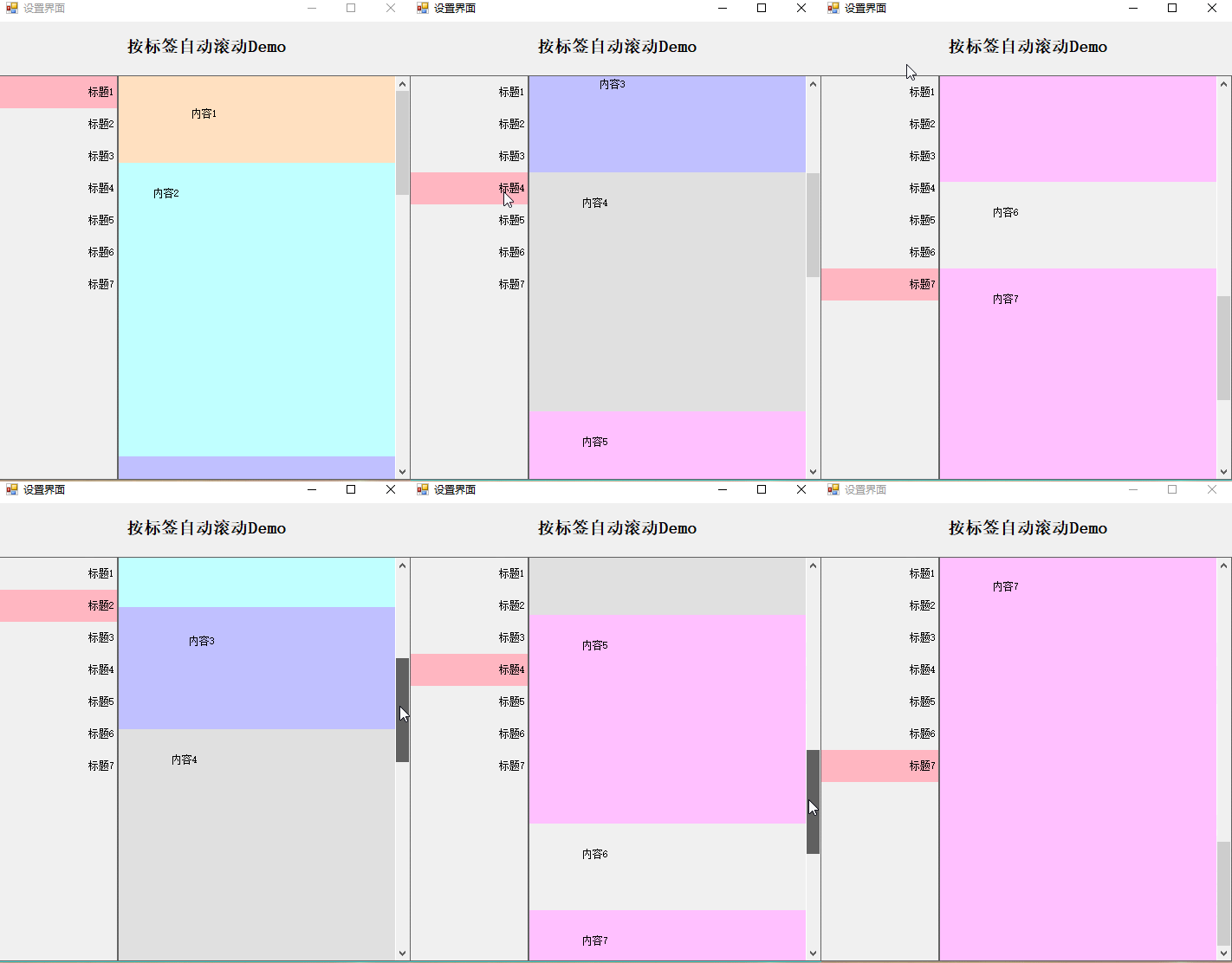
效果预览,选择左边标签,右边内容会自动滚动到适当位置
public class AnchorPanel

    {

        List<PanelMenu> lst = new List<PanelMenu>();

        Control MenuPan { get; set; }

        XtraScrollableControl XSControl;

        public AnchorPanel(Panel PanMenu, XtraScrollableControl xtraScrollableControl)

        {

            MenuPan = PanMenu;

            XSControl = xtraScrollableControl;

            XSControl.Scroll += XSControl_Scroll;

            XSControl.MouseWheel += XSControl_MouseWheel;

            XSControl.SizeChanged += XSControl_SizeChanged;

            XSControl.VerticalScroll.LargeChange = ;

        }

        void XSControl_SizeChanged(object sender, EventArgs e)

        {

            if (LastAnchor != null && LastAnchorIniHeight < (sender as Control).Height)

            {

                LastAnchor.AnchorContainer.Height = (sender as Control).Height;

            }

        }

        #region 容器滚动条移动事件

        void XSControl_MouseWheel(object sender, MouseEventArgs e)

        {

            XSControl_Scroll(sender, null);

        }

        void XSControl_Scroll(object sender, XtraScrollEventArgs e)

        {

            CurrentLable = GetMenu((sender as XtraScrollableControl).VerticalScroll.Value);

        }

        #endregion

        #region 添加锚点

        PanelMenu LastAnchor;

        int LastAnchorIniHeight;

        /// <summary>

        /// 添加锚点

        /// </summary>

        /// <param name="col">默认为控件的Top,Height,Text属性</param>

        /// <param name="LastControl">是否是最后一一个锚点,为了保证最后一个锚点定位在顶部,需要动态设置最后一个锚点的高度,如果最后一个锚点区域高度小于容器高度,则设置其高度为容器高度</param>

        public void AddAnchor(Control col, bool LastControl)

        {

            AddAnchor(col, col.Text, LastControl);

        }

        /// <summary>

        /// 添加锚点

        /// </summary>

        /// <param name="col">默认为控件的Top,Height属性</param>

        /// <param name="Caption">如果Caption为空则取Col的Text属性</param>

        /// <param name="LastControl">是否是最后一一个锚点,为了保证最后一个锚点定位在顶部,需要动态设置最后一个锚点的高度,如果最后一个锚点区域高度小于容器高度,则设置其高度为容器高度</param>

        public void AddAnchor(Control col, string Caption, bool LastControl)

        {

            Label lbl = new Label()

            {

                AutoSize = false,

                Dock = System.Windows.Forms.DockStyle.Top,

                Location = new System.Drawing.Point(, ),

                /*lbl.Size = new System.Drawing.Size(219, 37);*/

                Height = ,

                TabIndex = ,

                Text = Caption,

                TextAlign = System.Drawing.ContentAlignment.MiddleRight,

                Tag = col.Top.ToString()

            };

            IniEventLable(lbl);

            if (LastControl)

            {

                LastAnchor = new PanelMenu(lbl, col);

                LastAnchorIniHeight = col.Height;

                lst.Add(LastAnchor);

            }

            else

                lst.Add(new PanelMenu(lbl, col));

            MenuPan.Controls.Add(lbl);

            MenuPan.Controls.SetChildIndex(lbl, );

        }

        #endregion

        /// <summary>

        /// 根据滚动条位置获得对应的锚点空间

        /// </summary>

        /// <param name="ScrollValue">滚动条的值</param>

        /// <returns></returns>

        public Label GetMenu(int ScrollValue)

        {

            Label lbl = null;

            foreach (PanelMenu menu in lst)

            {

                if (menu.Top <= ScrollValue && menu.Buttom > ScrollValue)

                    lbl = menu.Label;

            }

            if (lbl == null)

            {

                return null;

            }

            return lbl;

        }

        /// <summary>

        /// 初始化锚点的事件

        /// </summary>

        /// <param name="lbl"></param>

        void IniEventLable(Label lbl)

        {

            lbl.MouseEnter += lbl_MouseEnter;

            lbl.MouseLeave += lbl_MouseLeave;

            lbl.MouseClick += lbl_MouseClick;

        }

        #region 锚点单击

        Label _CurrentLable;

        public Label CurrentLable

        {

            set

            {

                if (value == null) return;

                if (_CurrentLable == value) return;

                value.BackColor = Color.LightPink;

                if (_CurrentLable != null)

                    _CurrentLable.BackColor = Color.Transparent;

                _CurrentLable = value;

            }

            get { return _CurrentLable; } //{ return CurrentLable; }

        }

        /// <summary>

        /// 鼠标点击

        /// </summary>

        /// <param name="sender"></param>

        /// <param name="e"></param>

        void lbl_MouseClick(object sender, MouseEventArgs e)

        {

            if (e.Button == MouseButtons.Left)

            {

                CurrentLable = sender as Label;

                XSControl.VerticalScroll.Value = int.Parse((sender as Label).Tag.ToString()) - CurrentLable.Top;

            }

        }

        /// <summary>

        /// 设置鼠标进入时背景色

        /// </summary>

        /// <param name="sender"></param>

        /// <param name="e"></param>

        private void lbl_MouseEnter(object sender, EventArgs e)

        {

            if ((sender as Label) != CurrentLable)

                (sender as Label).BackColor = Color.FromArgb(0xFF, 0xFF, 0x99);

        }

        /// <summary>

        /// 鼠标移出,还原背景色

        /// </summary>

        /// <param name="sender"></param>

        /// <param name="e"></param>

        private void lbl_MouseLeave(object sender, EventArgs e)

        {

            if ((sender as Label) != CurrentLable)

                (sender as Label).BackColor = Color.Transparent;

        }

        #endregion

    }

    public class PanelMenu

    {

        public PanelMenu(Label label, Control anchorContainer)

        {

            Label = label;

            AnchorContainer = anchorContainer;

            Top = anchorContainer.Top;

        }

        public PanelMenu(Label label, int top, int height)

        {

            Label = label;

            Top = top;

            Height = height;

        }

        /// <summary>

        /// 锚点定位的容器对象,通常是Panel

        /// </summary>

        public Control AnchorContainer { get; set; }

        /// <summary>

        /// 锚点,Lable

        /// </summary>

        public Label Label { get; set; }

        public int Top

        {

            get;

            set;

        }

        private int _height;

        public int Height

        {

            get

            {

                if (AnchorContainer != null)

                    return AnchorContainer.Height;

                else

                    return _height;

            }

            set { _height = value; }

        }

        public int Buttom { get { return Top + Height; } }

    }
PS:界面新建一个panel1,用于存放左边的导航列表,右边拖一个dev控件:xtraScrollableControl1
在Load里面新增如下代码
使用:
AnchorPanel APanel;

       private void Form3_Load(object sender, EventArgs e)

       {

           APanel = new AnchorPanel(panel1, xtraScrollableControl1);

           labelControl1.Text = groupControl6.Height.ToString();

           if (groupControl6.Height < xtraScrollableControl1.Height)

               groupControl6.Height = xtraScrollableControl1.Height;

           panel1.Controls.Clear();

           APanel.AddAnchor(groupControl1, false);

           APanel.AddAnchor(groupControl2, false);

           APanel.AddAnchor(groupControl3, false);

           APanel.AddAnchor(groupControl4, false);

           APanel.AddAnchor(groupControl5, false);

           APanel.AddAnchor(groupControl6, true);

           APanel.CurrentLable = APanel.GetMenu();

       }
Demo下载地址:https://github.com/GarsonZhang/JumpPanel
C#仿QQ设置界面导航的更多相关文章
- 编写Java程序,使用Swing布局管理器和常用控件,实现仿QQ登录界面
返回本章节 返回作业目录 需求说明: 使用Swing布局管理器和常用控件,实现仿QQ登录界面 实现思路: 创建登录界面的类QQLogin,该类继承父类JFrame,在该类中创建无参数的构造方法,在构造 ...
- 高仿qq聊天界面
高仿qq聊天界面,给有需要的人,界面效果如下: 真心觉得做界面非常痛苦,给有需要的朋友. chat.xml <?xml version="1.0" encoding=&quo ...
- WPF开发实例——仿QQ登录界面
原文:WPF开发实例--仿QQ登录界面 版权声明:本文为博主原创文章,如需转载请标明转载地址 http://blog.csdn.net/u013981858 https://blog.csdn.net ...
- 仿QQ大战—界面篇
之前在<仿QQ大战-服务器的搭建(ServerSocket)>中实现了服务器的搭建,以及一个简单地传递数据的实现,现在就是来实现类似与QQ聊天通信的功能.首先是界面的实现: 首先:服务器和 ...
- Android项目实战(二十三):仿QQ设置App全局字体大小
一.项目需求: 因为产品对象用于中老年人,所以产品设计添加了APP全局字体调整大小功能. 这里仿做QQ设置字体大小的功能. QQ实现的效果是,滚动下面的seekbar,当只有seekbar到达某一个刻 ...
- JavaSwing仿QQ登录界面,注释完善,适合新手学习
使用说明: 这是一个java做的仿制QQ登录界面,界面仅使用一个类, JDK版本为jdk-11 素材包的名字为:素材(下载)请在项目中新建一个名字为“素材”的文件夹. 素材: https://pan. ...
- 零基础~仿qq登录界面
html代码: <!DOCTYPE html> <html> <head> <meta charset="utf-8"> <t ...
- Android 仿QQ微信开场导航以及登陆界面
相信大家对于微信等社交应用的UI界面已经都很熟悉了,该UI最值得借鉴的莫过于第一次使用的时候一些列产品介绍的图片,可以左右滑动浏览,最后进入应 用,这一效果适用于多种项目中,相信今后开发应用一定会用得 ...
- Android仿QQ微信开场导航以及登陆界面
相信大家对于微信等社交应用的UI界面已经都很熟悉了,该UI最值得借鉴的莫过于第一次使用的时候一些列产品介绍的图片,可以左右滑动浏览,最后 进入应用,这一效果适用于多种项目中,相信今后开发应用一定会用得 ...
随机推荐
- How to Start a New Cocos2d-x Game for version 3.0
This documentation will show you how to use cocos console to create and run a new project. Runtime R ...
- Yandex.Algorithm 2011 A. Double Cola
1.题目描写叙述:点击打开链接 2.解题思路:本题是一道找规律的数学题,通过题意描写叙述不难知道,相当于有5棵二叉树构成了一个森林,须要你按层次遍历找到第n个人是谁. 观察后不难发现,如果最開始的一层 ...
- 使用AlloyLever来搞定开发调试发布,错误监控上报,用户问题定位
传送门: # gituhbhttps://github.com/AlloyTeam/AlloyLever # 官网https://alloyteam.github.io/AlloyLever/ 下载和 ...
- PSSM特征-从生成到处理
以下代码均为个人原创,如有疑问,欢迎交流.新浪微博:拾毅者 本节内容: pssm生成 pssm简化 标准的pssm构建 滑动pssm生成 在基于蛋白质序列的相关预測中.使用PSSM打分矩阵会得将预測效 ...
- Python之内置类型
python有6大内置类型 数字.序列.映射.类.实例.异常. 下面就慢慢来说明: 1.数字 有3个明确的数字类型,整型,浮点型及复数.另外,布尔是整型的一个子类型. (另外标准库还包含额外的数字类型 ...
- Apache + Tomcat集群 + 负载均衡
Part I: 取经处: http://www.ramkitech.com/2012/10/tomcat-clustering-series-simple-load.html http://blog ...
- mysql解压版安装和卸载
问题1:发生系统错误 5. 解决:使用管理员身份安装即可 问题2:发生系统错误 2. 解决:cd C:\Program Files\MySQL\MySQL Server 5.6\bin 进入mysql ...
- X264学习1:简介
H.264是视频编码标准. X264是它的开源实现,是视频编码器. 目录 [隐藏] 1 编码器特性 2 输入输出文件类型 2.1 输入 2.2 输出 3 preset和tune系统 3.1 --pr ...
- VB.NET的前世今生
[前言]初次见到这个强大的东西.一看名字就没有了陌生感,由于它和我曾经见过的VB肯定有非常多的联系. 俗话说,看人看相,了解看感觉(O(∩_∩)O~~几乎相同这个意思吧). 要想了解VB.net就要从 ...
- git 撤销已经push到远端的代码
其实是没有直接让远端代码回复到某次的指令,实现撤销push的思路如下: 1.先让代码恢复到想要恢复的前一次提交记录 2.重新提交代码,覆盖端上的代码,就相当于撤销了push 的提交 实现方式如下: 1 ...