
C#仿QQ设置界面导航
效果预览,选择左边标签,右边内容会自动滚动到适当位置
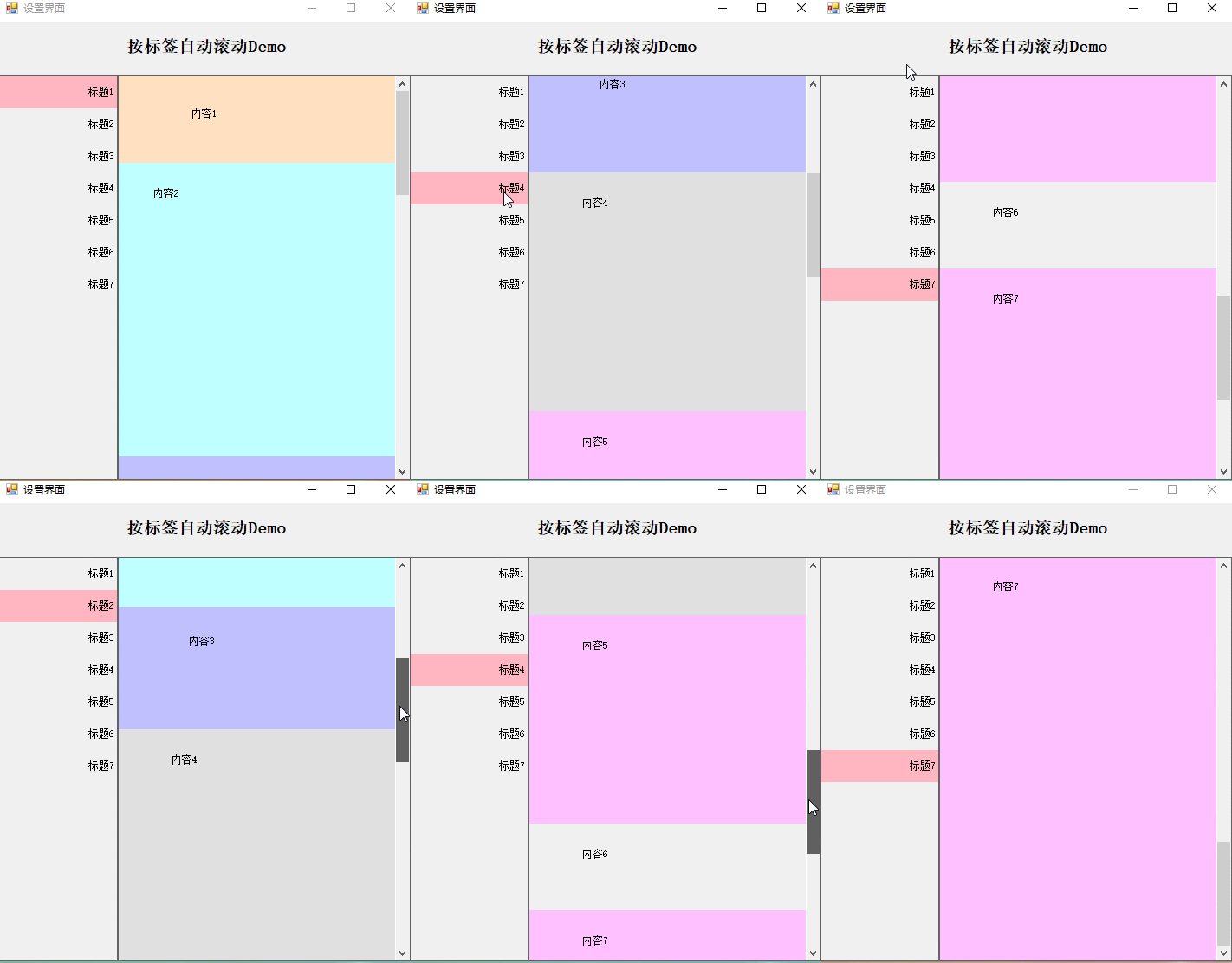
public class AnchorPanel

    {

        List<PanelMenu> lst = new List<PanelMenu>();

        Control MenuPan { get; set; }

        XtraScrollableControl XSControl;

        public AnchorPanel(Panel PanMenu, XtraScrollableControl xtraScrollableControl)

        {

            MenuPan = PanMenu;

            XSControl = xtraScrollableControl;

            XSControl.Scroll += XSControl_Scroll;

            XSControl.MouseWheel += XSControl_MouseWheel;

            XSControl.SizeChanged += XSControl_SizeChanged;

            XSControl.VerticalScroll.LargeChange = ;

        }

        void XSControl_SizeChanged(object sender, EventArgs e)

        {

            if (LastAnchor != null && LastAnchorIniHeight < (sender as Control).Height)

            {

                LastAnchor.AnchorContainer.Height = (sender as Control).Height;

            }

        }

        #region 容器滚动条移动事件

        void XSControl_MouseWheel(object sender, MouseEventArgs e)

        {

            XSControl_Scroll(sender, null);

        }

        void XSControl_Scroll(object sender, XtraScrollEventArgs e)

        {

            CurrentLable = GetMenu((sender as XtraScrollableControl).VerticalScroll.Value);

        }

        #endregion

        #region 添加锚点

        PanelMenu LastAnchor;

        int LastAnchorIniHeight;

        /// <summary>

        /// 添加锚点

        /// </summary>

        /// <param name="col">默认为控件的Top,Height,Text属性</param>

        /// <param name="LastControl">是否是最后一一个锚点,为了保证最后一个锚点定位在顶部,需要动态设置最后一个锚点的高度,如果最后一个锚点区域高度小于容器高度,则设置其高度为容器高度</param>

        public void AddAnchor(Control col, bool LastControl)

        {

            AddAnchor(col, col.Text, LastControl);

        }

        /// <summary>

        /// 添加锚点

        /// </summary>

        /// <param name="col">默认为控件的Top,Height属性</param>

        /// <param name="Caption">如果Caption为空则取Col的Text属性</param>

        /// <param name="LastControl">是否是最后一一个锚点,为了保证最后一个锚点定位在顶部,需要动态设置最后一个锚点的高度,如果最后一个锚点区域高度小于容器高度,则设置其高度为容器高度</param>

        public void AddAnchor(Control col, string Caption, bool LastControl)

        {

            Label lbl = new Label()

            {

                AutoSize = false,

                Dock = System.Windows.Forms.DockStyle.Top,

                Location = new System.Drawing.Point(, ),

                /*lbl.Size = new System.Drawing.Size(219, 37);*/

                Height = ,

                TabIndex = ,

                Text = Caption,

                TextAlign = System.Drawing.ContentAlignment.MiddleRight,

                Tag = col.Top.ToString()

            };

            IniEventLable(lbl);

            if (LastControl)

            {

                LastAnchor = new PanelMenu(lbl, col);

                LastAnchorIniHeight = col.Height;

                lst.Add(LastAnchor);

            }

            else

                lst.Add(new PanelMenu(lbl, col));

            MenuPan.Controls.Add(lbl);

            MenuPan.Controls.SetChildIndex(lbl, );

        }

        #endregion

        /// <summary>

        /// 根据滚动条位置获得对应的锚点空间

        /// </summary>

        /// <param name="ScrollValue">滚动条的值</param>

        /// <returns></returns>

        public Label GetMenu(int ScrollValue)

        {

            Label lbl = null;

            foreach (PanelMenu menu in lst)

            {

                if (menu.Top <= ScrollValue && menu.Buttom > ScrollValue)

                    lbl = menu.Label;

            }

            if (lbl == null)

            {

                return null;

            }

            return lbl;

        }

        /// <summary>

        /// 初始化锚点的事件

        /// </summary>

        /// <param name="lbl"></param>

        void IniEventLable(Label lbl)

        {

            lbl.MouseEnter += lbl_MouseEnter;

            lbl.MouseLeave += lbl_MouseLeave;

            lbl.MouseClick += lbl_MouseClick;

        }

        #region 锚点单击

        Label _CurrentLable;

        public Label CurrentLable

        {

            set

            {

                if (value == null) return;

                if (_CurrentLable == value) return;

                value.BackColor = Color.LightPink;

                if (_CurrentLable != null)

                    _CurrentLable.BackColor = Color.Transparent;

                _CurrentLable = value;

            }

            get { return _CurrentLable; } //{ return CurrentLable; }

        }

        /// <summary>

        /// 鼠标点击

        /// </summary>

        /// <param name="sender"></param>

        /// <param name="e"></param>

        void lbl_MouseClick(object sender, MouseEventArgs e)

        {

            if (e.Button == MouseButtons.Left)

            {

                CurrentLable = sender as Label;

                XSControl.VerticalScroll.Value = int.Parse((sender as Label).Tag.ToString()) - CurrentLable.Top;

            }

        }

        /// <summary>

        /// 设置鼠标进入时背景色

        /// </summary>

        /// <param name="sender"></param>

        /// <param name="e"></param>

        private void lbl_MouseEnter(object sender, EventArgs e)

        {

            if ((sender as Label) != CurrentLable)

                (sender as Label).BackColor = Color.FromArgb(0xFF, 0xFF, 0x99);

        }

        /// <summary>

        /// 鼠标移出,还原背景色

        /// </summary>

        /// <param name="sender"></param>

        /// <param name="e"></param>

        private void lbl_MouseLeave(object sender, EventArgs e)

        {

            if ((sender as Label) != CurrentLable)

                (sender as Label).BackColor = Color.Transparent;

        }

        #endregion

    }

    public class PanelMenu

    {

        public PanelMenu(Label label, Control anchorContainer)

        {

            Label = label;

            AnchorContainer = anchorContainer;

            Top = anchorContainer.Top;

        }

        public PanelMenu(Label label, int top, int height)

        {

            Label = label;

            Top = top;

            Height = height;

        }

        /// <summary>

        /// 锚点定位的容器对象,通常是Panel

        /// </summary>

        public Control AnchorContainer { get; set; }

        /// <summary>

        /// 锚点,Lable

        /// </summary>

        public Label Label { get; set; }

        public int Top

        {

            get;

            set;

        }

        private int _height;

        public int Height

        {

            get

            {

                if (AnchorContainer != null)

                    return AnchorContainer.Height;

                else

                    return _height;

            }

            set { _height = value; }

        }

        public int Buttom { get { return Top + Height; } }

    }
PS:界面新建一个panel1,用于存放左边的导航列表,右边拖一个dev控件:xtraScrollableControl1
在Load里面新增如下代码
使用:
AnchorPanel APanel;

       private void Form3_Load(object sender, EventArgs e)

       {

           APanel = new AnchorPanel(panel1, xtraScrollableControl1);

           labelControl1.Text = groupControl6.Height.ToString();

           if (groupControl6.Height < xtraScrollableControl1.Height)

               groupControl6.Height = xtraScrollableControl1.Height;

           panel1.Controls.Clear();

           APanel.AddAnchor(groupControl1, false);

           APanel.AddAnchor(groupControl2, false);

           APanel.AddAnchor(groupControl3, false);

           APanel.AddAnchor(groupControl4, false);

           APanel.AddAnchor(groupControl5, false);

           APanel.AddAnchor(groupControl6, true);

           APanel.CurrentLable = APanel.GetMenu();

       }
Demo下载地址:https://github.com/GarsonZhang/JumpPanel
C#仿QQ设置界面导航的更多相关文章
- 编写Java程序,使用Swing布局管理器和常用控件,实现仿QQ登录界面
返回本章节 返回作业目录 需求说明: 使用Swing布局管理器和常用控件,实现仿QQ登录界面 实现思路: 创建登录界面的类QQLogin,该类继承父类JFrame,在该类中创建无参数的构造方法,在构造 ...
- 高仿qq聊天界面
高仿qq聊天界面,给有需要的人,界面效果如下: 真心觉得做界面非常痛苦,给有需要的朋友. chat.xml <?xml version="1.0" encoding=&quo ...
- WPF开发实例——仿QQ登录界面
原文:WPF开发实例--仿QQ登录界面 版权声明:本文为博主原创文章,如需转载请标明转载地址 http://blog.csdn.net/u013981858 https://blog.csdn.net ...
- 仿QQ大战—界面篇
之前在<仿QQ大战-服务器的搭建(ServerSocket)>中实现了服务器的搭建,以及一个简单地传递数据的实现,现在就是来实现类似与QQ聊天通信的功能.首先是界面的实现: 首先:服务器和 ...
- Android项目实战(二十三):仿QQ设置App全局字体大小
一.项目需求: 因为产品对象用于中老年人,所以产品设计添加了APP全局字体调整大小功能. 这里仿做QQ设置字体大小的功能. QQ实现的效果是,滚动下面的seekbar,当只有seekbar到达某一个刻 ...
- JavaSwing仿QQ登录界面,注释完善,适合新手学习
使用说明: 这是一个java做的仿制QQ登录界面,界面仅使用一个类, JDK版本为jdk-11 素材包的名字为:素材(下载)请在项目中新建一个名字为“素材”的文件夹. 素材: https://pan. ...
- 零基础~仿qq登录界面
html代码: <!DOCTYPE html> <html> <head> <meta charset="utf-8"> <t ...
- Android 仿QQ微信开场导航以及登陆界面
相信大家对于微信等社交应用的UI界面已经都很熟悉了,该UI最值得借鉴的莫过于第一次使用的时候一些列产品介绍的图片,可以左右滑动浏览,最后进入应 用,这一效果适用于多种项目中,相信今后开发应用一定会用得 ...
- Android仿QQ微信开场导航以及登陆界面
相信大家对于微信等社交应用的UI界面已经都很熟悉了,该UI最值得借鉴的莫过于第一次使用的时候一些列产品介绍的图片,可以左右滑动浏览,最后 进入应用,这一效果适用于多种项目中,相信今后开发应用一定会用得 ...
随机推荐
- NSNotification的几点说明
1.NSNotification消息的同步性 ①NSNotification使用的是同步操作.即如果你在程序中的A位置post了一个NSNotification,在B位置注册了一个observer,通 ...
- BIOS截图中文
- json字符串转为json对象-jQuery.parseJSON()
<!DOCTYPE html> <html> <head> <meta charset="UTF-8"> <title> ...
- CSS 选择器 :last-child与:last-of-type的区别
:last-child----represents the last element among a group of sibling elements. CSS伪类 :last-child 代表在一 ...
- vim命令行模式
1. 激活命令行模式 : 进入命令行模式 <Esc> 退出命令行模式 2. 常用命令 :p 打印 (:print) :e 读入文件 (:edit) :w 写入文件 (:write) :t ...
- 网络数据传输socket和http优缺点
数据传输方式 Socket传输的定义 所谓socket通常也称作"套接字",实现服务器和客户端之间的物理连接,并进行数据传输,主要有UDP和TCP两个协议.Socket处于网络协议 ...
- oracle中sqlldr工具使用时注意事项
1.命令写在一行:如,sqlldr sh/&sh_pass@&connect_string control=&ctl_file data=&dat_file log=& ...
- homebrew可以管理众多开源软件的安装和卸载
通过homebrew可以管理众多开源软件的安装和卸载. 参考https://github.com/mxcl/homebrew/wiki 1. 安装: ruby -e "$(curl -fsS ...
- 如何玩转最新的项目的搭配springmvc+mybatis+Redis+Nginx+tomcat+mysql
上一次完成nginx+tomcat组合搭配,今天我们就说说,这几个软件在项目中充当的角色: 要想完成这几个软件的组合,我们必须知道和熟悉应用这个框架, 一: Nginx:在项目中大多数作为反向代理服务 ...
- Linux守护进程简单介绍和实例具体解释
Linux守护进程简单介绍和实例具体解释 简单介绍 守护进程(Daemon)是执行在后台的一种特殊进程.它独立于控制终端而且周期性地执行某种任务或等待处理某些发生的事件.守护进程是一种非常实用的进程. ...