
使用scrapy-crawlSpider 爬取tencent 招聘
Tencent 招聘信息网站
创建项目
scrapy startproject Tencent
创建爬虫
scrapy genspider -t crawl tencent
1. 起始url start_url = 'https://hr.tencent.com/position.php'
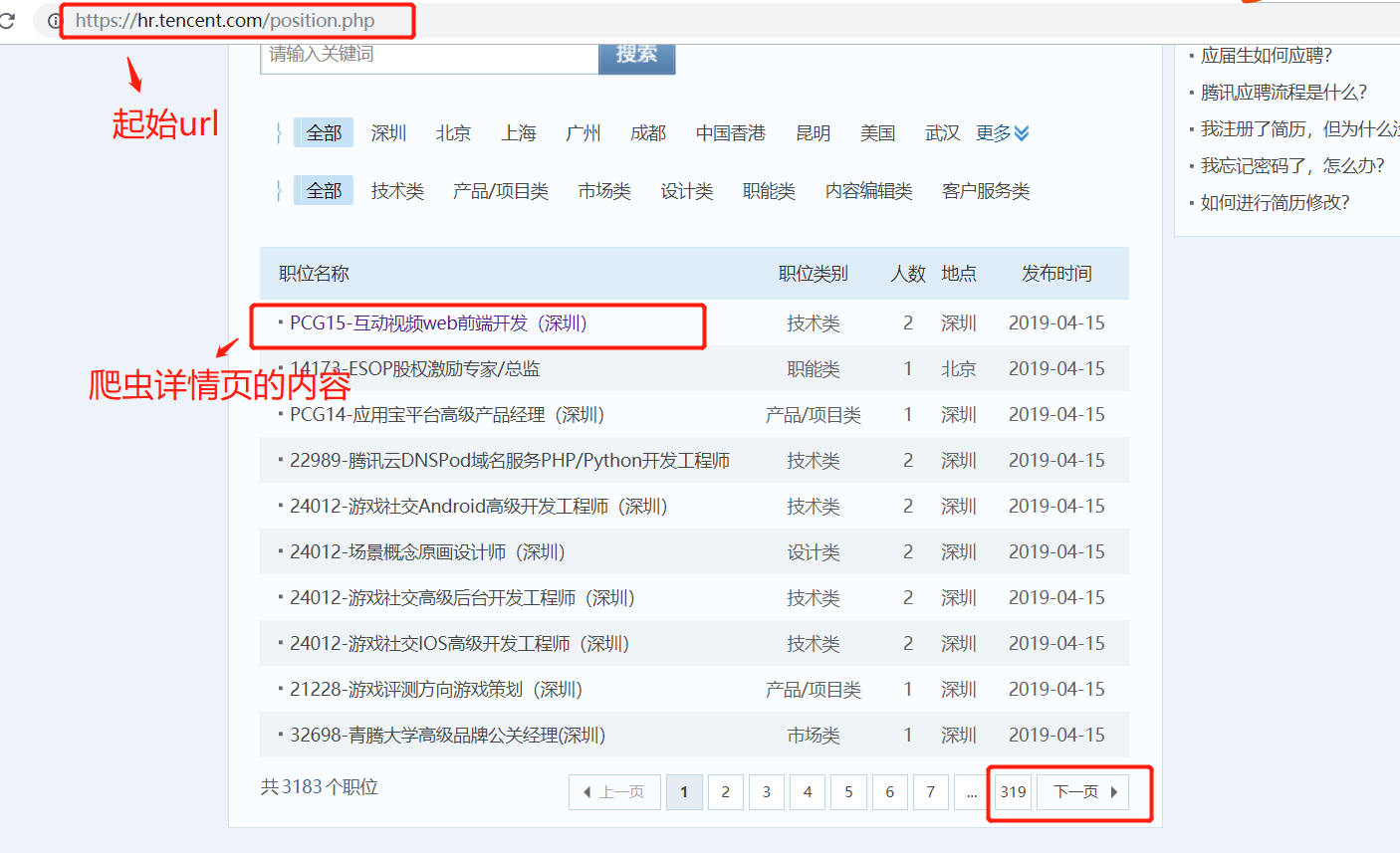
在起始页面,需要获取该也页面上的每个职位的详情页的url,同时需要提取下一页的url地址,做同样的操作。
因此起始页url地址的提取,分为两类:
1. 每个职位详情页的url地址的提取
2. 下一页url地址的提取,并且得到的页面做的操作和起始页的操作一样。
url地址的提取
1. 提取详情页url,详情页的url地址如下:
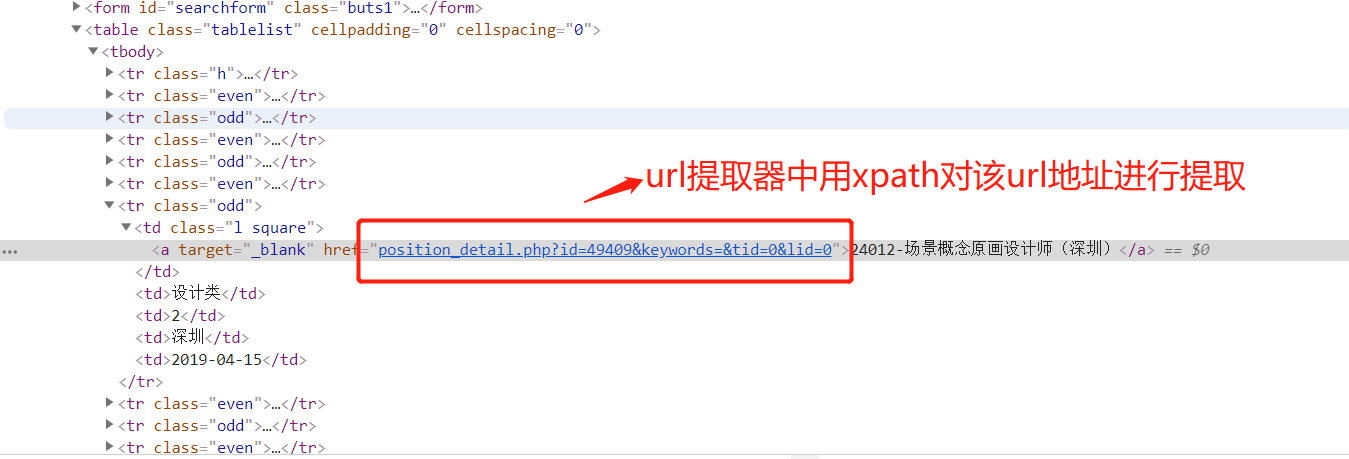
提取规则详情页的规则:
rules = (

        # 提取详情页的url地址  ,详情页url地址对应的响应,需要进行数据提取,所有需要有回调函数,用来解析数据

        Rule(LinkExtractor(restrict_xpaths=("//table[@class='tablelist']//td[@class='l square']")), callback='parse_item')

    )
提取下一页的htmlj所在的位置:
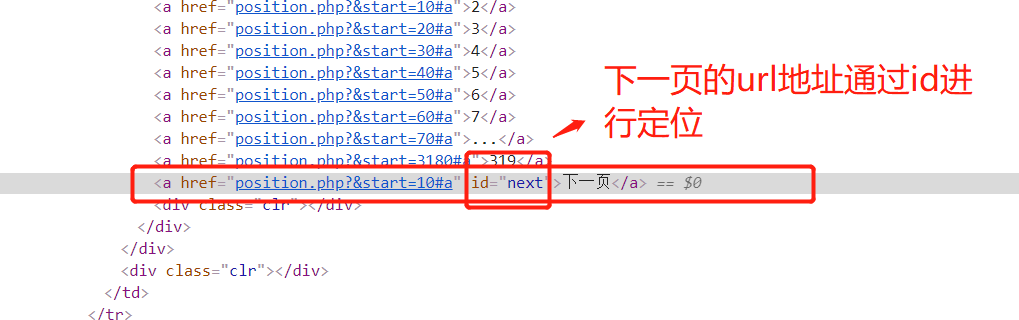
2 获取下一页的url 规则:
rules = (

        # 提取详情页的url地址

        # Rule(LinkExtractor(allow=r'position_detail.php?id=\d+\&keywords=&tid=0&lid=0'), callback='parse_item'), # 这个表达式有错,这里不用正则

        Rule(LinkExtractor(restrict_xpaths=("//table[@class='tablelist']//td[@class='l square']")), callback='parse_item'),

        # 翻页

        Rule(LinkExtractor(restrict_xpaths=("//a[@id='next']")), follow=True),

    )
获取详情页数据

1.详情数据提取(爬虫逻辑)
1.获取标题

xpath:
item['title'] = response.xpath('//td[@id="sharetitle"]/text()').extract_first()
2. 获取工作地点,职位,招聘人数
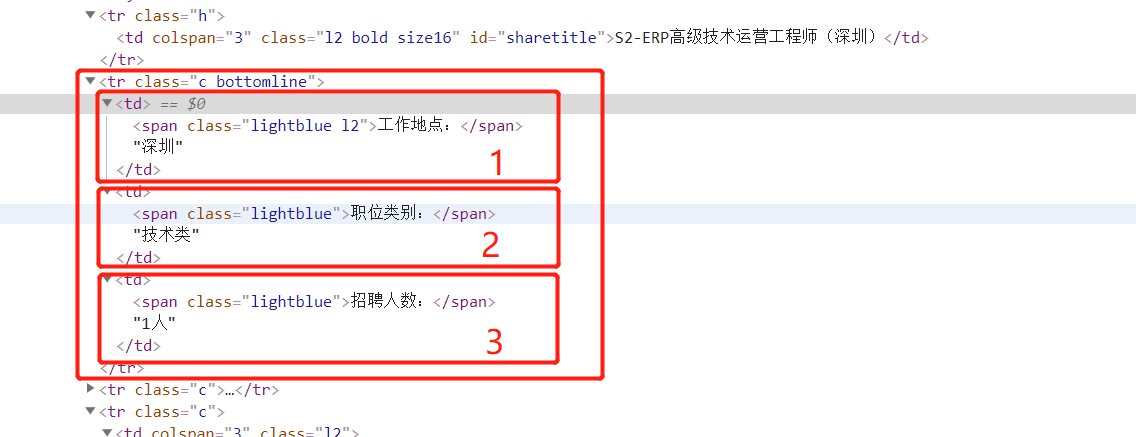
xpath:
 item['addr'] = response.xpath('//tr[@class="c bottomline"]/td[1]//text()').extract()[1]

 item['position'] = response.xpath('//tr[@class="c bottomline"]/td[2]//text()').extract()[1]

 item['num'] = response.xpath('//tr[@class="c bottomline"]/td[3]//text()').extract()[1]
3.工作要求抓取
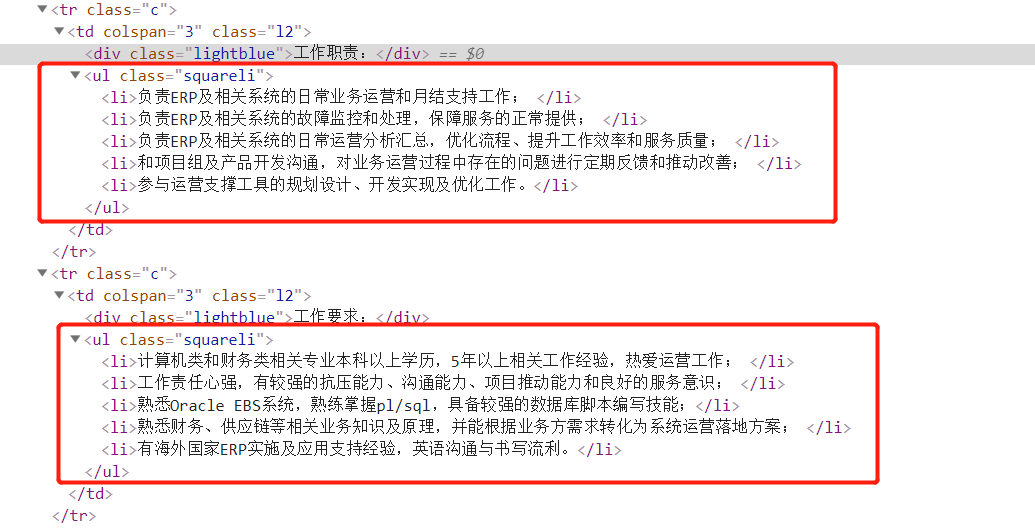
xpath:
item['skill'] =response.xpath('//ul[@class="squareli"]/li/text()').extract()
爬虫的代码:
# -*- coding: utf-8 -*-

import scrapy

from scrapy.linkextractors import LinkExtractor

from scrapy.spiders import CrawlSpider, Rule

from ..items import TencentItem

class TencentSpider(CrawlSpider):

    name = 'tencent'

    allowed_domains = ['hr.tencent.com']

    start_urls = ['https://hr.tencent.com/position.php']

    rules = (

        # 提取详情页的url地址

        # Rule(LinkExtractor(allow=r'position_detail.php?id=\d+\&keywords=&tid=0&lid=0'), callback='parse_item'), # 这个表达式有错

        Rule(LinkExtractor(restrict_xpaths=("//table[@class='tablelist']//td[@class='l square']")), callback='parse_item'),

        # 翻页

        Rule(LinkExtractor(restrict_xpaths=("//a[@id='next']")), follow=True),

    )

    def parse_item(self, response):

        item = TencentItem()

        item['title'] = response.xpath('//td[@id="sharetitle"]/text()').extract_first()

        item['addr'] = response.xpath('//tr[@class="c bottomline"]/td[1]//text()').extract()[0]

        item['position'] = response.xpath('//tr[@class="c bottomline"]/td[2]//text()').extract()[0]

        item['num'] = response.xpath('//tr[@class="c bottomline"]/td[3]//text()').extract()[0]

        item['skill'] =response.xpath('//ul[@class="squareli"]/li/text()').extract()

        print(dict(item))

        return item
tencent.py
2. 数据存储
1.settings.py 配置文件,配置如下信息
ROBOTSTXT_OBEY = False

USER_AGENT = 'Mozilla/5.0 (Macintosh; Intel Mac OS X 10_13_2) AppleWebKit/537.36 (KHTML, like Gecko) Chrome/63.0.3239.132 Safari/537.36'

ITEM_PIPELINES = {

   'jd.pipelines.TencentPipeline': 300,

}
2. items.py 中:
import scrapy

class TencentItem(scrapy.Item):

    # define the fields for your item here like:

    title = scrapy.Field()

    addr = scrapy.Field()

    position = scrapy.Field()

    num = scrapy.Field()

    skill = scrapy.Field()
3. pipeline.py中:
import  pymongo

class TencentPipeline(object):

    def open_spider(self,spider):

        # 爬虫开启是连接数据库

        client = pymongo.MongoClient()

        collention = client.tencent.ten

        self.client =client

        self.collention = collention

        pass

    def process_item(self, item, spider):

        # 数据保存在mongodb 中

        self.collention.insert(dict(item))

        return item

    def colse_spdier(self,spider):

        # 爬虫结束,关闭数据库

        self.client.close()
启动项目
1.先将MongoDB数据库跑起来。
2.执行爬虫命令:
scrapy crawl tencent
3. 执行程序后的效果:

使用scrapy-crawlSpider 爬取tencent 招聘的更多相关文章
- Scrapy框架——CrawlSpider爬取某招聘信息网站
CrawlSpider Scrapy框架中分两类爬虫,Spider类和CrawlSpider类. 它是Spider的派生类,Spider类的设计原则是只爬取start_url列表中的网页, 而Craw ...
- Python爬虫【实战篇】scrapy 框架爬取某招聘网存入mongodb
创建项目 scrapy startproject zhaoping 创建爬虫 cd zhaoping scrapy genspider hr zhaopingwang.com 目录结构 items.p ...
- Python+Scrapy+Crawlspider 爬取数据且存入MySQL数据库
1.Scrapy使用流程 1-1.使用Terminal终端创建工程,输入指令:scrapy startproject ProName 1-2.进入工程目录:cd ProName 1-3.创建爬虫文件( ...
- 简单的scrapy实战:爬取腾讯招聘北京地区的相关招聘信息
简单的scrapy实战:爬取腾讯招聘北京地区的相关招聘信息 简单的scrapy实战:爬取腾讯招聘北京地区的相关招聘信息 系统环境:Fedora22(昨天已安装scrapy环境) 爬取的开始URL:ht ...
- 爬虫07 /scrapy图片爬取、中间件、selenium在scrapy中的应用、CrawlSpider、分布式、增量式
爬虫07 /scrapy图片爬取.中间件.selenium在scrapy中的应用.CrawlSpider.分布式.增量式 目录 爬虫07 /scrapy图片爬取.中间件.selenium在scrapy ...
- scrapy-redis + Bloom Filter分布式爬取tencent社招信息
scrapy-redis + Bloom Filter分布式爬取tencent社招信息 什么是scrapy-redis 什么是 Bloom Filter 为什么需要使用scrapy-redis + B ...
- scrapy-redis分布式爬取tencent社招信息
scrapy-redis分布式爬取tencent社招信息 什么是scrapy-redis 目标任务 安装爬虫 创建爬虫 编写 items.py 编写 spiders/tencent.py 编写 pip ...
- python-scrapy爬取某招聘网站(二)
首先要准备python3+scrapy+pycharm 一.首先让我们了解一下网站 拉勾网https://www.lagou.com/ 和Boss直聘类似的网址设计方式,与智联招聘不同,它采用普通的页 ...
- 使用scrapy框架爬取自己的博文(2)
之前写了一篇用scrapy框架爬取自己博文的博客,后来发现对于中文的处理一直有问题- - 显示的时候 [u'python\u4e0b\u722c\u67d0\u4e2a\u7f51\u9875\u76 ...
随机推荐
- .NET BackgroundWorker的一般使用方式
代码如下: using System; using System.Collections.Generic; using System.ComponentModel; using System.Data ...
- C# 给类做事件的一般做法
https://docs.microsoft.com/zh-cn/dotnet/standard/events/how-to-raise-and-consume-events 第一个示例演示如何引发和 ...
- FJNU2018低程F jq解救fuls (贪心乱搞)题解
题目描述 一天fuls被邪恶的"咕咕咕"抓走了,jq为了救fuls可谓是赴汤蹈火,费了九牛二虎之力才找到了"咕咕咕"关押fuls的地方. fuls被关在一个机关 ...
- Sql Ado.net 学习笔记之连接字符串
https://www.cnblogs.com/heng95/p/5902019.html 连接字符串 SQL Client .net数据提供程序在连接到数据库时极其灵活,它提供了多种用以生成连接字符 ...
- CF375D Tree and Queries(dsu on tree)
思路 dsu on tree的板子,可惜人傻把 for(int i=fir[u];i;i=nxt[i]) 打成 for(int i=fir[u];i<=n;i++) 调了两个小时 这题要求维护& ...
- p3302 [SDOI2013]森林(树上主席树+启发式合并)
对着题目yy了一天加上看了一中午题解,终于搞明白了我太弱了 连边就是合并线段树,把小的集合合并到大的上,可以保证规模至少增加一半,复杂度可以是\(O(logn)\) 合并的时候暴力dfs修改倍增数组和 ...
- Katana的WebAPI集成Swagger 解决方案
这位大哥写的博客很清楚了,我就不重复了. http://www.cnblogs.com/caodaiming/p/4156476.html 错误解决 http://blog.csdn.net/gold ...
- 将 Graphviz .dot 文件转换为其他格式的图像
参考: Graphviz: How to go from .dot to a graph? 将 Graphviz .dot 文件转换为其他格式的图像 在Linux系统下,使用以下命令: dot -Tp ...
- 用flvplayer.swf在网页中播放视频(网页中flash视频播放的实现)
原:http://blog.csdn.net/ricciozhang/article/details/46868201 由于公司项目的需求,需要在展示一些信息的时候能够播放视频,拿到这个要求,我就从最 ...
- 5、lvs使用进阶(01)
四层.七层负载均衡的区别 https://jaminzhang.github.io/lb/L4-L7-Load-Balancer-Difference/ netfilter/iptables简介 ...