
Scrapy框架——CrawlSpider爬取某招聘信息网站
CrawlSpider
Scrapy框架中分两类爬虫,Spider类和CrawlSpider类。
它是Spider的派生类,Spider类的设计原则是只爬取start_url列表中的网页,
而CrawlSpider类定义了一些规则(rule)来提供跟进link的方便的机制,从爬取的网页中获取link并继续爬取的工作更适合。
创建项目指令:
scrapy startproject tenCent
CrawlSpider创建:
scrapy genspider -t crawl crawl_tencent "hr.tencent.com"
CrawlSpider继承于Spider类,除了继承过来的属性外(name、allow_domains),还提供了新的属性和方法:
LinkExtractor
from scrapy.linkextractors import LinkExtractor
LinkExtractor(allow=r'start=\d+')
通过实例化LinkExtractor提取链接
主要参数
allow:满足括号中“正则表达式”的值会被提取,如果为空,则全部匹配。

deny:与这个正则表达式(或正则表达式列表)不匹配的URL一定不提取。
rules
Rule(LinkExtractor(allow=r'start=\d+'), callback='parse_tencent', follow=True),
在rules中包含一个或多个Rule对象,每个Rule对爬取网站的动作定义了特定操作。
如果多个rule匹配了相同的链接,则根据规则在本集合中被定义的顺序,第一个会被使用
主要参数
link_extractor:是一个Link Extractor对象,用于定义需要提取的链接

callback: 从link_extractor中每获取到链接时,参数所指定的值作为回调函数,该回调函数接受一个response作为其第一个参数。

注意:当编写爬虫规则时,避免使用parse作为回调函数。由于CrawlSpider使用parse方法来实现其逻辑,如果覆盖了 parse方法,crawl spider将会运行失败。

follow:是一个布尔(boolean)值,指定了根据该规则从response提取的链接是否需要跟进。 如果callback为None,follow 默认设置为True ,否则默认为False。
使用CrawlSpider爬取信息
1.编写item文件
# -*- coding: utf-8 -*-

# Define here the models for your scraped items

#

# See documentation in:

# https://doc.scrapy.org/en/latest/topics/items.html

import scrapy

class TencentItem(scrapy.Item):

    # define the fields for your item here like:

    # name = scrapy.Field()

    # 职位名称

    position_name = scrapy.Field()

    # 详情链接

    position_link = scrapy.Field()

    # 职位类别

    position_type = scrapy.Field()

    # 职位人数

    position_number = scrapy.Field()

    # 职位地点

    work_location = scrapy.Field()

    # 发布时间

    publish_times = scrapy.Field()

    # 工作职责

    position_duty = scrapy.Field()

    # 工作要求

    position_require = scrapy.Field()

class DetailItem(scrapy.Item):

    # 工作职责

    position_duty = scrapy.Field()

    # 工作要求

    position_require = scrapy.Field()
2.编写crawlspider文件
# -*- coding: utf-8 -*-

import scrapy

from tenCent.items import TencentItem

from tenCent.items import DetailItem

from scrapy.linkextractors import LinkExtractor

from scrapy.spiders import CrawlSpider, Rule

class CrawlTencentSpider(CrawlSpider):

    name = 'crawl_tencent'

    allowed_domains = ['hr.tencent.com']

    start_urls = ['https://hr.tencent.com/position.php']

    '''

    rule LinkExtractor规则:

        allow:根据正则表达式匹配链接

        callback:回调函数

        follow:是否提取跟进页(链接套链接)

    '''

    rules = (

        Rule(LinkExtractor(allow=r'start=\d+'), callback='parse_tencent', follow=True),

        # 从上面的规则传递下一个

        Rule(LinkExtractor(allow=r'position_detail\.php\?id=\d+'), callback='parse_detail', follow=False),

    )

    def parse_tencent(self, response):

        print('start……')

        node_list = response.xpath('//tr[@class="even"] | //tr[@class="odd"]')

        # 选取所有标签tr 且class属性等于even或odd的元素

        #i['domain_id'] = response.xpath('//input[@id="sid"]/@value').extract()

        #i['name'] = response.xpath('//div[@id="name"]').extract()

        #i['description'] = response.xpath('//div[@id="description"]').extract()

        for node in node_list:

            item = TencentItem()

            item['position_name'] = node.xpath('./td[1]/a/text()').extract_first()  # 获取第一个td标签下a标签的文本

            item['position_link'] = node.xpath('./td[1]/a/@href').extract_first()  # 获取第一个td标签下a标签href属性

            item['position_type'] = node.xpath('./td[2]/text()').extract_first()  # 获取第二个td标签下文本

            item['position_number'] = node.xpath('./td[3]/text()').extract_first()  # 获取第3个td标签下文本

            item['work_location'] = node.xpath('./td[4]/text()').extract_first()  # 获取第4个td标签下文本

            item['publish_times'] = node.xpath('./td[5]/text()').extract_first()  # 获取第5个td标签下文本

            yield item

    def parse_detail(self, response):

        item = DetailItem()

        item['position_duty'] = ''.join(

            response.xpath('//ul[@class="squareli"]')[0].xpath('./li/text()').extract())  # 转化为字符串

        item['position_require'] = ''.join(

            response.xpath('//ul[@class="squareli"]')[1].xpath('./li/text()').extract())  # 转化为字符串

        yield item
3.建立pipeline文件
# -*- coding: utf-8 -*-

# Define your item pipelines here

#

# Don't forget to add your pipeline to the ITEM_PIPELINES setting

# See: https://doc.scrapy.org/en/latest/topics/item-pipeline.html

import json

from .items import TencentItem

from .items import DetailItem

class TencentPipeline(object):

    def open_spider(self, spider):

        """

         # spider (Spider 对象) – 被开启的spider

         # 可选实现,当spider被开启时,这个方法被调用。

        :param spider:

        :return:

        """

        self.file = open('tencent.json', 'w', encoding='utf-8')

        json_header = '{ "tencent_info":['

        self.count = 0

        self.file.write(json_header)  # 保存到文件

    def close_spider(self, spider):

        """

        # spider (Spider 对象) – 被关闭的spider

        # 可选实现,当spider被关闭时,这个方法被调用

        :param spider:

        :return:

        """

        json_tail = '] }'

        self.file.seek(self.file.tell() - 1)  # 定位到最后一个逗号

        self.file.truncate()  # 截断后面的字符

        self.file.write(json_tail)  # 添加终止符保存到文件

        self.file.close()

    def process_item(self, item, spider):

        """

        # item (Item 对象) – 被爬取的item

        # spider (Spider 对象) – 爬取该item的spider

        # 这个方法必须实现,每个item pipeline组件都需要调用该方法,

        # 这个方法必须返回一个 Item 对象,被丢弃的item将不会被之后的pipeline组件所处理。

        :param item:

        :param spider:

        :return:

        """

        # print('item=',dict(item))

        if isinstance(item, TencentItem):

            print('--'*20)

            content = json.dumps(dict(item), ensure_ascii=False, indent=2) + ","  # 字典转换json字符串

            self.count += 1

            print('content', self.count)

            self.file.write(content)  # 保存到文件

        '''

        return item后,item会根据优先级

        传递到下一个管道DetailPipeline处理

        此段代码说明当实例不属于TencentItem时,放弃存储json,

        直接传递到下一个管道处理

        return放在if外面,如果写在if里面item在不属于TencentItem实例后,

        item会终止传递,造成detail数据丢失

        '''

        return item

class DetailPipeline(object):

    def open_spider(self, spider):

        """

         # spider (Spider 对象) – 被开启的spider

         # 可选实现,当spider被开启时,这个方法被调用。

        :param spider:

        :return:

        """

        self.file = open('detail.json', 'w', encoding='utf-8')

        json_header = '{ "detail_info":['

        self.count = 0

        self.file.write(json_header)  # 保存到文件

    def close_spider(self, spider):

        """

        # spider (Spider 对象) – 被关闭的spider

        # 可选实现,当spider被关闭时,这个方法被调用

        :param spider:

        :return:

        """

        json_tail = '] }'

        self.file.seek(self.file.tell() - 1)  # 定位到最后一个逗号

        self.file.truncate()  # 截断后面的字符

        self.file.write(json_tail)  # 添加终止符保存到文件

        self.file.close()

    def process_item(self, item, spider):

        """

        # item (Item 对象) – 被爬取的item

        # spider (Spider 对象) – 爬取该item的spider

        # 这个方法必须实现,每个item pipeline组件都需要调用该方法,

        # 这个方法必须返回一个 Item 对象,被丢弃的item将不会被之后的pipeline组件所处理。

        :param item:

        :param spider:

        :return:

        """

        # print('item=',dict(item))

        if isinstance(item, DetailItem):

            '''

            得到item,判断item实例属于DetailItem,存储json文件

            如果不属于,直接return item到下一个管道

          '''

            print('**' * 30)

            content = json.dumps(dict(item), ensure_ascii=False, indent=2) + ","  # 字典转换json字符串

            self.count += 1

            print('content', self.count)

            self.file.write(content)  # 保存到文件

        return item
4.设置settiing
#1、项目名称,默认的USER_AGENT由它来构成,也作为日志记录的日志名

BOT_NAME = 'tenCent'

# 2、爬虫应用路径

SPIDER_MODULES = ['tenCent.spiders']

NEWSPIDER_MODULE = 'tenCent.spiders'

# Crawl responsibly by identifying yourself (and your website) on the user-agent

USER_AGENT = '"User-Agent":"Mozilla/5.0 (Windows NT 6.1; Win64; x64) AppleWebKit/537.36 (KHTML, like Gecko) Chrome/63.0.3239.132 Safari/537.36"'  # 头部信息,反爬

# Obey robots.txt rules

ROBOTSTXT_OBEY = True

# log日志

LOG_FILE = 'tencent.log'

LOG_LEVEL = 'DEBUG'

LOG_ENCODING = 'utf-8'

LOG_DATEFORMAT='%m/%d/%Y %H:%M:%S %p'

ITEM_PIPELINES = {

   'tenCent.pipelines.TencentPipeline': 300,

   'tenCent.pipelines.DetailPipeline':400

}
5.执行程序
scrapy crawl crawl_tencent
tencent.log
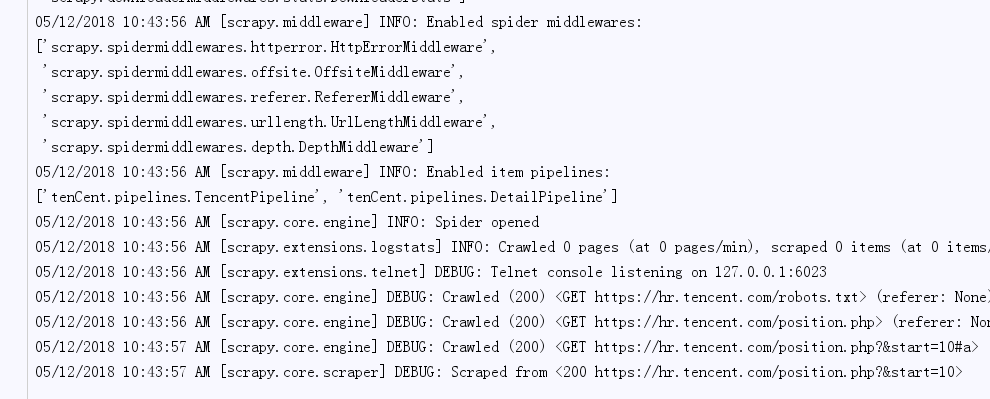
tencent.json

detail.json

Scrapy框架——CrawlSpider爬取某招聘信息网站的更多相关文章
- 爬虫框架之Scrapy——爬取某招聘信息网站
案例1:爬取内容存储为一个文件 1.建立项目 C:\pythonStudy\ScrapyProject>scrapy startproject tenCent New Scrapy projec ...
- 爬取拉勾网招聘信息并使用xlwt存入Excel
xlwt 1.3.0 xlwt 文档 xlrd 1.1.0 python操作excel之xlrd 1.Python模块介绍 - xlwt ,什么是xlwt? Python语言中,写入Excel文件的扩 ...
- Scrapy实战篇(七)之Scrapy配合Selenium爬取京东商城信息(下)
之前我们使用了selenium加Firefox作为下载中间件来实现爬取京东的商品信息.但是在大规模的爬取的时候,Firefox消耗资源比较多,因此我们希望换一种资源消耗更小的方法来爬取相关的信息. 下 ...
- Python爬取拉勾网招聘信息并写入Excel
这个是我想爬取的链接:http://www.lagou.com/zhaopin/Python/?labelWords=label 页面显示如下: 在Chrome浏览器中审查元素,找到对应的链接: 然后 ...
- python-scrapy爬虫框架爬取拉勾网招聘信息
本文实例为爬取拉勾网上的python相关的职位信息, 这些信息在职位详情页上, 如职位名, 薪资, 公司名等等. 分析思路 分析查询结果页 在拉勾网搜索框中搜索'python'关键字, 在浏览器地址栏 ...
- python之scrapy爬取jingdong招聘信息到mysql数据库
1.创建工程 scrapy startproject jd 2.创建项目 scrapy genspider jingdong 3.安装pymysql pip install pymysql 4.set ...
- pyspider爬虫框架webui简介-爬取阿里招聘信息
命令行输入pyspider开启pyspider 浏览器打开http://localhost:5000/ group表示组名,几个项目可以同一个组名,方便管理,当组名修改为delete时,项目会在一天后 ...
- python scrapy爬取前程无忧招聘信息
使用scrapy框架之前,使用以下命令下载库: pip install scrapy -i https://pypi.tuna.tsinghua.edu.cn/simple 1.创建项目文件夹 scr ...
- scrapy框架 + selenium 爬取豆瓣电影top250......
废话不说,直接上代码..... 目录结构 items.py import scrapy class DoubanCrawlerItem(scrapy.Item): # 电影名称 movieName = ...
随机推荐
- php_os 检查php运行环境
if(strtolower(PHP_OS)=='linux'){ $tests['os']['state']="good"; $tests['os']['message']='OS ...
- union-find算法
1.背景 <算法>一书中提到了关于算法的一些基本思想 优秀的算法因为能够解决实际的问题而变得更为重要: 高效算法的代码可以很简单: 理解某个实现的性能特点是一项有趣而令人满足的挑战: 在 ...
- JavaScript权威指南——跳转语句
前言:JavaScript中有一类语句叫做跳转语句.从名称就可以看出,它使得JavaScript的执行可以从一个位置跳转到另一个位置. return语句让解释器跳出循环体的执行,并提供本次调用的返回值 ...
- QT 5.4.1 for Android Windows环境搭建
QT 5.4.1 for Android Windows环境搭建 2015-5-13 目录 一.参考文章: 二.准备软件: 三.安装准备好的软件: 四.配置Qt 5.4.1 for Android 五 ...
- Maven配置dubbo环境简单例子
环境准备: 1.zookeeper:zookeeper-3.4.6版本 2.maven:apache-maven-3.3.9版本 3.dubbo监控工具:dubbo-admin-2.5.4-SNAPS ...
- 出于迁移项目的考虑,GitHub 中 Fork 出来的项目,如何与原项目断开 Fork 关系?
如果需要为 GitHub 上的项目做贡献,我们通常会 Fork 到自己的名称空间下.在推送代码之后添加 pull request 时,GitHub 会自动为我们跨仓库建立 pull request 的 ...
- .NET 中小心嵌套等待的 Task,它可能会耗尽你线程池的现有资源,出现类似死锁的情况
一个简单的 Task 不会消耗多少时间,但如果你不合适地将 Task 转为同步等待,那么也可能很快耗尽线程池的所有资源,出现类似死锁的情况. 本文将以一个最简单的例子说明如何出现以及避免这样的问题. ...
- pta 奇数值结点链表&&单链表结点删除
本题要求实现两个函数,分别将读入的数据存储为单链表.将链表中奇数值的结点重新组成一个新的链表.链表结点定义如下: struct ListNode { int data; ListNode *next; ...
- 租酥雨的NOIP2018赛前日记
租酥雨的NOIP2018赛前日记 离\(\mbox{NOIP2018}\)只剩下不到一个月的时间辣! 想想自己再过一个月就要退役了,觉得有必要把这段时间的一些计划与安排记录下来. 就从国庆收假开始吧. ...
- Array.prototype.slice.call(arguments)探究
Array.prototype.slice.call(arguments)能将具有length属性的对象转成数组 首先,slice有两个用法,一个是String.slice,一个是Array.slic ...