
Flume 多个agent串联
多个agent串联
采集需求:比如业务系统使用log4j生成的日志,日志内容不断增加,需要把追加到日志文件中的数据实时采集到hdfs,使用agent串联
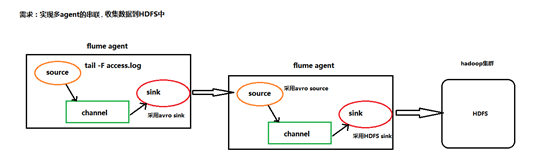
根据需求,首先定义以下3大要素
第一台flume agent
l 采集源,即source——监控文件内容更新 : exec ‘tail -F file’
l 下沉目标,即sink——数据的发送者,实现序列化 : avro sink
l Source和sink之间的传递通道——channel,可用file channel 也可以用 内存channel
第二台flume agent
l 采集源,即source——接受数据。并实现反序列化 : avro source
l 下沉目标,即sink——HDFS文件系统 : HDFS sink
l Source和sink之间的传递通道——channel,可用file channel 也可以用 内存channel
配置文件编写:
Flume-agent1:tail-avro-avro-logger.conf
|
#tail-avro-avro-logger.conf # Name the components on this agent a1.sources = r1 a1.sinks = k1 a1.channels = c1 # Describe/configure the source a1.sources.r1.type = exec a1.sources.r1.command = tail -F /home/hadoop/bigdatasoftware/datas/access.log a1.sources.r1.channels = c1 # Describe the sink ##sink端的avro是一个数据发送者 a1.sinks.k1.type = avro a1.sinks.k1.hostname = hadoop-001 a1.sinks.k1.port = 41414 a1.sinks.k1.batch-size = 10 # Use a channel which buffers events in memory a1.channels.c1.type = memory a1.channels.c1.capacity = 1000 a1.channels.c1.transactionCapacity = 100 # Bind the source and sink to the channel a1.sources.r1.channels = c1 a1.sinks.k1.channel = c1 |
Flume-agent2: avro-hdfs.conf
|
a1.sources = r1 a1.sinks =s1 a1.channels = c1 ##source中的avro组件是一个接收者服务 a1.sources.r1.type = avro a1.sources.r1.bind = 0.0.0.0 a1.sources.r1.port = 41414 a1.sinks.s1.type=hdfs a1.sinks.s1.hdfs.path=hdfs://hadoop-001:9000/logs/flume/ a1.sinks.s1.hdfs.filePrefix = access_log a1.sinks.s1.hdfs.batchSize= 100 a1.sinks.s1.hdfs.fileType = DataStream a1.sinks.s1.hdfs.writeFormat =Text a1.sinks.s1.hdfs.rollSize = 10240 a1.sinks.s1.hdfs.rollCount = 1000 a1.sinks.s1.hdfs.rollInterval = 10 a1.sinks.s1.hdfs.round = true a1.sinks.s1.hdfs.roundValue = 10 a1.sinks.s1.hdfs.roundUnit = minute a1.channels.c1.type = memory a1.channels.c1.capacity = 1000 a1.channels.c1.transactionCapacity = 100 a1.sources.r1.channels = c1 a1.sinks.s1.channel = c1 |
输入执行flume指令:
第一个终端:
./bin/flume-ng agent -c conf -f /home/hadoop/bigdatasoftware/flume-1.5.0/conf/avro-hdfs.conf -n a1 -Dflume.root.logger=INFO,console
第二个终端:
./bin/flume-ng agent -c conf -f /home/hadoop/bigdatasoftware/flume-1.5.0/conf/tail-avro-avro-logger.conf -n a1 -Dflume.root.logger=INFO,console
第三个终端
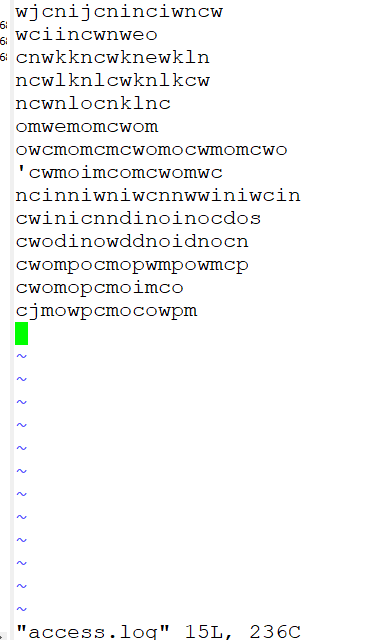
在/home/hadoop/bigdatasoftware/datas/access.log文件中添加数据
查看hdfs

cat一下

Flume 多个agent串联的更多相关文章
- 第1节 flume:9、flume的多个agent串联(级联)
3.两个agent级联 需求分析: 第一个agent负责收集文件当中的数据,通过网络发送到第二个agent当中去,第二个agent负责接收第一个agent发送的数据,并将数据保存到hdfs上面去 第一 ...
- flume中的agent配置和启动
首先创建一个文件example.conf(touch example.conf) 然后在文件中,进行agent文件的如下的配置(vi example.conf) agent文件的配置:(配置ag ...
- 大数据学习——实现多agent的串联,收集数据到HDFS中
采集需求:比如业务系统使用log4j生成的日志,日志内容不断增加,需要把追加到日志文件中的数据实时采集到hdfs,使用agent串联 根据需求,首先定义以下3大要素 第一台flume agent l ...
- 大数据入门第十二天——flume入门
一.概述 1.什么是flume 官网的介绍:http://flume.apache.org/ Flume is a distributed, reliable, and available servi ...
- 日志收集框架flume的安装及简单使用
flume介绍 Flume是一个分布式.可靠.和高可用的海量日志采集.聚合和传输的系统. Flume可以采集文件,socket数据包等各种形式源数据,又可以将采集到的数据输出到HDFS.hbase.h ...
- Flume+Morphlines实现数据的实时ETL
转载:http://mp.weixin.qq.com/s/xCSdkQo1XMQwU91lch29Uw Apache Flume介绍: Apache Flume是一个Apache的开源项目,是一个分布 ...
- Flume日志收集系统架构详解--转
2017-09-06 朱洁 大数据和云计算技术 任何一个生产系统在运行过程中都会产生大量的日志,日志往往隐藏了很多有价值的信息.在没有分析方法之前,这些日志存储一段时间后就会被清理.随着技术的发展和 ...
- Apache Flume的介绍安装及简单案例
概述 Flume 是 一个高可用的,高可靠的,分布式的海量日志采集.聚合和传输的软件.Flume 的核心是把数据从数据源(source)收集过来,再将收集到的数据送到指定的目的地(sink).为了保证 ...
- Flume示例
建议参考官方文档:http://flume.apache.org/FlumeUserGuide.html 示例一:用tail命令获取数据,下沉到hdfs 类似场景: 创建目录: mkdir /home ...
随机推荐
- embedding与word2vec
embedding是指将目标向量化,常用于自然语言处理(如:Word2Vec).这种思想的意义在于,可以将语义问题转换为数值计算问题,从而使计算机能够便捷处理自然语言问题.如果采用传统的One-hot ...
- 使用Intellij Idea创建简单Maven项目(转)
我是学Java Web的,基本靠自学,在网上收集了各种视频资料,逐一的看,代码逐一的敲.学习了这么久之前一直未成想过要把自己的学习路程记录下来,在网上也看到过很多人把自己的学习历程以及遇到的问题写在了 ...
- python day05 作业答案
1. b.不可以 c.tu=("alex",[11,22,{"k1":"v1","k2":["age" ...
- Puppet的一些奇技淫巧
puppet这个工具真的很神奇,先不说商业版有哪些黑科技,单是开源版本就有很多可能让你摸不着头脑的地方,下面来列举一下puppet是怎么查找puppet server的 其实很简单,puppet ag ...
- Windows在当前目录打开cmd
/********************************************************************** * Windows在当前目录打开cmd * 说明: * ...
- Linux audit安全审计工具
/********************************************************************** * Linux audit安全审计工具 * 说明: * ...
- spring事务管理-Spring 源码系列(6)
Spring事务抽象的是事务管理和事务策略.而实现则由各种资源方实现的.我们最常用的数据库实现:DataSourceTransactionManager 尝试阅读一下spring 的实现代码,由3个核 ...
- python import 其他 package的模块
https://blog.csdn.net/luo123n/article/details/49849649 http://blog.habnab.it/blog/2013/07/21/python- ...
- EF数据库配置
<?xml version="1.0" encoding="utf-8"?> <configuration> <configSec ...
- bulma入门
http://www.ruanyifeng.com/blog/2017/10/bulma.html