
linux下部署svn服务器
系统Linux debian 2.6.32-5-686
先安装svn工具:apt-get install subversion,耐心等待安装完成。安装完成后svn客户端、服务器都有了。
接者建立svn仓库目录svnadmin create truck
root@debian:/home/xzc# svnadmin create truck

root@debian:/home/xzc# cd truck

root@debian:/home/xzc/truck# ls

conf  db  format  hooks  locks  README.txt

root@debian:/home/xzc/truck# cd conf

root@debian:/home/xzc/truck/conf# ls

authz  passwd  svnserve.conf

root@debian:/home/xzc/truck/conf#
可以看到,建立的目录下已生成svn的配置文件。在默认配置下访问svn是不需要权限的。下面来设置一下权限。
svnserve.conf主要是配置整个svn的权限,如果看得懂注释,应该很容易明白。
### This file controls the configuration of the svnserve daemon, if you

### use it to allow access to this repository.  (If you only allow

### access through http: and/or file: URLs, then this file is

### irrelevant.)

### Visit http://subversion.tigris.org/ for more information.

[general]

### These options control access to the repository for unauthenticated

### and authenticated users.  Valid values are "write", "read",

### and "none".  The sample settings below are the defaults.

anon-access = read

auth-access = write

### The password-db option controls the location of the password

### database file.  Unless you specify a path starting with a /,

### the file's location is relative to the directory containing

### this configuration file.

### If SASL is enabled (see below), this file will NOT be used.

### Uncomment the line below to use the default password file.

password-db = passwd

### The authz-db option controls the location of the authorization

### rules for path-based access control.  Unless you specify a path

### starting with a /, the file's location is relative to the the

### directory containing this file.  If you don't specify an

### authz-db, no path-based access control is done.

### Uncomment the line below to use the default authorization file.

authz-db = authz

### This option specifies the authentication realm of the repository.

### If two repositories have the same authentication realm, they should

### have the same password database, and vice versa.  The default realm

### is repository's uuid.

realm = truck

[sasl]

### This option specifies whether you want to use the Cyrus SASL

### library for authentication. Default is false.

### This section will be ignored if svnserve is not built with Cyrus

### SASL support; to check, run 'svnserve --version' and look for a line

### reading 'Cyrus SASL authentication is available.'

# use-sasl = true

### These options specify the desired strength of the security layer
anon-access = read #anon表示未认证用户(即在passwd文件里没有该用户),权限为可读。可设置为none。如果anon-access = read而不是anon-access = none,则在使用merge功能时会出现客户端试图 svn merge 总是报svn: E220001: 遇到不可读的路径;拒绝访问
auth-access = write #已认证用户(即在passwd文件里没有该用户),权限为可写。注释没有rw这种写法,估计是有写权限必有读权限
password-db = passwd #用户配置文件,可以指定其他路径名字。
authz-db = authz #用户权限认证配置文件,可以指定其他路径名字。
realm = truck #认证范围
认证范围其实是自己定义的(一般为自己的svn目录或项目名,只是为了好记)。比如我定义为truck,那么其他svn目录如果在配置中也把认证范围标为truck,那么就要用我的认证,即使用我的passwd、authz文件。举个例子:
上面我们已在/home/xzc/truck下建立了一个svn仓库,假如公司现在又开了一个项目,那么就要为新项目建立一个svn仓库。而这个项目是由原项目truck的成员来做,又想用回原来的权限配置。

svnadmin create truck_test

anon-access = read

auth-access = write

password-db = ./../../truck/conf/passwd

authz-db = ./../../truck/conf/authz

realm = truck  #认证范围
那么,因为两个仓库目录的认证范围相同,则共用一份认证文件。如果认证范围一样,但认证文件不相同,还不知道会发生什么事情。作者只说“If two repositories have the same authentication realm, they should have the same password database, and vice versa”。
下面配置用户文件passwd
### This file is an example password file for svnserve.

### Its format is similar to that of svnserve.conf. As shown in the

### example below it contains one section labelled [users].

### The name and password for each user follow, one account per line.

[users]

# harry = harryssecret

# sally = sallyssecret

xzc =
可以看到,我增加了一个用户xzc,密码为1。注意一下空格之类的,以免认证错误。
然后是权限配置文件authz
### This file is an example authorization file for svnserve.

### Its format is identical to that of mod_authz_svn authorization

### files.

### As shown below each section defines authorizations for the path and

### (optional) repository specified by the section name.

### The authorizations follow. An authorization line can refer to:

###  - a single user,

###  - a group of users defined in a special [groups] section,

###  - an alias defined in a special [aliases] section,

###  - all authenticated users, using the '$authenticated' token,

###  - only anonymous users, using the '$anonymous' token,

###  - anyone, using the '*' wildcard.

###

### A match can be inverted by prefixing the rule with '~'. Rules can

### grant read ('r') access, read-write ('rw') access, or no access

### ('').

[aliases]

# joe = /C=XZ/ST=Dessert/L=Snake City/O=Snake Oil, Ltd./OU=Research Institute/CN=Joe Average

[groups]

# harry_and_sally = harry,sally

# harry_sally_and_joe = harry,sally,&joe

local_administrator = xzc

# [/foo/bar]

# harry = rw

# &joe = r

# * =

# [repository:/baz/fuz]

# @harry_and_sally = rw

# * = r

[/]

@local_administrator = r
对第一个aliases不太清楚,猜测是别名。比如有个用户名字叫aa_bb_cc_dd_ee,你嫌他名字太长太难写,于是写了个别名abcd = aa_bb_cc_dd_ee,那么下面配置权限只需要写abcd就可以了。但原文件中的写法实在看不懂,也懒得去验证。不知有没有大神知道。
groups就是组了,比如你想把管理人员分为一组、程序员分为一组,一组人的权限是相同的。组的名字自己随意起。上面我起了一个local_administrator组,里面只有xzc一个用户,如果有多个,用,号分开。
下面就是项目目录的权限设置了。[仓库名:/路径],比如[truck:/]表示truck仓库中根目录的权限设置。这与svnserve的-r参数有关,在本例中svnserver -d -r /home/xzc/truck启动则需要配置为[/],表示-r参数(/home/xzc/truck)的根目录,svnserver -d -r /home/xzc/的参数则为[truck:/]。[/foo/bar]这种是绝对路径的,不用仓库名。
@local_administrator中的@表示local_administrator是一个组名而不是用户名,所以注意起用户名时不要带这些符号。r表示只有read权限,也可以是rw或w或空,空表示什么权限都没有。xzc = rw则表示用户xzc具有read和write权限。* = r则表示所有用户(防止用户太多列不完)都有read权限。
注意:
1.authz文件修改后即生效,不用重启svn。passwd也可以这样,但在passwd中添加用户后记得在authz中添加对应的权限。
2.如果遇到“Unable to connect to a repository at URL xxx,认证错误”而且又不弹出让你重新登录的窗口时,则是没有指定passwd用户配置文件或是用户配置文件里没有任何用户,又或者是passwd格式错误,见http://shuishiwo.iteye.com/blog/1754069。
3.authz中子目录会继承父目录的权限,除非你另外设置了子目录的权限。子目录的权限优先于继承的权限。见http://www.cnblogs.com/terryglp/articles/2451398.html。
svn基本配置好了,那么就来启动svn了(可试试svnserve -help帮助):svnserve -d -r /home/xzc/truck.
-d 表示以daemon方式(后台运行)运行
-r 即指定仓库目录dir路径
下面再来启动另一个仓库truck_test
xzc@debian:~$ svnserve -d -r /home/xzc/truck_test/

svnserve: 不能绑定服务器套接字: 地址已在使用
可以看到,因为svn默认端口已被truck使用,这个无法启动,则需要指定端口
xzc@debian:~$ svnserve -d --listen-port  -r /home/xzc/truck_test

xzc@debian:~$ ps -ef | grep svnserve

xzc               : ?        :: svnserve -d -r /home/xzc/truck

xzc               : ?        :: svnserve -d --listen-port  -r /home/xzc/truck_test

xzc            : pts/    :: grep svnserve

xzc@debian:~$
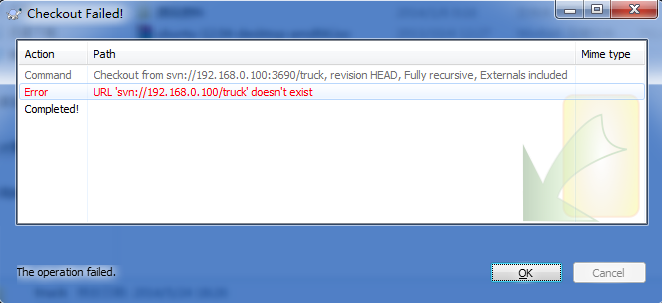
通过查看进程,可以看到两个仓库目录都已启动。接下来就是使用了。假如我的服务器ip为192.168.0.100,注意在check out时,是svn://192.168.0.100:3690而不是svn://192.168.0.100:3690/truck,仓库的名字并不出现在路径中,svn://192.168.0.100:3690其实就是/home/xzc/truck目录。但如果以参数svnserve -d -r /home/xzc启动,则是svn://192.168.0.100:3690/truck,不过这样就把truck_test一起在同一端口启动了。如果是路径错误则报
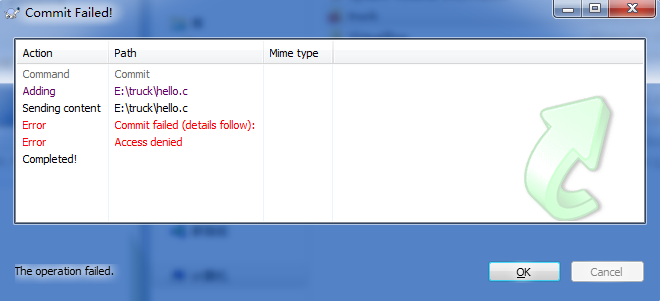
如果在check out或commit的时候,发现权限问题,则考虑-r参数与authz的参数配置是否正确
linux下部署svn服务器的更多相关文章
- Linux下的SVN服务器搭建
Linux下的SVN服务器搭建 鉴于在搭建时,参考网上很多资料,网上资料在有用的同时,也坑了很多人 本文的目的,也就是想让后继之人在搭建svn服务器时不再犯错,不再被网上漫天的坑爹作品所坑害,故此总 ...
- Linux下部署FTP服务器
Linux下部署FTP服务器 下载安装包 在这里介绍的是离线部署FTP,首先下载对应的rpm包,下载链接为: 下载vsftpd服务 下载FTP客户端 安装ftp服务器 关闭防火墙 service ip ...
- Linux下的SVN服务器搭建(转)
Linux下的SVN服务器搭建 鉴于在搭建时,参考网上很多资料,网上资料在有用的同时,也坑了很多人 本文的目的,也就是想让后继之人在搭建svn服务器时不再犯错,不再被网上漫天的坑爹作品所坑害,故此 ...
- Linux下的SVN服务器搭建
鉴于在搭建时,参考网上很多资料,网上资料在有用的同时,也坑了很多人 本文的目的,也就是想让后继之人在搭建svn服务器时不再犯错,不再被网上漫天的坑爹作品所坑害,故此总结 /******开始****** ...
- Linux下搭建SVN服务器及自动更新项目文件到web目录(www)的方法
首先搭建SVN服务器 1,安装SVN服务端 直接用apt-get或yum安装subversion即可(当然也可以自己去官方下载安装) sudo apt-get install subversion ...
- linux下搭建SVN服务器完全手册
原文:http://www.cnblogs.com/wrmfw/archive/2011/09/08/2170465.html 系统环境 RHEL5.4最小化安装(关iptables,关 ...
- Linux下的SVN服务器搭建(八)
1. 通过yum命令安装svnserve yum -y install subversion #查看svn安装位置 rpm -ql subversion 2. 创建版本库目录(此仅为目录,为后面创建版 ...
- linux下搭建SVN服务器完全手册【摘抄】
系统环境 RHEL5.4最小化安装(关iptables,关selinux) + ssh + yum 一,安装必须的软件包. yum install subversion ( ...
- linux下搭建SVN服务器完全手册-很强大!!!!!
系统环境 RHEL5.4最小化安装(关iptables,关selinux) + ssh + yum 一,安装必须的软件包. yum install subversion ( ...
随机推荐
- css中的段落样式及背景
一.段落样式 css中关于段落的样式主要有行高,缩进,段落对齐,文字间距,文字溢出,段落换行等.它们的具体语法如下: line-height : normal | length text-indent ...
- 小米路由器mini建FTP
输入命令 df -h 复制代码 查看自己的分区路径,我自己用了一个闲置笔记本电脑硬盘转USB,插到mini,有四个区 为了方便,我选择把ftp安装在第一个分区 /extdisks/sda1/ 创建f ...
- iOS 部分问题总结2 - 苹果审核篇
iOS 部分问题总结(二) - 苹果审核篇 1. 记录下5.1新规后上传被拒的问题排查和解决过程. 几天前,最新一次的更新被拒了,提示Invaild Binary.好在苹果同时发来了说明邮件做了详细说 ...
- 操作系统下查看HBA卡信息wwn的方法
一.Windows 系统在Windows系统中,可以使用FC HBA卡厂家提供的管理软件查看光纤适配器的WWN号码,具体如下:Qlogic:SANsurferEmulex:HBAnyware http ...
- Property与Attribute的区别
Property属于面向对象的范畴----属性 Attribute则是编程语言文法层面的东西----特征 Property属于面向对象的范畴.在使用面向对象编程的时候,常常需要对客观 ...
- Oracle序列简单应用
/* --指定cache的值 如果指定CACHE值 oracle就可以预先在内存里面放置一些sequence 这样存取会快些 cache里面 的取完 oracle自动再取一 组到 cache 使用ca ...
- sql 创建临时表
declare @channelid varchar(100) set @channelid='''WH00026'',''WH00083''' declare @sql varchar(1000) ...
- Python 学习日记(第三周)
知识回顾 在上一周的学习里,我学习了一些学习Python的基础知识下面先简短的回顾一些: 1Python的版本和和安装 Python的版本主要有2.x和3.x两个版本这两个版本在语法等方面有一定的区别 ...
- 布尔值(Boolean values)
布尔值是特殊的整数. 尽管布尔值由常量 True 和 False 来表示, 如果将布尔值放到一 个数值上下文环境中(比方将 True 与一个数字相加), True 会被当成整数值 1, 而 False ...
- 了不起的分支和循环02 - 零基础入门学习Python008
了不起的分支和循环02 让编程改变世界 Change the world by program 上节课,小甲鱼教大家如何正确的打飞机,其要点就是:判断和循环,判断就是该是不该做某事,循环就是持续做某事 ...