
PHP实现验证码制作
captcha.php(PHP产生验证码并储存Session):
<?php

//开启Session

session_start();

//绘制底图

$image = imagecreatetruecolor(100, 30);//返回资源型的值

$bgcolor = imagecolorallocate($image, 255, 255, 255);//创建一个底图

imagefill($image, 0, 0, $bgcolor);//区域填充

/*

//输出随机数字

for($i = 0; $i < 4; $i++){

    $fontsize = 6;//字体大小

    $fontcolor = imagecolorallocate($image, rand(0, 120), rand(0, 120), rand(0, 120));//字体颜色

    $fontcontent = rand(0, 9);//字符串内容

    $x = ($i*100/4) + rand(5, 10);//数字的横坐标

    $y = rand(5, 10);//数字的纵坐标

    imagestring($image, $fontsize, $x, $y, $fontcontent, $fontcolor);//在图像资源上绘制字符

}

*/

//产生随机字符串

$captch_code = '';

for($i = 0; $i < 4; $i++){

    $fontsize = 6;//字体大小

    $fontcolor = imagecolorallocate($image, rand(0, 120), rand(0, 120),rand(0, 120));//字体颜色

    $data = '23456789ABCDEFGHJKLMNOPQRTUVWXYZabcdefghjkmnopqrtuvwxy';//随机字符串的字典

    $fontcontent = substr($data, rand(0, strlen($data)), 1);//字符

    $captch_code .= $fontcontent;//拼接字符串

    $x = ($i*100/4) + rand(5, 10);//字符横坐标

    $y = rand(5, 10);//字符纵坐标

    //在图像资源上绘制字符

    imagestring($image, $fontsize, $x, $y, $fontcontent, $fontcolor);

}

//将验证码字符串存储在Session

$_SESSION['authcode'] = $captch_code;

//点干扰

for($i = 0; $i < 200; $i++){

    $pointcolor = imagecolorallocate($image, rand(50, 200), rand(50, 200), rand(50, 200));

    imagesetpixel($image, rand(1, 99), rand(1, 99), $pointcolor);

}

//线干扰

for($i = 0; $i < 6; $i++){

    $linecolor = imagecolorallocate($image, rand(80, 220), rand(80, 220), rand(80, 220));

    imageline($image, rand(1, 99), rand(1, 99), rand(1, 99), rand(1, 99), $linecolor);

}

//输出图片内容

header('content-type:image/png');//输出内容的格式

imagepng($image);//输出内容

imagedestroy($image);//销毁资源

?>
captcha-form.html(Web表单验证):
<!DOCTYPE html>

<html>

<head>

  <meta charset="utf-8">

  <title>验证码</title>

</head>

<body>

  <form method="post" action="./captcha-result.php">

    <p>

      验证码图片:

      <img id="captcha-img" border="1" src="./captcha.php?r=0">

      <a href="javascript:void(0);" onclick="getCaptchaImg();">看不清</a>

    </p>

    <p>请输入图片中的内容:<input id="authcode" type="text" name="authcode" value=""></p>

    <p><input type="submit" value="提交" style="padding:6px 20px;"></p>

  </form>

  <script>

    //动态获取验证码

    function getCaptchaImg(){

        //从服务器获取新的验证码

        document.getElementById('captcha-img').src='./captcha.php?r='+Math.random();

        //清空文本框里已输入的内容

        document.getElementById('authcode').value="";

    }

  </script>

</body>

</html>
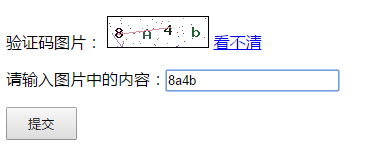
生成的验证码:
captcha-result.php(PHP判断验证码是否正确):
<?php

//验证验证码是否正确

if(isset($_REQUEST['authcode'])){

    //开启Session

    session_start();

    //strtolower()将字符串都转换成小写,将验证码设置为不区分大小写型

    if(strtolower($_REQUEST['authcode']) == strtolower($_SESSION['authcode'])){

        echo "输入正确";

    }else{

        echo "输入错误";

    }

    exit();

}

?>
所用到的函数原型:
<?php

//imagecreatetruecolor() 返回一个图像标识符,代表了一幅大小为 x_size 和 y_size 的黑色图像。

resource imagecreatetruecolor ( int $width , int $height );

//imagecolorallocate() 返回一个标识符,代表了由给定的 RGB 成分组成的颜色。red,green 和 blue 分别是所需要的颜色的红,绿,蓝成分。

int imagecolorallocate ( resource $image , int $red , int $green , int $blue );

//imagefill() 在 image 图像的坐标 x,y(图像左上角为 0, 0)处用 color 颜色执行区域填充(即与 x, y 点颜色相同且相邻的点都会被填充)。

bool imagefill ( resource $image , int $x , int $y , int $color );

//imagestring() 用 col 颜色将字符串 s 画到 image 所代表的图像的 x,y 坐标处(这是字符串左上角坐标,整幅图像的左上角为 0,0)。如果 font 是 1,2,3,4 或 5,则使用内置字体。

bool imagestring ( resource $image , int $font , int $x , int $y , string $s , int $col );

//imagesetpixel() 在 image 图像中用 color 颜色在 x,y 坐标(图像左上角为 0,0)上画一个点。

bool imagesetpixel ( resource $image , int $x , int $y , int $color );

//imageline() 用 color 颜色在图像 image 中从坐标 x1,y1 到 x2,y2(图像左上角为 0, 0)画一条线段。

bool imageline ( resource $image , int $x1 , int $y1 , int $x2 , int $y2 , int $color );

//imagepng() 将 GD 图像流(image)以 PNG 格式输出到标准输出(通常为浏览器),或者如果用 filename 给出了文件名则将其输出到该文件。

bool imagepng ( resource $image [, string $filename ] );

//imagedestroy() 释放与 image 关联的内存。image 是由图像创建函数返回的图像标识符,例如 imagecreatetruecolor()。

bool imagedestroy ( resource $image );

?>
本文链接:https://www.cnblogs.com/connect/p/php-captcha-image.html
PHP实现验证码制作的更多相关文章
- webform 图片验证码制作
界面:1 <%@ Page Language="C#" AutoEventWireup="true" CodeFile="Default2.as ...
- MVC-简单验证码制作
1.制作验证码: using System; using System.Collections.Generic; using System.Drawing; using System.Drawing. ...
- webform:图片水印、验证码制作
一.图片水印 1:引命名空间System.Drawing; 前端代码 <div> <asp:FileUpload ID="FileUpload1" runat=& ...
- Java实现验证码制作之一Kaptcha验证码
Kaptcha验证码 是google提供的验证码插件,使用起来相对简单,设置的干扰线以及字体扭曲不易让其他人读取破解. 这里我们需要 导入一个 kaptcha-2.3.jar 下载地址:http:/ ...
- Java实现验证码制作之一自己动手
以前弄验证码都是现找现用,下面是自己跟着敲代码弄好的,记录一下,分享给大家. 我这里用的是Servlet ,Servlet代码如下 import java.awt.Color;import java. ...
- php验证码制作
目标: 使用php生成验证码 成品: 逻辑代码: authcode.php <?php header("Content-type:image/png"); session_s ...
- PHP - 验证码制作加验证
一,主页 index.php <!DOCTYPE html> <html lang="en"> <head> <meta charse ...
- PHP绘图案例讲解验证码制作
<?php header("Content-type: image/png");//声明浏览器解析为图片 $width=200; $height=100; $color1=i ...
- Code笔记 之:注册页面验证码
文章内容包括: 1.验证码制作 -- 中文|字母|数字|…… 2.图文验证码 -- 图片防盗链(PHP而非JS) 3.JS防止右键点击图片 4.input表单输入框不记录输入过的信息 5.CSS+di ...
随机推荐
- 记一次nginx php配置的心路历程
1.本来搞好了php的配置,想把目录下移一层 从 www.abc.com 变成 www.abc.com/wxapi ,由于我的真实文件目录比路由少了一层public 尝试了很多办法都不行 甚至想到了u ...
- genymotion 模拟器内安装软件 the app contains ARM native code and your devices cannot run ARM instructions
问题如图: 解决方法: 下载一个Genymotion-ARM-Translation软件,安装到模拟器中就好了
- weblogic系列漏洞整理 -- 1. weblogic安装
目录 0. 概述 1. 下载安装Java环境 2. 下载安装weblogic 安装 部署domain域 进入weblogic 3. 排错 如果出现如下错误 0. 概述 WebLogic是美国Oracl ...
- 高通移植mipi LCD的过程LK代码
lk部分:(实现LCD兼容) 1. 函数定位 aboot_init()来到target_display_init(): 这就是高通原生lk LCD 兼容的关键所在.至于你需要兼容多少LCD 就在whi ...
- 软件工程实践_Task1
(1)回想一下你初入大学时对计算机专业的畅想 当初你是如何做出选择计算机专业的决定的? 说起来,当初选择计算机专业的缘由,更多应该归因于兴趣.虽然对CS全然不知,但也一点都不妨碍对它的神奇感到向往.再 ...
- svn 更新
dev更新流程: 1.打开软件,文件—>打开,弹出右边对话框链接dev地址 2.在窗口输入cd /var/www/user 回车 3.输入svn up 则更新dev代码完成 本地提交到 ...
- WPFのclipToBounds与maskToBounds的区别
UIView.clipsToBounds : 让子 View 只显示父 View 的 Frame 部分,子视图超出frame的部分不显示,默认为NO,设置为YES就会把超出的部分裁掉: maskToB ...
- ROS 订阅图像节点
博客 http://blog.csdn.net/github_30605157/article/details/50990493 参考ROS原网站 http://wiki.ros.org/image_ ...
- ROS 双目标定
http://wiki.ros.org/camera_calibration/Tutorials/StereoCalibration 发布ZED节点 roslaunch zed_cpu_ros zed ...
- 20145236《网络对抗》Exp 6 信息搜集与漏洞扫描
20145236<网络对抗>Exp 6 信息搜集与漏洞扫描 一.基础问题回答 哪些组织负责DNS,IP的管理? 互联网名称与数字地址分配机构,简称ICANN机构,决定了域名和IP地址的分配 ...