
iOS开发UI篇——九宫格坐标计算
一、要求
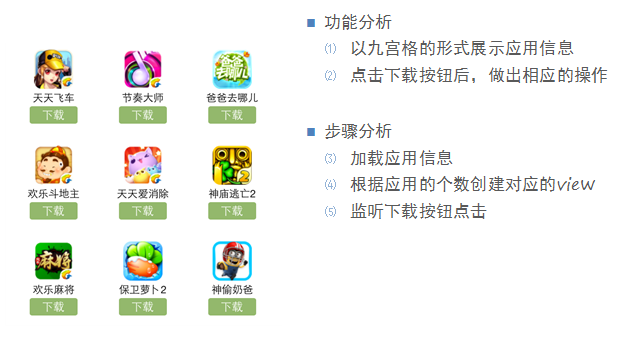
完成下面的布局
二、分析
寻找左边的规律,每一个uiview的x坐标和y坐标。
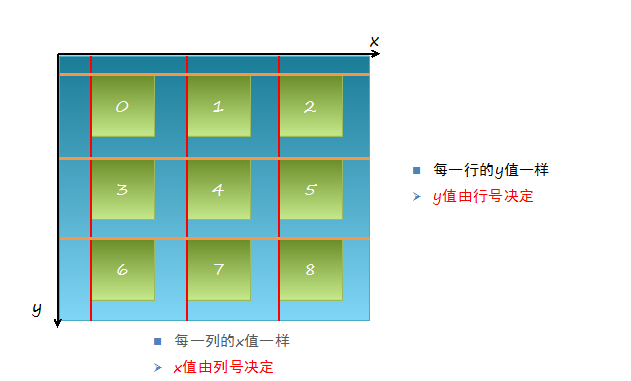
三、实现思路
(1)明确每一块用得是什么view
(2)明确每个view之间的父子关系,每个视图都只有一个父视图,拥有很多的子视图。
(3)可以先尝试逐个的添加格子,最后考虑使用for循环,完成所有uiview的创建
(4)加载app数据,根据数据长度创建对应个数的格子
(5)添加格子内部的子控件
(6)给内部的子控件装配数据
四、代码示例
//

//  YYViewController.m

//  九宫格练习

//

//  Created by 孔医己 on 14-5-22.

//  Copyright (c) 2014年 itcast. All rights reserved.

//

#import "YYViewController.h"

@interface YYViewController ()

@property(nonatomic,strong)NSArray *apps;

@end

@implementation YYViewController

//1.加载数据

- (NSArray *)apps

{

    if (!_apps) {

        NSString *path=[[NSBundle mainBundle]pathForResource:@"app.plist" ofType:nil];

        _apps=[NSArray arrayWithContentsOfFile:path];

    }

    return _apps;

}

- (void)viewDidLoad

{

    [super viewDidLoad];

    NSLog(@"%d",self.apps.count);

    //2.完成布局设计

    //三列

    int totalloc=;

    CGFloat appvieww=;

    CGFloat appviewh=;

    CGFloat margin=(self.view.frame.size.width-totalloc*appvieww)/(totalloc+);

    int count=self.apps.count;

    for (int i=; i<count; i++) {

        int row=i/totalloc;//行号

        //1/3=0,2/3=0,3/3=1;

        int loc=i%totalloc;//列号

        CGFloat appviewx=margin+(margin+appvieww)*loc;

        CGFloat appviewy=margin+(margin+appviewh)*row;

        //创建uiview控件

        UIView *appview=[[UIView alloc]initWithFrame:CGRectMake(appviewx, appviewy, appvieww, appviewh)];

        //[appview setBackgroundColor:[UIColor purpleColor]];

        [self.view addSubview:appview];

        //创建uiview控件中的子视图

        UIImageView *appimageview=[[UIImageView alloc]initWithFrame:CGRectMake(, , , )];

        UIImage *appimage=[UIImage imageNamed:self.apps[i][@"icon"]];

        appimageview.image=appimage;

        [appimageview setContentMode:UIViewContentModeScaleAspectFit];

       // NSLog(@"%@",self.apps[i][@"icon"]);

        [appview addSubview:appimageview];

        //创建文本标签

        UILabel *applable=[[UILabel alloc]initWithFrame:CGRectMake(, , , )];

        [applable setText:self.apps[i][@"name"]];

        [applable setTextAlignment:NSTextAlignmentCenter];

        [applable setFont:[UIFont systemFontOfSize:12.0]];

        [appview addSubview:applable];

        //创建按钮

        UIButton *appbtn=[UIButton buttonWithType:UIButtonTypeCustom];

        appbtn.frame= CGRectMake(, , , );

        [appbtn setBackgroundImage:[UIImage imageNamed:@"buttongreen"] forState:UIControlStateNormal];

        [appbtn setBackgroundImage:[UIImage imageNamed:@"buttongreen_highlighted"] forState:UIControlStateHighlighted];

        [appbtn setTitle:@"下载" forState:UIControlStateNormal];

        appbtn.titleLabel.font=[UIFont systemFontOfSize:12.0];

        [appview addSubview:appbtn];

        [appbtn addTarget:self action:@selector(click) forControlEvents:UIControlEventTouchUpInside];

    }

}

-(void)click

{

    //动画标签

    UILabel *animalab=[[UILabel alloc]initWithFrame:CGRectMake(self.view.center.x-, self.view.center.y+, , )];

    [animalab setText:@"下载成功"];

    animalab.font=[UIFont systemFontOfSize:12.0];

    [animalab setBackgroundColor:[UIColor brownColor]];

    [animalab setAlpha:];

    [self.view addSubview:animalab];

//    [UIView beginAnimations:Nil context:Nil];

//    [animalab setAlpha:1];

//    [UIView setAnimationDuration:4.0];

//    [UIView commitAnimations];

    //执行完之后,还得把这给删除了,推荐使用block动画

    [UIView animateWithDuration:4.0 animations:^{

    [animalab setAlpha:];

    } completion:^(BOOL finished) {

        //[self.view re];

    }];

}

- (void)didReceiveMemoryWarning

{

    [super didReceiveMemoryWarning];

}

@end
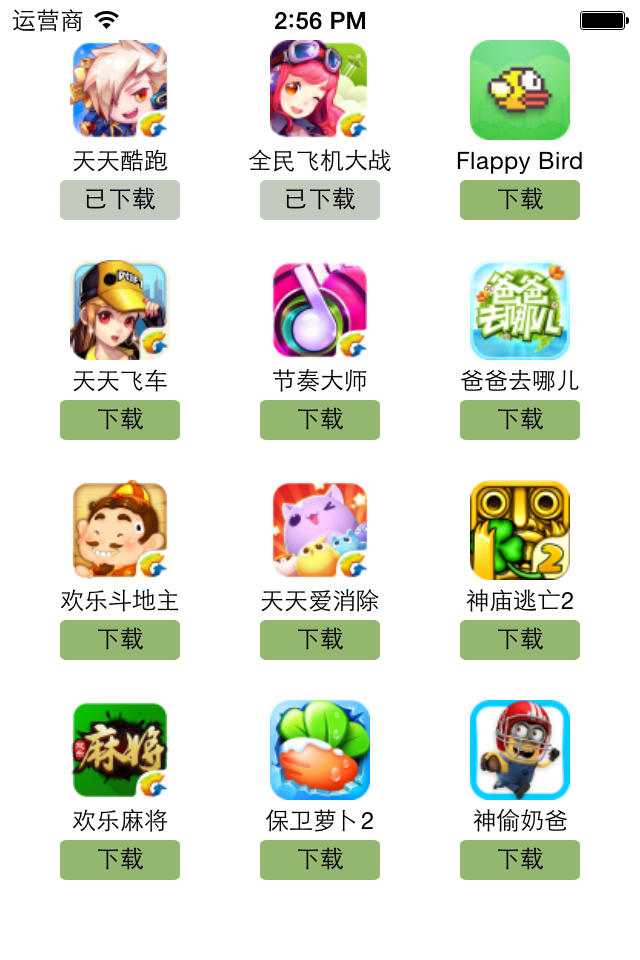
执行效果:
iOS开发UI篇——九宫格坐标计算的更多相关文章
- iOS开发UI篇—九宫格坐标计算
iOS开发UI篇—九宫格坐标计算 一.要求 完成下面的布局 二.分析 寻找左边的规律,每一个uiview的x坐标和y坐标. 三.实现思路 (1)明确每一块用得是什么view (2)明确每个view之间 ...
- iOS开发——UI篇&九宫格算法
九宫格算法 关于iOS开发中九宫格的实现虽然使用不多,而且后面会有更好的方实现,但是作为一个程序员必需要知道的就是九宫格算法的实现. 一:实现思路: (1)明确每一块用得是什么view (2)明确每个 ...
- iOS开发UI篇—简单的浏览器查看程序
iOS开发UI篇—简单的浏览器查看程序 一.程序实现要求 1.要求 2. 界面分析 (1) 需要读取或修改属性的控件需要设置属性 序号标签 图片 图片描述 左边按钮 右边按钮 (2) 需要监听响应事件 ...
- iOS开发UI篇—从代码的逐步优化看MVC
iOS开发UI篇—从代码的逐步优化看MVC 一.要求 要求完成下面一个小的应用程序. 二.一步步对代码进行优化 注意:在开发过程中,优化的过程是一步一步进行的.(如果一个人要吃五个包子才能吃饱,那么他 ...
- iOS开发UI篇—popoverController使用注意
iOS开发UI篇—popoverController使用注意 一.设置尺寸 提示:不建议,像下面这样吧popover的宽度和高度写死. //1.新建一个内容控制器 YYMenuViewControll ...
- iOS开发UI篇—CAlayer层的属性
iOS开发UI篇—CAlayer层的属性 一.position和anchorPoint 1.简单介绍 CALayer有2个非常重要的属性:position和anchorPoint @property ...
- ios开发UI篇—使用纯代码自定义UItableviewcell实现一个简单的微博界面布局
本文转自 :http://www.cnblogs.com/wendingding/p/3761730.html ios开发UI篇—使用纯代码自定义UItableviewcell实现一个简单的微博界面布 ...
- iOS开发UI篇—xib的简单使用
iOS开发UI篇—xib的简单使用 一.简单介绍 xib和storyboard的比较,一个轻量级一个重量级. 共同点: 都用来描述软件界面 都用Interface Builder工具来编辑 不同点: ...
- iOS开发UI篇—UIScrollView控件介绍
iOS开发UI篇—UIScrollView控件介绍 一.知识点简单介绍 1.UIScrollView控件是什么? (1)移动设备的屏幕⼤大⼩小是极其有限的,因此直接展⽰示在⽤用户眼前的内容也相当有限 ...
随机推荐
- html中混入的特殊字符
从设计那里拿来的psd中常常会有全角的单双引号. 如果只是拷贝这些字符到做好的html里面,顶多看到乱码再加以改正. 但是,如果是通篇的doc,需要加上各种html语义标签,在拷贝来的doc文字之间加 ...
- 数学(莫比乌斯反演):HAOI 2011 问题B
题目描述: 对于给出的n个询问,每次求有多少个数对(x,y),满足a≤x≤b,c≤y≤d,且gcd(x,y) = k,gcd(x,y)函数为x和y的最大公约数. 输入格式: 第一行一个整数n,接下来n ...
- 字符串(后缀数组||SAM):NOI2015 品酒大会
aaarticlea/png;base64,iVBORw0KGgoAAAANSUhEUgAAByIAAALuCAIAAABtq0bwAAAgAElEQVR4nOy9f2wb150vev4boESeln ...
- 动态规划(背包问题):POJ 1742 Coins
Coins Time Limit: 3000MS Memory Limit: 30000K Total Submissions: 32955 Accepted: 11199 Descripti ...
- 【数学】Codeforces 707C Pythagorean Triples
题目链接: http://codeforces.com/problemset/problem/707/C 题目大意: 给你一个数,构造其余两个勾股数.任意一组答案即可,没法构造输出-1. 答案long ...
- C++程序原码
直接插入排序基本算法 #include<iostream.h> #include<stdlib.h> #include<time.h> const int n=10 ...
- G - MPI Maelstrom
题目大意: BIT最近要取会他们的超级计算机,32处理器阿波罗奥德赛与分层通信子系统分布式共享内存的机器(听着很高端大气),瓦伦丁*麦基的顾问杰克*斯威特告诉她基准测试的新系统.(没有明白什么意思) ...
- poj2245
题目分析: 抽奖 在德国乐透你需要从49个数(1,2,3......49)里面选择6个数,玩德国乐透一个流行的策略-尽管他不会增加你获奖的机会-选择一个子集S包含k(k>6)个数从这49个数字里 ...
- java 编辑报错 非法字符: \ufeff 解决方案
用Notepad ++ 调成utf-8 格式 bom 或无bom根据情况 新建类 把代码一句句粘进去 ok
- python面向对象【进阶篇】
静态方法 通过@staticmethod装饰器即可把其装饰的方法变为一个静态方法,什么是静态方法呢?其实不难理解,普通的方法,可以在实例化后直接调用,并且在方法里可以通过self.调用实例变量或类变量 ...