
Spring_自动组件扫描和 基于注解配置bean
自动组件扫描
package com.tanlei.dao;

import org.springframework.stereotype.Component;

import org.springframework.stereotype.Repository;

@Component或者是@Repository

public class CustomerDao {

    @Override

    public String toString() {

        // TODO Auto-generated method stub

        return "hello ,this is CustomerDao";

    }

}
package com.tanlei.service;

import org.springframework.beans.factory.annotation.Autowired;

import org.springframework.stereotype.Component;

import org.springframework.stereotype.Service;

import com.tanlei.dao.CustomerDao;

@Component或是@Service

public class CustomerService {

    @Autowired

    CustomerDao customerDao;

    @Override

    public String toString() {

        // TODO Auto-generated method stub

        return "CustomerService [customerDAO=" + customerDao + "]";

    }

}
将这个“context:component”在bean配置文件,这意味着,在 Spring 中启用自动扫描功能。base-package 是指明存储组件,Spring将扫描该文件夹,并找出Bean(注解为@Component)并注册到 Spring 容器。
扫描指定的资源:
resource-pattern="service/*.class"
<?xml version="1.0" encoding="UTF-8"?>

<beans xmlns="http://www.springframework.org/schema/beans"

    xmlns:xsi="http://www.w3.org/2001/XMLSchema-instance"

    xmlns:context="http://www.springframework.org/schema/context"

    xsi:schemaLocation="http://www.springframework.org/schema/beans http://www.springframework.org/schema/beans/spring-beans.xsd

        http://www.springframework.org/schema/context http://www.springframework.org/schema/context/spring-context-4.0.xsd">

    <context:component-scan base-package="com.tanlei.service"></context:component-scan>

   <context:component-scan base-package="com.tanlei.dao"></context:component-scan>

</beans>
执行
package com.tanlei.test;

import org.springframework.context.ApplicationContext;

import org.springframework.context.support.ClassPathXmlApplicationContext;

import com.tanlei.service.CustomerService;

public class App {

    public static void main(String[] args) {

        ApplicationContext context = new ClassPathXmlApplicationContext(new String[] { "beans-spring.xml" });

        CustomerService cust = (CustomerService) context.getBean("customerService");

        System.out.println(cust);

    }

}
结果
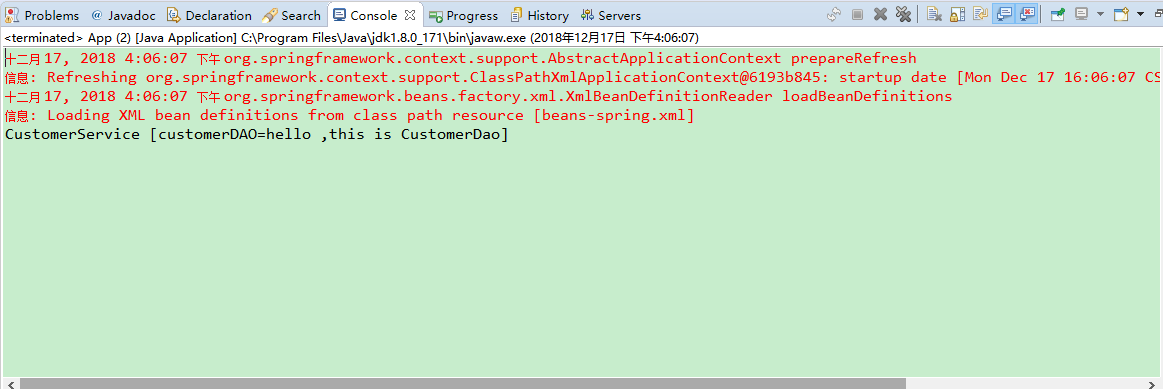
自定义自动扫描组件名称
要创建组件的自定义名称,你可以这样自定义名称:
@Service("AAA")

public class CustomerService

...
现在,可以用'AAA'这个名称进行检索。
CustomerService cust = (CustomerService)context.getBean("AAA");
自动组件扫描注释类型
- @Component – 指示自动扫描组件。
- @Repository – 表示在持久层DAO组件。
- @Service – 表示在业务层服务组件。
- @Controller – 表示在表示层控制器组件。
因此,使用哪一个?其实并不那么重要。参见 @Repository,@Service 或 @Controller 源代码。
@Target({ElementType.TYPE})

@Retention(RetentionPolicy.RUNTIME)

@Documented

@Component

public @interface Repository {

    String value() default "";

}
你可能会发现,所有的 @Repository, @Service 或 @Controller 被注解为 @Component。因此,我们可以只使用 @Component 对所有组件进行自动扫描?是的,Spring会自动扫描所有组件的 @Component 注解。
context:exclude-filter
> 子节点指定排除哪些指定表达式的组件
<
context:include-filter
子节点指定包含哪些表达式的组件,该子节点需要use-default-filters="true"配合使用
>
1.过滤组件 - 包含
<context:component-scan base-package="com.tanlei">

        <context:include-filter type="regex"

                       expression="com.tanlei.dao.*DAO.*" />

        <context:include-filter type="regex"

                       expression="com.tanlei.service.*Service.*" />

    </context:component-scan>
2.过滤组件 - 不包含
<context:component-scan base-package="com.yiibai.customer"   >

        <context:exclude-filter type="annotation"

            expression="org.springframework.stereotype.Service" />

    </context:component-scan>
不包括那些包含DAO这个词组文件名。
<context:component-scan base-package="com.yiibai" >

        <context:exclude-filter type="regex"

            expression="com.yiibai.customer.dao.*DAO.*" />

    </context:component-scan>
注意事项
找不到bean可以使用 @Autowired(required=false)
IOC有相同类型的bean @Repository("bean的名字")
@Qualifier("指定一个名字")
setter方法
Spring_自动组件扫描和 基于注解配置bean的更多相关文章
- [原创]java WEB学习笔记103:Spring学习---Spring Bean配置:基于注解的方式(基于注解配置bean,基于注解来装配bean的属性)
本博客的目的:①总结自己的学习过程,相当于学习笔记 ②将自己的经验分享给大家,相互学习,互相交流,不可商用 内容难免出现问题,欢迎指正,交流,探讨,可以留言,也可以通过以下方式联系. 本人互联网技术爱 ...
- 13Spring通过注解配置Bean(1)
配置Bean的形式:基于XML文件的方式:基于注解的方式(基于注解配置Bean:基于注解来装配Bean的属性) 下面介绍基于注解的方式来配置Bean. ——组件扫描(component scannin ...
- Spring学习笔记之 Spring IOC容器(二) 之注入参数值,自动组件扫描方式,控制Bean实例化方式,使用注解方式
本节主要内容: 1. 给MessageBean注入参数值 2. 测试Spring自动组件扫描方式 3. 如何控制ExampleBean实例化方式 4. 使用注解方式重构Jdb ...
- 基于注解配置spring
1 对 bean 的标注基于注解方式有3个注解 @Component @Repository 对DAO类进行标注 @Service 对Service类进行标注 @Controller 对Contro ...
- Spring框架入门之基于Java注解配置bean
Spring框架入门之基于Java注解配置bean 一.Spring bean配置常用的注解 常用的有四个注解 Controller: 用于控制器的注解 Service : 用于service的注解 ...
- 基于注解的bean配置
基于注解的bean配置,主要是进行applicationContext.xml配置.DAO层类注解.Service层类注解. 1.在applicationContext.xml文件中配置信息如下 &l ...
- spring(读取外部数据库配置信息、基于注解管理bean、DI)
###解析外部配置文件在resources文件夹下,新建db.properties(和数据库连接相关的信息) driverClassName=com.mysql.jdbc.Driverurl=jdbc ...
- Unit03: Spring Web MVC简介 、 基于XML配置的MVC应用 、 基于注解配置的MVC应用
Unit03: Spring Web MVC简介 . 基于XML配置的MVC应用 . 基于注解配置的MVC应用 springmvc (1)springmvc是什么? 是一个mvc框架,用来简化基于mv ...
- IDEA02 利用Maven创建Web项目、为Web应用添加Spring框架支持、bean的创建于获取、利用注解配置Bean、自动装配Bean、MVC配置
1 环境版本说明 Jdk : 1.8 Maven : 3.5 IDEA : 专业版 2017.2 2 环境准备 2.1 Maven安装及其配置 2.2 Tomcat安装及其配置 3 详细步骤 3.1 ...
随机推荐
- HZOI2019 A. 那一天我们许下约定 dp
题目大意:https://www.cnblogs.com/Juve/articles/11219089.html 读这道题的题目让我想起了... woc我到底在想什么?好好写题解,现在不是干那个的时候 ...
- Vue 将本地图片上传到阿里云
一.获取服务器通行证(即获取AccessKey和accessKeySecret) getAccess () { let that = this let url = '服务器地址' let params ...
- idea使用及其快捷键(Jetbrains很多是通用的)(转)
Java程序员肯定会使用idea进行开发,因为其非常强大,很好用,而且可以很傻瓜式导入gradle,用来做SSM项目也很简单 学生是可以使用教育邮箱或者上床学生证使用免费的jetbrains全家桶的, ...
- 两天了。照着SVN的界面画的一个界面。
可以选择显示哪些列. 界面上的东西,都简单,麻烦的是它的下层.下层全部用svn server的服务器自带的svn.exe来支持. 有些位置要启动svn.exe不止一次.所以参数的来回传递,来回组合 ...
- css3之属性选择器
总体来看一下都有哪些选择器 1.属性选择器 1)[att*=val] 2)[att^=val] 3)[att$=val] 2.结构伪类选择器 3.UI伪类选择器 其中E:read-only伪类选择器 ...
- SDI在自定义的工具栏上添加下拉控件
0.首先到自己的工具条上新建一个控件,并命名新ID 1.拷贝FlatComboBox.h和FlatComboBox.cpp到工程目录下 2.建立新类 class CTrackerToolBar : p ...
- HNOI 2019 多边形
HNOI 2019 多边形 题意 小 R 与小 W 在玩游戏. 他们有一个边数为\(n\)的凸多边形,其顶点沿逆时针方向标号依次为\(1,2,3...n\).最开始凸多边形中有\(n\)条线段,即多边 ...
- sulin LuceneNet 搜索二
1.添加引用dll using Lucene.Net.Search;using Lucene.Net.Analysis.PanGu;using PanGu;using PanGu.HighLight; ...
- bzoj 3231 [Sdoi2008]递归数列——矩阵乘法
题目:https://www.lydsy.com/JudgeOnline/problem.php?id=3231 矩阵乘法裸题. 1018是10^18.别忘了开long long. #include& ...
- Vue开发警告[Vue warn]: Avoid replacing instance root $data. Use nested data properties instead.
Avoid replacing instance root $data. Use nested data properties instead. 翻译 避免替换实例根$data.请改用嵌套数据属性 错 ...