
Python网络爬虫案例(二)——爬取招聘信息网站
利用Python,爬取 51job 上面有关于 IT行业 的招聘信息
版权声明:未经博主授权,内容严禁分享转载
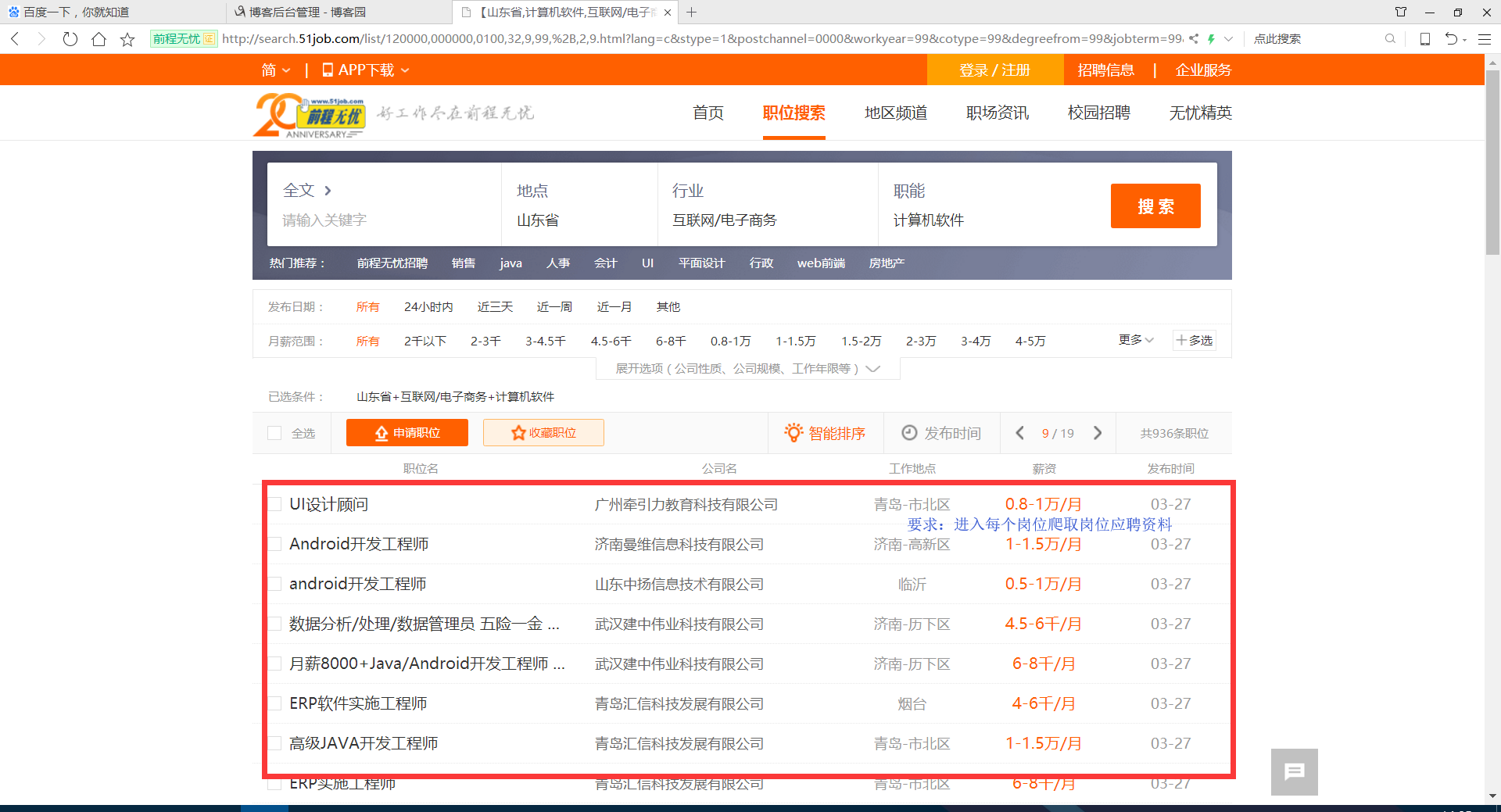
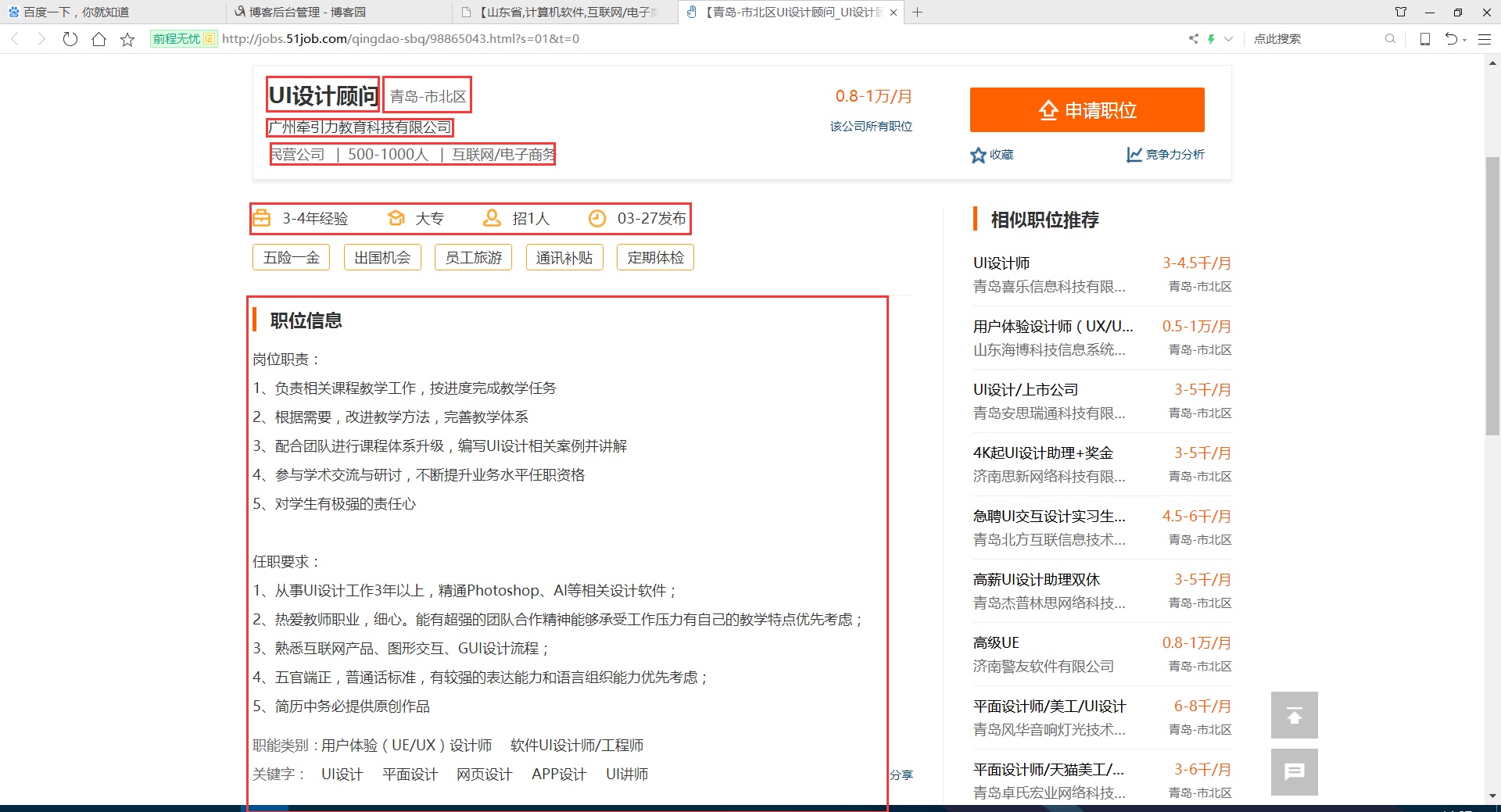
案例代码:
# __author : "J"
# date : 2018-03-07 import urllib.request
import re
import pymysql connection = pymysql.connect(host='127.0.0.1', port=3306, user='root', password='******', db='51job',
charset='utf8')
cursor = connection.cursor() num = 0
textnum = 1
while num < 18: num += 1
# 51job IT行业招聘网址 需要翻页,大约800多条数据
request = urllib.request.Request(
"http://search.51job.com/list/120000,000000,0100,32,9,99,%2B,2," + str(
num) + ".html?lang=c&stype=1&postchannel=0000&workyear=99&cotype=99°reefrom=99&jobterm=99&companysize=99&lonlat=0%2C0&radius=-1&ord_field=0&confirmdate=9&fromType=1&dibiaoid=0&address=&line=&specialarea=00&from=&welfare=") response = urllib.request.urlopen(request)
my_html = response.read().decode('gbk')
# print(my_html) my_re = re.compile(r'href="(.*?)" onmousedown="">')
second_html_list = re.findall(my_re, my_html) for i in second_html_list:
second_request = urllib.request.Request(i)
second_response = urllib.request.urlopen(second_request)
second_my_html = second_response.read().decode('gbk')
# 职位 地区 工资 公司名称 公司简介
# 工作经验 学历 招聘人数 发布时间
# 职位信息 联系方式 公司信息
second_my_re = re.compile('<h1 title=.*?">(.*?)<input value=.*?' +
'<span class="lname">(.*?)</span>.*?' +
'<strong>(.*?)</strong>.*?' +
'target="_blank" title=".*?">(.*?)<em class="icon_b i_link"></em></a>.*?' +
'<p class="msg ltype">(.*?)</p>.*?</div>'
, re.S | re.M | re.I)
second_html_news = re.findall(second_my_re, second_my_html)[0]
zhiwei = second_html_news[0].replace("\n|\t|\r|\r\n", '').replace(" ", '').replace(" ", '').replace(
" ",
'')
diqu = second_html_news[1].replace("\n|\t|\r|\r\n", '').replace(" ", '').replace(" ", '').replace(
" ",
'')
gongzi = second_html_news[2].replace("\n|\t|\r|\r\n", '').replace(" ", '').replace(" ", '').replace(
" ",
'')
gongsimingcheng = second_html_news[3].replace("\n|\t|\r|\r\n", '').replace(" ", '').replace(" ",
'').replace(
" ",
'')
gongsijianjie = second_html_news[4].replace("\n|\t|\r|\r\n", '').replace(" ", '').replace(" ",
'').replace(
" ",
'')
# print(zhiwei,diqu,gongzi,gongsimingcheng,gongsijianjie)
try:
second_my_re = re.compile('<span class="sp4"><em class="i1"></em>(.*?)</span>'
, re.S | re.M | re.I)
yaoqiu = re.findall(second_my_re, second_my_html)[0]
except Exception as e:
pass
try:
second_my_re = re.compile('<span class="sp4"><em class="i2"></em>(.*?)</span>'
, re.S | re.M | re.I)
yaoqiu += ' | ' + re.findall(second_my_re, second_my_html)[0]
except Exception as e:
pass
try:
second_my_re = re.compile('<span class="sp4"><em class="i3"></em>(.*?)</span>'
, re.S | re.M | re.I)
yaoqiu += ' | ' + re.findall(second_my_re, second_my_html)[0]
except Exception as e:
pass
try:
second_my_re = re.compile('<span class="sp4"><em class="i4"></em>(.*?)</span>'
, re.S | re.M | re.I)
yaoqiu += ' | ' + re.findall(second_my_re, second_my_html)[0]
except Exception as e:
pass
# print(yaoqiu)
second_my_re = re.compile('<div class="bmsg job_msg inbox">(.*?)<div class="mt10">'
, re.S | re.M | re.I)
gangweizhize = re.findall(second_my_re, second_my_html)[0].replace("\r\n|\n|\t|\r", '').replace(" ",
'').replace(
" ", '').replace(" ", '') dr = re.compile(r'<[^>]+>', re.S)
gangweizhize = dr.sub('', gangweizhize) second_my_re = re.compile('<span class="bname">联系方式</span>(.*?)<div class="tBorderTop_box">'
, re.S | re.M | re.I)
lianxifangshi = re.findall(second_my_re, second_my_html)[0].replace("\r\n|\n|\t|\r", '').replace(" ", '') dr = re.compile(r'<[^>]+>', re.S)
lianxifangshi = dr.sub('', lianxifangshi)
lianxifangshi = re.sub('\s', '', lianxifangshi) second_my_re = re.compile('<span class="bname">公司信息</span>(.*?)<div class="tCompany_sidebar">'
, re.S | re.M | re.I)
gongsixinxi = re.findall(second_my_re, second_my_html)[0].replace(" ", '')
dr = re.compile(r'<[^>]+>', re.S)
gongsixinxi = dr.sub('', gongsixinxi)
gongsixinxi = re.sub('\s', '', gongsixinxi) print('第 '+str(textnum) + ' 条数据 **********************************************')
print(zhiwei, diqu, gongzi, gongsimingcheng, gongsijianjie, yaoqiu, gangweizhize, lianxifangshi, gongsixinxi)
textnum += 1
# try:
# sql = "INSERT INTO `jobNews` (`position`,`region`,`Pay`,`company`,`Nature`,`Requirement`,`Job_information`,`Contact_information`,`Company_information`) VALUES ('" + zhiwei + "','" + diqu + "','" + gongzi + "','" + gongsimingcheng + "','" + gongsijianjie + "','" + yaoqiu + "','" + gangweizhize + "','" + lianxifangshi + "','" + gongsixinxi + "')"
# cursor.execute(sql)
# connection.commit()
# print('存储成功!')
# except Exception as e:
# pass cursor.close()
connection.close()
效果:
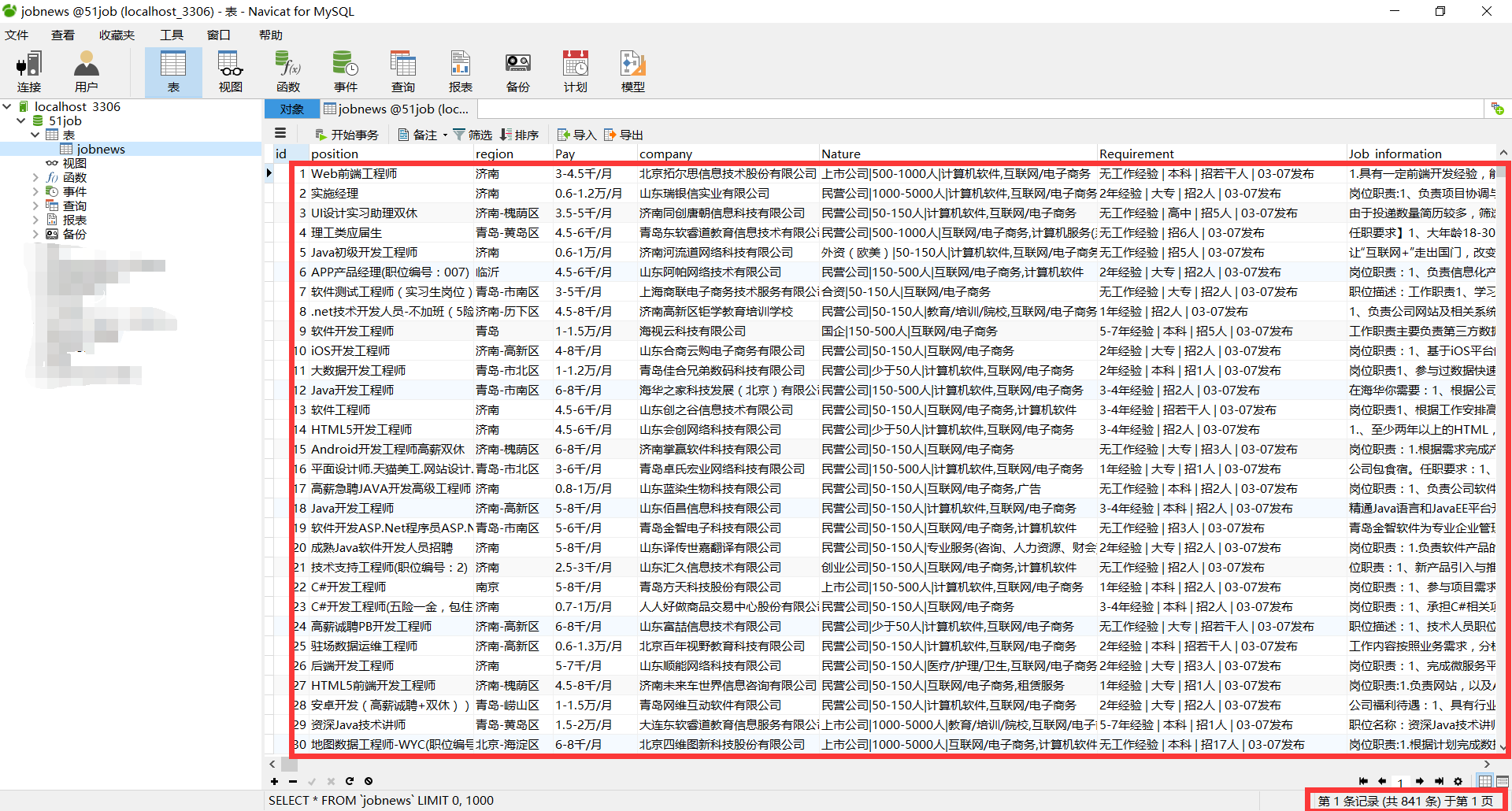
我正则表达式用的不好,所以写的很麻烦,接受建议~
Python网络爬虫案例(二)——爬取招聘信息网站的更多相关文章
- Python 网络爬虫 002 (入门) 爬取一个网站之前,要了解的知识
网站站点的背景调研 1. 检查 robots.txt 网站都会定义robots.txt 文件,这个文件就是给 网络爬虫 来了解爬取该网站时存在哪些限制.当然了,这个限制仅仅只是一个建议,你可以遵守,也 ...
- Python网络爬虫与如何爬取段子的项目实例
一.网络爬虫 Python爬虫开发工程师,从网站某一个页面(通常是首页)开始,读取网页的内容,找到在网页中的其它链接地址,然后通过这些链接地址寻找下一个网页,这样一直循环下去,直到把这个网站所有的网页 ...
- 【Python网络爬虫三】 爬取网页新闻
学弟又一个自然语言处理的项目,需要在网上爬一些文章,然后进行分词,刚好牛客这周的是从一个html中找到正文,就实践了一下.写了一个爬门户网站新闻的程序 需求: 从门户网站爬取新闻,将新闻标题,作者,时 ...
- Python 网络爬虫实战:爬取 B站《全职高手》20万条评论数据
本周我们的目标是:B站(哔哩哔哩弹幕网 https://www.bilibili.com )视频评论数据. 我们都知道,B站有很多号称“镇站之宝”的视频,拥有着数量极其恐怖的评论和弹幕.所以这次我们的 ...
- 精通python网络爬虫之自动爬取网页的爬虫 代码记录
items的编写 # -*- coding: utf-8 -*- # Define here the models for your scraped items # # See documentati ...
- python网络爬虫之四简单爬取豆瓣图书项目
一.爬虫项目一: 豆瓣图书网站图书的爬取: import requests import re content = requests.get("https://book.douban.com ...
- Python爬取招聘信息,并且存储到MySQL数据库中
前面一篇文章主要讲述,如何通过Python爬取招聘信息,且爬取的日期为前一天的,同时将爬取的内容保存到数据库中:这篇文章主要讲述如何将python文件压缩成exe可执行文件,供后面的操作. 这系列文章 ...
- python 网络爬虫(二)
一.编写第一个网络爬虫 为了抓取网站,我们需要下载含有感兴趣的网页,该过程一般被称为爬取(crawling).爬取一个网站有多种方法,而选择哪种方法更加合适,则取决于目标网站的结构. 首先探讨如何安全 ...
- 网络爬虫之scrapy爬取某招聘网手机APP发布信息
1 引言 过段时间要开始找新工作了,爬取一些岗位信息来分析一下吧.目前主流的招聘网站包括前程无忧.智联.BOSS直聘.拉勾等等.有段时间时间没爬取手机APP了,这次写一个爬虫爬取前程无忧手机APP岗位 ...
随机推荐
- 详解Oracle多种表连接方式
1. 内连接(自然连接) 2. 外连接 (1)左外连接 (左边的表不加限制) (2)右外连接(右边的表不加限制) (3)全外连接(左右两表都不加限制) 3. 自连接(同一张表内的连接) SQL的标准语 ...
- Linux下的反调试技术
Linux下的反调试技术 2014年01月30日 ⁄ 综合 ⁄ 共 2669字 ⁄ 字号 小 中 大 ⁄ 评论关闭 转自 http://wangcong.org/blog/archives/310 ...
- TP5.0 controller下分版本 分块 分目录写法访问
这个写法是在api模块下的controller目录下又分出了v1和以后未知的v(x)版本,这个时候需要配置路由来访问这个接口类似于这种形式: http://www.xx.com/index.php/a ...
- form表单的enctype属性
①application/x-www-form-urlencoded : 数据被编码为名称/值对. ②multipart/form-data : 数据被编码为一条消息,页上的每个控件对应消息中的一个部 ...
- 图片放大_css3
.flash_little_img{position:relative;}.flash_little_img{width:500px;height:333px;border:none; margin: ...
- 003-Nginx 设置Header 获取真实IP
1.X-Forwarded-For的定义: X-Forwarded-For:简称XFF头,它代表客户端,也就是HTTP的请求端真实的IP,只有在通过了HTTP 代理或者负载均衡服务器时才会添加该项.它 ...
- 加密货币 (Cryptocurrency) 市值 (market capitalization) 列表
https://coinmarketcap.com/all/views/all/ ico 列表 https://www.icoalert.com/?q=&is_v=1 https://www. ...
- 20180531-Postman 常用测试结果验证及使用技巧
- 使用HttpClient进行远程接口测试
前两天在工作中,项目组长给我了一个远程接口让我给测一下,因为是http协议,所以我首先想到了用httpClient工具类来测试,网上一查,找到了好多示例代码,随便复制了一个demo进行了简单的修改,结 ...
- localhost和本机IP和127.0.0.1之间的区别
参考出处:https://www.zhihu.com/question/23940717 localhost 是个域名,不是地址,它可以被配置为任意的 IP 地址,不过通常情况下都指向 127.0.0 ...