
精通python网络爬虫之自动爬取网页的爬虫 代码记录
items的编写
 # -*- coding: utf-8 -*-

 # Define here the models for your scraped items

 #

 # See documentation in:

 # https://doc.scrapy.org/en/latest/topics/items.html

 import scrapy

 class AutopjtItem(scrapy.Item):

     # define the fields for your item here like:

     # 用来存储商品名

     name = scrapy.Field()

     #用来存储商品价格

     price = scrapy.Field()

     # 用来存储商品链接

     link = scrapy.Field()

     # 用来存储商品评论数

     comnum = scrapy.Field()

     # 用来存储商品评论内容链接

     comnum_link = scrapy.Field()
piplines的编写
 # -*- coding: utf-8 -*-

 import codecs

 import json

 # Define your item pipelines here

 #

 # Don't forget to add your pipeline to the ITEM_PIPELINES setting

 # See: https://doc.scrapy.org/en/latest/topics/item-pipeline.html

 class AutopjtPipeline(object):

     def __init__(self):

         self.file = codecs.open("D:/git/learn_scray/day11/1.json", "wb", encoding="utf-8")

     def process_item(self, item, spider):

         # 爬取当前页的所有信息

         for i in range(len(item["name"])):

             name = item["name"][i]

             price = item["price"][i]

             link = item["link"][i]

             comnum = item["comnum"][i]

             comnum_link = item["comnum_link"][i]

             current_conent = {"name":name,"price":price,"link":link,

                               "comnum":comnum,"comnum_link":comnum_link}

             j = json.dumps(dict(current_conent),ensure_ascii=False)

             # 为每条数据添加换行

             line = j + '\n'

             print(line)

             self.file.write(line)

         # for key,value in current_conent.items():

         #     print(key,value)

         return item

     def close_spider(self,spider):

         self.file.close()
自动爬虫编写实战
 # -*- coding: utf-8 -*-

 import scrapy

 from autopjt.items import AutopjtItem

 from scrapy.http import Request

 class AutospdSpider(scrapy.Spider):

     name = 'autospd'

     allowed_domains = ['dangdang.com']

     # 当当地方特产

     start_urls = ['http://category.dangdang.com/pg1-cid10010056.html']

     def parse(self, response):

         item = AutopjtItem()

         print("进入item")

         # print("获取标题:")

         # 获取标题

         item["name"] = response.xpath("//p[@class='name']/a/@title").extract()

         # print(title)

         # print("获取价格:")

         # 价格

         item["price"] = response.xpath("//span[@class='price_n']/text()").extract()

         # print(price)

         # print("获取商品链接:")

         # 获取商品链接

         item["link"] = response.xpath("//p[@class='name']/a/@href").extract()

         # print(link)

         # print("\n")

         # print("获取商品评论数:")

         # 获取商品评论数

         item["comnum"] = response.xpath("//a[@name='itemlist-review']/text()").extract()

         # comnum = response.xpath("//a[@name='itemlist-review']/text()").extract()

         # print(comnum)

         # print("获取商品评论数链接:")

         # 获取商品评论数链接

         item["comnum_link"] = response.xpath("//a[@name='itemlist-review']/@href").extract()

         # comnum_link = response.xpath("//a[@name='itemlist-review']/@href").extract()

         # print(comnum_link)

         yield item

         for i in range(1,79):

             # print(i)

             url = "http://category.dangdang.com/pg"+ str(i) + "-cid10010056.html"

             # print(url)

             yield Request(url, callback=self.parse)
yield详解:
https://stackoverflow.com/questions/231767/what-does-the-yield-keyword-do
settings的设置:
 # -*- coding: utf-8 -*-

 # Scrapy settings for autopjt project

 #

 # For simplicity, this file contains only settings considered important or

 # commonly used. You can find more settings consulting the documentation:

 #

 #     https://doc.scrapy.org/en/latest/topics/settings.html

 #     https://doc.scrapy.org/en/latest/topics/downloader-middleware.html

 #     https://doc.scrapy.org/en/latest/topics/spider-middleware.html

 BOT_NAME = 'autopjt'

 SPIDER_MODULES = ['autopjt.spiders']

 NEWSPIDER_MODULE = 'autopjt.spiders'

 # Crawl responsibly by identifying yourself (and your website) on the user-agent

 #USER_AGENT = 'autopjt (+http://www.yourdomain.com)'

 # Obey robots.txt rules

 # 默认为true遵守robots.txt协议 我试了一下能爬 为了保险设置为false

 ROBOTSTXT_OBEY = True

 # Configure maximum concurrent requests performed by Scrapy (default: 16)

 #CONCURRENT_REQUESTS = 32

 # Configure a delay for requests for the same website (default: 0)

 # See https://doc.scrapy.org/en/latest/topics/settings.html#download-delay

 # See also autothrottle settings and docs

 #DOWNLOAD_DELAY = 3

 # The download delay setting will honor only one of:

 #CONCURRENT_REQUESTS_PER_DOMAIN = 16

 #CONCURRENT_REQUESTS_PER_IP = 16

 # Disable cookies (enabled by default)

 COOKIES_ENABLED = False

 # Disable Telnet Console (enabled by default)

 #TELNETCONSOLE_ENABLED = False

 # Override the default request headers:

 #DEFAULT_REQUEST_HEADERS = {

 #   'Accept': 'text/html,application/xhtml+xml,application/xml;q=0.9,*/*;q=0.8',

 #   'Accept-Language': 'en',

 #}

 # Enable or disable spider middlewares

 # See https://doc.scrapy.org/en/latest/topics/spider-middleware.html

 #SPIDER_MIDDLEWARES = {

 #    'autopjt.middlewares.AutopjtSpiderMiddleware': 543,

 #}

 # Enable or disable downloader middlewares

 # See https://doc.scrapy.org/en/latest/topics/downloader-middleware.html

 #DOWNLOADER_MIDDLEWARES = {

 #    'autopjt.middlewares.AutopjtDownloaderMiddleware': 543,

 #}

 # Enable or disable extensions

 # See https://doc.scrapy.org/en/latest/topics/extensions.html

 #EXTENSIONS = {

 #    'scrapy.extensions.telnet.TelnetConsole': None,

 #}

 # Configure item pipelines

 # See https://doc.scrapy.org/en/latest/topics/item-pipeline.html

 ITEM_PIPELINES = {

    'autopjt.pipelines.AutopjtPipeline': 300,

 }

 # Enable and configure the AutoThrottle extension (disabled by default)

 # See https://doc.scrapy.org/en/latest/topics/autothrottle.html

 #AUTOTHROTTLE_ENABLED = True

 # The initial download delay

 #AUTOTHROTTLE_START_DELAY = 5

 # The maximum download delay to be set in case of high latencies

 #AUTOTHROTTLE_MAX_DELAY = 60

 # The average number of requests Scrapy should be sending in parallel to

 # each remote server

 #AUTOTHROTTLE_TARGET_CONCURRENCY = 1.0

 # Enable showing throttling stats for every response received:

 #AUTOTHROTTLE_DEBUG = False

 # Enable and configure HTTP caching (disabled by default)

 # See https://doc.scrapy.org/en/latest/topics/downloader-middleware.html#httpcache-middleware-settings

 #HTTPCACHE_ENABLED = True

 #HTTPCACHE_EXPIRATION_SECS = 0

 #HTTPCACHE_DIR = 'httpcache'

 #HTTPCACHE_IGNORE_HTTP_CODES = []

 #HTTPCACHE_STORAGE = 'scrapy.extensions.httpcache.FilesystemCacheStorage'
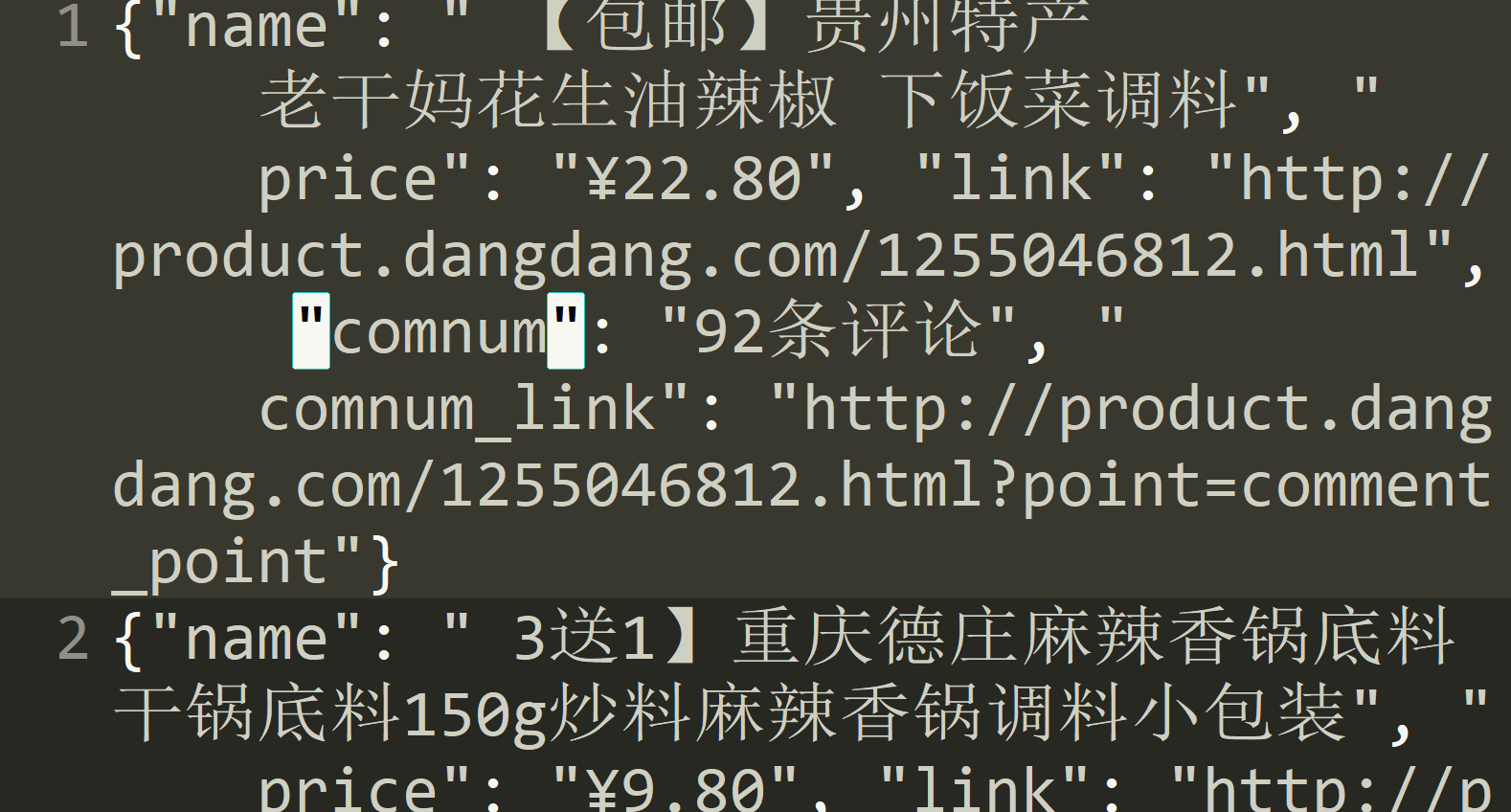
最后的效果:
精通python网络爬虫之自动爬取网页的爬虫 代码记录的更多相关文章
- python爬取网页的通用代码框架
python爬取网页的通用代码框架: def getHTMLText(url):#参数code缺省值为‘utf-8’(编码方式) try: r=requests.get(url,timeout=30) ...
- python(27)requests 爬取网页乱码,解决方法
最近遇到爬取网页乱码的情况,找了好久找到了种解决的办法: html = requests.get(url,headers = head) html.apparent_encoding html.enc ...
- 【Python网络爬虫三】 爬取网页新闻
学弟又一个自然语言处理的项目,需要在网上爬一些文章,然后进行分词,刚好牛客这周的是从一个html中找到正文,就实践了一下.写了一个爬门户网站新闻的程序 需求: 从门户网站爬取新闻,将新闻标题,作者,时 ...
- 爬虫-----selenium模块自动爬取网页资源
selenium介绍与使用 1 selenium介绍 什么是selenium?selenium是Python的一个第三方库,对外提供的接口可以操作浏览器,然后让浏览器完成自动化的操作. sel ...
- python爬虫学习(7) —— 爬取你的AC代码
上一篇文章中,我们介绍了python爬虫利器--requests,并且拿HDU做了小测试. 这篇文章,我们来爬取一下自己AC的代码. 1 确定ac代码对应的页面 如下图所示,我们一般情况可以通过该顺序 ...
- [原创]python爬虫之BeautifulSoup,爬取网页上所有图片标题并存储到本地文件
from bs4 import BeautifulSoup import requests import re import os r = requests.get("https://re. ...
- 爬虫系列----scrapy爬取网页初始
一 基本流程 创建工程,工程名称为(cmd):firstblood: scrapy startproject firstblood 进入工程目录中(cmd):cd :./firstblood 创建爬虫 ...
- Python学习--两种方法爬取网页图片(requests/urllib)
实际上,简单的图片爬虫就三个步骤: 获取网页代码 使用正则表达式,寻找图片链接 下载图片链接资源到电脑 下面以博客园为例子,不同的网站可能需要更改正则表达式形式. requests版本: import ...
- 《精通python网络爬虫》笔记
<精通python网络爬虫>韦玮 著 目录结构 第一章 什么是网络爬虫 第二章 爬虫技能概览 第三章 爬虫实现原理与实现技术 第四章 Urllib库与URLError异常处理 第五章 正则 ...
随机推荐
- java设计模式基础 - 解决某一类问题最行之有效的方法,框架是大的设计模式.
一.单例模式(Singleton) 1.单例对象(Singleton)是一种常用的设计模式.在Java应用中,单例对象能保证在一个JVM中,该对象只有一个实例存在.这样的模式有几个好处: 1>某 ...
- class extension、class category、class-continuation category
class extension Objective-C 2.0增加了class extensions用于解决两个问题: 允许一个对象可以拥有一个私有的interface,且可由编译器验证. 支持一个公 ...
- Alert and Action sheets and Timer and Animation
- 【状态压缩 meet in middle】poj3139Balancing the Scale
数组溢出真是可怕的事情 Description You are given a strange scale (see the figure below), and you are wondering ...
- python入门(一)作业
一,流程控制之if...else 1. 如果:女人的年龄>30岁,那么:叫阿姨,否则:叫小妞 age_of_girl = 21 if age_of_girl >30: print('阿姨' ...
- centos7系统优化
优化说明: 一.关闭selinux 二.更改为阿里yum源 三.提权dm用户可以使用sudo 四.优化ssh远程登录配置 五.设置中文字符集 六.设置时间同步 七.历史记录数及登录超时环境变量设置 八 ...
- CVS在update时状态status
cvs update -Ad 时,terminal 会display如下: P xx.v P xx.c ? xx.v ? xx.c A xx.v M xx.v U xx.v C xx.v 第一个字母: ...
- Python列表,元组,字典,集合详细操作
菜鸟学Python第五天 数据类型常用操作及内置方法 列表(list) ======================================基本使用====================== ...
- Vector模板类----构造与析构
/* 基于C++平台*/ typedef int rank; //用int来定义 “秩” 这种概念 #define DEFAULT_CAPACIITY 3 //默认初始容量,实际应用中可以取更大的值 ...
- main()中的参数argc, argv
转自:http://blog.csdn.net/eastmount/article/details/20413773 一.main()函数参数 通常我们在写主函数时都是void main()或int ...