
Unity3D学习笔记(十一):布料和协程
延迟函数:
动态资源加载:
T:Resources.Load<T>(string path);
Assets - Resources,Resources是一个资源管理的工具类,预制体放在Resources 文件夹下
绝对路径:从磁盘的根目录开始
相对路径:相对于Resources文件夹下的路径,用斜杠
斜杠(除号):Unity,网址http
反斜杠:Windows资源管理文件夹
进程:双击一个.exe可执行应用程序,windows就会给我们开启一个进程来运行程序。
线程:每一个进程中,最少有一个主线程(Main函数是主线程的入口),但是可以有多个辅助线程。
主线程卡死,程序会崩溃,辅线程卡死,程序不会崩溃,可以把死循环放在辅线程里。
协程(协同程序):协程是Unity为我们提供的一个模拟多线程的工具,并不是真的多线程。
开启协程:
StartCoroutine(string methodName);//由此就开启一个协程,程序会进入到协程里面执行
StartCoroutine(methodName());//第二种方式
yield return new WaitForSecond(float time);//等待n秒
yield return null或0;//等待一帧
yield return StartCoroutine();//等待此协程执行完毕
yield break;//直接跳出,结束当前协程
停止协程:
StopCoroutines();
//当使用方法名的字符串形式开启的协程,可以用同样的方式停止协程
//用方法名加括号开启的协程,只能用StopAllCoroutines停止协程
StopAllCoroutines();
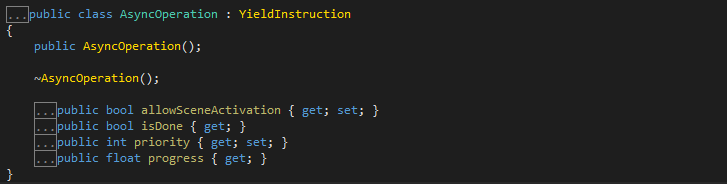
协程的返回值是一个迭代器对象,Unity引擎会判断条件是否成立,如果成立再继续执行
协程也有生命周期,类似update,每一帧Unity都会去判断条件是否成立
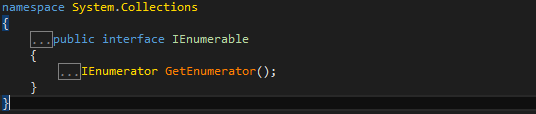
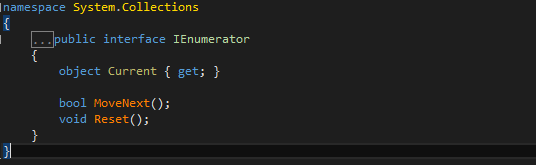
IEnumerator是迭代器
Current指向第一个元素的指针,MoveNext判断是否可以移到下一个元素
using System.Collections;

using System.Collections.Generic;

using UnityEngine;

public class LightOnOff : MonoBehaviour {

    //public int lightOnTime;

    //public int lightOffTime;

    //private Light light;

    public GameObject directionalLight;

    public GameObject[] points;

    private int index = ;

    // Use this for initialization

    void Start () {

        //思考题

        //地面,灯-点光源(白,红,蓝,绿),依次亮灭

        //light = GetComponent<Light>();

        //InvokeRepeating("LightOn", lightOnTime, 5);

        //InvokeRepeating("LightOff", lightOffTime, 5);

        directionalLight.SetActive(false);

        InvokeRepeating("ChangePointLightState", , );

    }

    // Update is called once per frame

    void Update () {

       }

    //void LightOn()

    //{

    //    Debug.Log("LightOn");

    //    light.range = 10;

    //}

    //void LightOff()

    //{

    //    Debug.Log("LightOff");

    //    light.range = 0;

    //}

    void ChangePointLightState()

    {

        for (int i = ; i < points.Length; i++)

        {

            if (i == index)

            {

                points[i].SetActive(true);

            }

            else

            {

                points[i].SetActive(false);

            }

        }

        index++;

        index %= points.Length;//防止数组越界

    }

}
using System.Collections;

using System.Collections.Generic;

using UnityEngine;

public class AttackMonster : MonoBehaviour {

    private int hp = ;

       // Use this for initialization

       void Start () {

        InvokeRepeating("MonsterUnderAttack", , );

    }

       // Update is called once per frame

       void Update ()

    {

              if (Input.GetMouseButton())

        {

            CancelInvoke();

            Debug.Log("你取消了进攻");

        }

    }

    void MonsterUnderAttack()

    {

        hp -= ;

        Debug.Log("怪兽被攻击" + hp);

        if (hp <= )

        {

            CancelInvoke();

            Debug.Log("怪兽被打死了");

        }

    }

}
using System.Collections;

using System.Collections.Generic;

using UnityEngine;

public class TimeWait : MonoBehaviour {

       // Use this for initialization

       void Start () {

        StartCoroutine(DelayTime());

        Debug.Log("等待两秒");

    }

       // Update is called once per frame

       void Update () {

    }

    IEnumerator DelayTime()

    {

        yield return new WaitForSeconds(2f);

        Debug.Log("两秒到了");

    }

}
using System.Collections;

using System.Collections.Generic;

using UnityEngine;

public class ResourcesScript : MonoBehaviour {

       // Use this for initialization

       void Start () {

        //动态资源加载

        GameObject cube = Resources.Load<GameObject>("Prefabs/Cube");

        Instantiate(cube);

        //加载多个资源

        //Resources.LoadAll<GameObject>();

        //异步资源加载

        //异步场景切换

    }

    // Update is called once per frame

    void Update () {

       }

}
using System.Collections;

using System.Collections.Generic;

using System.Threading;

using UnityEngine;

public class LessonTest : MonoBehaviour {

       // Use this for initialization

       void Start () {

        //开启线程

        Thread lxmThread = new Thread(Hello);

        //开启协程,方法名的字符串形式

        StartCoroutine("HelloWorld");//程序从此进入,遇到yield return关键词又从此跳出

        Debug.Log("this is start");

        //开启协程,方法名加括号形式

        //StartCoroutine(HelloWorld());

        //停止协程,方法名的字符串形式,被挂起的程序不会执行

        StopCoroutine("HelloWorld");

        //停止所有协程

        StopAllCoroutines();

        //停止协程,不能用方法名加括号形式

        //用方法名加括号开启协程,只能用StopAllCoroutines关闭

        //StopCoroutine(HelloWorld());

    }

    // Update is called once per frame

    void Update () {

       }

    void Hello()

    {

    }

    IEnumerator HelloWorld()

    {

        //StopAllCoroutines();//"this is before HelloWorld"仍会执行

        Debug.Log("this is before HelloWorld");//程序执行到此包括之前,和执行一个普通的方法没有任何区别

        yield return new WaitForSeconds();//直到遇到yield return关键字,程序会跳出,从哪来跳哪去(程序被挂起2秒之后再执行)

        Debug.Log("this is after HelloWorld");//如果迭代器对象满足条件了,程序就会再次从此处执行。

        yield return new WaitForSeconds();//程序从Unity引擎进入,并跳回Unity引擎,不会跳到主线程的StartCoroutine

        Debug.Log("this is last HelloWorld");

        //等最后一帧判断

        //yield return new WaitForEndOfFrame();

        //等待一帧,可以开启另一个update

        //yield return null;

        //while (true)//模拟update,卡死模拟线程,

        //{

        //    yield return null;//程序从此跳出,等一帧再进来

        //}

        //协程的嵌套

        yield return StartCoroutine("ThankYou");

        Debug.Log("this is second last HelloWorld");

        //等待物理帧更新

        yield return new WaitForFixedUpdate();

        //等待百度响应

        yield return new WWW("www.baidu.com");

        //WWW的资源热更新

    }

    IEnumerator ThankYou()

    {

        Debug.Log("this is before ThankYou");

        yield return new WaitForSeconds();

        Debug.Log("this is after ThankYou");

    }

}
using System.Collections;

using System.Collections.Generic;

using UnityEngine;

using UnityEngine.SceneManagement;

using UnityEngine.UI;

public class GUITest : MonoBehaviour {

    public Slider slider;

    public Texture image;

    public float height;

    public float width;

    public float addHeight;

    public float uiNormalFactor = ;//血条缩放因子的系数,控制血条缩放大小

    private float totelHealth;

    private Transform player;

    private Camera camera;

    private float uiScaleFactor = ;//血条缩放因子

    private float _progress;//真实进度

    private float m_progress;//虚拟进度

    // Use this for initialization

    void Start () {

        player = GameObject.Find("CJY").transform;

        camera = Camera.main;

        totelHealth = width;

    }

       // Update is called once per frame

       void Update () {

        //减血,血条左边框位置固定的,从右边减血条宽度

        if (Input.GetKeyDown(KeyCode.Space))

        {

            width -= totelHealth * 0.1f;//减剩余血量的百分之十

            if (width <= )

            {

                Dead();

            }

        }

    }

    private void Dead()

    {

        Destroy(gameObject);

    }

    void OnGUI()

    {

        //OnGUI在商业中只负责调试工具,实际开发用UGUI

        //Rect类似屏幕坐标系坐标,x指的是UI左上角离屏幕左边框的距离

        //绘制血条

        //位置:屏幕坐标转世界转世界坐标

        //Vector3 screenPosl = camera.W

        Vector3 targetPos = new Vector3(player.position.x, player.position.y + addHeight, player.position.z);

        Vector3 screenPos = camera.WorldToScreenPoint(targetPos);

        uiScaleFactor =  / screenPos.z * uiNormalFactor;//血条缩放因子,血条近大远小,z分量去调节

        //屏幕坐标转世界坐标系,无论在摄像机前后,都换算出一个坐标

        //用点乘,判断摄像机前后位置,在后面不绘制

        Vector3 cameraForward = camera.transform.forward;

        Vector3 camera2Player = transform.position - camera.transform.position;

        if (Vector3.Dot(cameraForward, camera2Player) > )

        {

            GUI.DrawTexture(new Rect(screenPos.x - width /  * uiScaleFactor,

                Screen.height - screenPos.y - height /  * uiScaleFactor,

                width * uiScaleFactor,

                height * uiScaleFactor),

                image);

        }

        //场景切换

        //1、场景打包,Build Setting 加入场景

        //2、引用命名空间,using UnityEngine.SceneManagement;

        //异步切换场景,场景大,加载慢,用SceneManager只有加载完毕,才会显示场景

        if (GUI.Button(new Rect(Screen.width /  - width / , Screen.height /  - height / , width, height), "开始游戏"))

        {

            AsyncOperation oepration = SceneManager.LoadSceneAsync("GameScene");

            StartCoroutine(LoadSceneAsync(oepration));        //在协程里加载

        }

        GUILayout.Label("加载进度: " + m_progress);//把加载进度显示在屏幕右上角

        slider.value = m_progress;//把加载进度赋值给滚动条

    }

    IEnumerator LoadSceneAsync(AsyncOperation oepration)

    {

        oepration.allowSceneActivation = false;//自动加载场景关闭,改为手动切换

        while (m_progress < 1.0)

        {

            if (_progress < 0.9f)//小于0.9f时,让虚拟进度追赶真实进度,真实进度会卡在0.9f自动加载场景处

            {

                _progress = oepration.progress;

                m_progress = Mathf.MoveTowards(m_progress, _progress, 0.01f);//显示虚拟进度,,速度0.01f

            }

            else//大于等于0.9f时,让虚拟进度超过真实进度,改为追赶1.0

            {

                m_progress = Mathf.MoveTowards(m_progress, 1.0f, 0.01f);

            }

            yield return ;//等待1帧

        }

        yield return new WaitForSeconds();//等待1秒再做切换

        oepration.allowSceneActivation = true;

    }

}
using System.Collections;

using System.Collections.Generic;

using UnityEngine;

public class FindPath : MonoBehaviour {

    public Transform[] paths;

    public Vector3 dir;

    public float moveSpeed = 0.1f;

    public float rotSpeed = ;

    int index = ;

    // Use this for initialization

    void Start () {

       }

       // Update is called once per frame

       void Update () {

        if (Vector3.Distance(paths[index].position, transform.position) <= 0.5f)

        {

            if (index == )

            {

                Destroy(gameObject);

            }

            index++;

            index %= paths.Length;

        }

        else

        {

            dir = paths[index].position - transform.position;

            Quaternion targetRotation = Quaternion.LookRotation(dir);

            transform.rotation = Quaternion.Slerp(transform.rotation, targetRotation,  / Quaternion.Angle(transform.rotation, targetRotation) * rotSpeed);

            transform.position = Vector3.Lerp(transform.position, paths[index].position,  / Vector3.Distance(transform.position, paths[index].position) * moveSpeed);

        }

    }

}
using System.Collections;

using System.Collections.Generic;

using UnityEngine;

public class EnemySpawn : MonoBehaviour {

    public float monsterRate = 1f;

    private int monsterNum;

    // Use this for initialization

    void Start () {

    }

       // Update is called once per frame

       void Update () {

    }

    IEnumerator EnemyTeamBirth()

    {

        InvokeRepeating("EnemyBirth", , monsterRate);

        yield return new WaitForSeconds();

        InvokeRepeating("EnemyBirth", , monsterRate);

        yield return new WaitForSeconds();

        InvokeRepeating("EnemyBirth", , monsterRate);

        yield return new WaitForSeconds();

        InvokeRepeating("EnemyBirth", , monsterRate);

        yield return new WaitForSeconds();

        InvokeRepeating("EnemyBirth", , monsterRate);

    }

    void EnemyBirth()

    {

        monsterNum++;

        GameObject cube = Resources.Load<GameObject>("Prefabs/Cube");

        Instantiate(cube);

        Debug.Log(monsterNum);

        if (monsterNum >= )

        {

            CancelInvoke();

            monsterNum = ;

        }

    }

    void OnGUI()

    {

        if (GUI.Button(new Rect(, , , ), "开始游戏"))

        {

            StartCoroutine("EnemyTeamBirth");

        }

    }

}
复习
using System.Collections;

using System.Collections.Generic;

using UnityEngine;

public class w07d3 : MonoBehaviour

{

    Rigidbody rig;

    public float force = ;

    public float radius = ;

    void Start()

    {

        //rig = GetComponent<Rigidbody>();

        //rig.AddForce(transform.up * force, ForceMode.Impulse);

        /*                       Ft = mv

           Force = 0,    持续力   F = ma

           //

           // 摘要:

           //     ///

           //     Add an instant force impulse to the rigidbody, using its mass.

           //     ///

           Impulse = 1,         t = 1,  F = mv

           //

           // 摘要:

           //     ///

           //     Add an instant velocity change to the rigidbody, ignoring its mass.

           //     ///

           VelocityChange = 2,   t = m = 1,  F = v

           //

           // 摘要:

           //     ///

           //     Add a continuous acceleration to the rigidbody, ignoring its mass.

           //     ///

           Acceleration = 5      m = 1   F = v/t = a

           */

        // 射线检测:必须要有碰撞器组件

        // 相交球

        //Collider[] cols = Physics.OverlapSphere(transform.position, radius, LayerMask.GetMask("Enemy", "Boss"));

        //foreach (var item in cols)

        //{

        //    Debug.Log(item.transform.name);

        //}

        // 开始按钮

        // 5波小怪  每波之间间隔5秒

        // 每一波有20个小怪 每个小怪 间隔1秒

    }

    private void OnDrawGizmos()

    {

        Gizmos.color = new Color(, , , 0.3f);

        Gizmos.DrawSphere(transform.position, radius);

    }

    void Update1()

    {

        RaycastHit hit;

        Ray ray = new Ray(transform.position, transform.forward);

        if (Physics.Raycast(ray, out hit, , LayerMask.GetMask("Enemy", "Boss")))

        {

            Debug.Log("name:" + hit.transform.name);

            // 检测到的游戏物体的位置

            Debug.Log("pos :" + hit.transform.position);

            // 射线与碰撞框相交的点的位置

            Debug.Log("hit pos :" + hit.point);

            //Debug.Log("distance :" + hit.distance);

            Vector3 dir = hit.point - ray.origin;

            float distance = dir.magnitude;

        }

    }

}
using System.Collections;

using System.Collections.Generic;

using UnityEngine;

public class Pool<T> where T : class  // 对泛型做限制

    // 限制为 引用类型 where T : class

    // 限制为 值类型   where T : struct

    // 限制T有默认无参构造函数 where T : new()

    // 限制T为某类型的子类    where T : UnityEngine.Object

    // 限制T 继承了某接口     where T : IEnumerable

    // 组合使用 通过逗号分割   组合的时候 new()写在末尾

{

    Stack<T> pool = new Stack<T>();

    Stack<int> pool = new Stack<int>();  // 栈 先进后出

    Queue<int> queue = new Queue<int>();  // 队列 先进先出

    LinkedList<int> link = new LinkedList<int>();

    void Start()

    {

        #region 栈操作

        pool.Push();

        pool.Push();               // 入栈

        int result = pool.Pop();    // 弹栈

        //result = pool.Pop();

        result = pool.Peek();       // 访问栈顶元素 该元素没有弹栈

        Debug.Log(result);

        Debug.Log(pool.Count);

        #endregion

        #region 队列操作

        queue.Enqueue();             // 入队

        queue.Enqueue();

        int result = queue.Dequeue();  // 出队  元素会从队列里移除

        result = queue.Peek();         // 访问队头的元素 该元素没有出队

        Debug.Log(result);

        Debug.Log(queue.Count);

        #endregion

        #region 链表操作

        link.AddLast();

        link.AddLast();

        link.AddFirst();

        #endregion

    }

    public void Push(T item)

    {

        pool.Push(item);

    }

    public T Pop()

    {

        if (pool.Count == )

        {

            return default(T);      // 使用类型的默认值 如果T是引用类型 返回null

        }

        return pool.Pop();

    }

}
using System.Collections;

using System.Collections.Generic;

using UnityEngine;

// 管理所有的对象池 对于各个类型 都需要有相应的方法

public class PoolManager : MonoBehaviour {

    enum EPoolType

    {

        Bullet,

        Enemy,

    }

    Dictionary<EPoolType, Pool<GameObject>> pools = new Dictionary<EPoolType, Pool<GameObject>>();

    public GameObject bulletPrefab;

    public Texture t;

    //Pool<GameObject> bulletPool = new Pool<GameObject>();

    //Pool<GameObject> enemyPool = new Pool<GameObject>();

    private void Awake()

    {

        bulletPrefab = Resources.Load<GameObject>("Bullets/Bullet"); //Resources.Load("Bullet") as GameObject;

        t = Resources.Load<Texture>("Effects/Light");

    }

    void Start () {

        // 对于对象池做初始化操作

        pools.Add(EPoolType.Bullet, new Pool<GameObject>());

        pools.Add(EPoolType.Enemy, new Pool<GameObject>());

       }

       void Update () {

       }

    public GameObject SpawnBullet(Vector3 pos, Quaternion q)

    {

        GameObject bullet = pools[EPoolType.Bullet].Pop();

        //GameObject bullet = bulletPool.Pop();

        if(bullet == null)

        {

            bullet = Instantiate(bulletPrefab, pos, q);

        }

        else

        {

            bullet.SetActive(true);

        }

        return bullet;

    }

    public void PushBullet(GameObject bullet)

    {

        bullet.SetActive(false);

        //bulletPool.Push(bullet);

        pools[EPoolType.Bullet].Push(bullet);

    }

}
Unity3D学习笔记(十一):布料和协程的更多相关文章
- Swoft2.x 小白学习笔记 (三) --- Task、协程
介绍swoft中 1.Task 2.协程 一:Task任务: 1.配置,在 app/bean.php文件中加入 'httpServer' => [ // ... 'on' => [ Swo ...
- python3.4学习笔记(十一) 列表、数组实例
python3.4学习笔记(十一) 列表.数组实例 #python列表,数组类型要相同,python不需要指定数据类型,可以把各种类型打包进去#python列表可以包含整数,浮点数,字符串,对象#创建 ...
- Go语言学习笔记十一: 切片(slice)
Go语言学习笔记十一: 切片(slice) 切片这个概念我是从python语言中学到的,当时感觉这个东西真的比较好用.不像java语言写起来就比较繁琐.不过我觉得未来java语法也会支持的. 定义切片 ...
- unity3d学习笔记(一) 第一人称视角实现和倒计时实现
unity3d学习笔记(一) 第一人称视角实现和倒计时实现 1. 第一人称视角 (1)让mainCamera和player(视角对象)同步在一起 因为我们的player是生成的,所以不能把mainCa ...
- Unity3D学习笔记2——绘制一个带纹理的面
目录 1. 概述 2. 详论 2.1. 网格(Mesh) 2.1.1. 顶点 2.1.2. 顶点索引 2.2. 材质(Material) 2.2.1. 创建材质 2.2.2. 使用材质 2.3. 光照 ...
- Unity3D学习笔记3——Unity Shader的初步使用
目录 1. 概述 2. 详论 2.1. 创建材质 2.2. 着色器 2.2.1. 名称 2.2.2. 属性 2.2.3. SubShader 2.2.3.1. 标签(Tags) 2.2.3.2. 渲染 ...
- Unity3D学习笔记4——创建Mesh高级接口
目录 1. 概述 2. 详论 3. 其他 4. 参考 1. 概述 在文章Unity3D学习笔记2--绘制一个带纹理的面中使用代码的方式创建了一个Mesh,不过这套接口在Unity中被称为简单接口.与其 ...
- Unity3D学习笔记6——GPU实例化(1)
目录 1. 概述 2. 详论 3. 参考 1. 概述 在之前的文章中说到,一种材质对应一次绘制调用的指令.即使是这种情况,两个三维物体使用同一种材质,但它们使用的材质参数不一样,那么最终仍然会造成两次 ...
- Unity3D学习笔记7——GPU实例化(2)
目录 1. 概述 2. 详论 2.1. 实现 2.2. 解析 3. 参考 1. 概述 在上一篇文章<Unity3D学习笔记6--GPU实例化(1)>详细介绍了Unity3d中GPU实例化的 ...
- Unity3D学习笔记8——GPU实例化(3)
目录 1. 概述 2. 详论 2.1. 自动实例化 2.2. MaterialPropertyBlock 3. 参考 1. 概述 在前两篇文章<Unity3D学习笔记6--GPU实例化(1)&g ...
随机推荐
- InnoSQL/MySQL并行复制的实现与配置
InnoSQL/MySQL并行复制的实现与配置 http://www.innomysql.net/article/6276.html 并行复制之前的解决方案 InnoSQL在5.5.30-v4版本中支 ...
- vue学习五之VueCLi
概念 通俗的说,Vue CLI是我们创建大型项目时的脚手架,所谓脚手架,就是帮助我们建设好了建造大厦的所需模板,建设者只需往模板里面填入实质内容,即可完成大厦的建设,对于程序开发来说,脚手架使程序员只 ...
- Comparable和Comparator的使用
1:对象实现Comparable, 那么对象就具有了比较功能 package comparableAndComparator; import java.util.Collections; import ...
- [LeetCode] 197. Rising Temperature_Easy tag: SQL
Given a Weather table, write a SQL query to find all dates' Ids with higher temperature compared to ...
- 8款世界级Webmail工具推荐
Webmail软件或者基于Web的电子邮件包含两个重要方面:Webmail客户端和Webmail提供商.Webmail客户端负责通过本地或远程服务器使用POP3和SMTP协议发送和接收电子邮件.Web ...
- js 数组循环和迭代
(之前一直没怎么注意数组循环,今天做一道题时,用到forEach循环发现它并没有按照我想象的样子执行,总结一下数组循环) 一.第一种方法就是for()循环 for( var index = 0; ...
- 下载YouTube视频的方法
这个网站就可以: http://www.clipconverter.cc/ 更多的网站及介绍参考知乎:http://www.zhihu.com/question/19964181
- Trove系列(一)—入门篇
概述DBaaS是目前云计算服务的重要部分,数据库作为一种特殊的应用程序,在应用中普遍存在.而其独特性不仅在于普遍性,而且其性能对应用的表现是至关重要的.数据库的通用性和重要性使得维护一个健壮的数据库实 ...
- Object-C-复制
copy 减少对象上下文依赖 copy 创建一个新对象,copy得到的副本对象与原来内容相同,新的对象retain为1,与旧有对象的引用计数无关,旧有对象没有变化 使用 copy 创建出来的对象是不可 ...
- hdu5145 莫队算法
这题说的是个了n个数字 然后 在L 和R 区间内的数字的排列有多少种方案, 这里我们通过 将 这n长度的字符串 分成sqrt(n) 块然后 一个属性 他们的l 属于 那个快 以这个为第一关键字 ,然 ...