
Objective-C ,ios,iphone开发基础:picker控件详解与使用,(实现省市的二级联动)
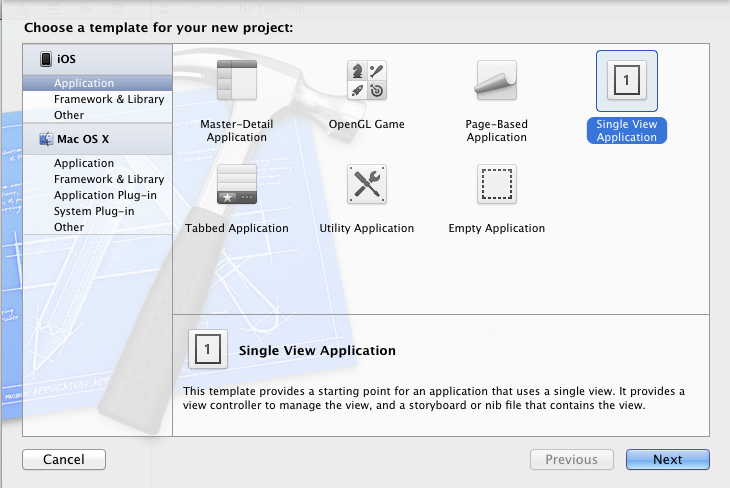
第一步:新建一个单视图(single view)的工程,
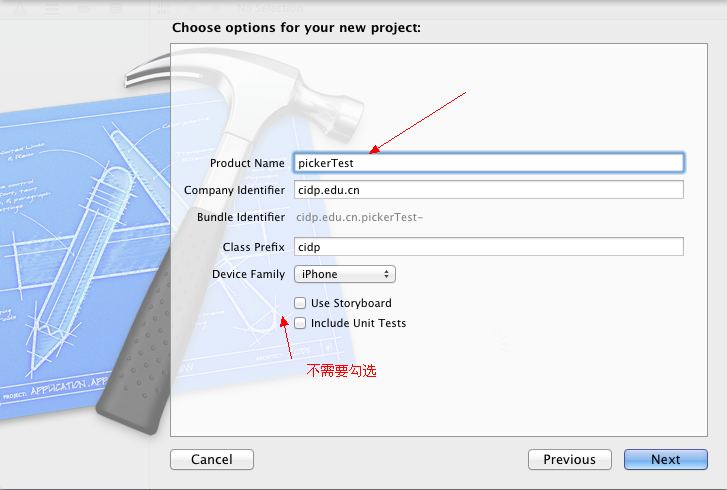
命名为pickerTest,不要勾选下面两个选项,第一个是新版本里面的,第二个是单元测试,现在用不着。
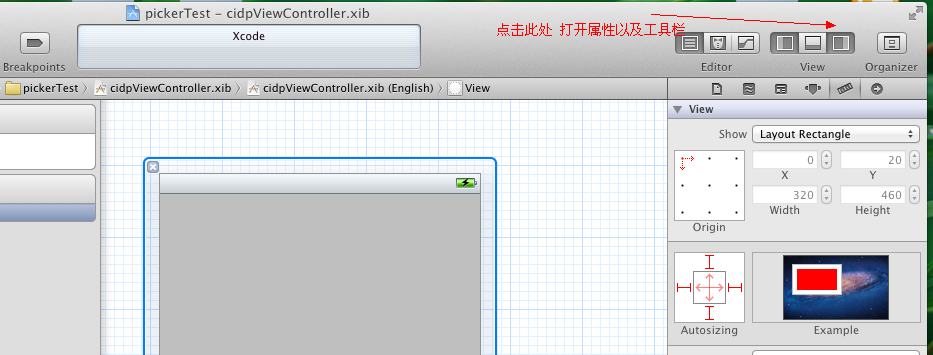
点击next ->creat之后,打开工具栏:
在下面的控件工具栏中往视图上拖放一个Picker View控件,一个UIButton控件,一个UILable控件,(所有在前端可以看得见的控件都继承自UIView)
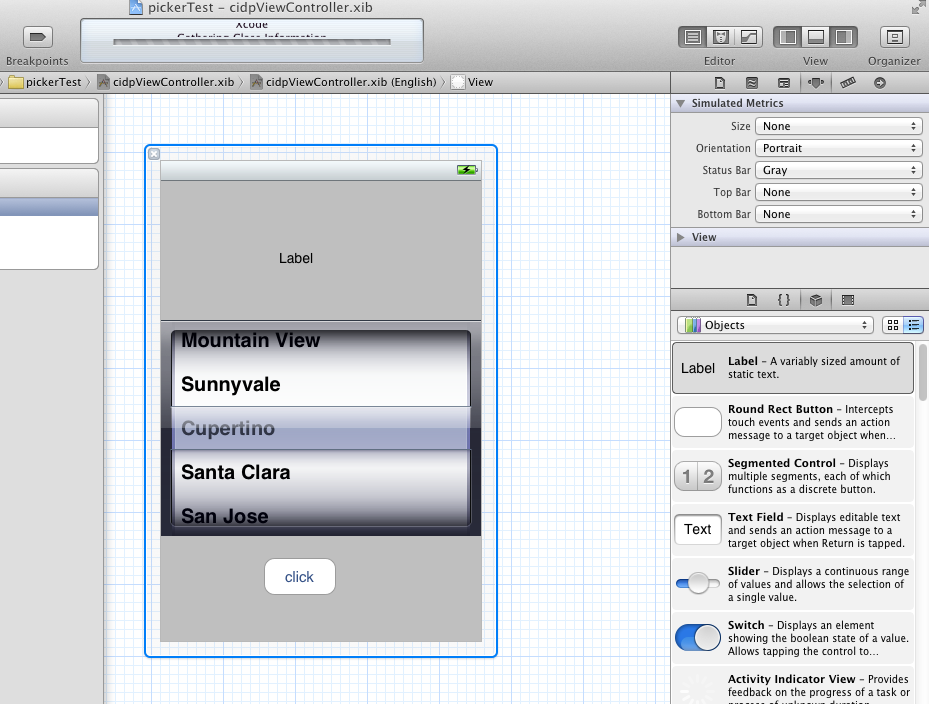
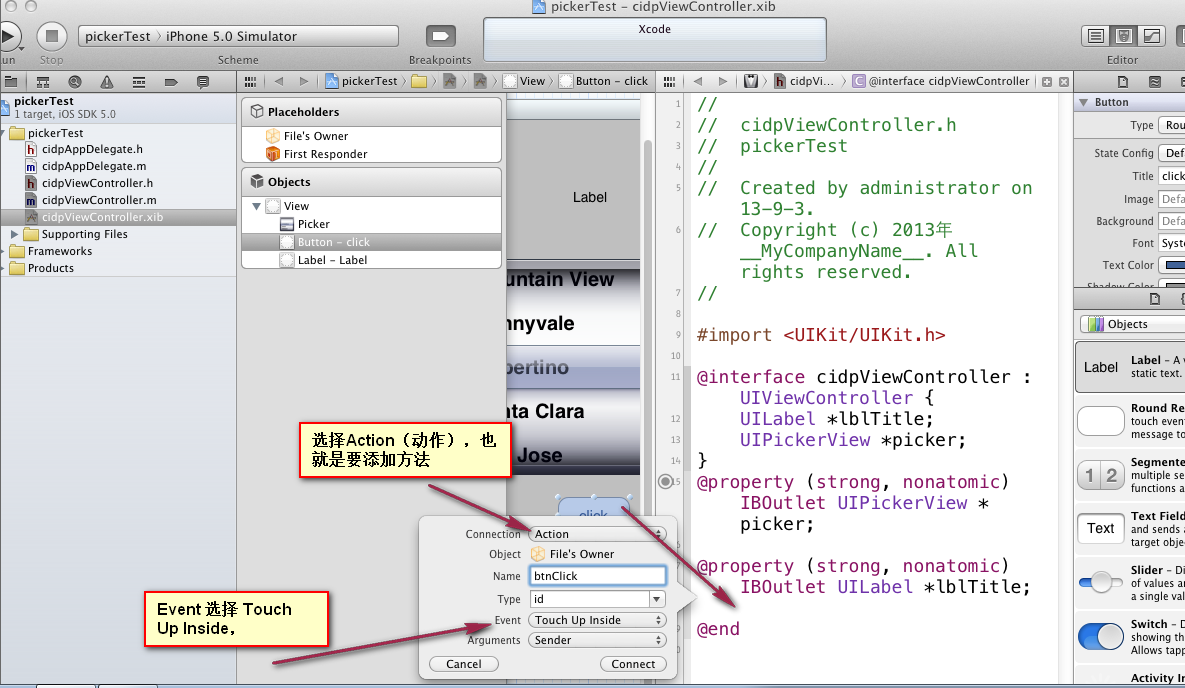
修改UIButton的title属性,设置为click 然后点击分栏按钮,为控件连线(这种方式相对于手动去写,要快速很多)。

依次为UILable 和 Picker View 控件添加插座变量,并且为UIButton添加Action
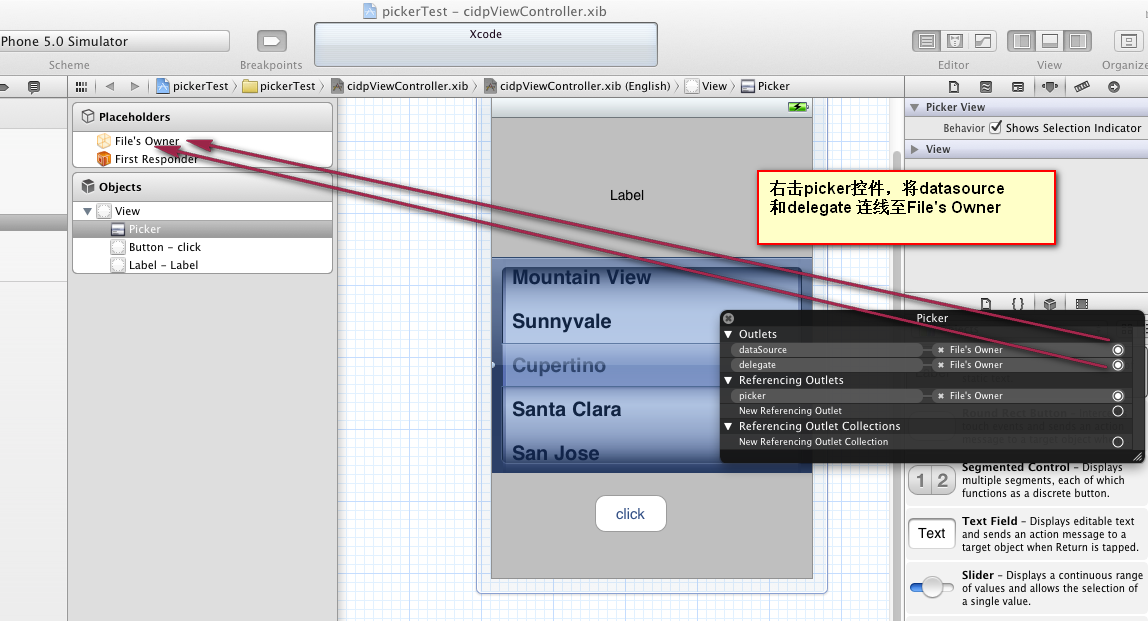
右击picker控件,将 Datesource和delegate连线至File's Owner, 设置它的数据源和代理。
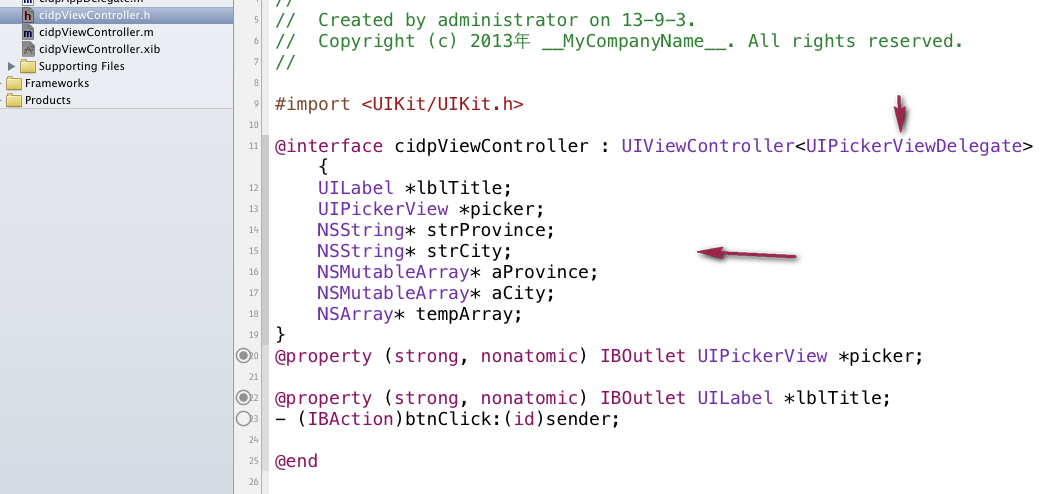
在 cidpViewController.h文件中添加几个变量和遵循 UIPickerViewDelegate 协议,这样就可以用UIPickerViewDelegate里面的几个方法了 。
@interface cidpViewController : UIViewController<UIPickerViewDelegate>
#import <UIKit/UIKit.h>

@interface cidpViewController : UIViewController<UIPickerViewDelegate> {

    UILabel *lblTitle;

    UIPickerView *picker;

    NSString* strProvince;

    NSString* strCity;

    NSMutableArray* aProvince;

    NSMutableArray* aCity;

    NSArray* tempArray;

}

@property (strong, nonatomic) IBOutlet UIPickerView *picker;

@property (strong, nonatomic) IBOutlet UILabel *lblTitle;

- (IBAction)btnClick:(id)sender;

@end
#import "cidpViewController.h"

@implementation cidpViewController

@synthesize picker;

@synthesize lblTitle;

- (void)didReceiveMemoryWarning

{

    [super didReceiveMemoryWarning];

    // Release any cached data, images, etc that aren't in use.

}

#pragma mark - View lifecycle

- (void)viewDidLoad

{

    [super viewDidLoad];

    //初始哈5个省份

    aProvince = [[NSMutableArray alloc] initWithObjects:@"北京",@"甘肃",@"山西",@"湖北",@"广州", nil];

    //初始化5个数组 ,分别初始化为5个省的城市

    NSArray* array1 = [NSArray arrayWithObjects:@"海淀",@"昌平",@"朝阳",@"西城",@"丰台", nil];

    NSArray* array2 = [NSArray arrayWithObjects:@"兰州",@"白银",@"张掖",@"陇西",@"天水", nil];

    NSArray* array3 = [NSArray arrayWithObjects:@"太原",@"大同",@"运城",@"晋城",@"五台山", nil];

    NSArray* array4 = [NSArray arrayWithObjects:@"武汉",@"荆州",@"襄阳",@"赣州", nil];

    NSArray* array5 = [NSArray arrayWithObjects:@"广州",@"佛山",@"尖沙咀",@"中山", nil];

    aCity = [[NSMutableArray alloc] initWithObjects:array1,array2,array3,array4,array5, nil];

    //tempArray 用来初始化第二个 ,并且引用一次,避免提前释放,内存出错

    tempArray = [array1 retain];

    // 用来第一次显示UIlable,负责的话就会显示 null,null

    strProvince = [aProvince objectAtIndex:];

    strCity = [tempArray objectAtIndex:];

    [aProvince release];

    [aCity release];

}

-(NSInteger)numberOfComponentsInPickerView:(UIPickerView*)pickerView{

    //返回2 表示将有两个component(滚轮)

    return ;

}

-(NSInteger)pickerView:(UIPickerView*)pivkerView numberOfRowsInComponent:(NSInteger)component{

    if(component == ){

        // 返回省份数组的长度

        return [aProvince count];

    }else{

        //返回省份对应城市数组的长度。

        [tempArray count];

}

- (NSString *)pickerView:(UIPickerView *)pickerView titleForRow:(NSInteger)row forComponent:(NSInteger)component{

        if(component == ){

            //返回对应row 的数组元素。

            return [aProvince objectAtIndex:row];

        }else{

            return [tempArray objectAtIndex:row];

        }

}

- (void)pickerView:(UIPickerView *)pickerView didSelectRow:(NSInteger)row inComponent:(NSInteger)component{

    if(component == ){

        //返回省份对应的城市数组,

        tempArray = [aCity objectAtIndex:row]

        [picker selectRow: inComponent: animated:YES];

        [picker reloadComponent:];

        strProvience = [aProvince objectAtIndex:row];

        strCity = [tempArray objectAtIndex:];

    }else{

        //城市滚轮滚动时,strCity也随着改变。

       strCity =  [tempArray objectAtIndex:];

    }

    lblTitle.text = [[NSString alloc] initWithFormat:@"%@,%@",strProvince,strCity,nil];

}

- (void)viewDidUnload

{

    [self setLblTitle:nil];

    [self setPicker:nil];

    [super viewDidUnload];

}

- (void)viewWillAppear:(BOOL)animated

{

    [super viewWillAppear:animated];

}

- (void)viewDidAppear:(BOOL)animated

{

    [super viewDidAppear:animated];

}

- (void)viewWillDisappear:(BOOL)animated

{

    [super viewWillDisappear:animated];

}

- (void)viewDidDisappear:(BOOL)animated

{

    [super viewDidDisappear:animated];

}

- (BOOL)shouldAutorotateToInterfaceOrientation:(UIInterfaceOrientation)interfaceOrientation

{

    // Return YES for supported orientations

    return (interfaceOrientation != UIInterfaceOrientationPortraitUpsideDown);

}

- (IBAction)btnClick:(id)sender {

    lblTitle.text = [[NSString alloc] initWithFormat:@"%@,%@",strProvince,strCity,nil];

}

-(void)dealloc{

    [aProvince release];

    [aCity release];

    [lblTitle release];

    [strCity release];

    [strProvince release];

    [picker release];

    [super  dealloc];

}

@end
@protocol UIPickerViewDataSource<NSObject>

@required

// returns the number of 'columns' to display.

- (NSInteger)numberOfComponentsInPickerView:(UIPickerView *)pickerView;

// returns the # of rows in each component..

- (NSInteger)pickerView:(UIPickerView *)pickerView numberOfRowsInComponent:(NSInteger)component;

@end
UIPickerViewDelegate协议中的五个方法,非必须实现,
@protocol UIPickerViewDelegate<NSObject>

@optional

// returns width of column and height of row for each component.

- (CGFloat)pickerView:(UIPickerView *)pickerView widthForComponent:(NSInteger)component;

- (CGFloat)pickerView:(UIPickerView *)pickerView rowHeightForComponent:(NSInteger)component;

// these methods return either a plain UIString, or a view (e.g UILabel) to display the row for the component.

// for the view versions, we cache any hidden and thus unused views and pass them back for reuse.

// If you return back a different object, the old one will be released. the view will be centered in the row rect

- (NSString *)pickerView:(UIPickerView *)pickerView titleForRow:(NSInteger)row forComponent:(NSInteger)component;

- (UIView *)pickerView:(UIPickerView *)pickerView viewForRow:(NSInteger)row forComponent:(NSInteger)component reusingView:(UIView *)view;

- (void)pickerView:(UIPickerView *)pickerView didSelectRow:(NSInteger)row inComponent:(NSInteger)component;

@end
Objective-C ,ios,iphone开发基础:picker控件详解与使用,(实现省市的二级联动)的更多相关文章
- picker控件详解与使用,(实现省市的二级联动)
picker控件详解与使用,(实现省市的二级联动) 第一步:新建一个单视图(single view)的工程, 命名为pickerTest,不要勾选下面两个选项,第一个是新版本里面的,第二个是单元测试, ...
- Android开发:文本控件详解——TextView(一)基本属性
一.简单实例: 新建的Android项目初始自带的Hello World!其实就是一个TextView. 在activity_main.xml中可以新建TextView,从左侧组件里拖拽到右侧预览界面 ...
- Android开发:文本控件详解——TextView(二)文字跑马灯效果实现
一.需要使用的属性: 1.android:ellipsize 作用:若文字过长,控制该控件如何显示. 对于同样的文字“Android开发:文本控件详解——TextView(二)文字跑马灯效果实现”,不 ...
- Android开发:文本控件详解——EditText(一)基本属性
一.简单实例: EditText输入的文字样式部分的属性,基本都是和TextView中的属性一样. 除此之外,EditText还有自己独有的属性. 二.基本属性: hint 输入框显示的提示文本 ...
- Android开发:文本控件详解——RadioButton和CheckBox(一)基本属性
一.RadioButton和RadioGroup: RadioButton是单个的圆形单选框,而RadioGroup是可以容纳多个RadioButton存在的容器,因此RadioButton和Radi ...
- IOS—UITextFiled控件详解
IOS—UITextFiled控件详解 //初始化textfield并设置位置及大小 UITextField *text = [[UITextField alloc]initWithFrame:CGR ...
- Spinner控件详解
Spinner控件详解 效果图 修改Spinner样式 在介绍之前,先看一下系统原生的样式 6.x & 5.x系统样式 4.x系统样式 官方文档 XML属性 方法 描述 android:dro ...
- Switch控件详解
Switch控件详解 原生效果 5.x 4.x 布局 <Switch android:id="@+id/setting_switch" android:layout_widt ...
- ToolBar控件详解
ToolBar控件详解 在Activity中添加ToolBar 1.添加库 dependencies { ... compile "com.android.support:appcompat ...
随机推荐
- Microsoft TFS 如何显示在Windows 的上下文菜单中
How to showing in Windows Explorer context for TFS I am not sure if this would help or you are willi ...
- Java多线程编程之同步器
同步器 为每种特定的同步问题提供了解决方案 Semaphore Semaphore[信号标:旗语],通过计数器控制对共享资源的访问. 测试类: package concurrent; import c ...
- 修改Map中确定key对应的value问题
今天在码代码的时候出现一个没有预料的问题: 先看下面的代码: public static void main(String[] args) { String[] files=new String[]{ ...
- JDBC学习笔记(4)——PreparedStatement的使用
PreparedStatement public interface PreparedStatement extends Statement;可以看到PreparedStatement是Stateme ...
- javascript函数作用域和提前声明
一些语言如C.java都有块级作用域,即花括号内的每一段代码都具有各自的作用域,而且变量在声明它们的代码段之外是不可见的,但是javascript没有块级作用域.javascript使用函数作用域,即 ...
- AutoCAD.NET二次开发:创建自定义菜单(COM)
当我们要在CAD中创建自定菜单时,可以引用COM组件来实现. 下面是实现方式: 1.新建类库项目,并引用CAD目录(我这里用的是CAD2008)下的acdbmgd.dll.acmgd.dll,并将引用 ...
- 百度地图 >> 自定义控件
前言 百度地图API中预定义的UI控件,比如NavigationControl平移缩放控件,CopyrightControl版权控件,MapTypeControl地图类型控件....,这些都继承自抽象 ...
- Java:浅谈InputStream的close方法
原则:最好在任何时候使用InputStream或者OutputStream的时候,在finally中调用close()方法,显式关闭. 一个典型的示例 InputStream in = null; t ...
- 最小较小codeforces 2B The least round way
查了好多资料,发现还是不全,干脆自己整理吧,至少保证在我的做法正确的,以免误导读者,也是给自己做个记载吧! 求从左上角到右下角所经过的数字之积末端所含0最小的个数 终究的积可以当作A*2^x*5^y, ...
- C# 启动外部程序的几种方法
. 启动外部程序,不等待其退出. . 启动外部程序,等待其退出. . 启动外部程序,无限等待其退出. . 启动外部程序,通过事件监视其退出. // using System.Diagnostics; ...