
学习EF之CodeFirst一
最近将花点时间学习EF相关知识,通过文章来进行一个完整的学习,Code First是由先有代码后生成数据库;将通过一实例来进行学习;我们简单分为三层,其中DataLibrary为EF上下文处理层,ModelLib为实体层,而MainApplication为主程序层
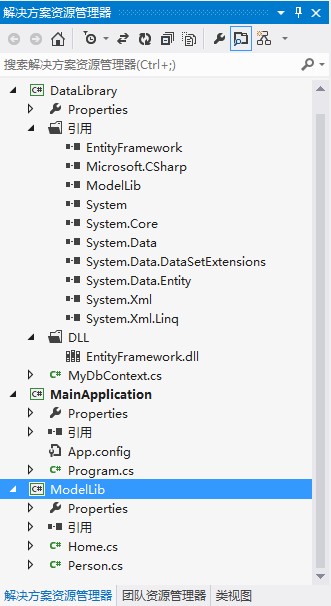
注意:DataLibrary层、MainApplication层要引用System.Data.Entity和EntityFramework.dll两个,还有一个就是ModelLib层,主程序还要引用DataLibrary层
1:实体层ModelLib两个实体:Home实体,其中一个Home里面有多Person;
using System.Linq;

using System.Text;

namespace ModelLib

{

    public class Home

    {

        public int ID { get; set; }

        public string Address { get; set; }

        public List<Person> PersonList { get; set; }

    }

}
Person实体:
using System.Linq;

using System.Text;

namespace ModelLib

{

    public class Person

    {

        public int ID { get; set; }

        public string Name { set; get; }

        public string PassWord { get; set; }

        public int Age { get; set; }

    }

}
2:接下EF上下文层,我们通过继承自DbContext,它是在EntityFramework.dll里面的,所以要对它引用才会出现的;基中base("name=MyTestDb")就是配置文件里连接数据库的名称,其实也可以不写的,因为默认就是找配置文件里name和本类名称一致的数据库连接串,它生成的数据库名称就为是:MyDbContextFile;当然也可以像下面我们这种特别指定的name;
using System.Data.Entity;

using ModelLib;

namespace DataLibrary

{

    public class MyDbContext : DbContext

    {

        public MyDbContext()

            : base("name=MyTestDb")

        {

        }

        public DbSet<Person> Person { get; set; }

        public DbSet<Home> Home { get; set; }

    }

}
3:主程序包括配置跟代码两部分;app.config配置:
<?xml version="1.0" encoding="utf-8" ?>

<configuration>

  <connectionStrings>

    <add name="MyTestDb" providerName="System.Data.SqlClient" connectionString="Server=.;Database=TestDb;user=sa;pwd=admin"/>

  </connectionStrings>

</configuration>
代码如下:
using ModelLib;

using DataLibrary;

using System.Data.Entity;

namespace MainApplication

{

    class Program

    {

        static void Main(string[] args)

        {

            Database.SetInitializer(new DropCreateDatabaseIfModelChanges<MyDbContext>());

            InsertDbInfo();

            Console.WriteLine("插入成功");

        }

        private static void InsertDbInfo()

        {

            List<Person> list=new List<Person>(){

                new Person(){ ID=, Name="Wujy", Age=, PassWord=""},

                new Person(){ID=, Name="Zyb", Age=, PassWord=""},

                new Person(){ID=, Name="Xim", Age=, PassWord=""}

            };

            var HomeModel = new Home()

            {

                ID = ,

                Address = "厦门市思明区",

                PersonList = list

            };

            using (var context = new MyDbContext())

            {

                context.Home.Add(HomeModel);

                context.SaveChanges();

            }

        }

    }

}
其中代码:Database.SetInitializer(new DropCreateDatabaseIfModelChanges<MyDbContext>());是因为后期我们肯定不停的要修改Model里的实体,所以加这句代码如果实体类有变化,那么重新生成一下数据库,使用这个方法在System.Data.Entity命名空间里
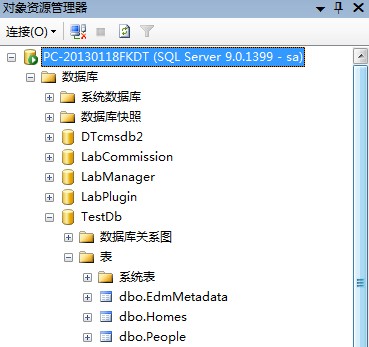
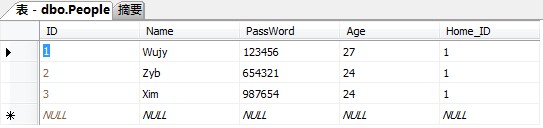
4:查看数据库生成的效果:
 |
 |
 |
 |
注意:表EdmMetadata
EF并不需要EdmMetadata表在你的数据库中。这些表只是为了检测模型类的变化。如果你明白在干什么,你可以随意的删除EF中的EdmMetadata表。一旦你删除EdmMetadata表,你(或者你的数据库管理员)将负责手工同步数据库结构和模型类结构。你可以手工调节保持模型和数据库之间的映射同步。
Entity Framework Code First中映射习惯。
1. 数据库映射:Code First 默认会在本地的SQL Expression数据库中建立一个和DbContext的子类的全名相同的数据库,全名指的是命名空间加上类名。当然后边会介绍怎么进行配置。
2.表映射:Code First 默认会按照类型名复数建立数据表,比如说ProductCatalog类对应的表名就叫ProductCatalogs.后边会介绍如何改变默认的表名。
3.列映射:Code First 默认会按照类中的属性名建立column,它还有默认的数据类型映射习惯,int会映射为interger,string会映射为nvarchar(max),decimal会映射为decimal(18,2)。后边会介绍如何更改column的名称,类型以及其他特性。
4.主键映射:Code First 默认会在类的属性中需找名字为Id或类型名称+Id的int类型的属性作为主键,并且是自增字段。这些也是可以改的。
学习EF之CodeFirst一的更多相关文章
- 学习EF之CodeFirst二(数据库对应映射)
在上一篇文章我们简单通过一个实例完成对CodeFirst的理解,我们通过实体生成数据库里的表和字段,虽然有一些默认的配置生成规定,但其实我们可以能过对实体进一步控制从而对生成的表字段进行更加符合我们要 ...
- EF架构~codeFirst从初始化到数据库迁移
一些介绍 CodeFirst是EntityFrameworks的一种开发模式,即代码优先,它以业务代码为主,通过代码来生成数据库,并且加上migration的强大数据表比对功能来生成数据库版本,让程序 ...
- 21.翻译系列:Entity Framework 6 Power Tools【EF 6 Code-First系列】
原文链接:https://www.entityframeworktutorial.net/code-first/entity-framework-power-tools.aspx 大家好,这里就是EF ...
- 20.2.翻译系列:EF 6中基于代码的数据库迁移技术【EF 6 Code-First系列】
原文链接:https://www.entityframeworktutorial.net/code-first/code-based-migration-in-code-first.aspx EF 6 ...
- 20.翻译系列:Code-First中的数据库迁移技术【EF 6 Code-First系列】
原文链接:https://www.entityframeworktutorial.net/code-first/migration-in-code-first.aspx EF 6 Code-First ...
- 19.翻译系列:EF 6中定义自定义的约定【EF 6 Code-First约定】
原文链接:https://www.entityframeworktutorial.net/entityframework6/custom-conventions-codefirst.aspx EF 6 ...
- 14.翻译系列:从已经存在的数据库中生成上下文类和实体类【EF 6 Code-First系列】
原文链接:https://www.entityframeworktutorial.net/code-first/code-first-from-existing-database.aspx EF 6 ...
- 13.翻译系列:Code-First方式配置多对多关系【EF 6 Code-First系列】
原文链接:https://www.entityframeworktutorial.net/code-first/configure-many-to-many-relationship-in-code- ...
- 11.翻译系列:在EF 6中配置一对零或者一对一的关系【EF 6 Code-First系列】
原文链接:https://www.entityframeworktutorial.net/code-first/configure-one-to-one-relationship-in-code-fi ...
随机推荐
- 设计模式-迭代器模式(Iterator Pattern)
本文由@呆代待殆原创,转载请注明出处:http://www.cnblogs.com/coffeeSS/ 迭代器模式简介 迭代器相信大部分人都不陌生,java/c++等很多编程语言的容器类都支持迭代器操 ...
- css-移动&缩放元素
transform 属性向元素应用 2D 或 3D 转换.该属性允许我们对元素进行旋转.缩放.移动或倾斜. 用法:object.style.transform="rotate(7deg)&q ...
- [Luogu1979][NOIP2013]华容道(BFS+SPFA)
考虑从起点到终点的过程,一定是先将空格子移到指定格子旁边,和指定格子交换,再移到下一个指定格子要到的地方,再交换,如此反复. 于是问题分为两个部分: 1.给定两个曼哈顿距离为2的格子求最短路,BFS即 ...
- 【LIS】【递推】Gym - 101246H - ``North-East''
x坐标排序,y坐标当权值,同一个x坐标的,y从大到小排. 求f(i)表示以i结尾的LIS以后,从后向前枚举,不断更新一个max数组,max(i)代表最长上升子序列为i时,当前的 结尾的最大值是多少. ...
- 使用redis时出现java.util.ArrayList cannot be cast to java.lang.Long
java.lang.ClassCastException: java.util.ArrayList cannot be cast to java.lang.Long at redis.clients. ...
- mvn在线仓库搜索
使用Maven进行开发的时候,比较常见的一个问题就是如何寻找我要的依赖,比如说,我想要使用activeMQ,可是我不知道groupId,artifactId,和合适的version.怎么办呢?本文介绍 ...
- [典型漏洞分享]上传导致的应用层DOS攻击
YS 视频封面设置功能可上传大量图片,可进行资源消耗型DOS攻击[中] 问题描述: YS允许用户为设备设置封面,后台在处理时允许用户间接可控上传图片的二级路径以及直接可控保存图片的文 ...
- .Net 2014 Connect() 相关文章合集
微软在11月中旬的Connect()研讨会中公布了一系列 2015年的发展规划,今天在MSDN Blog上看到了一篇比较全的相关文章合集,这里转录一下,感兴趣的朋友可以看看. Announcement ...
- HDU 4632 Palindrome subsequence (2013多校4 1001 DP)
Palindrome subsequence Time Limit: 2000/1000 MS (Java/Others) Memory Limit: 131072/65535 K (Java/ ...
- es6数组去重复
var arr=[1,1,2,3,5,7,7,7] arr=Array.from(new Set(arr))