
Layer Trees Reflect Different Aspects of the Animation State
https://developer.apple.com/library/content/documentation/Cocoa/Conceptual/CoreAnimation_guide/CoreAnimationBasics/CoreAnimationBasics.html#//apple_ref/doc/uid/TP40004514-CH2-SW3
Layer Trees Reflect Different Aspects of the Animation State
An app using Core Animation has three sets of layer objects. Each set of layer objects has a different role in making the content of your app appear onscreen:
Objects in the model layer tree (or simply “layer tree”) are the ones your app interacts with the most. The objects in this tree are the model objects that store the target values for any animations. Whenever you change the property of a layer, you use one of these objects.
Objects in the presentation tree contain the in-flight values for any running animations. Whereas the layer tree objects contain the target values for an animation, the objects in the presentation tree reflect the current values as they appear onscreen. You should never modify the objects in this tree. Instead, you use these objects to read current animation values, perhaps to create a new animation starting at those values.
Objects in the render tree perform the actual animations and are private to Core Animation.
Each set of layer objects is organized into a hierarchical structure like the views in your app. In fact, for an app that enables layers for all of its views, the initial structure of each tree matches the structure of the view hierarchy exactly. However, an app can add additional layer objects—that is, layers not associated with a view—into the layer hierarchy as needed. You might do this in situations to optimize your app’s performance for content that does not require all the overhead of a view. Figure 1-9 shows the breakdown of layers found in a simple iOS app. The window in the example contains a content view, which itself contains a button view and two standalone layer objects. Each view has a corresponding layer object that forms part of the layer hierarchy.
Figure 1-9 Layers associated with a window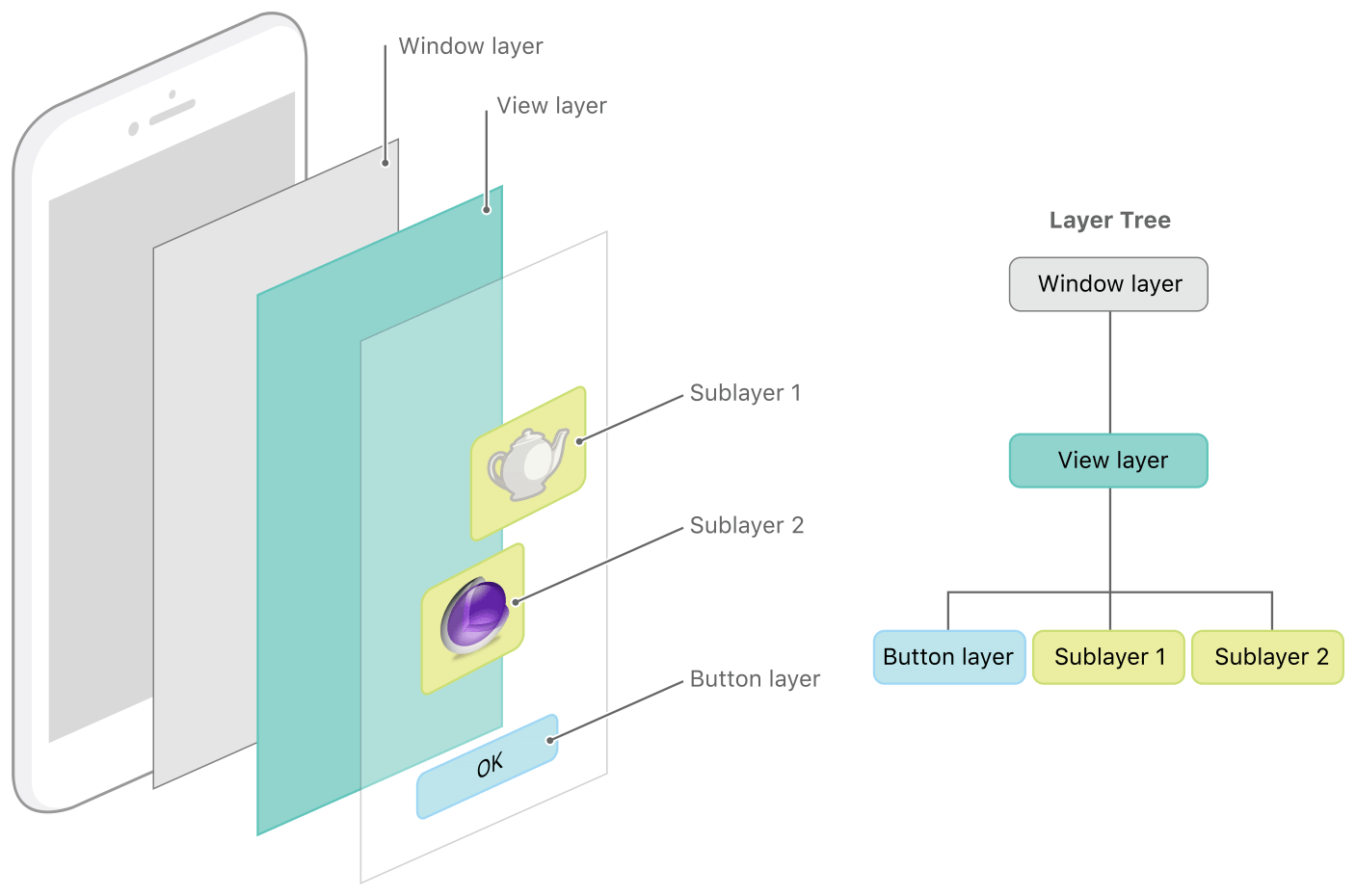
For every object in the layer tree, there is a matching object in the presentation and render trees, as shown in Figure 1-10. As was previously mentioned, apps primarily work with objects in the layer tree but may at times access objects in the presentation tree. Specifically, accessing the presentationLayerproperty of an object in the layer tree returns the corresponding object in the presentation tree. You might want to access that object to read the current value of a property that is in the middle of an animation.
Figure 1-10 The layer trees for a window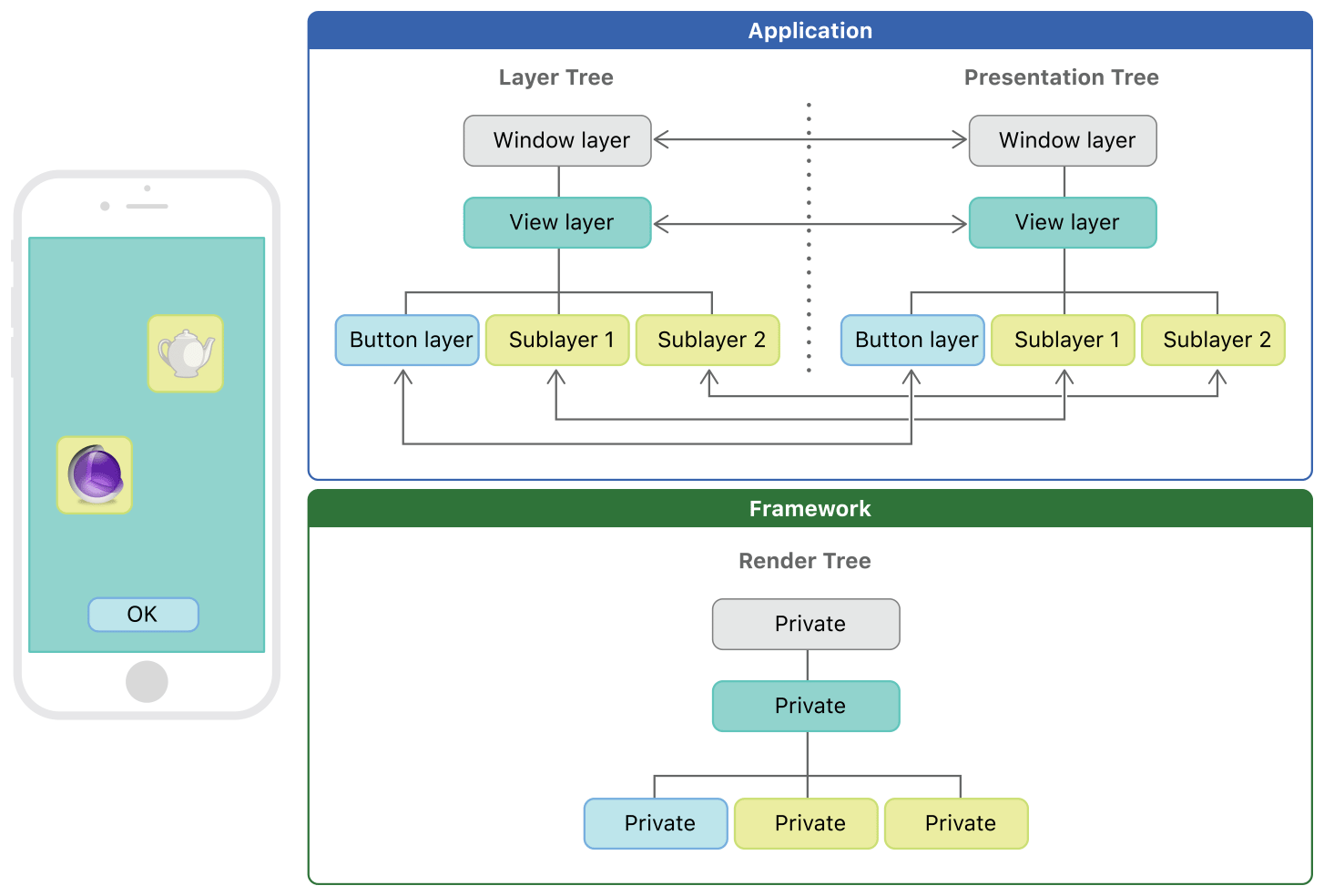
Important: You should access objects in the presentation tree only while an animation is in flight. While an animation is in progress, the presentation tree contains the layer values as they appear onscreen at that instant. This behavior differs from the layer tree, which always reflects the last value set by your code and is equivalent to the final state of the animation.
Layer Trees Reflect Different Aspects of the Animation State的更多相关文章
- Unity3D之Mecanim动画系统学习笔记(四):Animation State
动画的设置 我们先看看Animation Clip的一些设置: Loop time:动画是否循环播放. 下面出现了3个大致一样的选项: Root Transform Rotation:表示为播放动画的 ...
- 理解以太坊的Layer 2扩容解决方案:状态通道(State Channels)、Plasma 和 Truebit
-宾夕法尼亚州的尼科尔森大桥建设照片(图源).罗马人的工程原理扩展至新的应用 对于以太坊来说,2018年是专注底层架构之年.今年很多早期参与者会测试网络极限,并且重新关注以太坊的扩容技术. 以太坊仍然 ...
- iOS CALayer动画中使用的3个tree
在网上经常看到关于layer的tree的描述,不太理解,今天找到了官方文档,原文在Core Animation Programming Guide 中. Layer Trees Reflect Dif ...
- iOS动画的要素:CALayer维护数据模型和图片,沟通了CPU和GPU--视图中与图形绘制相关的功能
1)iOS动画的模型:三层树模型: CALayer维护数据模型和图片,沟通了CPU和GPU:数据模型和图片本尊有CPU生成和维护:图片动画由GPU合成和呈现: https://developer.ap ...
- Core Animation 文档翻译 (第二篇)
Core Animation 文档翻译 (第二篇) 核心动画基础要素 核心动画为我们APP内Views动画和其他可视化元素动画提供了综合性的实现体系.核心动画不是我们APP内Views的替代品,相反, ...
- Framework for Graphics Animation and Compositing Operations
FIELD OF THE DISCLOSURE The subject matter of the present disclosure relates to a framework for hand ...
- 谈谈iOS Animation
零.前言 这里没有太多的代码细节,只是探索iOS动画的基本概念,以及其抽象模型,数学基础等.我们学习一个知识的时候一般有两个部分,抽象部分和形象部分,抽象好比语言的语法,是规则,形象好比具体的句子,可 ...
- iOS Core Animation
1.什么是Core Animation? 它是一套包含图形绘制,投影,动画的OC类集合.它就是一个framework.通过CoreAnimation提供的接口,你可以方便完成自己所想要的动画. 2.我 ...
- core animation (转)
iOS Core Animation 简明系列教程 看到无数的CA教程,都非常的难懂,各种事务各种图层关系看的人头大.自己就想用通俗的语言翻译给大家听,尽可能准确表达,如果哪里有问题,请您指出我会尽快 ...
随机推荐
- ASP.NET Core项目中新增和删除的内容
最新一版的.NET几经改名,最终得到了.NET Core这个高大上的名称,相应的ASP.NET MVC也跟着提供了ASP.NET Core MVC版本. 在.NET Core没有稳定名称时,叫做MVC ...
- sb追加网页(在追加中添加C#代码)
“+代码+”
- C#语言-06.XML
a. XML:称为可扩展标记性语言,它主要用于描述数据 i. 特点: . XML 中用于描述数据的各个节点可以自由扩展 . XML 文件中的节点区分大小写 . XML 中的每对标记通常被称为节点,它们 ...
- 登陆oracle数据库时提示“ORA-28002: 7 天之后口令将过期” 或提示 密码过期
登陆oracle数据库时提示“ORA-28002: 7 天之后口令将过期” 或提示 密码过期. [原因/触发因素] 确定是由于oracle11g中默认在default概要文件中设置了“PASSWORD ...
- [错误记录_C] 还未给指针变量正确赋值的情况下,就使用它的值
错误的代码: 错误的结果: 错误原因分析: 在使用(1) 将pB,pC的值赋给pA的lchild和rchild时: 还未给指针变量pB和pC赋值,现在pB和pC中存的是个垃圾值 Note: (2)- ...
- springboot1.5.10兼容高版本6.1.1elasticsearch
1.引入依赖 <dependency> <groupId>org.elasticsearch</groupId> <artifactId>elastic ...
- side Effect
副作用 side Effect 副作用是在计算结果的过程中,系统状态的一种变化,或者与外部世界进行的可观察的交互. 副作用可能包含,但不限于: 1.更改文件系统 2.往数据库里插入数据 3.发送一个h ...
- laravel验证码
登录验证码 1.首先,进入https://github.com/mewebstudio/captcha,根据captcha上的使用方法一步步来实现验证码的安装,因为是laravel5.7,所以选择了c ...
- apply()方法和call()方法
obj.func.call(obj1) //是将obj1看做obj,调用func方法,将第一个参数看做函数调用的对象,可以看做,将obj的方法给obj1使用 ECMAScript规范给所有 ...
- JS原型学习笔记
1.原型是函数对象的属性,它的初始值是一个空对象,这个prototype原型对象可以添加方法和属性. 2.构造器对象查找属性和方法时先查找构造器后查找原型. 3.若构造器中的属性和原型中的属性相同,构 ...