
iOS - Quartz 2D 下载进度按钮绘制
1、绘制下载进度按钮
具体实现代码见 GitHub 源码 QExtension
QProgressButton.h
	@interface QProgressButton : UIButton

	/// 进度值,范围 0 ~ 1

	@property (nonatomic, assign) CGFloat progress;

	/// 进度终止状态标题,一旦设置了此标题进度条就会停止

	@property (nonatomic, strong) NSString *stopTitle;

	/**

	 *  创建带进度条的按钮

	 *

	 *  @param frame        按钮的 frame 值

	 *  @param title        进按钮的标题

	 *  @param lineWidth    进度条的线宽,default is 2

	 *  @param lineColor    进度条线的颜色,default is greenColor

	 *  @param textColor    进度值的颜色,default is blackColor

	 *  @param backColor    按钮的背景颜色,default is clearColor

	 *  @param isRound      按钮是否显示为圆形,default is YES

	 *

	 *  @return 带进度条的按钮

	 */

	+ (instancetype)q_progressButtonWithFrame:(CGRect)frame

	                                    title:(NSString *)title

	                                lineWidth:(CGFloat)lineWidth

	                                lineColor:(nullable UIColor *)lineColor

	                                textColor:(nullable UIColor *)textColor

	                                backColor:(nullable UIColor *)backColor

	                                  isRound:(BOOL)isRound;

	@end
QProgressButton.m
	@interface QProgressButton ()

	/// 进度条的线宽

	@property (nonatomic, assign) CGFloat lineWidth;

	/// 进度条线的颜色

	@property (nonatomic, strong) UIColor *lineColor;

	/// 按钮的背景颜色

	@property (nonatomic, strong) UIColor *backColor;

	/// 按钮是否显示为圆形

	@property (nonatomic, assign, getter=isRound) BOOL round;

	@end

	@implementation QProgressButton

	/// 创建带进度条的按钮

	+ (instancetype)q_progressButtonWithFrame:(CGRect)frame

	                                    title:(NSString *)title

	                                lineWidth:(CGFloat)lineWidth

	                                lineColor:(nullable UIColor *)lineColor

	                                textColor:(nullable UIColor *)textColor

	                                backColor:(nullable UIColor *)backColor

	                                  isRound:(BOOL)isRound {

	    QProgressButton *progressButton = [[self alloc] init];

	    progressButton.lineWidth = lineWidth ? : 2;

	    progressButton.lineColor = lineColor ? : [UIColor colorWithRed:76/255.0 green:217/255.0 blue:100/255.0 alpha:1.0];

	    progressButton.backColor = backColor ? : [UIColor clearColor];

	    progressButton.round = isRound;

	    // 设置按钮的实际 frame

	    if (isRound) {

	        CGRect tmpFrame = frame;

	        tmpFrame.origin.y = frame.origin.y - (frame.size.width - frame.size.height) * 0.5;

	        tmpFrame.size.height = frame.size.width;

	        progressButton.frame = tmpFrame;

	    } else {

	        progressButton.frame = frame;

	    }

	    // 设置显示的标题和颜色

	    [progressButton setTitle:title forState:UIControlStateNormal];

	    [progressButton setTitleColor:(textColor ? : [UIColor blackColor]) forState:UIControlStateNormal];

	    return progressButton;

	}

	/// 绘制进度条

	- (void)drawRect:(CGRect)rect {

	    // 设置按钮圆角

	    self.layer.masksToBounds = YES;

	    self.layer.cornerRadius = rect.size.height * 0.5;

	    // 绘制按钮的背景颜色

	    UIBezierPath *path = [UIBezierPath bezierPathWithRect:rect];

	    [self.backColor set];

	    [path fill];

	    // 设置进度终止时显示的内容

	    if (self.stopTitle) {

	        // 设置下载完成后的标题

	        [self setTitle:self.stopTitle forState:UIControlStateNormal];

	        return;

	    }

	    if (self.progress <= 0) {

	        return;

	    }

	    // 清除按钮背景图片

	    [self setBackgroundImage:nil forState:UIControlStateNormal];

	    // 设置进度值

	    [self setTitle:[NSString stringWithFormat:@"%.2f%%", self.progress * 100] forState:UIControlStateNormal];

	    if (self.isRound) {

	        CGPoint center = CGPointMake(rect.size.height * 0.5, rect.size.height * 0.5);

	        CGFloat radius = (rect.size.height - self.lineWidth) * 0.5;

	        CGFloat startA = - M_PI_2;

	        CGFloat endA = startA + self.progress * 2 * M_PI;

	        // 绘制进度条背景

	        path = [UIBezierPath bezierPathWithArcCenter:center

	                                              radius:radius

	                                          startAngle:0

	                                            endAngle:2 * M_PI

	                                           clockwise:YES];

	        [[[UIColor lightGrayColor] colorWithAlphaComponent:0.5] set];

	        path.lineWidth = self.lineWidth;

	        [path stroke];

	        // 绘制进度条

	        path = [UIBezierPath bezierPathWithArcCenter:center

	                                              radius:radius

	                                          startAngle:startA

	                                            endAngle:endA

	                                           clockwise:YES];

	        path.lineWidth = self.lineWidth;

	        path.lineCapStyle = kCGLineCapRound;

	        [self.lineColor set];

	        [path stroke];

	    } else {

	        CGFloat w = self.progress * rect.size.width;

	        CGFloat h = rect.size.height;

	        // 绘制进度条背景

	        path = [UIBezierPath bezierPathWithRect:CGRectMake(0, 0, rect.size.width, rect.size.height)];

	        [[[UIColor lightGrayColor] colorWithAlphaComponent:0.5] set];

	        [path fill];

	        // 绘制进度条

	        path = [UIBezierPath bezierPathWithRect:CGRectMake(0, 0, w, h)];

	        [self.lineColor set];

	        [path fill];

	    }

	}

	/// 设置进度值

	- (void)setProgress:(CGFloat)progress {

	    _progress = progress;

	    [self setNeedsDisplay];

	}

	/// 设置进度终止状态标题

	- (void)setStopTitle:(NSString *)stopTitle {

	    _stopTitle = stopTitle;

	    [self setNeedsDisplay];

	}

	@end
ViewController.m
	// 创建进度按钮

	QProgressButton *progressButton = [QProgressButton q_progressButtonWithFrame:CGRectMake(100, 100, 100, 50)

	                                                                       title:@"开始下载"

	                                                                   lineWidth:10

	                                                                   lineColor:[UIColor blueColor]

	                                                                   textColor:[UIColor redColor]

	                                                                   backColor:[UIColor yellowColor]

	                                                                     isRound:YES];

	// 设置按钮点击事件

	[progressButton addTarget:self action:@selector(progressUpdate:) forControlEvents:UIControlEventTouchUpInside];

	// 将按钮添加到当前控件显示

	[self.view addSubview:progressButton];

	// 设置按钮的进度值

	self.progressButton.progress = progress;

	// 设置按钮的进度终止标题,一旦设置了此标题进度条就会停止

	self.progressButton.stopTitle = @"下载完成";
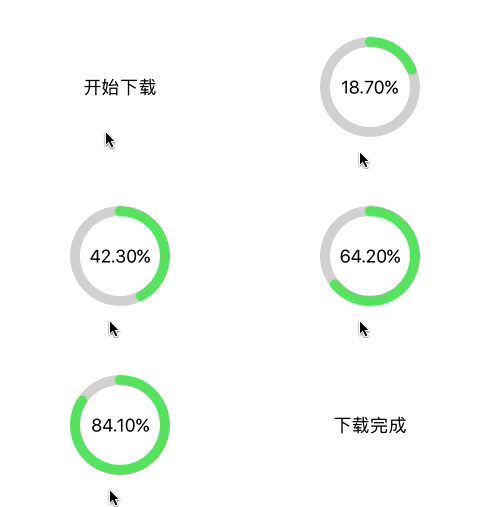
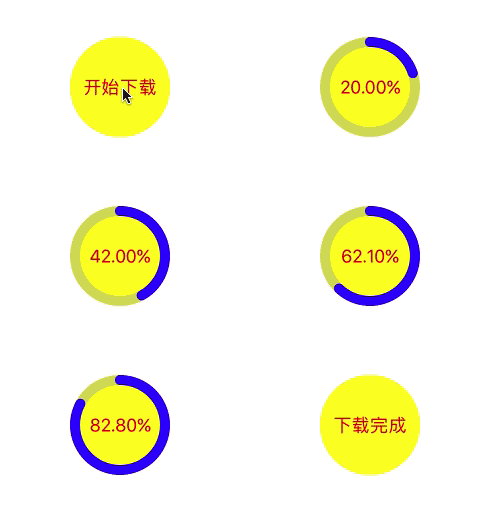
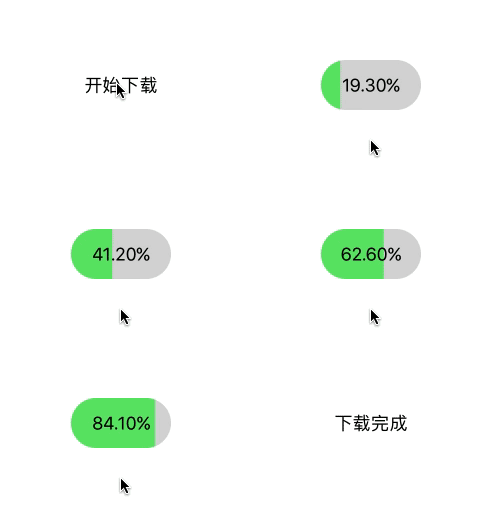
效果

iOS - Quartz 2D 下载进度按钮绘制的更多相关文章
- iOS - Quartz 2D 第三方框架 Charts 绘制图表
1.Charts 简介 使用第三方框架 Charts 绘制 iOS 图表.GitHub 源码 Charts Charts 是一款用于绘制图表的框架,可以绘制柱状图.折线图.K线图.饼状图等.Chart ...
- iOS - Quartz 2D 手势截屏绘制
1.绘制手势截屏 具体实现代码见 GitHub 源码 QExtension QTouchClipView.h @interface QTouchClipView : UIView /** * 创建手势 ...
- iOS - Quartz 2D 二维绘图
1.Quartz 2D 简介 Quartz 2D 属于 Core Graphics(所以大多数相关方法的都是以 CG 开头),是 iOS/Mac OSX 提供的在内核之上的强大的 2D 绘图引擎,并且 ...
- iOS - Quartz 2D 贝塞尔曲线
1.贝塞尔曲线 贝塞尔曲线(Bézier curve),又称贝兹曲线或贝济埃曲线,是应用于二维图形应用程序的数学曲线.一般的矢量图形软件通过它来精确画出曲线,贝兹曲线由线段与节点组成,节点是可拖动的支 ...
- iOS空心圆下载进度指示器控件
self.layer = [CAShapeLayer layer]; self.layer.frame = CGRectMake(, , , ); self.layer.position = self ...
- iOS - Quartz 2D 画板绘制
1.绘制画板 1.1 绘制简单画板 PaintBoardView.h @interface PaintBoardView : UIView @end PaintBoardView.m @interfa ...
- IOS Quartz 2D 学习(1)
IOS提供两种创建图形的途径: 1.OpenGL. 2.Quartz.Core Animation.UIKit图形支持. UIKit的图形系统 1.视图绘画周期: DrawRect方法,在任何时候,当 ...
- iOS开发——图层OC篇&Quartz 2D各种绘制实例
Quartz 2D各种绘制实例 首先说一下,本篇文章只是介绍怎么使用Quartz 2D绘制一些常用的图像效果,关于Quartz和其他相关技术请查看笔者之前写的完整版(Quartz 2D详解) 一:画线 ...
- iOS 2D绘图 (Quartz 2D) 概述
本篇博客原文地址:http://blog.csdn.net/hello_hwc?viewmode=list 由于自己的项目需要,从网络上下载了许多关于绘制图形的demo,只是用在自己的项目中,很多地方 ...
随机推荐
- python dns查询与DNS传输漏洞查询
前言: 昨天晚上在看DNS协议,然后想到了 DNS传输漏洞.便想写一个DNS查询与DNS传输漏洞查询 DNS传输漏洞介绍: DNS传输漏洞:若DNS服务器配置不当,可能导致匿名用户获取某个域的所有记录 ...
- create-react-app搭建的项目中添加bootstrap
react-bootstrap是一个非常受欢迎的针对react封装过的bootstrap,它本身不包含css,所以也是需要使用bootstrap原生库. 在create-react-app建的项目目录 ...
- 如何知道你的linux是什么时候安装的
在安装系统时,每个分区下都会有一个 lost+found,而且这个目录的创建时间是和该分区创建的时间一样的.所以如果想知道你的系统是什么时候安装的,只需要看这个目录的创建时间即可. 通常情况下,我们分 ...
- Python 判断闰年,判断日期是当前年的第几天
http://www.cnblogs.com/vamei/archive/2012/07/19/2600135.html Python小题目 针对快速教程 作业答案 写一个程序,判断2008年是否是闰 ...
- jersey2.26+spring5+jpa一步步搭建restful服务
前言 首先,为什么想选择Jersey做restful服务呢?我个人比较喜欢它的插件化设计,可以方便的注入自己的全局处理逻辑.再一个就是可以生成wadl描述文件,供查询服务方法.所以在学习spring的 ...
- aforge 学习-命名空间中文理解
序列 名称 介绍 1 Aforge AForge AForge名称空间的核心名称空间.微软网络框架,其中包含核心类所使用的其他框架的命名空间和类,可以独立用于各种用途. 2 AForge.Cont ...
- css的一些复习
css,全称Cascading Style Sheets,层叠样式表. css选择器是从右往左解析的,解析速度会比较快. 选择器 选择器权重 !important 优先级最高 元素属性 优先级高 相同 ...
- pep 8 规范的一些记录
一.pep8起源 龟叔创立Python的初衷里就有创立一个容易阅读的编程语言,所以亲自操刀写了pep8 代码规范,每个项目开始前都要有一个共识,就是自己的代码规范,pep8 就是一个很好的范本. 二. ...
- PAT1117. Eddington Number
思路:搞懂题意是关键–E满足有共有E天骑车的距离超过E米,求最大的E! 将数组排序,我们假设最大的E是e,e满足条件有e天骑车超过e米,并且e+1不满足有e+1天骑车超过e+1米.那么我们可以逆序统计 ...
- SpringBoot SpringSession redis 共享 SESSION
号称无缝整合httpsession 共享, 但注意如果存在第三方框架,例如SESSION并发控制,这个是需要自己重写session名单的. 关于redis session 共享 的session并发控 ...