
Elasticsearch-6.7.0系列(一)9200端口 .tar.gz版本centos7环境--下载安装运行
https://www.elastic.co/guide/index.html(推荐) ES官方英文原版文档,一般会更新到最新版本
https://www.elastic.co/cn/downloads/ ES下载地址
https://www.cnblogs.com/zhuwenjoyce/p/10632628.html 安装jdk1.8
下载 Elasticsearch6.7.0
cd /home/soft
wget https://artifacts.elastic.co/downloads/elasticsearch/elasticsearch-6.7.0.tar.gz 建议离线下载elasticsearch
tar -zxvf elasticsearch-6.7.0.tar.gz 解压
./bin/elasticsearch 尝试启动ES
备注: network.host: 0.0.0.0 如需远程连接ES,需修改elasticsearch.yml,把其中的network.host改成0.0.0.0
不能以root用户启动 can not run elasticsearch as root
useradd elastic 新建linux用户elastic
chown -R elastic:elastic elasticsearch-6.7.0 赋予elastic用户和组读写es目录权限
su elastic 从root用户切换到elastic用户
普通用户获取文件夹读写权限:
chmod  elasticsearch-6.7.             赋予elastic用户目录所有权权限

或者加sudo命令:sudo chmod -R  elasticsearch-6.7.

获得sudo命令使用权的方法  https://www.cnblogs.com/zox2011/archive/2013/05/28/3103824.html
cd elasticsearch-6.7.0/ 进入ES目录
./bin/elasticsearch 前台启动es,ctrl + c 终止。
./bin/elasticsearch -d 后台启动es,停止方法如下截图:

es启动和停止服务命令:
sudo systemctl daemon-reload

sudo systemctl enable elasticsearch.service

sudo systemctl start elasticsearch.service
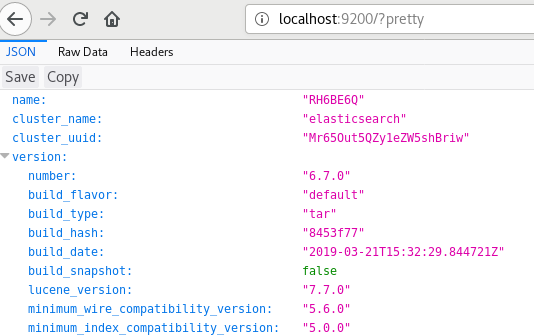
验证启动成功: http://localhost:9200/?pretty
有用的URL
| URL | |
| http://192.168.10.110:9200/ | 基本信息 |
| http://192.168.10.110:9200/_all/_search?pretty | 搜索引擎数据 |
| http://192.168.10.110:9200/_xpack/security/_authenticate?pretty | 权限信息 |
| http://192.168.10.110:9200/_license | 许可证信息 |
| http://192.168.10.110:9200/_xpack | xpack信息 |
| http://192.168.10.110:9200/_cluster/state?pretty | 集群信息 |
ES常见启动错误
ES安装目录/logs/elasticsearch.log可以查看启动日志。除了不能以root用户启动ES意外,还有3个常见启动错误:
ERROR: [3] bootstrap checks failed

[1]: max file descriptors [4096] for elasticsearch process is too low, increase to at least [65535]

[2]: max number of threads [3766] for user [elastic] is too low, increase to at least [4096]

[3]: max virtual memory areas vm.max_map_count [65530] is too low, increase to at least [262144]
[1][2]两个错误解决方法:
vim /etc/security/limits.conf
增加以下配置:
*                soft    nofile          65536

*                hard    nofile          65536

*                soft    nproc           4096

*                hard    nproc           4096
[3]解决方法:
vim /etc/sysctl.conf
vm.max_map_count=262144 增加这行配置
sysctl -p 重新生效配置文件sysctl.conf
cd ES安装目录
./bin/elasticsearch -d 后台启动,注意不要使用root用户启动。
浏览器打开验证:http://localhost:9200/_all/_search?pretty
Elasticsearch-6.7.0系列(一)9200端口 .tar.gz版本centos7环境--下载安装运行的更多相关文章
- 如何用elasticsearch构架亿级数据采集系统(第1集:非生产环境windows安装篇)
(一)做啥的? 基于Elasticsearch,可以为实现,大数据量(亿级)的实时统计查询的方案设计,提供底层数据框架. 本小节jacky会在非生产环境下,在 window 系统下,给大家分享着部分的 ...
- linux/centos elasticsearch 环境搭建 安装 运行 使用
环境搭建也是有些坑的存在,所以整理了一下搭建流程,安全无痛. ElasticSearch是一个开源的分布式搜索引擎,具备高可靠性,支持非常多的企业级搜索用例. 一.java 环境 直接apt安装火箭一 ...
- 3.0 zookeeper的集群介绍、搭建、环境、安装
zookeeper是本身是一种分布式协调服务(英文意思动物园园长因为Hadoop就是一个动物园,storm.hadoop.kafkaka.hbaser都是基于zookeeper开发的) 原理:Zook ...
- Win10环境下载安装MySQL Community 8.0.12
1.下载MySQL Community 8.0.12的免安装版,下载地址:https://dev.mysql.com/downloads/mysql/ 2.解压到D:\Program Files\My ...
- 阿里云服务器centos7环境下安装xampp后,mysql有进程,但是却没有监听3306端口
配置阿里云服务器centos7中xampp环境时出现了一种情况: 在centos中可以使用命令进入mysql 修改后也可以远程用phpmyadmin连接mysql 但是用navicat却无法连接 先修 ...
- 重要消息:MoviePy v2.0.0.dev1预发布版本已经可以下载安装使用
☞ ░ 前往老猿Python博文目录 ░ 刚刚得知,MoviePy v2.0.0.dev1版本已经预发布,据说解决了多语言支持及TextClip等一系列Bug,大家不妨升级使用.升级指令:pip in ...
- Elasticsearch-6.7.0系列-Joyce博客总目录
官方英文文档地址:https://www.elastic.co/guide/index.html Elasticsearch博客目录 Elasticsearch-6.7.0系列(一)9200端口 . ...
- Elasticsearch-6.7.0系列(二)ES集群安装与验证
准备3台centos7机器/虚拟机,每台都安装上elasticsearch6.7.0 ,安装过程参考我的另一篇博客<Elasticsearch-6.7.0系列(一)9200端口 .tar.gz版 ...
- Elasticsearch-6.7.0系列(五)5044端口 logstash安装
centos7环境 下载logstash wget https://artifacts.elastic.co/downloads/logstash/logstash-6.7.0.tar.gz ...
随机推荐
- 在Linux系统使用VMware安装虚拟机
首先到VMware官网上www.vmware.com下载相应的版本 我这边用的是 VMware-Workstation-Full-12.5.0-4352439.x86_64.bundle 上传到Lin ...
- Qt设置创建部分半透明,上面控件不透明
//头文件#pragma once #include <QWidget> #include "ui_widgetFullAD.h" class widgetFullAD ...
- php7-编译安装参数
./configure \--with-fpm-user=www \--with-fpm-group=www \--prefix=/usr/local/php7 \--with-config-file ...
- Html中video的属性和方法大全
<video>标签的属性 src :视频的属性 poster:视频封面,没有播放时显示的图片 preload:预加载 autoplay:自动播放 loop:循环播放 controls:浏览 ...
- mysql免安装版的下载与安装
下载 打开:https://www.mysql.com/downloads/ 1.点击该项:
- tensorflow 调参过程
1. optimizer = tf.train.GradientDescentOptimizer(0.1) 参数小,loss减少的慢:参数大,出现Nan问题 2. optimizer = tf.tra ...
- UML第二次作业:类在类图中的表示
类在类图中的表示 一.概览 1.plant UML语法学习小结 2.班级学生管理系统中的 —— “学生” 类的属性.方法 3.类图脚本程序 4.类图示例 二.类图语法学习小结 1.类之间的关系 通过某 ...
- 小妖精的完美游戏教室——人工智能,A*算法,导航网络篇
//================================================================//// Copyright (C) 2017 Team Saluk ...
- 《用Python玩转数据》项目—线性回归分析入门之波士顿房价预测(二)
接上一部分,此篇将用tensorflow建立神经网络,对波士顿房价数据进行简单建模预测. 二.使用tensorflow拟合boston房价datasets 1.数据处理依然利用sklearn来分训练集 ...
- H3C_IRF
1.IRF的优点: 跨设备负载均衡 规避环路 强大的网络扩展能力 带宽/可靠性增加 2.IRF域编号存在的意义: 域是一个逻辑概念,一个 IRF 对应一个 IRF 域 如果IRF 1 和IRF 2 之 ...