
震惊!!!源程序特征统计程序——基于python getopt库
项目github地址:https://github.com/holidaysss/WC
|
PSP2.1 |
Personal Software Process Stages |
预估耗时(分钟) |
实际耗时(分钟) |
|
Planning |
计划 |
90 | 90 |
|
· Estimate |
· 估计这个任务需要多少时间 |
90 | 90 |
|
Development |
开发 |
365 | 385 |
|
· Analysis |
· 需求分析 (包括学习新技术) |
240 | 240 |
|
· Design Spec |
· 生成设计文档 |
20 | 20 |
|
· Design Review |
· 设计复审 (和同事审核设计文档) |
30 | 30 |
|
· Coding Standard |
· 代码规范 (为目前的开发制定合适的规范) |
15 | 15 |
|
· Design |
· 具体设计 |
180 | 180 |
|
· Coding |
· 具体编码 |
180 | 200 |
|
· Code Review |
· 代码复审 |
120 | 120 |
|
· Test |
· 测试(自我测试,修改代码,提交修改) |
180 | 180 |
|
Reporting |
报告 |
165 | 165 |
|
· Test Report |
· 测试报告 |
120 | 120 |
|
· Size Measurement |
· 计算工作量 |
15 | 15 |
|
· Postmortem & Process Improvement Plan |
· 事后总结, 并提出过程改进计划 |
30 | 30 |
|
合计 |
620 | 640 |
执行代码:
if __name__ == '__main__':

    opts, args = getopt.getopt(sys.argv[1:], "hc:w:l:s:a:")

    files_list = []  # 相应后缀文件列表

    main(opts)
主要函数:
count_word : 统计文件的词数(单词) (基本功能 -w)
def count_word(file):

    list = open(file, 'r', encoding='utf-8').read()

    word_list = []

    end = 0

    for i in range(len(list)):  # 遍历全文

        if list[i].isalpha() and i >= end:  # 词首(字母)

            for j in range(i, len(list)):

                if (list[j].isalpha() == 0) or (j == len(list)-1):  # 词尾(非字母)

                    word_list.append(list[i: j])  # 词

                    end = j

                    break

    word_list.pop(-1)

    for k, v in Counter(word_list).items():

        print('{}: {}'.format(k, v))

    num = len(word_list)

    print('总词数: {}'.format(num))
count_char, count_line :统计字符数和行数 (基本功能 -c, -l)
def count_char(file):

    num = len(open(file, 'r', encoding='ISO-8859-1').read())

    print("文件{}的字符数(包括换行符)为{}".format(file, num))

def count_line(file):

    print('文件{}的行数:'.format(file) +

          str(len(open(file, 'r', encoding='ISO-8859-1').readlines())))
down_find: 递归查询当前目录下相应后缀(hz)的文件, 返回文件列表files (拓展功能 -s)
recursion: 对文件列表进行第二选项串判断,执行相应处理
def down_find(dir, hz):

    dir_files = os.listdir(dir)  # 路径下的文件列表

    for i in dir_files:  # 生成子目录

        son_path = os.path.join(dir, i)

        if os.path.isdir(son_path):  # 如果是目录,递归操作

            down_find(son_path, hz)

        elif hz in son_path:

            files_list.append(son_path)

    return files_list

def recursion(value):

    op2 = value[0: 2]  # 第二选项串

    hz = args[0]  # 文件后缀参数

    dir = os.getcwd()  # 当前路径

    files = down_find(dir, hz)  # 返回相应后缀文件列表

    print("当前目录下符合后缀{}的文件有: {}".format(hz, files))

    for file in files:

        if op2 == "-c":  # 返回字符数

            count_char(file)

        elif op2 == "-w":  # 返回词的数目

            count_word(file)

        elif op2 == "-l":  # 返回行数

            count_line(file)

        elif op2 == '-a':

            more_data(file)
more_data: 返回文件空行,代码行,注释行数 (拓展功能 -a)
def more_data(value):

    code_line = blank_line = comment_line = 0

    end = -1

    lines = open(value, 'r', encoding='ISO-8859-1').readlines()

    for i in range(len(lines)):

        if '#' in lines[i] and (i > end):  # 单行注释

            comment_line += 1

        elif len(lines[i].strip()) <= 1:  # 空行

            blank_line += 1

        elif lines[i][0].isalpha() and (i > end) and ('#' not in lines[i]):  # 代码行

            code_line += 1

        elif lines[i].startswith('"""') and (i > end):  # 多行注释

            for j in range(i + 1, len(lines)):

                if lines[j].startswith('"""'):

                    comment_line += (j - i + 1)

                    end = j

        elif lines[i].startswith("'''") and (i > end):

            for j in range(i + 1, len(lines)):

                if lines[j].startswith("'''"):

                    comment_line += (j - i + 1)

                    end = j

    print('文件:{}\n代码行:{}\n空行:{}\n注释行:{}\n'.format(value,code_line, blank_line, comment_line))
main():
def main(opts):

    for op, value in opts:  # op为选项串,value为附加参数

        try:

            if op == "-c":  # 返回字符数

                count_char(value)

            elif op == "-w":  # 返回词的数目

                count_word(value)

            elif op == "-l":  # 返回行数

                count_line(value)

            elif op == "-s":  # 递归处理目录下符合条件的文件

                recursion(value)

            elif op == "-a":  # 返回代码行,空行,注释行数

                more_data(value)

            elif op == "-h":

                print('-c file  返回文件 file 的字符数\n'

                      '-w file  返回文件 file 的词的数目\n'

                      '-l file  返回文件 file 的行数\n'

                      '-a file  返回空行代码行注释行数\n'

                      '-s -*[后缀]  递归相应后缀文件再执行基本指令')

                sys.exit()

        except FileNotFoundError as e:

            print("{}\n输入 -h 查看帮助".format(e))
运行结果:
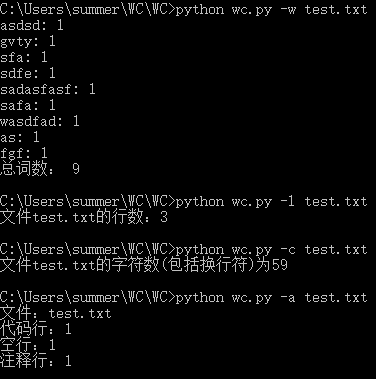
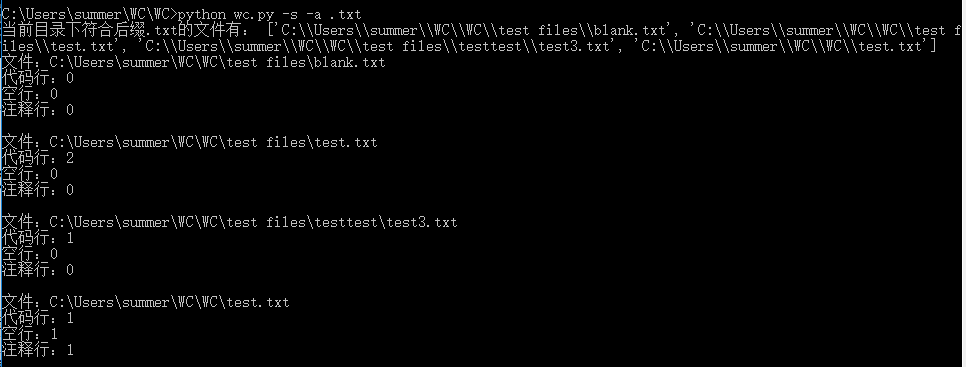
过程中遇到的问题:
1.打开文件的编码问题:刚开始默认gpk无法识别。后来换utf-8还不行,最后百度到转为
'ISO-8859-1',问题解决。

项目小结:
python 是当下比较流行的一种编译语言,学好python可以让一些让其他编译语言头疼的事变得轻松!
震惊!!!源程序特征统计程序——基于python getopt库的更多相关文章
- 个人项目 源程序特征统计程序(C++)
零.GitHub地址 https://github.com/King-Authur/Word-count 一.项目的相关要求 wc.exe 是一个常见的工具,它能统计文本文件的字符数.单词数和行数.这 ...
- 个人项目——wc源程序特征统计
这一次要做的项目是wc——统计程序文件特征的命令行程序. 根据需求需求得到的模式为:wc.exe [parameter][filename] 在[parameter]中,用户通过输入参数与程序交互,需 ...
- 【Python Deap库】遗传算法/遗传编程 进化算法基于python DEAP库深度解析讲解
目录 前言 概述 启发式的理解(重点) 优化问题的定义 个体编码 初始族群的创建 评价 配种选择 锦标赛 轮盘赌选择 随机普遍抽样选择 变异 单点交叉 两点交叉 均匀交叉 部分匹配交叉 突变 高斯突变 ...
- 基于Python Pillow库生成随机验证码
from PIL import Image from PIL import ImageDraw from PIL import ImageFont import random class ValidC ...
- 二维码生成器,基于python,segno库
import segno temp = input("Please enter value:") qr = segno.make(temp) qr.save("qrcod ...
- 【python(deap库)实现】GEAP 遗传算法/遗传编程 genetic programming +
目录 前言 1.优化问题的定义 单目标优化 多目标优化 2.个体编码 实数编码 二进制编码 序列编码(Permutation encoding) 粒子(Particles) 3 初始种群建立 一般族群 ...
- 基于Python实现的系统SLA可用性统计
基于Python实现的系统SLA可用性统计 1. 介绍 SLA是Service Level Agreement的英文缩写,也叫服务质量协议.根据SRE Google运维解密一书中的定义: SLA是服务 ...
- 基于Python的Web应用开发实战——2 程序的基本结构
2.1 初始化 所有Flaks程序都必须创建一个程序实例. Web服务器使用一种名为Web服务器网关接口(Web Server Gateway Interface,WSGI)的协议,把接收自客户端的所 ...
- selenium2自动化测试实战--基于Python语言
自动化测试基础 一. 软件测试分类 1.1 根据项目流程阶段划分软件测试 1.1.1 单元测试 单元测试(或模块测试)是对程序中的单个子程序或具有独立功能的代码段进行测试的过程. 1.1.2 集成测试 ...
随机推荐
- react - next.js 设置body style
因为next.js可以用pages文件夹中的js文件进行route,所以不需要public文件夹和html,因此没有body tag. body自带8px的maigin,我想要给整个页面设置背景颜色, ...
- [LeetCode] 83. Remove Duplicates from Sorted List ☆(从有序链表中删除重复项)
描述 Given a sorted linked list, delete all duplicates such that each element appear only once. Exampl ...
- 解决libVLC无法响应鼠标消息
参考: https://blog.jianchihu.net/player-based-on-libvlc.html 自己在Qt上的实现: 头文件 libvlc_instance_t * m_inst ...
- linux下sort命令详解
1 sort的工作原理 sort将文件的每一行作为一个单位,相互比较,比较原则是从首字符向后,依次按ASCII码值进行比较,最后将他们按升序输出. [rocrocket@rocrocket progr ...
- 初识HT for web
目前国内经济转型在潜移默化中已经发生了巨大的变化,保险,零售业,汽车等我能想到的. 只要互联网能插足的行业,都难逃一‘劫’. 刚看了一篇博客--基于 HTML5 的工业组态高炉炼铁 3D 大屏可视化 ...
- unity 中让Text的文字动态刷新形式
第一种刷新文字形式 using UnityEngine; using System.Collections; using UnityEngine.UI; public class SensorText ...
- 装B命令行,常用Windows命令
winver检查Windows版本 dxdiag检查DirectX信息 gpedit.msc 组策略 regedit.exe 注册表 Msconfig.exe 系统配置实用程序 lusrmgr. ...
- Saiku数据库迁移H2迁移到Mysql(二十二)
Saiku数据库迁移H2迁移到Mysql Saiku默认使用H2数据库来存储saiku的用户与角色信息,我们可以根据角色来做saiku的权限控制,然后将角色分配给用户 ,该用户就会有对应的约束了! 由 ...
- 输入系统:进程间双向通信(socketpair+binder)
一.双向通信(socketpair) socketpair()函数用于创建一对无名的.相互连接的套接子,如果函数成功,则返回0,创建好的套接字分别是sv[0]和sv[1]:否则返回-1,错误码保存于e ...
- eureka注册中心列表页面加账号和密码
正常情况下,注册中心服务启动后,页面是这样的,如下图所示 这样的话,如果注册中心不再内网地址下,有可能就会泄露所有的服务地址信息,增加受攻击的风险,针对这个问题咱们可以这样解决 首先注册中心pom.x ...