
ZXing 生成、读取二维码(带logo)
前言
ZXing,一个支持在图像中解码和生成条形码(如二维码、PDF 417、EAN、UPC、Aztec、Data Matrix、Codabar)的库。ZXing(“zebra crossing”)是一个开源的、多格式的、用Java实现的一维/二维条码图像处理库,具有到其他语言的端口。
GitHub地址,猛戳:https://github.com/zxing/zxing
API文档,猛戳:https://zxing.github.io/zxing/apidocs/index.html
介绍文档,猛戳:https://zxing.github.io/zxing/
代码编写
部分代码参考:https://blog.csdn.net/weixin_39494923/article/details/79058799
maven
我们是java端,所以需要引这两个
        <!-- ZXing -->

        <dependency>

            <groupId>com.google.zxing</groupId>

            <artifactId>core</artifactId>

            <version>3.3.3</version>

        </dependency>

        <dependency>

            <groupId>com.google.zxing</groupId>

            <artifactId>javase</artifactId>

            <version>3.3.3</version>

        </dependency>
Test.java
public class Test{

    public static void main(String[] args) {

        try {

            QREncode();

            QRReader(new File("D:\\zxing1.gif"));

        } catch (WriterException e) {

            e.printStackTrace();

        } catch (IOException e) {

            e.printStackTrace();

        } catch (NotFoundException e) {

            e.printStackTrace();

        }

    }

    /**

     * 生成二维码

     */

    public static void QREncode() throws WriterException, IOException {

        String content = "个人博客:https://www.cnblogs.com/huanzi-qch/";//二维码内容

        int width = 200; // 图像宽度

        int height = 200; // 图像高度

        String format = "gif";// 图像类型

        Map<EncodeHintType, Object> hints = new HashMap<>();

        //内容编码格式

        hints.put(EncodeHintType.CHARACTER_SET, "UTF-8");

        // 指定纠错等级

        hints.put(EncodeHintType.ERROR_CORRECTION, ErrorCorrectionLevel.H);

        //设置二维码边的空度,非负数

        hints.put(EncodeHintType.MARGIN, 1);

        BitMatrix bitMatrix = new MultiFormatWriter().encode(content, BarcodeFormat.QR_CODE, width, height, hints);

        MatrixToImageWriter.writeToPath(bitMatrix, format, new File("D:\\zxing.gif").toPath());// 输出原图片

        MatrixToImageConfig matrixToImageConfig = new MatrixToImageConfig(0xFF000001, 0xFFFFFFFF);

        /*

            问题:生成二维码正常,生成带logo的二维码logo变成黑白

            原因:MatrixToImageConfig默认黑白,需要设置BLACK、WHITE

            解决:https://ququjioulai.iteye.com/blog/2254382

         */

        BufferedImage bufferedImage = LogoMatrix(MatrixToImageWriter.toBufferedImage(bitMatrix,matrixToImageConfig), new File("D:\\logo.png"));

//        BufferedImage bufferedImage = LogoMatrix(toBufferedImage(bitMatrix), new File("D:\\logo.png"));

        ImageIO.write(bufferedImage, "gif", new File("D:\\zxing1.gif"));//输出带logo图片

        System.out.println("输出成功.");

    }

    /**

     * 识别二维码

     */

    public static void QRReader(File file) throws IOException, NotFoundException {

        MultiFormatReader formatReader = new MultiFormatReader();

        //读取指定的二维码文件

        BufferedImage bufferedImage =ImageIO.read(file);

        BinaryBitmap binaryBitmap= new BinaryBitmap(new HybridBinarizer(new BufferedImageLuminanceSource(bufferedImage)));

        //定义二维码参数

        Map  hints= new HashMap<>();

        hints.put(EncodeHintType.CHARACTER_SET, "utf-8");

        com.google.zxing.Result result = formatReader.decode(binaryBitmap, hints);

        //输出相关的二维码信息

        System.out.println("解析结果:"+result.toString());

        System.out.println("二维码格式类型:"+result.getBarcodeFormat());

        System.out.println("二维码文本内容:"+result.getText());

        bufferedImage.flush();

    }

    /**

     * 二维码添加logo

     * @param matrixImage 源二维码图片

     * @param logoFile logo图片

     * @return 返回带有logo的二维码图片

     * 参考:https://blog.csdn.net/weixin_39494923/article/details/79058799

     */

    public static BufferedImage LogoMatrix(BufferedImage matrixImage, File logoFile) throws IOException{

        /**

         * 读取二维码图片,并构建绘图对象

         */

        Graphics2D g2 = matrixImage.createGraphics();

        int matrixWidth = matrixImage.getWidth();

        int matrixHeigh = matrixImage.getHeight();

        /**

         * 读取Logo图片

         */

        BufferedImage logo = ImageIO.read(logoFile);

        //开始绘制图片

        g2.drawImage(logo,matrixWidth/5*2,matrixHeigh/5*2, matrixWidth/5, matrixHeigh/5, null);//绘制

        BasicStroke stroke = new BasicStroke(5,BasicStroke.CAP_ROUND,BasicStroke.JOIN_ROUND);

        g2.setStroke(stroke);// 设置笔画对象

        //指定弧度的圆角矩形

        RoundRectangle2D.Float round = new RoundRectangle2D.Float(matrixWidth/5*2, matrixHeigh/5*2, matrixWidth/5, matrixHeigh/5,20,20);

        g2.setColor(Color.white);

        g2.draw(round);// 绘制圆弧矩形

        //设置logo 有一道灰色边框

        BasicStroke stroke2 = new BasicStroke(1,BasicStroke.CAP_ROUND,BasicStroke.JOIN_ROUND);

        g2.setStroke(stroke2);// 设置笔画对象

        RoundRectangle2D.Float round2 = new RoundRectangle2D.Float(matrixWidth/5*2+2, matrixHeigh/5*2+2, matrixWidth/5-4, matrixHeigh/5-4,20,20);

        g2.setColor(new Color(128,128,128));

        g2.draw(round2);// 绘制圆弧矩形

        g2.dispose();

        matrixImage.flush() ;

        return matrixImage ;

    }

}
效果演示
D盘文件

查看图片
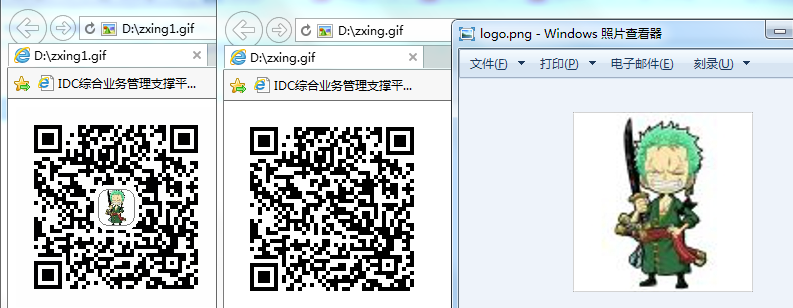
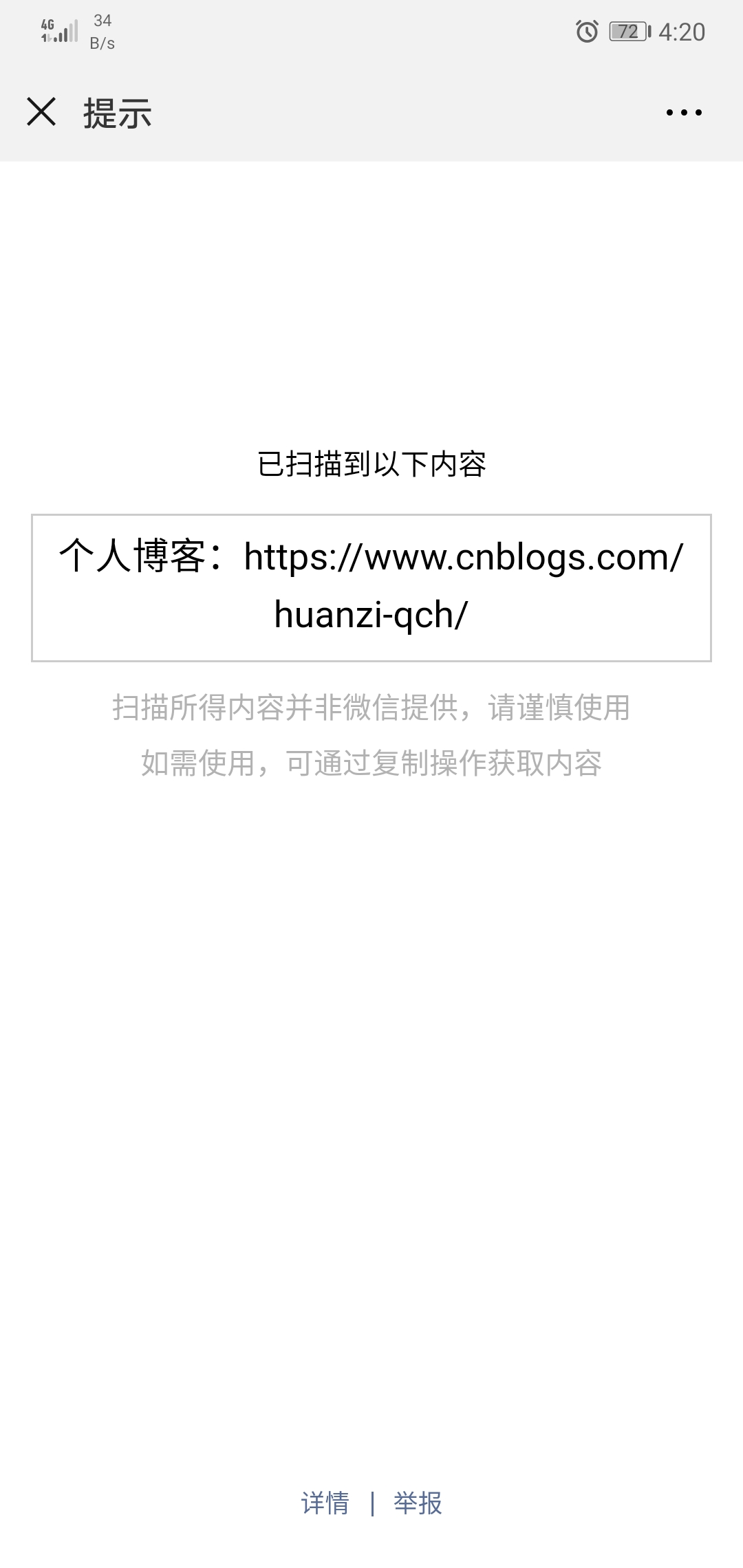
后台识别、微信扫描结果

后记
后端生成我们可以用ZXing框架,那么前端js又应该如何生成、识别二维码呢?QRCode.js,QRCode.js 是一个用于生成二维码的 JavaScript 库。主要是通过获取 DOM 的标签,再通过 HTML5 Canvas 绘制而成,不依赖任何库。菜鸟教程,猛戳:http://www.runoob.com/w3cnote/javascript-qrcodejs-library.html
但是qrcode默认不支持自定义logo,怎么办呢?两种方法:
1、创建一个img标签,调整样式,让logo在二维码区域上居中显示
2、创建一个canvas画布,将二维码跟logo重新绘制,让logo在二维码区域上居中显示
补充
2020-02-25补充:实现二维码输出到浏览器功能
1、生成二维码时,不是直接保存成图片,而是返回BufferedImage
    /**

     * 生成二维码

     */

    public static BufferedImage QREncode(String content){

        int width = 250; // 图像宽度

        int height = 250; // 图像高度

        Map<EncodeHintType, Object> hints = new HashMap<>();

        //内容编码格式

        hints.put(EncodeHintType.CHARACTER_SET, "UTF-8");

        // 指定纠错等级

        hints.put(EncodeHintType.ERROR_CORRECTION, ErrorCorrectionLevel.H);

        //设置二维码边的空度,非负数

        hints.put(EncodeHintType.MARGIN, 1);

        BitMatrix bitMatrix = null;

        BufferedImage bufferedImage = null;

        try {

            bitMatrix = new MultiFormatWriter().encode(content, BarcodeFormat.QR_CODE, width, height, hints);

            MatrixToImageConfig matrixToImageConfig = new MatrixToImageConfig(0xFF000001, 0xFFFFFFFF);

            bufferedImage = MatrixToImageWriter.toBufferedImage(bitMatrix,matrixToImageConfig);

        } catch (WriterException e) {

            e.printStackTrace();

        }

        //无logo

        //return bufferedImage;

        //带logo,System.getProperty("user.dir")是项目工程根路径

        assert bufferedImage != null;

        return LogoMatrix(bufferedImage,new File(System.getProperty("user.dir") + "\\src\\main\\resources\\static\\img\\logo.png"));

    }
2、新增controller,供web调用
    //获取二维码图片

    @GetMapping("getBarCodeImage/{id}")

    public void getBarCodeImage(@PathVariable("id") String id) throws IOException {

        HttpServletRequest request = ((ServletRequestAttributes) RequestContextHolder.currentRequestAttributes()).getRequest();

        HttpServletResponse response = ((ServletRequestAttributes) RequestContextHolder.currentRequestAttributes()).getResponse();

        //设置页面不缓存

        assert response != null;

        response.setHeader("Pragma", "no-cache");

        response.setHeader("Cache-Control", "no-cache");

        response.setDateHeader("Expires", 0);

        response.getOutputStream();

        //设置输出的内容的类型为JPEG图像

        response.setContentType("image/jpeg");

        //通过id查询数据设置二维码内容

        String text = "{\"id\":\""+ id +"\"}"

        BufferedImage bufferedImage = QREncode(text);

        //写给浏览器

        ImageIO.write(bufferedImage, "JPEG", response.getOutputStream());

    }
3、web页面调用,thymeleaf语法
<img id="barCodeImage" th:src="@{'/getBarCodeImage/' + ${id}}"/>

<br/><br/>

<button th:onclick="${'document.getElementById(''barCodeImage'').src = ctx + ''/getBarCodeImage/'+ id +'?time='' + new Date().getTime()'}">
    刷新二维码
</button>
ZXing 生成、读取二维码(带logo)的更多相关文章
- vue生成条形码/二维码/带logo二维码
条形码:https://blog.csdn.net/dakache11/article/details/83749410 //安装 cnpm install @xkeshi/vue-barcode / ...
- C# 生成二维码(带Logo)
C# 生成二维码(带Logo) 第一种方式 我们需要引用 ThoughtWorks.QRCode.dll 生成带logo二维码(framework4.0以上) 下载地址:https://pan.ba ...
- 给二维码(图片)添加文字(水印),让生成的二维码中间带logo
<?php //生成二维码 require_once IA_ROOT . '/framework/library/qrcode/phpqrcode.php'; QRcode::png($url, ...
- Java生成微信二维码及logo二维码
依赖jar包 二维码的实现有多种方法,比如 Google 的 zxing 和日本公司的 QrCode,本文以 QrCode 为例. QrCode.jar:https://pan.baidu.com/s ...
- Java使用ZXing生成/解析二维码图片
ZXing是一种开源的多格式1D/2D条形码图像处理库,在Java中的实现.重点是在手机上使用内置摄像头来扫描和解码设备上的条码,而不与服务器通信.然而,该项目也可以用于对桌面和服务器上的条形码进行编 ...
- 使用zxing生成解析二维码
1. 前言 随着移动互联网的发展,我们经常在火车票.汽车票.快餐店.电影院.团购网站以及移动支付等各个场景下见到二维码的应用,可见二维码以经渗透到人们生活的各个方面.条码.二维码以及RFID被人们应用 ...
- golang中生成读取二维码(skip2/go-qrcode和boombuler/barcode,tuotoo/qrcode)
1 引言 在github上有好用golan二维码生成和读取库,两个生成二维码的qrcode库和一个读取qrcode库. skip2/go-qrcode生成二维码,github地址:https://g ...
- 给通过canvas生成的二维码添加logo
以jquery.qrcode为例来说, 生成二维码代码: 依赖jquery.js, jquery.qrcode.js //计算宽,高,中心坐标,logo大小 var width = 256,heigh ...
- (转)js jquery.qrcode生成二维码 带logo 支持中文
场景:公司最最近在开发二维码支付业务,所以需要做一个html5中的二维码生成和部署! 前天用js生成二维码,节省服务器资源及带宽 原版jquery.qrcode不能生成logo,本文采用的是修改版 1 ...
- xamarin android 实现二维码带logo生成效果
MultiFormatWriter writer = new MultiFormatWriter(); Dictionary<EncodeHintType, object> hint = ...
随机推荐
- 我们来谈谈最近最热门的微信小程序
最近微信小程序真是火到不行,我们的经理大人也就此给我做了一定的培训.他讲的太好,我实在忍不住跟大家简单分享一下: 1.什么是微信小程序? 一种不需要下载安装即可使用的应用,它实现了应用“触手可及”的梦 ...
- C++ 初步
c++新特性: 1. 初始化方法: 复制初始化 int x=1024; 直接初始化 int x (1024); 2.变量随用随定义 3.增加bool数据类型 输入输出: cout<<x; ...
- Java工作原理:JVM,内存回收及其他
JAVA虚拟机系列文章 http://developer.51cto.com/art/201001/176550.htm Java语言引入了Java虚拟机,具有跨平台运行的功能,能够很好地适应各种We ...
- Java spring boot 2.0连接mysql异常:The server time zone value 'Öйú±ê׼ʱ¼ä' is unrecognized or represents more than one time zone
解决办法:application.yml提示信息表明数据库驱动com.mysql.jdbc.Driver'已经被弃用了.应当使用新的驱动com.mysql.cj.jdbc.Driver' com.my ...
- git命令别名(Alias)
每次切换分支: git ckeckout branch_name 等命令费时又费力,git 别名配置起来: 别名配置: git config --global alias.ck ckeckout 其他 ...
- js面向对象和php面向对象的区别
---恢复内容开始--- js的面向对象 1.类 具体相同的特征的一些对象的集合. 2.对象 具体到某一个失误了都可以叫做对象. 3.类 通过function 定义类 所以在js里类的本质是函数, ...
- Spring源码工程导入Eclsipse缺少两个jar文件
按照<Spring源码深度解析>所述,使用gradle cleanidea eclipse将Spring源码转为eclipse工程后,导入eclipse,最后发现还是缺少spring-cg ...
- url中文参数乱码问题
1.参数乱码: js: var url = $$pageContextPath + "iecp/ads/heilanAnalogCurve.do?pointCode=" + get ...
- Python微信公众号开发—小白篇
本文面向想通过Python学习公众号开发的同学.一站式解决新手开发微信公众号遇到的所有问题. 为了防止我的文章被到处转载,贴一下我的公众号[智能制造专栏],欢迎大家关注. github仓库地址http ...
- [Swift]LeetCode21. 合并两个有序链表 | Merge Two Sorted Lists
Merge two sorted linked lists and return it as a new list. The new list should be made by splicing t ...