
Spring Cloud 入门教程(二): 服务消费者(rest+ribbon)
在上一篇文章,讲了服务的注册和发现。在微服务架构中,业务都会被拆分成一个独立的服务,服务与服务的通讯是基于http restful的。Spring cloud有两种服务调用方式,一种是ribbon+restTemplate,另一种是feign。在这一篇文章首先讲解下基于ribbon+rest。
一、ribbon简介
Ribbon is a client side load balancer which gives you a lot of control over the behaviour of HTTP and TCP clients. Feign already uses Ribbon, so if you are using @FeignClient then this section also applies.
-----摘自官网
ribbon是一个负载均衡客户端,可以很好的控制htt和tcp的一些行为。Feign默认集成了ribbon。
ribbon 已经默认实现了这些配置bean:
- IClientConfig ribbonClientConfig: DefaultClientConfigImpl
- IRule ribbonRule: ZoneAvoidanceRule
- IPing ribbonPing: NoOpPing
- ServerList ribbonServerList: ConfigurationBasedServerList
- ServerListFilter ribbonServerListFilter: ZonePreferenceServerListFilter
- ILoadBalancer ribbonLoadBalancer: ZoneAwareLoadBalancer
二、准备工作
这一篇文章基于上一篇文章的工程,启动eureka-server 工程;启动service-hi工程,它的端口为8762;将service-hi的配置文件的端口改为8763,并启动,这时你会发现:service-hi在eureka-server注册了2个实例,这就相当于一个小的集群。访问localhost:8761如图所示:

三、建一个服务消费者
重新新建一个spring-boot工程,取名为:service-ribbon;
在它的pom.xml文件分别引入起步依赖spring-cloud-starter-eureka、spring-cloud-starter-ribbon、spring-boot-starter-web,代码如下:
<?xml version="1.0" encoding="UTF-8"?>

<project xmlns="http://maven.apache.org/POM/4.0.0" xmlns:xsi="http://www.w3.org/2001/XMLSchema-instance"

	xsi:schemaLocation="http://maven.apache.org/POM/4.0.0 http://maven.apache.org/xsd/maven-4.0.0.xsd">

	<modelVersion>4.0.0</modelVersion>

	<groupId>com.bdqn.cskt</groupId>

	<artifactId>service-ribbon</artifactId>

	<version>0.0.1-SNAPSHOT</version>

	<packaging>jar</packaging>

	<name>service-ribbon</name>

	<description>Demo project for Spring Boot</description>

	<parent>

		<groupId>org.springframework.boot</groupId>

		<artifactId>spring-boot-starter-parent</artifactId>

		<version>1.5.2.RELEASE</version>

		<relativePath/> <!-- lookup parent from repository -->

	</parent>

	<properties>

		<project.build.sourceEncoding>UTF-8</project.build.sourceEncoding>

		<project.reporting.outputEncoding>UTF-8</project.reporting.outputEncoding>

		<java.version>1.8</java.version>

	</properties>

	<dependencies>

		<dependency>

			<groupId>org.springframework.cloud</groupId>

			<artifactId>spring-cloud-starter-eureka</artifactId>

		</dependency>

		<dependency>

			<groupId>org.springframework.cloud</groupId>

			<artifactId>spring-cloud-starter-ribbon</artifactId>

		</dependency>

		<dependency>

			<groupId>org.springframework.boot</groupId>

			<artifactId>spring-boot-starter-web</artifactId>

		</dependency>

		<dependency>

			<groupId>org.springframework.boot</groupId>

			<artifactId>spring-boot-starter-test</artifactId>

			<scope>test</scope>

		</dependency>

	</dependencies>

	<dependencyManagement>

		<dependencies>

			<dependency>

				<groupId>org.springframework.cloud</groupId>

				<artifactId>spring-cloud-dependencies</artifactId>

				<version>Dalston.RC1</version>

				<type>pom</type>

				<scope>import</scope>

			</dependency>

		</dependencies>

	</dependencyManagement>

	<build>

		<plugins>

			<plugin>

				<groupId>org.springframework.boot</groupId>

				<artifactId>spring-boot-maven-plugin</artifactId>

			</plugin>

		</plugins>

	</build>

	<repositories>

		<repository>

			<id>spring-milestones</id>

			<name>Spring Milestones</name>

			<url>https://repo.spring.io/milestone</url>

			<snapshots>

				<enabled>false</enabled>

			</snapshots>

		</repository>

	</repositories>

</project>
在工程的配置文件指定服务的注册中心地址为http://localhost:8761/eureka/,程序名称为 service-ribbon,程序端口为8764。配置文件application.yml如下:
eureka:

  client:

    serviceUrl:

      defaultZone: http://localhost:8761/eureka/

server:

  port: 8764

spring:

  application:

    name: service-ribbon
在工程的启动类中,通过@EnableDiscoveryClient向服务中心注册;并且向程序的ioc注入一个bean: restTemplate;并通过@LoadBalanced注解表明这个restRemplate开启负载均衡的功能。
@SpringBootApplication

@EnableDiscoveryClient

public class ServiceRibbonApplication {

	public static void main(String[] args) {

		SpringApplication.run(ServiceRibbonApplication.class, args);

	}

	@Bean

	@LoadBalanced

	RestTemplate restTemplate() {

		return new RestTemplate();

	}

}
写一个测试类HelloService,通过之前注入ioc容器的restTemplate来消费service-hi服务的“/hi”接口,在这里我们直接用的程序名替代了具体的url地址,在ribbon中它会根据服务名来选择具体的服务实例,根据服务实例在请求的时候会用具体的url替换掉服务名,代码如下:
@Service

public class HelloService {

    @Autowired

    RestTemplate restTemplate;

    public String hiService(String name) {

        return restTemplate.getForObject("http://SERVICE-HI/hi?name="+name,String.class);

    }

}
写一个controller,在controller中用调用HelloService 的方法,代码如下:
/**

 * Created by fangzhipeng on 2017/4/6.

 */

@RestController

public class HelloControler {

    @Autowired

    HelloService helloService;

    @RequestMapping(value = "/Mark")

    public String hi(@RequestParam String name){

        return helloService.hiService(name);

    }

}
在浏览器上多次访问http://localhost:8764/Mark?name=Spirit,浏览器交替显示:
Mark Spirit,i am from port:8762
Mark Spirit ,i am from port:8763
这说明当我们通过调用restTemplate.getForObject(“http://SERVICE-HI/Mark?name=”+name,String.class)方法时,已经做了负载均衡,访问了不同的端口的服务实例。
四、此时的架构 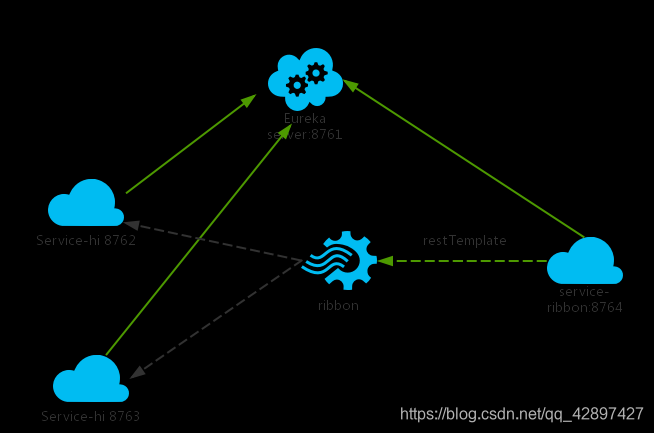
Spring Cloud 入门教程(二): 服务消费者(rest+ribbon)的更多相关文章
- Spring Cloud 入门教程(一): 服务注册
1. 什么是Spring Cloud? Spring提供了一系列工具,可以帮助开发人员迅速搭建分布式系统中的公共组件(比如:配置管理,服务发现,断路器,智能路由,微代理,控制总线,一次性令牌,全局锁 ...
- Spring Cloud 入门教程(二): 配置管理
使用Config Server,您可以在所有环境中管理应用程序的外部属性.客户端和服务器上的概念映射与Spring Environment和PropertySource抽象相同,因此它们与Spring ...
- Spring Cloud入门教程(二):客户端负载均衡(Ribbon)
对于大型应用系统负载均衡(LB:Load Balancing)是首要被解决一个问题.在微服务之前LB方案主要是集中式负载均衡方案,在服务消费者和服务提供者之间又一个独立的LB,LB通常是专门的硬件,如 ...
- Spring Cloud 入门Eureka -Consumer服务消费(Ribbon)(二)
前面一篇介绍了LoadBalancerClient来实现负载均衡, 这里介绍Spring cloud ribbon 1.ribbon Spring Cloud Ribbon 是一个基于Http和TCP ...
- Spring Cloud 入门教程 - Eureka服务注册与发现
简介 在微服务中,服务注册与发现对管理各个微服务子系统起着关键作用.随着系统水平扩展的越来越多,系统拆分为微服务的数量也会相应增加,那么管理和获取这些微服务的URL就会变得十分棘手,如果我们每新加一个 ...
- Spring Cloud 入门教程(四): 分布式环境下自动发现配置服务
前一章, 我们的Hello world应用服务,通过配置服务器Config Server获取到了我们配置的hello信息“hello world”. 但自己的配置文件中必须配置config serve ...
- Spring Cloud 入门教程(三): 配置自动刷新
之前讲的配置管理, 只有在应用启动时会读取到GIT的内容, 之后只要应用不重启,GIT中文件的修改,应用无法感知, 即使重启Config Server也不行. 比如上一单元(Spring Cloud ...
- Spring Cloud 入门教程(五): Ribbon实现客户端的负载均衡
接上节,假如我们的Hello world服务的访问量剧增,用一个服务已经无法承载, 我们可以把Hello World服务做成一个集群. 很简单,我们只需要复制Hello world服务,同时将原来的端 ...
- Spring Cloud 入门教程 - 搭建配置中心服务
简介 Spring Cloud 提供了一个部署微服务的平台,包括了微服务中常见的组件:配置中心服务, API网关,断路器,服务注册与发现,分布式追溯,OAuth2,消费者驱动合约等.我们不必先知道每个 ...
随机推荐
- [LGOJ1273]有线电视网
solution 用了一个很有意思的转移方法. $dp[i][j] $ 表达 \(i\) 作为根,\(j\)个终端时最大的收益,即钱数,当\(0\leq dp[1][i]\)时,即以1为根可以转移到\ ...
- 【ACwing 95】费解的开关——枚举 + 搜索
(题面来自ACwing) 你玩过"拉灯"游戏吗?25盏灯排成一个5x5的方形.每一个灯都有一个开关,游戏者可以改变它的状态.每一步,游戏者可以改变某一个灯的状态.游戏者改变一个灯的 ...
- Codeforces Round #674 (Div. 3) C、D 题解
C.Increase and Copy #枚举 题目链接 题意 最初你有仅包含一个数字\(1\)的数组\(a\),一次操作中可对该数组进行两类操作: 从数组中选择一个元素,将该元素\(+1\): 从数 ...
- WireShark抓包分析以及对TCP/IP三次握手与四次挥手的分析
WireShark抓包分析TCP/IP三次握手与四次挥手 Wireshark介绍: Wireshark(前称Ethereal)是一个网络封包分析软件.功能十分强大,是一个可以在多个操作系统平台上的开源 ...
- Eclipse的新建工作空间如何用以前工作空间的配置
1.找到以前工作空间的配置目录:\.metadata\.plugins\org.eclipse.core.runtime 2.替换掉新的工作空间的配置目录:\.metadata\.plugins\or ...
- 【2020.12.02提高组模拟】A组反思
55,rk47 T1 赛时先想了\(trie\),想到不一定是前缀,然后就放弃转为打暴力 得分:\(RE22\) 正解是只用判断\(i\)与\(i+1\)的关系,那么只有两种情况,判断一下然后\(dp ...
- CPU实现原子操作的原理
586之前的CPU, 会通过LOCK锁总线的形式来实现原子操作. 686开始则提供了存储一致性(Cache coherence), 这是多处理的基础, 也是原子操作的基础. 1. 存储的粒度 存储的 ...
- redis雪崩,击穿,穿透
redis穿透 什么是redis穿透? 1.查询一个一定不存在的数据,由于缓存是不命中时被动写的,并且出于容错考虑,如果从存储层查不到数据则不写入缓存 2.这将导致这个不存在的数据每次请求都要到存储层 ...
- PyQt(Python+Qt)学习随笔:QTreeWidgetItem项的子项排序sortChildren及获取项对应的树型部件对象方法
老猿Python博文目录 专栏:使用PyQt开发图形界面Python应用 老猿Python博客地址 1.sortChildren对子项排序 树型部件QTreeWidget中的QTreeWidgetIt ...
- PyQt(Python+Qt)学习随笔:QTreeView树形视图的indentation属性
老猿Python博文目录 专栏:使用PyQt开发图形界面Python应用 老猿Python博客地址 QTreeView树形视图的indentation属性用于控制视图中每级数据项之间的缩进,对于顶级项 ...