
从Unity中的Attribute到AOP(三)
上一篇我们对系统的Attributes进行了MSIL代码的查看,了解到了其本质就是一个类的构造函数。本章我们将编写自己的Attributes。
首先我们定义书的属性代码,如下:
    [AttributeUsage(AttributeTargets.Field | AttributeTargets.Class,

                             AllowMultiple = true,

                             Inherited = false)]

    class BookAttribute : Attribute

    {

        private string bookName;

        private string bookAuthor;

        private int bookPrice;

        public int year = ;

        public int version = ;

        public BookAttribute(string bookname,

                                         string bookauthor,

                                         int bookprice)

        {

            bookName = bookname;

            bookAuthor = bookauthor;

            bookPrice = bookprice;

        }

        public string BookName { get { return bookName; } }

        public string BookAuthor { get { return bookAuthor; } }

        public int BookPrice { get { return bookPrice; } }

    }
写自己的Attribute其实非常简单,首先你的类需要直接或者间接地继承自系统类Attribute。我们查看Attribute类就会发现该类只有两大类的方法,获取Attribute和IsDefined。
其次,使用AttributeUsage这个Attribute,非常有意思。查看AttributeUsage类,发现构造函数的参数只有一个AttributeTargets,就是Attribute的限制范围,这是系统定义的枚举,我们稍后再做详解。暂时限制只在指定的代码域和类上才能用BookAttribute。AllowMultiple参数指定了是否允许同一代码区间多次使用Attribute,Inherited则指定该类的子类是否继承该属性。
紧接着我们写一个体育书的类:
[BookAttribute("SportsBook", "sports", )]

public class SportsBook

{

}
在这里,BookAttribute就和一个构造函数一样调用,构造函数的参数顺序不能调换,不能省略,类型也必须匹配,这些参数因此得名“定位参数”。
我们发现在BookAttribute里面还有一些变量,他们有默认值,如果我们一定要给这些变量赋值,可以写在定位参数的后面,如下:
[BookAttribute("SportsBook", "sports", , version = , year = )]

public class SportsBook

{

}
这些参数的名字叫命名参数,顾名思义。对于这类参数,我们可以完全不写,也可以写其中的某几个变量,当然,调换顺序也是完全没问题的,但注意不能和定位参数调换顺序。
接下来我们利用反射来取Attribute的值,代码如下:
static void Main(string[] args)

        {

            System.Reflection.MemberInfo memberinfo = typeof(SportsBook);

            BookAttribute attribute = (BookAttribute)Attribute.GetCustomAttribute(memberinfo, typeof(BookAttribute));

            if (null != attribute)

            {

                Console.WriteLine(attribute.BookName);

                Console.WriteLine(attribute.BookAuthor);

                Console.WriteLine(attribute.BookPrice);

                Console.WriteLine(attribute.version);

                Console.WriteLine(attribute.year);

            }

            Console.ReadKey();

        }
利用反射稍微繁琐了一点,但总体流程很清晰。运行程序后得到结果:
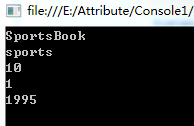
可以看到,Attribute和继承有点像,但是我们在SportsBook类内部是无法直接使用Attribute的变量的。
如果我们在SportsBook上放多个Attribute会怎么样?
代码如下:
[BookAttribute("SportsBook", "sports", , year = , version = )]

[BookAttribute("ArtBook", "art", , year = )]

public class SportsBook

{ }
直接运行程序,系统报错了~
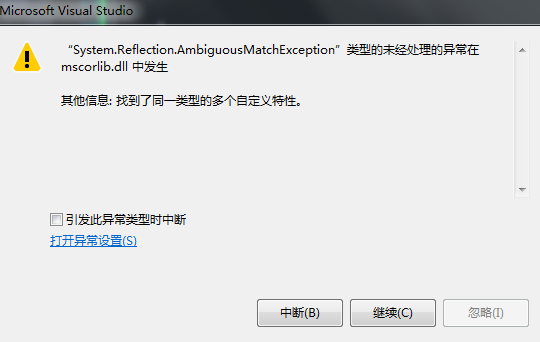
当使用GetCustomAttribute获取Attribute的时候发生了语义异常。修改我们的Main方法:
static void Main(string[] args)

{

        System.Reflection.MemberInfo memberinfo = typeof(SportsBook);

        Attribute[] attribute = Attribute.GetCustomAttributes(memberinfo, typeof(BookAttribute));

        for (int i = ; i < attribute.Length; ++i)

        {

            var attr = attribute[i];

            if (attr is BookAttribute)

            {

                var battr = (BookAttribute)attr;

                Console.WriteLine(battr.BookName);

                Console.WriteLine(battr.BookAuthor);

                Console.WriteLine(battr.BookPrice);

                Console.WriteLine(battr.version);

                Console.WriteLine(battr.year);

            }

        }
}
我们使用了GetCustomAttributes的方法,该方法返回一个Attribute的数组。通过遍历数组我们能够取到我们定义的所有属性。输出如下:
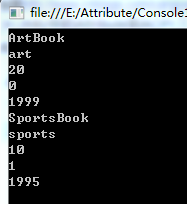
可以看到写在越下面的Attribute在数组中的位置更靠前。
继续改造我们的SportsBook类:
[BookAttribute("SportsBook", "sports", , year = , version = )]

public class SportsBook

{

        [BookAttribute("ArtBook", "art", , year = )]

        public string bookName;

}
我们在类内部增加了一个变量bookName,虽然和BookAttribute的变量重名了,但并没有影响。把BookAttribute的作用范围改为All,所以我们能把属性直接加到变量的字段上面。依然使用获取Attribute数组的方法,跑我们的程序:
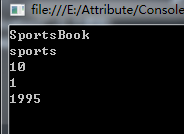
可以看到并没有取得类内部的Attribute。修改Main方法:
        static void Main(string[] args)

        {

            System.Reflection.MemberInfo memberinfo = typeof(SportsBook);

            Attribute[] attribute = Attribute.GetCustomAttributes(memberinfo, typeof(BookAttribute));

            System.Reflection.PropertyInfo propertyInfo = typeof(SportsBook).GetProperty("bookName");

            BookAttribute bookattr = (BookAttribute)Attribute.GetCustomAttribute(propertyInfo, typeof(BookAttribute));

            for (int i = ; i < attribute.Length; ++i)

            {

                var attr = attribute[i];

                if (attr is BookAttribute)

                {

                    var battr = (BookAttribute)attr;

                    Console.WriteLine(battr.BookName);

                    Console.WriteLine(battr.BookAuthor);

                    Console.WriteLine(battr.BookPrice);

                    Console.WriteLine(battr.version);

                    Console.WriteLine(battr.year);

                }

            }

            Console.WriteLine("----------------分割线------------------");

            Console.WriteLine(bookattr.BookName);

            Console.WriteLine(bookattr.BookAuthor);

            Console.WriteLine(bookattr.BookPrice);

            Console.WriteLine(bookattr.version);

            Console.WriteLine(bookattr.year);

            Console.ReadKey();

        }
继续利用反射获取单个变量的property,并从该property上获得了对应的attribute。运行代码如下:
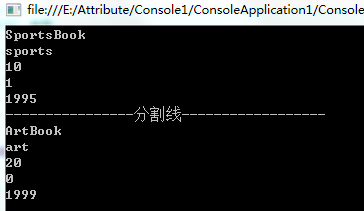
至此,我们自己的Attribute写完了。
回头再看看AttributeTargets的定义:
public enum AttributeTargets

    {

        // 摘要:

        //     可以对程序集应用属性。

        Assembly = ,

        //

        // 摘要:

        //     可以对模块应用属性。

        Module = ,

        //

        // 摘要:

        //     可以对类应用属性。

        Class = ,

        //

        // 摘要:

        //     可以对结构应用属性,即值类型。

        Struct = ,

        //

        // 摘要:

        //     可以对枚举应用属性。

        Enum = ,

        //

        // 摘要:

        //     可以对构造函数应用属性。

        Constructor = ,

        //

        // 摘要:

        //     可以对方法应用属性。

        Method = ,

        //

        // 摘要:

        //     可以对属性 (Property) 应用属性 (Attribute)。

        Property = ,

        //

        // 摘要:

        //     可以对字段应用属性。

        Field = ,

        //

        // 摘要:

        //     可以对事件应用属性。

        Event = ,

        //

        // 摘要:

        //     可以对接口应用属性。

        Interface = ,

        //

        // 摘要:

        //     可以对参数应用属性。

        Parameter = ,

        //

        // 摘要:

        //     可以对委托应用属性。

        Delegate = ,

        //

        // 摘要:

        //     可以对返回值应用属性。

        ReturnValue = ,

        //

        // 摘要:

        //     可以对泛型参数应用属性。

        GenericParameter = ,

        //

        // 摘要:

        //     可以对任何应用程序元素应用属性。

        All = ,

    }
可以看到基本区分段都有了,二进制移位的赋值,也能让我们直接使用与或操作来达到自己想要的效果。注意经常用的Field字段指代类或者结构体里的区域。
下一章节我们将探索Unity中定义好的各个Attribute。
从Unity中的Attribute到AOP(三)的更多相关文章
- 从Unity中的Attribute到AOP(七)
本章我们将依然讲解Unity中的Attribute,继续命名空间在UnityEngine里的. PropertyAttribute,这个特性主要来控制变量或者类在Inspector里面的显示方式.和P ...
- 从Unity中的Attribute到AOP(五)
今天主要来讲一下Unity中带Menu的Attribute. 首先是AddComponentMenu.这是UnityEngine命名空间下的一个Attribute. 按照官方文档的说法,会在Compo ...
- 从Unity中的Attribute到AOP(四)
本篇我们将逐一讲解Unity中经常使用的Attribute(Unity对应的文档版本为2018.1b). 首先是Serializable,SerializeField以及NonSerialized,H ...
- 从Unity中的Attribute到AOP(六)
本文将重点对Unity剩下常用的Attribute进行讲解,其他不常用的Attribute各位可以自行去官方文档查阅. 首先是UnityEngine命名空间下的. ColorUsage,这个主要作用于 ...
- 从Unity中的Attribute到AOP(一)
首先来看一下微软官方对Attributes(C#)的定义: https://docs.microsoft.com/en-us/dotnet/csharp/programming-guide/conce ...
- 从Unity中的Attribute到AOP(八)
本文将讲一下在UnityEditor命名空间下的一些特性. CallBackOrder,这个Attribute是所有带callback index的Attribute的基类,由于官方也没有给出详细的说 ...
- 从Unity中的Attribute到AOP(二)
上一篇文章我们初步了解了一下Attributes的含义,并且使用系统自带的Attributes写了点代码.在进一步解剖我们的代码之前,我觉得有个概念可能需要巩固一下:什么是元数据? 我们知道C#代码会 ...
- Unity中使用Attribute
Attribute是c#的语言特性 msdn说明如下: The Attribute class associates predefined system information or user-def ...
- 关于Unity中的transform组件(三)
game_root节点下右一个Cube子节点,和一个Sphere节点,脚本挂载在game_root下 四元数:(1)Quaternion rot (2)this.cube.rotation 欧拉角:V ...
随机推荐
- jersey实现文件下载
好久没有更新博客了,今天来再次总结一下,之前有整理过关于jersey实现文件上传功能的相关知识,但是前一阵子在实习过程中写接口又要实现文件下载的功能,由于这些东西基本都是使用jersey提供的注解和接 ...
- check the manual that corresponds to your MySQL server version for the right syntax处理方案
check the manual that corresponds to your MySQL server version for the right syntax:代码出现这样的bug,就要注意你 ...
- 2.python数据类型
1 Number(数字) 2 字符串类型(string) 字符串内置方法 # string.capitalize() 把字符串的第一个字符大写 # string.center(width) 返 ...
- 【java】多线程同步生产者消费者问题
package 多线程; class Producer implements Runnable{ private Data data; public Producer(Data data){ this ...
- python安装和环境变量的配置
python安装和环境变量的配置 研究生阶段学习的需求,简单的学习了python的语法和基础之后产生了兴趣,有了想从基础把python学好用好的想法.因此在忙碌的学习中抽出时间,在每天花几个小时学习p ...
- ES6异步操作Thunk、co和async
使用Thunk函数对Generator函数进行流程管理,首先什么是Thunk函数?我们应该先说下参数的求值策略,编译器的求值策略一个是"传值调用"另一个是"传名调用&qu ...
- springboot学习(三)————使用HttpMessageConverter进行http序列化和反序列化
以下内容,如有问题,烦请指出,谢谢! 对象的序列化/反序列化大家应该都比较熟悉:序列化就是将object转化为可以传输的二进制,反序列化就是将二进制转化为程序内部的对象.序列化/反序列化主要体现在程序 ...
- 598. Range Addition II
Given an m * n matrixMinitialized with all0's and several update operations. Operations are represen ...
- rm 命令详解
rm 作用: 删除一个目录中的一个或多个文件或目录,也可以将某个目录及下属的所有文件及子目录均删除掉, 对于连接文件只是删除整个连接文件,而保持原有文件. 注意: 使用rm 命令要格外小心,因为一旦 ...
- 限制ssh远程登陆
超过十次,就添加到hosts.deny里面去 #!/bin/bash date=`date +%Y%m%d` file="/var/log/secure" max=10 if [[ ...