
Solr7.1---数据库导入并建立中文分词器
这里只是告诉你如何导入,生产环境不要这样部署你的solr服务。
首先修改solrConfig.xml文件
备份_default文件夹
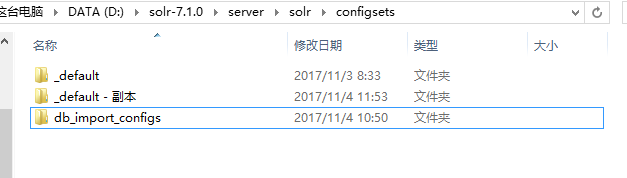
修改solrconfig.xml

加入如下内容
官方示例:
<requestHandler name="/dataimport" class="org.apache.solr.handler.dataimport.DataImportHandler">

  <lst name="defaults">

    <str name="config">/path/to/my/DIHconfigfile.xml</str>

  </lst>

</requestHandler>
效果:

在conf目录建立一个db-data-config.xml文件
<dataConfig>

    <dataSource driver="com.mysql.jdbc.Driver" url="jdbc:mysql://localhost:3306/demo" user="root" password="" />

    <document>

        <entity name="bless" query="select * from bless"

                deltaQuery="select bless_id from bless where bless_time > '${dataimporter.last_index_time}'">

            <field column="BLESS_ID" name="blessId" />

            <field column="BLESS_CONTENT" name="blessContent" />

            <field column="BLESS_TIME" name="blessTime" />

        </entity>

    </document>

</dataConfig>
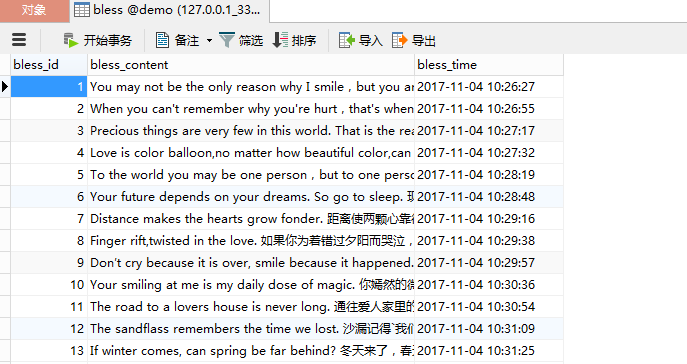
我的数据库
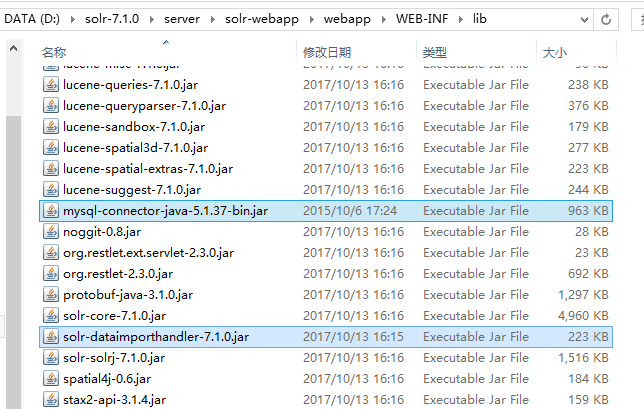
复制jar
找到这个:

连同mysql驱动包一起复制到
找到自带的中文分词器
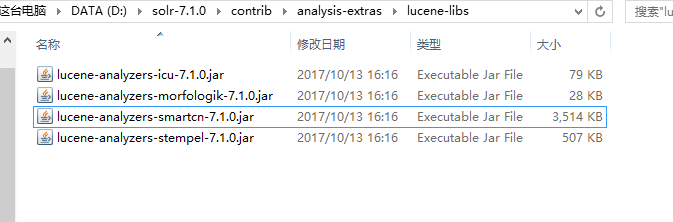
复制到webapp的lib目录
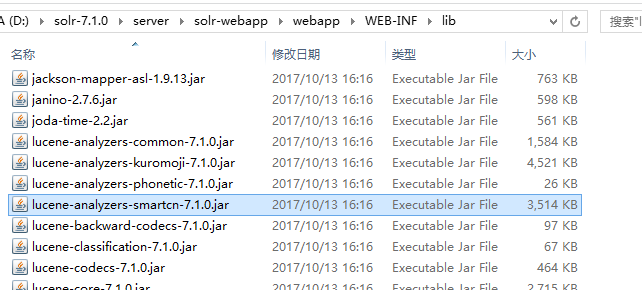
修改managed-shchema

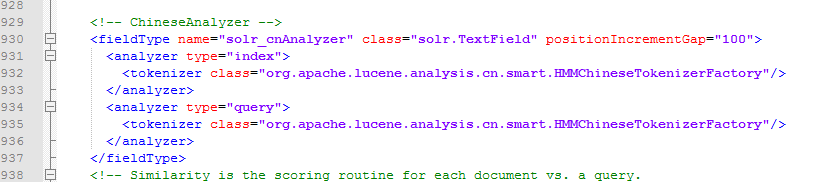
在最后加入如下中文配置
    <!-- ChineseAnalyzer -->

    <fieldType name="solr_cnAnalyzer" class="solr.TextField" positionIncrementGap="100">

      <analyzer type="index">

        <tokenizer class="org.apache.lucene.analysis.cn.smart.HMMChineseTokenizerFactory"/>

      </analyzer>

      <analyzer type="query">

        <tokenizer class="org.apache.lucene.analysis.cn.smart.HMMChineseTokenizerFactory"/>

      </analyzer>

    </fieldType>
下面以cloud模式启动
整个过程只需要输入 索引集合 的名称,其他都是一路回车。
D:\>cd solr-7.1.

D:\solr-7.1.>bin\solr start -e cloud

Welcome to the SolrCloud example!

This interactive session will help you launch a SolrCloud cluster on your local

workstation.

To begin, how many Solr nodes would you like to run in your local cluster? (spec

ify - nodes) []:

【回车】

Ok, let's start up 2 Solr nodes for your example SolrCloud cluster.

Please enter the port for node1 []:

【回车】

Please enter the port for node2 []:

【回车】

Solr home directory D:\solr-7.1.\example\cloud\node1\solr already exists.

D:\solr-7.1.\example\cloud\node2 already exists.

Starting up Solr on port  using command:

"D:\solr-7.1.0\bin\solr.cmd" start -cloud -p  -s "D:\solr-7.1.0\example\clou

d\node1\solr"

Waiting up to  to see Solr running on port

Starting up Solr on port  using command:

"D:\solr-7.1.0\bin\solr.cmd" start -cloud -p  -s "D:\solr-7.1.0\example\clou

d\node2\solr" -z localhost:9983

Started Solr server on port . Happy searching!

Waiting up to  to see Solr running on port

INFO  - -- ::02.823; org.apache.solr.client.solrj.impl.ZkClientClust

erStateProvider; Cluster at localhost: ready

Now let's create a new collection for indexing documents in your 2-node cluster.

Please provide a name for your new collection: [gettingstarted]

Started Solr server on port . Happy searching!

bless【输入名称并回车】

How many shards would you like to split bless into? []

【回车】

How many replicas per shard would you like to create? []

【回车】

Please choose a configuration for the bless collection, available options are:

_default or sample_techproducts_configs [_default]

【回车】

Created collection 'bless' with  shard(s),  replica(s) with config-set 'bless'

Enabling auto soft-commits with maxTime  secs using the Config API

POSTing request to Config API: http://localhost:8983/solr/bless/config

{"set-property":{"updateHandler.autoSoftCommit.maxTime":""}}

Successfully set-property updateHandler.autoSoftCommit.maxTime to

SolrCloud example running, please visit: http://localhost:8983/solr

D:\solr-7.1.>
下面访问
选择bless
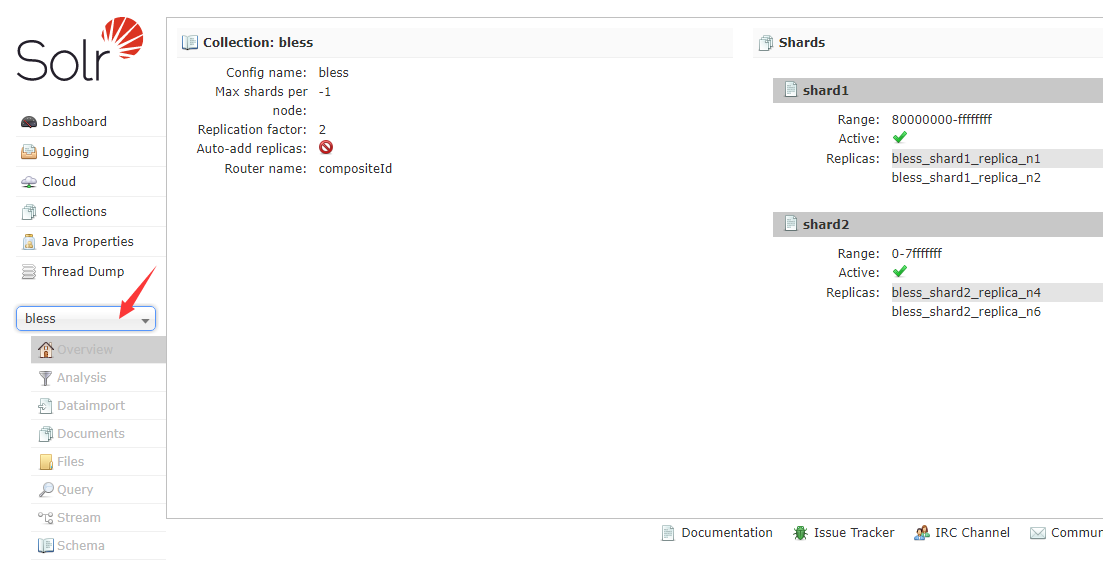
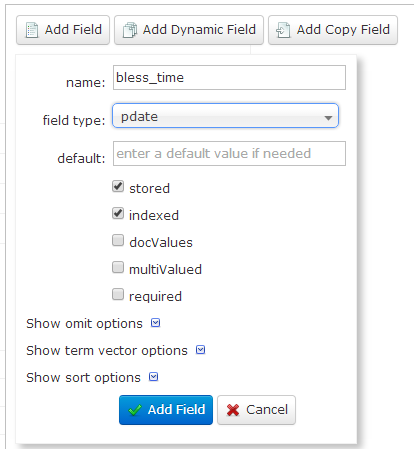
然后选择Schema,来配置字段【注意:这里的名字要与数据库中的字段名一模一样!!!】
bless_id
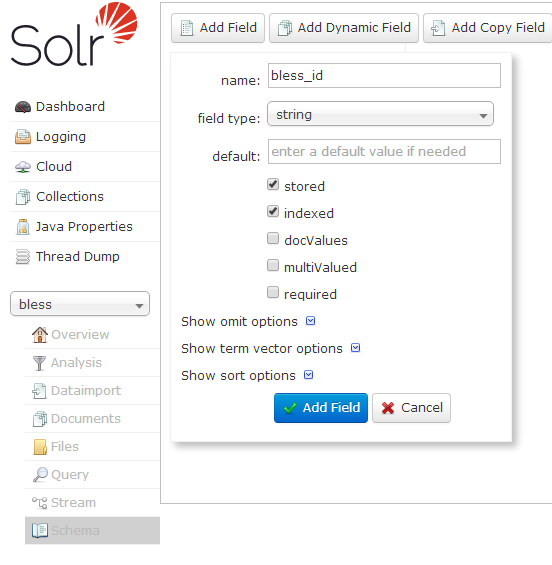
bless_content

bless_time
点击DataImport
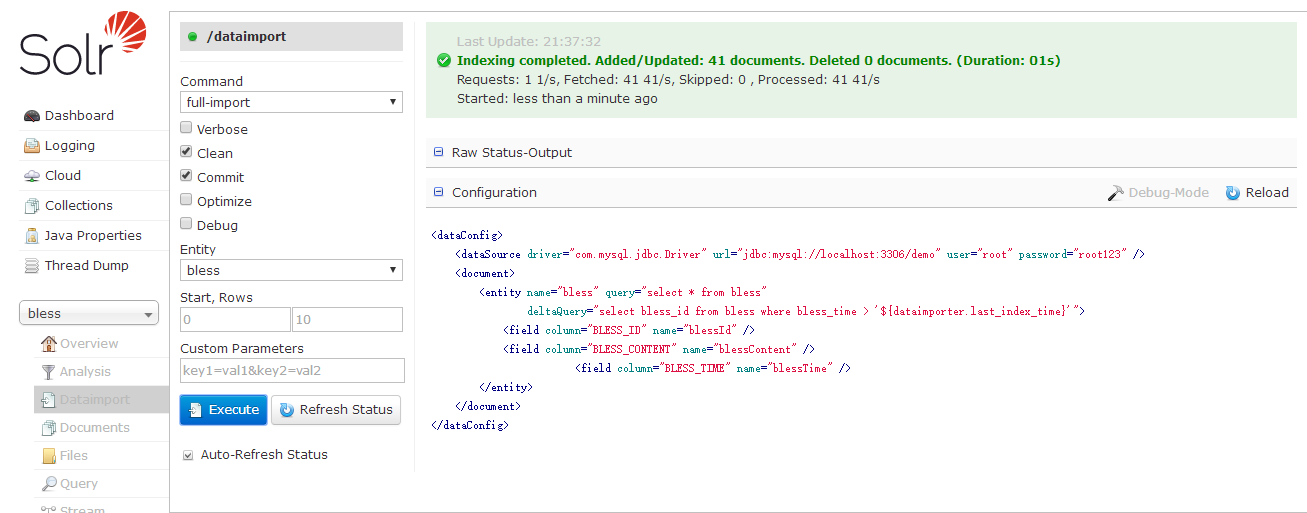
要注意勾选Auto-Refresh Status
现在点击Query。可以看到,数据库中的数据都导入了。

下面看一下中文分词

看起来还不错。查询试试看。
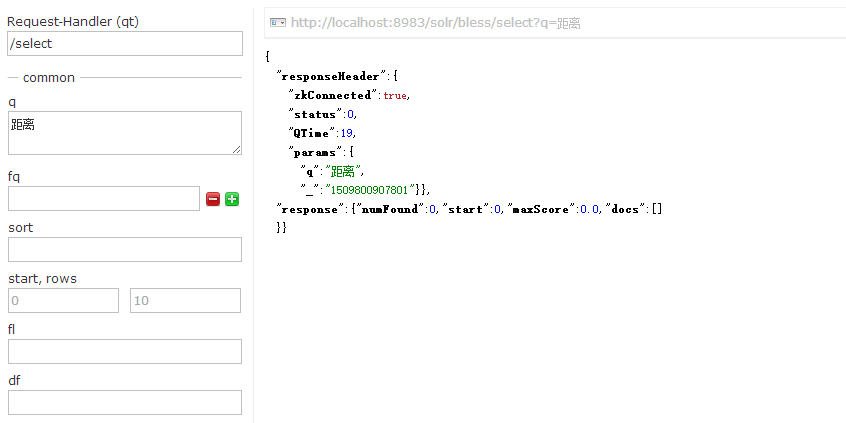
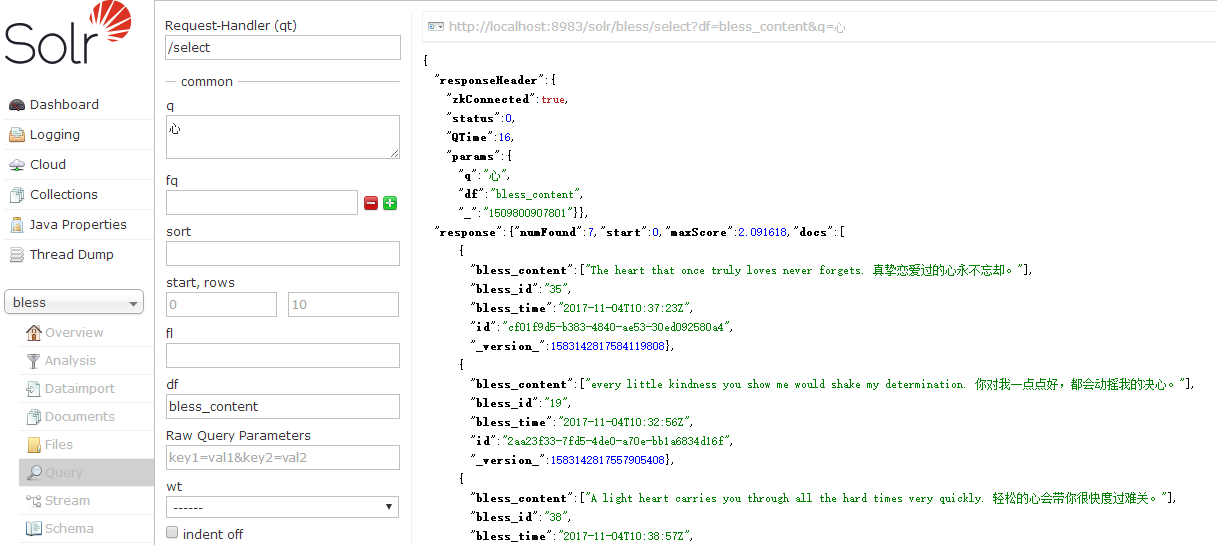
发现0条数据,至少也得有一条啊!然而如果我指定默认搜索字段。会发现出来了。
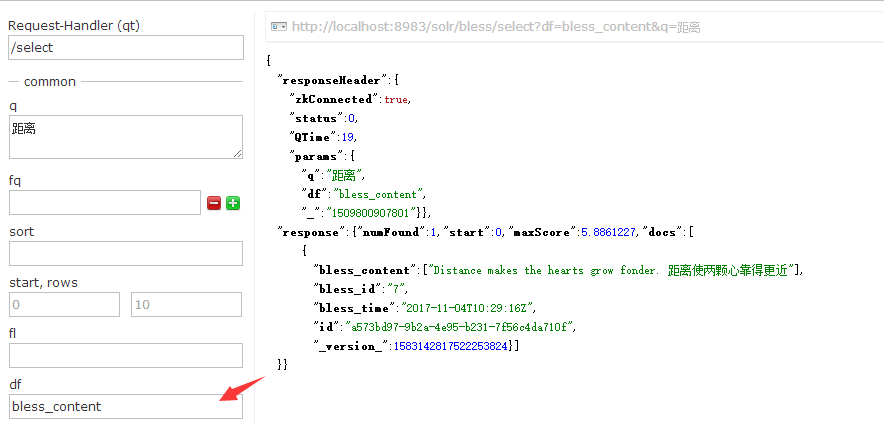
试试搜索【心】
关于数据库的文件,大家如果想要用来测试可以GitHub
Solr7.1---数据库导入并建立中文分词器的更多相关文章
- Solr7.2.1环境搭建和配置ik中文分词器
solr7.2.1环境搭建和配置ik中文分词器 安装环境:Jdk 1.8. windows 10 安装包准备: solr 各种版本集合下载:http://archive.apache.org/dist ...
- solr 7+tomcat 8 + mysql实现solr 7基本使用(安装、集成中文分词器、定时同步数据库数据以及项目集成)
基本说明 Solr是一个开源项目,基于Lucene的搜索服务器,一般用于高级的搜索功能: solr还支持各种插件(如中文分词器等),便于做多样化功能的集成: 提供页面操作,查看日志和配置信息,功能全面 ...
- 真分布式SolrCloud+Zookeeper+tomcat搭建、索引Mysql数据库、IK中文分词器配置以及web项目中solr的应用(1)
版权声明:本文为博主原创文章,转载请注明本文地址.http://www.cnblogs.com/o0Iris0o/p/5813856.html 内容介绍: 真分布式SolrCloud+Zookeepe ...
- solr7.2安装实例,中文分词器
一.安装实例 1.创建实例目录 [root@node004]# mkdir -p /usr/local/solr/home/jonychen 2.复制实例相关配置文件 [root@node004]# ...
- Solr7.3.0入门教程,部署Solr到Tomcat,配置Solr中文分词器
solr 基本介绍 Apache Solr (读音: SOLer) 是一个开源的搜索服务器.Solr 使用 Java 语言开发,主要基于 HTTP 和 Apache Lucene 实现.Apache ...
- Lucene全文检索_分词_复杂搜索_中文分词器
1 Lucene简介 Lucene是apache下的一个开源的全文检索引擎工具包. 1.1 全文检索(Full-text Search) 1.1.1 定义 全文检索就是先分词创建索引,再执行搜索的过 ...
- 11大Java开源中文分词器的使用方法和分词效果对比,当前几个主要的Lucene中文分词器的比较
本文的目标有两个: 1.学会使用11大Java开源中文分词器 2.对比分析11大Java开源中文分词器的分词效果 本文给出了11大Java开源中文分词的使用方法以及分词结果对比代码,至于效果哪个好,那 ...
- Elasticsearch系列---使用中文分词器
前言 前面的案例使用standard.english分词器,是英文原生的分词器,对中文分词支持不太好.中文作为全球最优美.最复杂的语言,目前中文分词器较多,ik-analyzer.结巴中文分词.THU ...
- ElasticSearch7.3学习(十五)----中文分词器(IK Analyzer)及自定义词库
1. 中文分词器 1.1 默认分词器 先来看看ElasticSearch中默认的standard 分词器,对英文比较友好,但是对于中文来说就是按照字符拆分,不是那么友好. GET /_analyze ...
随机推荐
- Page visibility 页面可见性
一直以来,判断页面是不是当前可见标签,浏览器有没有缩小都是比较麻烦的. 通过页面可见性API可以获得相关信息document.hidden 判断页面当前是不是可见的document.visibi ...
- 对象作为 handleEvent
elem.addEventListener("click", obj, false); //用对象作为处理函数 var obj = { handleEvent: ...
- react-native多图选择、图片裁剪(支持ad/ios图片个数控制)
扯淡: 目前关于rn比较知名并且封装好的图片选择控件很多,不过能同时支持多图片上传,个数控制兼容iOS/Ad的却寥寥无几,而今天介绍的这款框架可以实现:图片裁剪.最大图片个数限制.拍照.本地相册等功能 ...
- ECMAScript arguments 对象(摘自W3C)
arguments 对象 在函数代码中,使用特殊对象 arguments,开发者无需明确指出参数名,就能访问它们. 例如,在函数 sayHi() 中,第一个参数是 message.用 argument ...
- Python 直接赋值、浅拷贝和深度拷贝解析
直接赋值:其实就是对象的引用(别名). 浅拷贝(copy):拷贝父对象,不会拷贝对象的内部的子对象. 深拷贝(deepcopy): copy 模块的 deepcopy 方法,完全拷贝了父对象及其子对象 ...
- [转载] Java实现生产者消费者问题
转载自http://www.cnblogs.com/happyPawpaw/archive/2013/01/18/2865957.html 引言 生产者和消费者问题是线程模型中的经典问题:生产者和消费 ...
- 利用可变参数模拟Printf()函数实现一个my_print()函数和调用可变参数注意的陷阱!
可变参数函数的实现与函数调用的栈结构密切相关,正常情况下C的函数参数入栈规则为__stdcall, 它是从右到左的,即函数中的最右边的参数最先入栈. 例如,对于函数: void test(char a ...
- vue初级知识总结
从我第一篇博客的搭建环境开始,就开始学习vue了,一直想将这些基本知识点整理出来,但是一直不知如何下手,今天刚好实战了两个小demo,所以就想趁这机会将以前的一起整理出来,这是vue最基础的知识,我有 ...
- one 策略模式 strategy
--读书笔记 定义 策略模式--定义算法簇,分别封装起来,让他们之间可以互相替换,此模式让算法的变化独立于使用算法的客户.(看不懂的话,往下,有人话版/我自己的解释) 相关原则 > 1,变化单独 ...
- java中的static和final关键字
一:static 1)修饰成员变量: static关键字可以修饰成员变量,它所修饰的成员变量不属于对象的数据结构,而是属于类的变量,通常通过类名来引用static成员. 当创建对象后,成员变量是存储在 ...