
⑥bootstrap表单使用基础案例
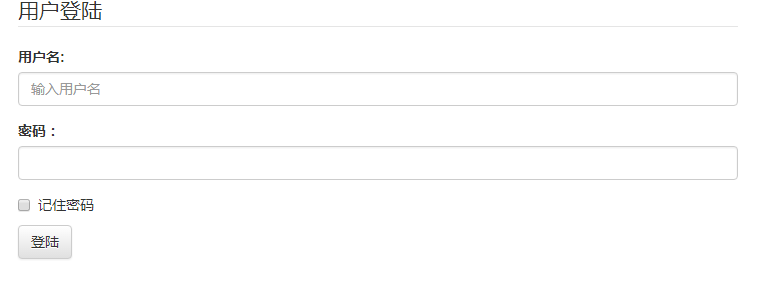
<!DOCTYPE html>
<html lang="en">
<head>
    <meta charset="UTF-8">
    <meta http-equiv="X-UA-Compatible" content="IE=edge">
    <meta name="viewport" content="width=device-width, initial-scale=1">
    <!--移动设备优先-->
    <title>bootstrap</title>
    <!-- 最新版本的 Bootstrap 核心 CSS 文件 -->
    <link rel="stylesheet" href="https://cdn.bootcss.com/bootstrap/3.3.7/css/bootstrap.min.css" integrity="sha384-BVYiiSIFeK1dGmJRAkycuHAHRg32OmUcww7on3RYdg4Va+PmSTsz/K68vbdEjh4u" crossorigin="anonymous">

    <!-- 可选的 Bootstrap 主题文件(一般不用引入) -->
    <link rel="stylesheet" href="https://cdn.bootcss.com/bootstrap/3.3.7/css/bootstrap-theme.min.css" integrity="sha384-rHyoN1iRsVXV4nD0JutlnGaslCJuC7uwjduW9SVrLvRYooPp2bWYgmgJQIXwl/Sp" crossorigin="anonymous">

    <!-- 最新的 Bootstrap 核心 JavaScript 文件 -->
    <script src="https://cdn.bootcss.com/bootstrap/3.3.7/js/bootstrap.min.js" integrity="sha384-Tc5IQib027qvyjSMfHjOMaLkfuWVxZxUPnCJA7l2mCWNIpG9mGCD8wGNIcPD7Txa" crossorigin="anonymous"></script>
    <style>
        .table-hover{background-color: #e29c84;}
    </style>
</head>
<body>
<div class="container">
    <form action="#" method="post">
        <fieldset>
            <legend>用户登陆</legend>

            <div class="form-group">
                <!--距离下一个div bottom15px-->
                <label>用户名:</label>
                <input type="text" class="form-control" name="name" placeholder="输入用户名" />
                <!--form-control沾满容器长度-->
            </div>

            <div class=" form-group">
                <label>密码:</label>
                <input type="password" class="form-control" name="pwd" />
            </div>
            <div class="checkbox">
                <label><input type="checkbox" />记住密码</label>
            </div>
            <button type="submit" class="btn btn-default">登陆</button>

        </fieldset>

    </form>

</div>
</body>
</html>
<!DOCTYPE html>
<html lang="en">
<head>
    <meta charset="UTF-8">
    <meta http-equiv="X-UA-Compatible" content="IE=edge">
    <meta name="viewport" content="width=device-width, initial-scale=1">
    <!--移动设备优先-->
    <title>bootstrap</title>
    <!-- 最新版本的 Bootstrap 核心 CSS 文件 -->
    <link rel="stylesheet" href="https://cdn.bootcss.com/bootstrap/3.3.7/css/bootstrap.min.css" integrity="sha384-BVYiiSIFeK1dGmJRAkycuHAHRg32OmUcww7on3RYdg4Va+PmSTsz/K68vbdEjh4u" crossorigin="anonymous">

    <!-- 可选的 Bootstrap 主题文件(一般不用引入) -->
    <link rel="stylesheet" href="https://cdn.bootcss.com/bootstrap/3.3.7/css/bootstrap-theme.min.css" integrity="sha384-rHyoN1iRsVXV4nD0JutlnGaslCJuC7uwjduW9SVrLvRYooPp2bWYgmgJQIXwl/Sp" crossorigin="anonymous">

    <!-- 最新的 Bootstrap 核心 JavaScript 文件 -->
    <script src="https://cdn.bootcss.com/bootstrap/3.3.7/js/bootstrap.min.js" integrity="sha384-Tc5IQib027qvyjSMfHjOMaLkfuWVxZxUPnCJA7l2mCWNIpG9mGCD8wGNIcPD7Txa" crossorigin="anonymous"></script>
    <style>
        .table-hover{background-color: #e29c84;}
    </style>
</head>
<body>
<div class="container">
    <form action="#" method="post" class="form-inline">
        <fieldset>
            <legend>用户登陆</legend>

            <div class="form-group">
                <!--距离下一个div bottom15px-->
                <label class="sr-only">用户名:</label>
                <input type="text" class="form-control" name="name" placeholder="输入用户名" />
                <!--form-control沾满容器长度-->
            </div>

            <div class=" form-group">
                <label>密码:</label>
                <input type="password" class="form-control" name="pwd" />
            </div>
            <div class="checkbox">
                <label><input type="checkbox" />记住密码</label>
            </div>
            <button type="submit" class="btn btn-default">登陆</button>

        </fieldset>

    </form>

</div>
</body>
</html>

<!DOCTYPE html>
<html lang="en">
<head>
    <meta charset="UTF-8">
    <meta http-equiv="X-UA-Compatible" content="IE=edge">
    <meta name="viewport" content="width=device-width, initial-scale=1">
    <!--移动设备优先-->
    <title>bootstrap</title>
    <!-- 最新版本的 Bootstrap 核心 CSS 文件 -->
    <link rel="stylesheet" href="https://cdn.bootcss.com/bootstrap/3.3.7/css/bootstrap.min.css" integrity="sha384-BVYiiSIFeK1dGmJRAkycuHAHRg32OmUcww7on3RYdg4Va+PmSTsz/K68vbdEjh4u" crossorigin="anonymous">

    <!-- 可选的 Bootstrap 主题文件(一般不用引入) -->
    <link rel="stylesheet" href="https://cdn.bootcss.com/bootstrap/3.3.7/css/bootstrap-theme.min.css" integrity="sha384-rHyoN1iRsVXV4nD0JutlnGaslCJuC7uwjduW9SVrLvRYooPp2bWYgmgJQIXwl/Sp" crossorigin="anonymous">

    <!-- 最新的 Bootstrap 核心 JavaScript 文件 -->
    <script src="https://cdn.bootcss.com/bootstrap/3.3.7/js/bootstrap.min.js" integrity="sha384-Tc5IQib027qvyjSMfHjOMaLkfuWVxZxUPnCJA7l2mCWNIpG9mGCD8wGNIcPD7Txa" crossorigin="anonymous"></script>
    <style>
        .table-hover{background-color: #e29c84;}
    </style>
</head>
<body>
<div class="container">

    <form class="form-horizontal" role="from">
        <!--form-horizontal水平样式为下面的格子布局铺垫就是做了一些边距-->
        <div class="form-group">
            <label class=" col-sm-2 control-label">用户名:</label>
            <!--control-label消除间距对齐-->
            <div class="col-sm-8">
                <input type="text" class="form-control"/>
                <!--form-control沾满全屏-->
            </div>
        </div>

        <div class="form-group">
            <label class="control-label col-sm-2">密码:</label>
            <div class="col-sm-8">
                <input type="password"  class="form-control"/>
            </div>

        </div>

    </form>

</div>
</body>
</html>

<!DOCTYPE html>
<html lang="en">
<head>
    <meta charset="UTF-8">
    <meta http-equiv="X-UA-Compatible" content="IE=edge">
    <meta name="viewport" content="width=device-width, initial-scale=1">
    <!--移动设备优先-->
    <title>bootstrap</title>
    <!-- 最新版本的 Bootstrap 核心 CSS 文件 -->
    <link rel="stylesheet" href="https://cdn.bootcss.com/bootstrap/3.3.7/css/bootstrap.min.css" integrity="sha384-BVYiiSIFeK1dGmJRAkycuHAHRg32OmUcww7on3RYdg4Va+PmSTsz/K68vbdEjh4u" crossorigin="anonymous">

    <!-- 可选的 Bootstrap 主题文件(一般不用引入) -->
    <link rel="stylesheet" href="https://cdn.bootcss.com/bootstrap/3.3.7/css/bootstrap-theme.min.css" integrity="sha384-rHyoN1iRsVXV4nD0JutlnGaslCJuC7uwjduW9SVrLvRYooPp2bWYgmgJQIXwl/Sp" crossorigin="anonymous">

    <!-- 最新的 Bootstrap 核心 JavaScript 文件 -->
    <script src="https://cdn.bootcss.com/bootstrap/3.3.7/js/bootstrap.min.js" integrity="sha384-Tc5IQib027qvyjSMfHjOMaLkfuWVxZxUPnCJA7l2mCWNIpG9mGCD8wGNIcPD7Txa" crossorigin="anonymous"></script>
    <style>
        .table-hover{background-color: #e29c84;}
    </style>
</head>
<body>
<div class="container">

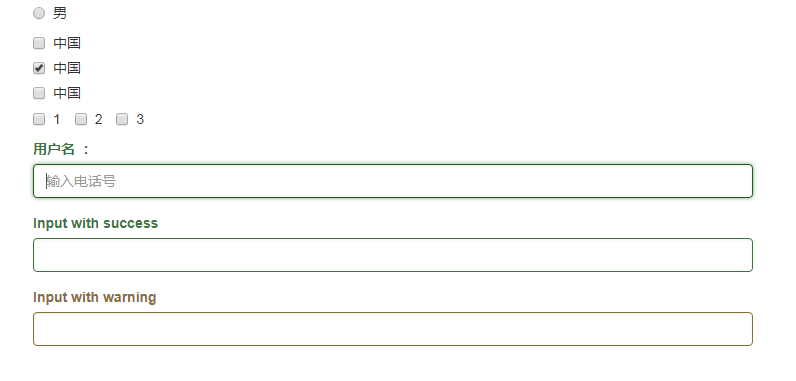
    <form>
        <fieldset>
            <div class="radio">
                <label><input type="radio" name="sex" value="M" />男</label>

            </div>
            <div class="checkbox">
                <label><input type="checkbox" />中国</label>
            </div>
            <div class="checkbox">
                <label><input type="checkbox" checked/>中国</label>

            </div>
            <div class="checkbox">
                <label><input type="checkbox" />中国</label>

            </div>

            <div class="checkbox">
                <label class="checkbox-inline">  <input type="checkbox" > 1</label>
                <label class="checkbox-inline">  <input type="checkbox"> 2</label>
                <label class="checkbox-inline">  <input type="checkbox" > 3</label>

            </div>
            <div class=" form-group has-success">
                <label class="control-label">用户名 :</label>
                <input type="tel" placeholder="输入电话号" class="form-control" autofocus/>
            </div>

            <div class="form-group has-success">
                <label class="control-label" for="inputSuccess1">Input with success</label>
                <input type="text" class="form-control" id="inputSuccess1">
            </div>
            <div class="form-group has-warning">
                <label class="control-label" for="inputWarning1">Input with warning</label>
                <input type="text" class="form-control" id="inputWarning1">
            </div>
        </fieldset>
    </form>

</div>
</body>
</html>
<!DOCTYPE html>
<html lang="en">
<head>
    <meta charset="UTF-8">
    <meta http-equiv="X-UA-Compatible" content="IE=edge">
    <meta name="viewport" content="width=device-width, initial-scale=1">
    <!--移动设备优先-->
    <title>bootstrap</title>
    <!-- 最新版本的 Bootstrap 核心 CSS 文件 -->
    <link rel="stylesheet" href="https://cdn.bootcss.com/bootstrap/3.3.7/css/bootstrap.min.css" integrity="sha384-BVYiiSIFeK1dGmJRAkycuHAHRg32OmUcww7on3RYdg4Va+PmSTsz/K68vbdEjh4u" crossorigin="anonymous">

    <!-- 可选的 Bootstrap 主题文件(一般不用引入) -->
    <link rel="stylesheet" href="https://cdn.bootcss.com/bootstrap/3.3.7/css/bootstrap-theme.min.css" integrity="sha384-rHyoN1iRsVXV4nD0JutlnGaslCJuC7uwjduW9SVrLvRYooPp2bWYgmgJQIXwl/Sp" crossorigin="anonymous">

    <!-- 最新的 Bootstrap 核心 JavaScript 文件 -->
    <script src="https://cdn.bootcss.com/bootstrap/3.3.7/js/bootstrap.min.js" integrity="sha384-Tc5IQib027qvyjSMfHjOMaLkfuWVxZxUPnCJA7l2mCWNIpG9mGCD8wGNIcPD7Txa" crossorigin="anonymous"></script>
    <style>
        .table-hover{background-color: #e29c84;}
    </style>
</head>
<body>
<div class="container">
    <form action="#" method="post">

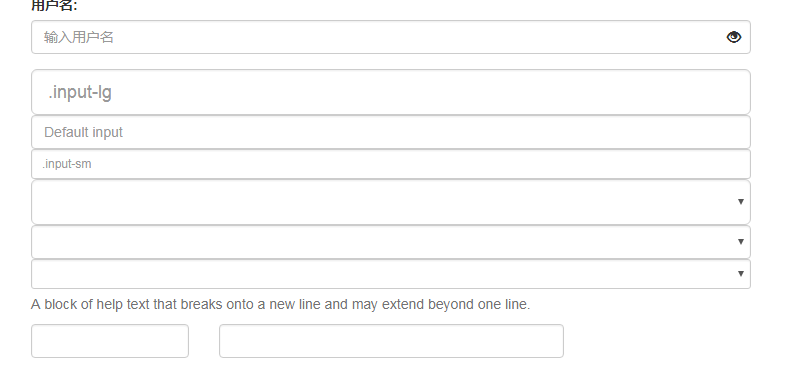
        <div class="form-group has-feedback">
            <label>用户名:</label>
            <input type="text" class="form-control" name="name" placeholder="输入用户名" />
            <span class="glyphicon glyphicon-eye-open form-control-feedback" aria-hidden="true"></span>
        </div>
        <div>

            <input class="form-control input-lg" type="text" placeholder=".input-lg">
            <input class="form-control" type="text" placeholder="Default input">
            <input class="form-control input-sm" type="text" placeholder=".input-sm">

            <select class="form-control input-lg">...</select>
            <select class="form-control">...</select>
            <select class="form-control input-sm">...</select>
        </div>
        <span id="helpBlock" class="help-block">A block of help text that breaks onto a new line and may extend beyond one line.</span>
        <div class="form-group">
            <div class="row">
                <div class="col-sm-3">

                    <input type="tel" class="form-control" />
                </div>
                <div class="col-sm-6">

                    <input type="tel" class="form-control" />
                </div>
            </div>

        </div>

    </form>

</div>
</body>
</html>
⑥bootstrap表单使用基础案例的更多相关文章
- 第二百三十四节,Bootstrap表单和图片
Bootstrap表单和图片 学习要点: 1.表单 2.图片 本节课我们主要学习一下 Bootstrap 表单和图片功能,通过内置的 CSS 定义,显示各 种丰富的效果. 一.表单 Bootstrap ...
- Bootstrap表单
Bootstrap 提供了下列类型的表单布局: 垂直表单(默认) -> 这个不好看,都是手机版了,PC版占一排不好看: 内联表单 -> 我相信这个才是你想要的,PC版响应横排,手机版响应竖 ...
- bootstrapValidator.js,最好用的bootstrap表单验证插件
前言:做Web开发的我们,表单验证是再常见不过的需求了.友好的错误提示能增加用户体验.博主搜索bootstrap表单验证,搜到的结果大部分都是文中的主题:bootstrapvalidator.今天就来 ...
- bootstrap表单带验证
<!DOCTYPE html> <html lang="zh-CN"> <head> <meta charset="utf-8& ...
- 详解Bootstrap表单组件
表单常见的元素主要包括:文本输入框.下拉选择框.单选框.复选框.文本域.按钮等.下面是不同的bootstrap版本: LESS: forms.less SASS: _forms.scss boot ...
- bootstrap 表单控件 控件状态 控件大小 help-block
bootstrap 表单控件 控件状态 控件大小 help-block <!DOCTYPE html> <html lang="en"> <head& ...
- 基于Bootstrap表单验证
基于Bootstrap表单验证 GitHub地址:https://github.com/chentangchun/FormValidate 使用方式: 1.CSS样式 .valierror { bor ...
- 测开之路一百一十一:bootstrap表单
bootstrap表单 引入bootstrap和jquery 默认表单 垂直表单 表单属性绑定:for属性,当for的属性和id的属性相同时,单击for标签,光标自动跳到相同属性的输入框 复选框 水平 ...
- bootstrap 表单类
bootstrap 表单类 表单美化 用法: 向父元素 <form role="form"></form> 添加 role="form&q ...
随机推荐
- 《HelloGitHub》第 18 期
<HelloGitHub>第 18 期 兴趣是最好的老师,HelloGitHub 就是帮你找到兴趣! 简介 分享 GitHub 上有趣.入门级的开源项目. 这是一个面向编程新手.热爱编程. ...
- POJ 2359 Questions(约瑟夫环——数学解法)
题目链接: http://poj.org/problem?id=2359 题意描述: 输入一个字符串 按照下面的规则,如果剩下的最后一个字符是'?',输出"Yes",如果剩下的最后 ...
- Web API 路由 [二] Attribute Routing
1) 启用.在App_Start - WebApiConfig.cs下 //在Register函数添加如下代码: config.MapHttpAttributeRoutes(); 2) 使用.Cont ...
- eslint使用
参考文档 http://www.cnblogs.com/hahazexia/p/6393212.html http://blog.guowenfh.com/2016/08/07/ESLint-Rule ...
- WPF DataGrid自动生成行号
在使用WPF进行应用程序的开发时,经常会为DataGrid生成行号,这里主要介绍一下生成行号的方法.通常有三种方法,这里主要介绍其中的两种,另一种简单提一下. 1. 直接在LoadingRow事件 ...
- zabbix使用mysql数据库 对表分区
zabbix删除历史数据 mysql 表自动分区.删除 ----2016年终总结 二 zabbix清理历史数据是个比较蛋疼的问题,尤其在监控数据较多时,一方面无法彻底释放历史数据空间,一方面数据库删除 ...
- Linux基础命令讲解(二)
Linux命令基本格式: 命令 [参数] [路径文件] 方括号内容可省略 查看命令帮助手段: 1 man 命令名 (man 还可以获取配置文件,函数的帮助) 2 命令 --help 3 help 命令 ...
- JSONP、图片Ping、XMLHttpRequest2.0等跨域资源请求(CORS)
跨域:当协议.主域名.子域名.端口号中任意一个不相同时都不算同一个域,而在不同域之间请求数据即为跨域请求.解决方法有以下几种(如有错误欢迎指出)以请求图片url为例: 1.通过XMLHttpReque ...
- jscodeshift 简易教程
本文首发于 https://github.com/whxaxes/blog/issues/10 背景 jscodeshift 是 fb 出的一个 codemod toolkit,基于 recast 这 ...
- VMware Tools安装方法及共享文件夹设置方法
正确安装好VMware Tools后,可以实现主机与虚拟机之间的文件共享, 可以设置共享文件夹,以及在主机与虚拟机之间直接进行复制黏贴的操作. 安装方法: 选择"虚拟机"-> ...