
Xamarin-Android_BaseAdapter 简单的复用
Xamarin-Android_BaseAdapter 简单的复用
缘由:
本人是一枚 小菜 初学Xamarin-Android 正在学习ListView 控件 发现这个控件的自定义布局 用的那叫一个爽字了得。
但是每次用ListView的时候都要 继承一下BaseAdapter 这就不爽了。好气啊,我这个人非常的懒只好寻求改良之法。
写这篇博客在这里献丑甚是尴尬啊,还请园子里的诸位大咖多多指正。小弟不胜感激!【谢谢O(∩_∩)O哈!】
小弟学识浅薄仅仅做了以下的改良之处
- 抽取泛型 因为基本上的是大同小异的 只是 类型的不同 如这次是 Person 类型 下次可能就是 Student 类型的区别而已 所以就想到了泛型
- 将对 View 进行赋值的方法 使用委托进行替换。因为除了类型不同之外 也就这点不同了
下面是效果图 自己都感觉丑 丑哭了 (⊙o⊙)…
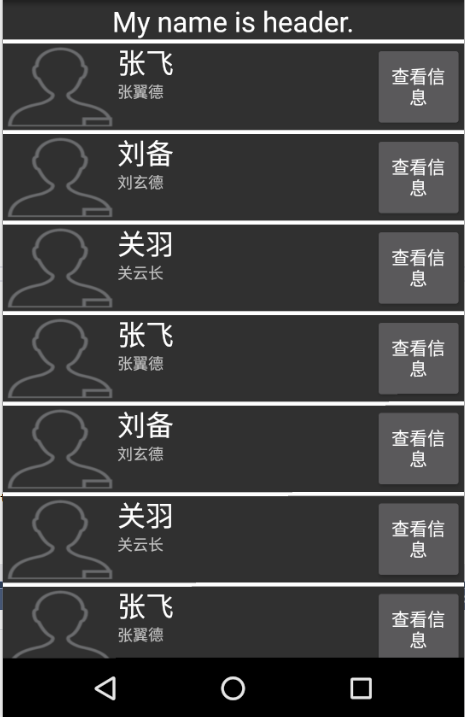
代码奉上
ListItem的布局代码
 <?xml version="1.0" encoding="utf-8"?>

 <LinearLayout xmlns:android="http://schemas.android.com/apk/res/android"

     android:orientation="horizontal"

     android:layout_width="match_parent"

     android:layout_height="match_parent"

     android:minWidth="25px"

     android:minHeight="25px">

     <ImageView

         android:layout_width="89.5dp"

         android:layout_height="67.5dp"

         android:id="@+id/imgHard" />

     <LinearLayout

         android:orientation="vertical"

         android:minWidth="25px"

         android:minHeight="25px"

         android:layout_width="200dp"

         android:layout_height="67.5dp"

         android:id="@+id/linearLayout1">

         <TextView

             android:text="Large Text"

             android:textAppearance="?android:attr/textAppearanceLarge"

             android:layout_width="279.5dp"

             android:layout_height="wrap_content"

             android:id="@+id/txtName" />

         <TextView

             android:text="Small Text"

             android:textAppearance="?android:attr/textAppearanceSmall"

             android:layout_width="match_parent"

             android:layout_height="wrap_content"

             android:id="@+id/txtDesc"

             android:textSize="12dp" />

     </LinearLayout>

     <Button

         android:text="查看信息"

         android:layout_width="wrap_content"

         android:layout_height="67.5dp"

         android:id="@+id/button1" />

 </LinearLayout>
主界面的代码
 <?xml version="1.0" encoding="utf-8"?>

 <LinearLayout xmlns:android="http://schemas.android.com/apk/res/android"

     android:orientation="vertical"

     android:layout_width="match_parent"

     android:layout_height="match_parent">

     <ListView

         android:minWidth="25px"

         android:minHeight="25px"

         android:layout_width="match_parent"

         android:layout_height="match_parent"

         android:id="@+id/itemsPerson"

         android:divider="@android:color/white"

         android:dividerHeight="3dp"

         android:descendantFocusability="afterDescendants" />

 </LinearLayout>
AllRoundBaseAdapter代码
 using System;

 using System.Collections.Generic;

 using System.Linq;

 using System.Text;

 using Android.App;

 using Android.Content;

 using Android.OS;

 using Android.Runtime;

 using Android.Views;

 using Android.Widget;

 namespace AdapterStudy_20170301

 {

     public class AllRoundAdapter<T> : BaseAdapter<T>

     {

         #region 全局变量

         /// <summary>

         /// 上下文

         /// </summary>

         public Activity MyContext { get; set; }

         /// <summary>

         /// 数据源

         /// </summary>

         public List<T> MyDataSource { get; set; }

         /// <summary>

         /// Item 布局资源

         /// </summary>

         public int LayoutSource { get; set; }

         /// <summary>

         /// 执行的委托

         /// </summary>

         Action<View, T> MyAction;

         #endregion

         /// <summary>

         /// 建立 AllRoundBaseAdapter

         /// </summary>

         /// <param name="actity">上下文</param>

         /// <param name="listDataSource">数据源</param>

         /// <param name="layoutSource">布局ID</param>

         /// <param name="action">为布局赋值用到的方法</param>

         public AllRoundAdapter(Activity actity, List<T> listDataSource, int layoutSource, Action<View, T> action)

         {

             this.MyContext = actity;

             this.MyDataSource = listDataSource;

             this.LayoutSource = layoutSource;

             this.MyAction = action;

         }

         public override T this[int position]

         {

             get

             {

                 return MyDataSource[position];

             }

         }

         public override int Count

         {

             get

             {

                 return this.MyDataSource.Count;

             }

         }

         public override long GetItemId(int position)

         {

             return position;

         }

         public override View GetView(int position, View convertView, ViewGroup parent)

         {

             T t = this.MyDataSource[position];

             View v = convertView;

             if (v == null)

             {

                 v = this.MyContext.LayoutInflater.Inflate(this.LayoutSource, null);

             }

             if (this.MyAction != null)

             {

                 this.MyAction.Invoke(v, t);

             }

             return v;

         }

     }

 }
MainActivity的代码
 using System;

 using Android.App;

 using Android.Content;

 using Android.Runtime;

 using Android.Views;

 using Android.Widget;

 using Android.OS;

 using System.Collections.Generic;

 using Javax.Crypto;

 namespace AdapterStudy_20170301

 {

     [Activity(Label = "AdapterStudy_20170301", MainLauncher = true, Icon = "@drawable/icon")]

     public class MainActivity : Activity

     {

         private ListView lvPerson;

         private List<Person> listPerson = new List<Person>();

         protected override void OnCreate(Bundle bundle)

         {

             base.OnCreate(bundle);

             // Set our view from the "main" layout resource

             SetContentView(Resource.Layout.Main);

             lvPerson = FindViewById<ListView>(Resource.Id.itemsPerson);

             //填充一些数据

             this.listPerson.Add(new Person("张飞", Resource.Drawable.person, "张翼德"));

             this.listPerson.Add(new Person("刘备", Resource.Drawable.person, "刘玄德"));

             this.listPerson.Add(new Person("关羽", Resource.Drawable.person, "关云长"));

             this.listPerson.Add(new Person("张飞", Resource.Drawable.person, "张翼德"));

             this.listPerson.Add(new Person("刘备", Resource.Drawable.person, "刘玄德"));

             this.listPerson.Add(new Person("关羽", Resource.Drawable.person, "关云长"));

             this.listPerson.Add(new Person("张飞", Resource.Drawable.person, "张翼德"));

             this.listPerson.Add(new Person("刘备", Resource.Drawable.person, "刘玄德"));

             this.listPerson.Add(new Person("张飞", Resource.Drawable.person, "张翼德"));

             this.listPerson.Add(new Person("刘备", Resource.Drawable.person, "刘玄德"));

             this.listPerson.Add(new Person("关羽", Resource.Drawable.person, "关云长"));

             this.listPerson.Add(new Person("关羽", Resource.Drawable.person, "关云长"));

             //设置表头表尾

             View header = this.LayoutInflater.Inflate(Resource.Layout.HeaderLayout, null);

             View footer = this.LayoutInflater.Inflate(Resource.Layout.FooterLayout, null);

             this.lvPerson.AddHeaderView(header);

             this.lvPerson.AddFooterView(footer);

             //使用泛型的Adapter 进行赋值

             lvPerson.Adapter = new AllRoundAdapter<Person>(this, listPerson, Resource.Layout.ListViewItemLayout,

                 (x, y) =>

                 {

                     x.FindViewById<TextView>(Resource.Id.txtName).Text = y.Name;

                     x.FindViewById<TextView>(Resource.Id.txtDesc).Text = y.Desc;

                     x.FindViewById<ImageView>(Resource.Id.imgHard).SetBackgroundResource(y.Image);

                 });

         }

     }

 }
学识浅薄,请多多指正,多多关照! 感觉自己好菜 掩面而逃。
Xamarin-Android_BaseAdapter 简单的复用的更多相关文章
- Xamarin + MvvmCross 简单事例 Part 2
MvvmCross 说起MvvmCross,要先说到Mvvm,Mvvm是Mvc框架的一种变形.对应的分别为Model.View和ViewModel层.三层之间的关系是这样的: Model层为数据层,实 ...
- 简单的复用accep
s = socket.socket() adress = ("192.168.15.102", 9999) s.bind(adress) s.listen() s.setblock ...
- Visual Studio跨平台开发实战(2) - Xamarin.iOS基本控制项介绍
原文 Visual Studio跨平台开发实战(2) - Xamarin.iOS基本控制项介绍 前言 在上一篇文章中, 我们介绍了Xamarin 以及简单的HelloWorld范例, 这次我们针对iO ...
- MaintainableCSS 《可维护性 CSS》 --- 复用篇
复用 通常,Harry Roberts 所说的 DRY (Don't repeat yourself) 经常被曲解成永远不要重复做通一件事. 但实际上这是不现实的,而且常常导致过分抽象,用太多的精力去 ...
- C#-Xamarin的Android项目开发(一)——创建项目
创建项目 使用Xamarin开发安卓项目,首先需要安装VS2017以上版本.因为VS2017以上的版本,可以直接创建Xamarin项目. 另外用Xamarin开发安卓项目,还需要使用Intel的CPU ...
- Xamarin移动开发的优点和缺点
在考虑iOS或Android应用程序开发时,我们大多数人会首先考虑Objective-C vs Swift和Java.作为本地技术堆栈,当涉及到iOS和Android应用程序开发时,它们自然是最常用的 ...
- Xamarin.Forms学习之初
微软的Build 2016结束的有段时间了,对于一个简单的小屌丝程序员--我来说,关注最大的无疑是Xamarin的免费(开源什么的让大神们上吧),内心激动啊.大会结束的周末我就迫不及待的安装了,然后. ...
- Visual Studio跨平台开发(2):Xamarin.iOS基本控制项介绍
前言 在上一篇文章中, 我们介绍了Xamarin 以及简单的HelloWorld范例, 这次我们针对iOS的专案目录架构以及基本控制项进行说明. 包含UIButton,UISlider,UISwitc ...
- 无辜的RAD(RAD是让你去创造和使用可复用的组件,不是让程序员“变白痴”)good
无辜的RAD 2005-3-21 说实话,RAD很无辜.从出生的那天其就被骂,天天被指着鼻子说“不就是拖个控件嘛”,就好像当年说学电脑“不就是插个鼠标嘛”.也怪程序员大都天性犯贱,就爱一遍又一便的写基 ...
随机推荐
- android 系统开发板挂载U盘
cat /proc/partitions 查看有u盘设备 df 查看挂载情况 iTOP4416开发板插入u盘,自动挂载到 /mnt/udisk1
- python爬虫 Scrapy2-- 爬取豆瓣电影TOP250
sklearn实战-乳腺癌细胞数据挖掘(博主亲自录制视频) https://study.163.com/course/introduction.htm?courseId=1005269003& ...
- python爬虫 scrapy1-安装及创建第一个项目
sklearn实战-乳腺癌细胞数据挖掘(博主亲自录制视频) https://study.163.com/course/introduction.htm?courseId=1005269003& ...
- Bellman-Ford 最短路径算法
算法证明:http://courses.csail.mit.edu/6.006/spring11/lectures/lec15.pdf 先来看一个这样的图: 这是含有负边权的,如果是用djistra的 ...
- 内网服务器通过Squid代理访问外网
环境说明 项目整体需部署Zabbix监控并配置微信报警,而Zabbix Server并不能访问外网,故运维小哥找了台能访问外网的服务器做Suqid代理,Zabbix Server服务器通过代理服务器访 ...
- 官方资料&一些好的博客与技术点
https://technet.microsoft.com/zh-cn/library/hh848794.aspxzh https://msdn.microsoft.com/en-us/power ...
- ASP.NET MVC学习(四)之视图View
1.视图 2.强类型视图 3.@RenderSection("HeaderSection", false) @RenderBody() 4.子行为 5.ASP.NET MV ...
- [转载]必须Mark!最佳HTML5应用开发工具推荐
http://www.csdn.net/article/2014-04-25/2819503-10-html5-tools-worth-checking-out/2 摘要:HTML5自诞生以来,作为新 ...
- netty学习总结(一)
netty是一个nio框架,将java的nio进行了一个封装,形成了一个高性能,高可用的网络编程框架,很多的框架都是基于netty的,所以学好netty是很有用的,而且netty本身的代码结构设计,以 ...
- springboot整合rabbirmq(3.7.9)中使用mandatory参数获取匹配失败的消息以及存入rabbitmq备份交换器中!
先说下这个参数的作用: /** * Mandatory为true时,消息通过交换器无法匹配到队列会返回给生产者 * 为false时,匹配不到会直接被丢弃 */在一些特定场景下还是有用处的!接下来说一下 ...