
gnuplot examples
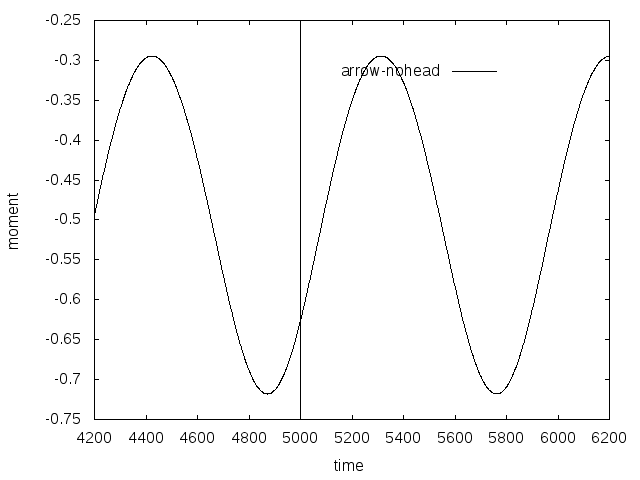
add dashed vertical line
#set terminal pdf

#set output 'c_p_tsr5.5_sine_udf_e387.pdf'

set terminal postscript eps enhanced color font 20 size 8in, 6in

set out 'vertical_line.eps'

#set terminal X11

set autoscale

unset log

unset label

unset pm3d

set key at graph .8, .9

set key spacing 1.2

set xtic auto

set ytic auto

set xlabel  "time"

set xrange [*:*]

# r0 initial pulse

set yrange [*:*]

set ylabel "moment"

set style line 1 lt 1 lc rgb "black" lw 1

set style line 2 lt 2 lc rgb "red" lw 4

set style line 3 lt 3 lc rgb "purple" lw 3

set style line 4 lt 4 lc rgb "blue" lw 3

set style line 5 lt 5 lc rgb "black" lw 2

set style line 6 lt 6 lc rgb "brown" lw 3

# vertical line

set arrow 1 from 5000,-0.75 to 5000,-0.25 nohead dt "."

plot "cm-sine-udf.out"  using 1:3 t "arrow-nohead" ls 1 with lines
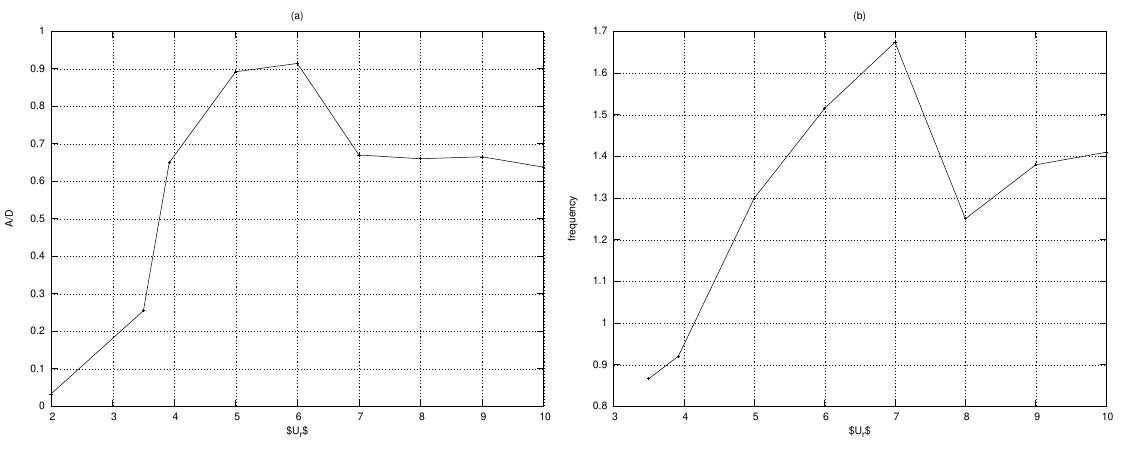
two figures side by side
# multiplot
#set terminal svg  font "Arial"enhanced size 700, 600

#set output "multiplt1.svg"

# eps

set terminal postscript eps font 10 size 7.5in, 6in

set out 'multiplt1.eps'

set style line 1  linecolor rgb "black"  linewidth 1.000 lt 1 pointtype 1 ps 0.5

set style line 2  linecolor rgb "black"  linewidth 2.000 lt 2 pointtype 3 ps 0.

set size 1.0, 0.5

set origin 0.0, 0.0

set multiplot

set grid

unset key

set angles radians

set samples 250

#####################  -- figure 1

set xtic auto

set ytic auto

set size 0.5, 0.5

set origin 0.0, 0.0

set title "(a)"

set xlabel "$U_r$"

set ylabel "A/D"

set label 1 "Damping =.1,.2,.3,.4,.5,.707,1.0,2.0" at .14,17

set xrange [*:*]

set yrange [*:*]

plot  "amp.txt"  using 1:8 t "0.0"  ls 1 with linespoints

#######################  -- figure 2

set xtic auto

set ytic auto

set size 0.5,0.5

set origin 0.5,0.0

set title "(b)"

set label 1 ""

set xlabel "$U_r$"

set ylabel "frequency"

set xrange [*:*]

set yrange [*:*]

plot  "fre.txt"  using 1:2 title "0.005"  ls 1 with linespoints

unset multiplot
single plot
Code:
# set terminal jpeg

# set output 'alfa_epp_a7.jpg'

# set terminal postscript eps font 20

# set out 'alfa_tsr_e387.eps'

set terminal pdf

set output 'alfa_tsr_e387.pdf'

# set terminal X11

set autoscale

unset log

unset label

unset pm3d

set key ins vert

set key samplen 1

set key at graph 1, 0.9

set key spacing 1

set xtic auto

set ytic auto

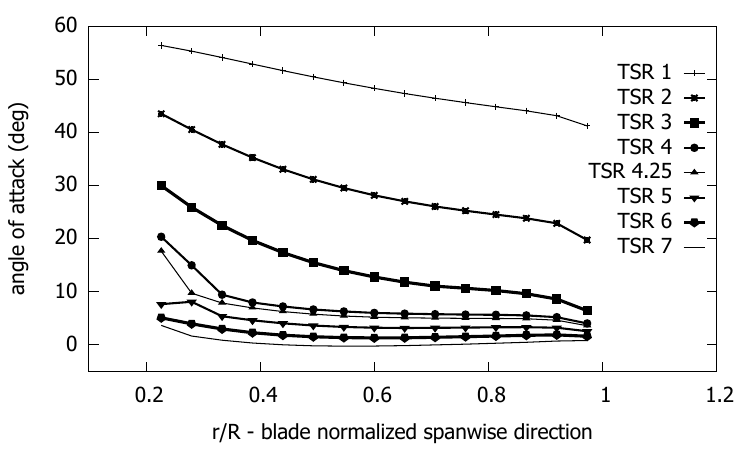
set xlabel  "r/R - blade normalized spanwise direction"

set xrange [0.1:1.2]

# r0 initial pulse

set yrange [-5:*]

set ylabel "angle of attack (deg)"

set style line 1  linecolor rgb "black"  linewidth 1.000 lt 1 pointtype 1 ps 0.5

set style line 2  linecolor rgb "black"  linewidth 2.000 lt 2 pointtype 3 ps 0.5

set style line 3  linecolor rgb "black"  linewidth 3.000 lt 3 pointtype 5 ps 0.5

set style line 4  linecolor rgb "black"  linewidth 2.000 lt 4 pointtype 7 ps 0.5

set style line 5  linecolor rgb "black"  linewidth 1.000 lt 5 pointtype 9 ps 0.5

set style line 6  linecolor rgb "black"  linewidth 2.000 lt 6 pointtype 11 ps 0.5

set style line 7  linecolor rgb "black"  linewidth 3.000 lt 7  pointtype 13 ps 0.5

set style line 7  linecolor rgb "black"  linewidth 3.000 lt 7  pointtype 15 ps 0.5

plot "e387_bem/fort.101"  using 1:2 t "TSR 1" ls 1 with linespoints,\

"e387_bem/fort.105"  using 1:2 t "TSR 2" ls 2 with linespoints ,\

"e387_bem/fort.110" using 1:2 t "TSR 3" ls 3 with linespoints ,\

"e387_bem/fort.114" using 1:2 t "TSR 4" ls 4 with linespoints ,\

"e387_bem/fort.115" using 1:2 t "TSR 4.25" ls 5 with linespoints ,\

"e387_bem/fort.118" using 1:2 t "TSR 5" ls 6 with linespoints ,\

"e387_bem/fort.122" using 1:2 t "TSR 6" ls 7 with linespoints ,\

"e387_bem/fort.127" using 1:2 t "TSR 7" ls 8 with lines
output:
Code
#set terminal jpeg

#set output 'alfa.jpg'

set terminal postscript eps font 24

set out 'U_vs_X_tsr5.eps'

#set terminal X11

set autoscale

unset log

unset label

unset pm3d

set key at graph .99, .58

set key spacing 1

set xtic auto

set ytic auto

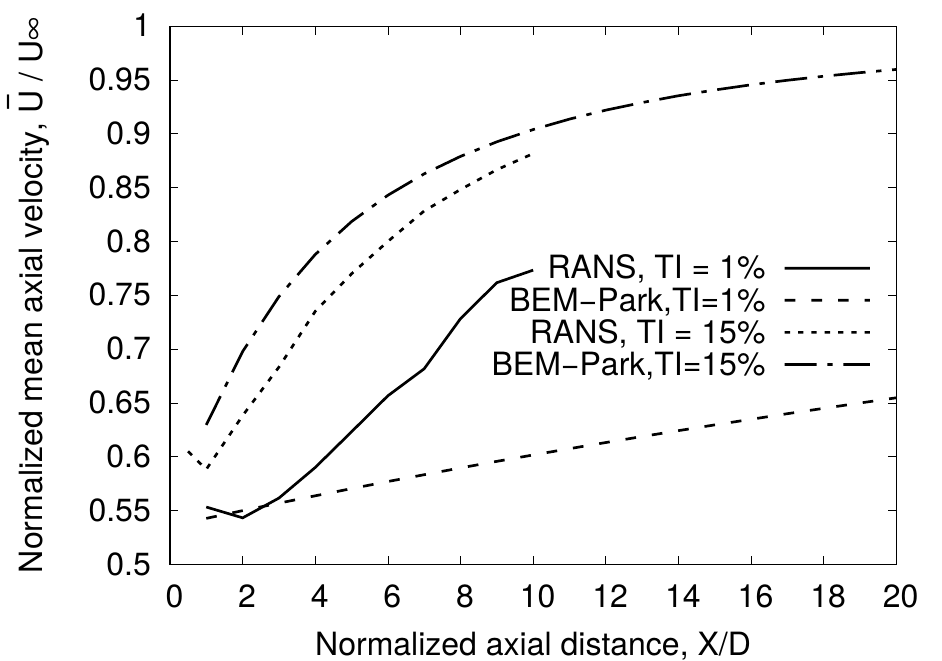
set xlabel  "Normalized axial distance, X/D"

set xrange [*:*]

# r0 initial pulse

set yrange [*:*]

set ylabel "Normalized mean axial velocity, ~U{0.8-} / U{/Symbol \245}"

set style line 1 lt 1 lc rgb "black" lw 4 pt 1 ps 2

set style line 2 lt 2 lc rgb "black" lw 4  pt 3 ps 2

set style line 3 lt 3 lc rgb "black" lw 4  pt 5 ps 2

set style line 4 lt 4 lc rgb "black" lw 4  pt 7 ps 2

set style line 5 lt 5 lc rgb "black" lw 4

set style line 6 lt 6 lc rgb "brown" lw 4

#set label 1 "TSR 5"  at graph .8, .9

plot  "cfd/area_averaged_axial_mean_velocity_TI_1.txt" using 1:6 t "RANS, TI = 1%" ls 1 with lines,\

"park_model/wave_axial_velocity_tsr5_park_TI_1.txt" using 1:2 t "BEM-Park,TI=1%" ls 2 with lines,\

"cfd/area_averaged_axial_mean_velocity_TI_15.txt" using 1:6 t "RANS, TI = 15%" ls 3 with lines,\

"park_model/wave_axial_velocity_tsr5_park_TI_15.txt" using 1:2 t "BEM-Park,TI=15%" ls 4 with lines
example 2
important code
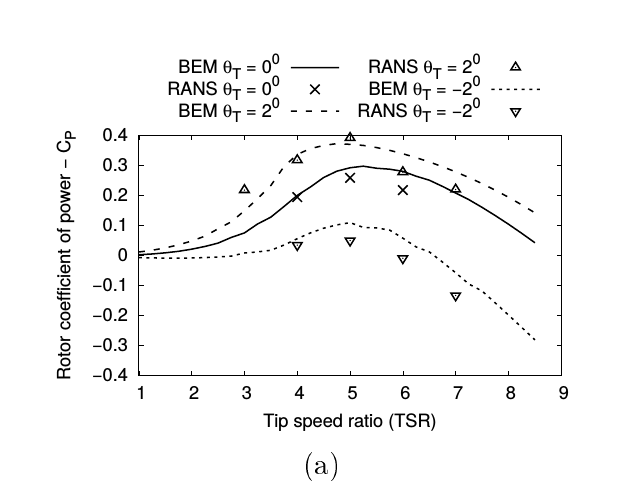
set key out horiz center top
#set terminal jpeg

#set output 'coeff_epp.jpg'

#set terminal png

#set output 'coeff_epp.png'

set terminal postscript eps font 24

set out 'coeff_naca0012.eps'

#set terminal X11

set autoscale

unset log

unset label

unset pm3d

set key out horiz center top

set xtic auto

set ytic auto

set xlabel "Tip speed ratio (TSR)"

set xrange [1:*]

# r0 initial pulse

set yrange [-0.4:0.4]

set ylabel "Rotor coefficient of power - C_P"

set style line 1 lt 1 lc rgb "black" lw 4 pointtype 2 pointsize 2

set style line 2 lt 2 lc rgb "black" lw 4 pointtype 7 pointsize 2

set style line 3 lt 3 lc rgb "black" lw 4 pointtype 6 pointsize 2

set style line 4 lt 4 lc rgb "black" lw 4 pointtype 8 pointsize 2

set style line 5 lt 5 lc rgb "black" lw 4 pointtype 10 pointsize 2

set style line 6 lt 6 lc rgb "brown" lw 4 pointtype 12 pointsize 2

set pointsize 2

set bars 3

plot  "naca0012/re_135k/zero/coeff.plt"  using 1:4 t "BEM {/Symbol q}_T = 0^{0}" ls 1 with lines  ,\

"RANS/Cp_Ct_tsr_one_untwist.dat"  using 1:2 t "RANS {/Symbol q}_T = 0^{0}" ls 1 with points  ,\

"naca0012/re_135k/fwd_2/coeff.plt"  using 1:4  t "BEM {/Symbol q}_T = 2^{0}" ls 2 with lines,\

"RANS/Cp_one_front_eldad_blade.dat" using 1:2 t "RANS {/Symbol q}_T = 2^{0}" ls 4 with points,\

"naca0012/re_135k/rear_2/coeff.plt"  using 1:4  t "BEM {/Symbol q}_T = -2^{0}" ls 3 with lines,\

"RANS/Cp_Ct_tsr_one_rear.dat" using 1:2 t "RANS {/Symbol q}_T = -2^{0}" ls 5 with points
gnuplot examples的更多相关文章
- NS3 利用Gnuplot生成拥塞窗口例子fifth.cc的png图像
参考链接:一个ns-3的Gnuplot例子 命令: (1)首先将fifth.cc拷贝到scratch目录下(由于环境变量的因素,./waf编译只对scratch目录下的文件有效,也可以忽略此步,直接. ...
- Js: Extensible Calendar Examples
http://ext.ensible.comhttps://github.com/bmoeskau/Extensiblehttps://github.com/TeamupCom/extensibleh ...
- Selenium Xpath Tutorials - Identifying xpath for element with examples to use in selenium
Xpath in selenium is close to must required. XPath is element locator and you need to provide xpath ...
- https://github.com/chenghuige/tensorflow-exp/blob/master/examples/sparse-tensor-classification/
https://github.com/chenghuige/tensorflow-exp/blob/master/examples/sparse-tensor-classification/ ...
- gnuplot: 一种更为简洁的曲线,柱状图绘图软件
gnuplot: 一种更为简洁的曲线,柱状图绘图软件 gnuplot: 一种更为简洁的曲线,柱状图绘图软件 Zhong Xiewei Wed Jun 25 gnuplot简单介绍 关于gnuplot的 ...
- (转载)SQL Reporting Services (Expression Examples)
https://msdn.microsoft.com/en-us/library/ms157328(v=SQL.100).aspx Expressions are used frequently in ...
- Examples of MIB Variables - SNMP Tutorial
30.5 Examples of MIB Variables Versions 1 and 2 of SNMP each collected variables together in a singl ...
- DataBinding examples
Databinding in Windows Forms demo (CSWinFormDataBinding) /************************************* Modu ...
- https://developers.google.com/maps/documentation/javascript/examples/places-autocomplete-addressform
https://developers.google.com/maps/documentation/javascript/examples/places-autocomplete-addressform
随机推荐
- 【USACO 2008FEB】 旅馆
[题目链接] 点击打开链接 [算法] 线段树 对于一个节点,记录它从左端点延伸的最多的空房间的个数,从右端点延伸的最多的空房间个数,和该区间最多的连续 空房间个数 [代码] #include<b ...
- js几种escape()解码与unescape()编码
js几种escape()解码与unescape()编码 www.111cn.net 编辑:kepeer 来源:转载 一篇js几种escape()解码与unescape()编码函数,同时我们也和它和服务 ...
- java笔记线程方式1线程暂停yield
public static void yield():暂停当前正在执行的线程对象,并执行其他线程. 让多个线程的执行更和谐,但是不能靠它保证一人一次. public class ThreadYield ...
- 从缓冲上看阻塞与非阻塞socket在发送接收上的区别(转载)
转自:http://blog.chinaunix.net/uid-24517549-id-4044877.html 首先socket在默认情况下是阻塞状态的,这就使得发送以及接收操作处于阻塞的状态 ...
- 统一微信公众号、小程序、APP的用户信息
上次接手一个项目需要整合公众号.小程序以及APP的用户,查阅了微信文档以及一些作者的文章,中间踩了不少坑,在此记录一下解决的流程. 要点 实现统一信息的有以下几点: 1. 在微信开放平台绑定需要 ...
- echart 参数 vue配置 图文展示
https://blog.csdn.net/she_lover/article/details/51448967 https://blog.csdn.net/n_meng/article/detail ...
- 致创业者:APP已死 服务永生
前几日,有位创业者和我讲他在带领团队做一个将爱踢球的人集中在一起的App,我告诉他你的创业方向错了.原因在于你的目的是要为爱踢球的人提供服务,而你现在却在竭尽全力的做App,你应该做的是设计你为爱踢球 ...
- A8ERP权限管理系统
- exe4j将可执行的jar封装成exe文件
1,将java项目打包成可执行的jar:https://www.cnblogs.com/3b2414/p/9355292.html, 2,下载好exe4j工具, 3,首先注册,如果你不注册,打包好的软 ...
- LN : leetcode 529 Minesweeper
lc 529 Minesweeper 529 Minesweeper Let's play the minesweeper game! You are given a 2D char matrix r ...