
大数据学习——flume日志分类采集汇总
1. 案例场景
A、B两台日志服务机器实时生产日志主要类型为access.log、nginx.log、web.log
现在要求:
把A、B 机器中的access.log、nginx.log、web.log 采集汇总到C机器上然后统一收集到hdfs中。
但是在hdfs中要求的目录为:
/source/logs/access/20160101/**
/source/logs/nginx/20160101/**
/source/logs/web/20160101/**
2. 场景分析
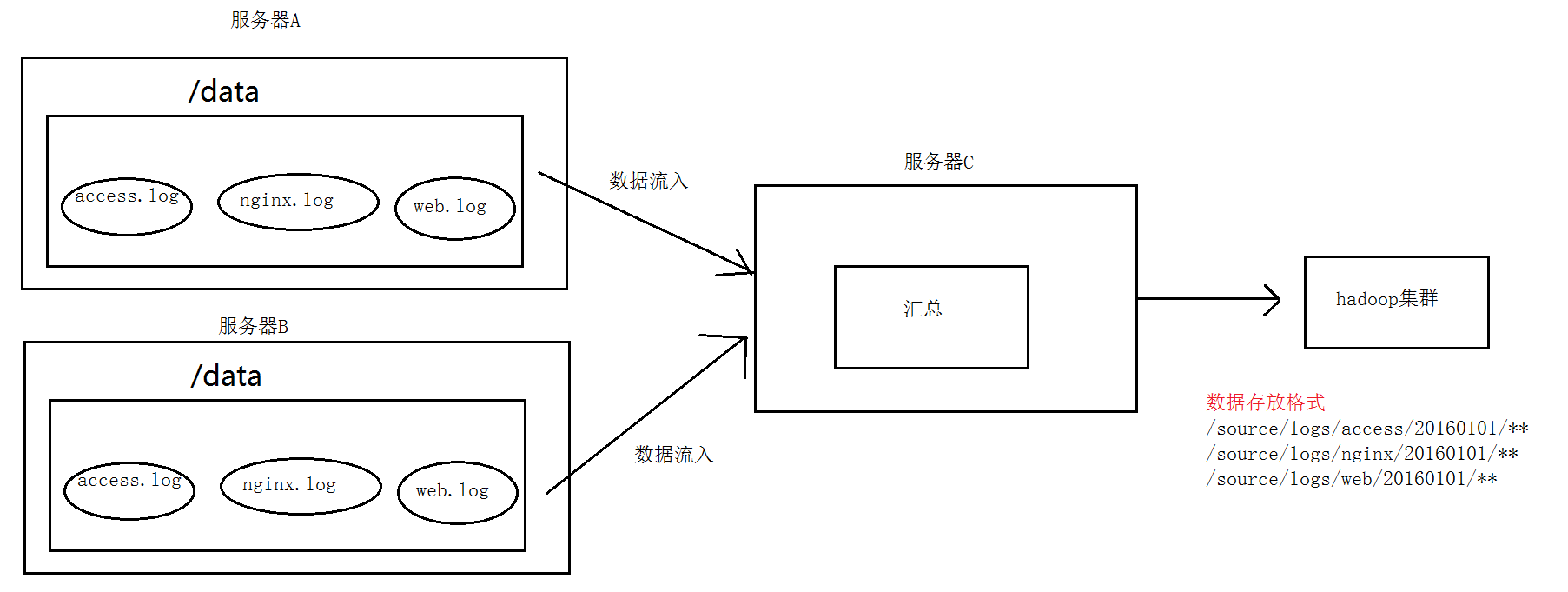
3. 数据流程处理分析
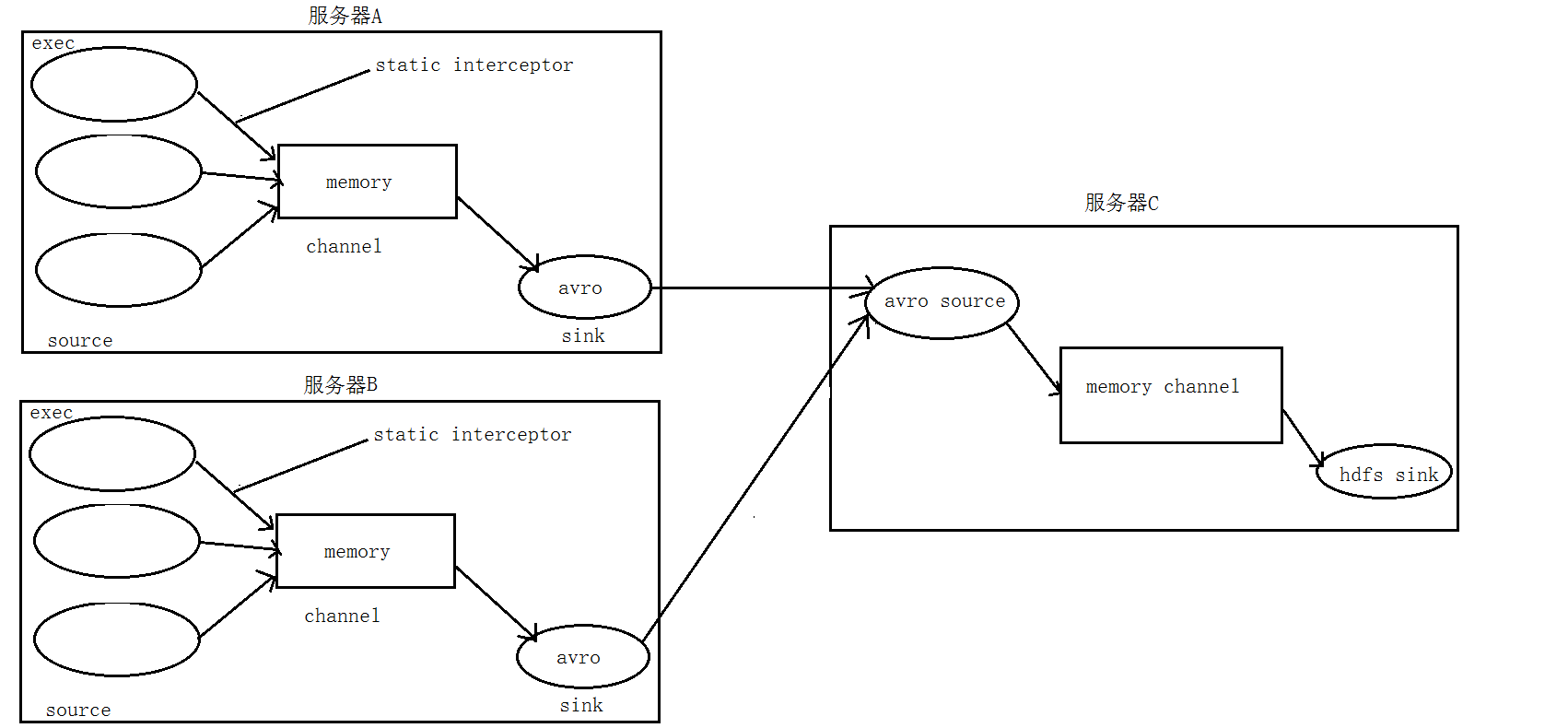
4. 实现
服务器A对应的IP为 192.168.200.102
服务器B对应的IP为 192.168.200.103
服务器C对应的IP为 192.168.200.101
① 在服务器A和服务器B上的$FLUME_HOME/conf 创建配置文件 exec_source_avro_sink.conf 文件内容为
    exec_source_avro_sink.conf  文件内容为

# Name the components on this agent

a1.sources = r1 r2 r3

a1.sinks = k1

a1.channels = c1

# Describe/configure the source

a1.sources.r1.type = exec

a1.sources.r1.command = tail -F /root/data/access.log

a1.sources.r1.interceptors = i1

a1.sources.r1.interceptors.i1.type = static

##  static拦截器的功能就是往采集到的数据的header中插入自己定## 义的key-value对

a1.sources.r1.interceptors.i1.key = type

a1.sources.r1.interceptors.i1.value = access

a1.sources.r2.type = exec

a1.sources.r2.command = tail -F /root/data/nginx.log

a1.sources.r2.interceptors = i2

a1.sources.r2.interceptors.i2.type = static

a1.sources.r2.interceptors.i2.key = type

a1.sources.r2.interceptors.i2.value = nginx

a1.sources.r3.type = exec

a1.sources.r3.command = tail -F /root/data/web.log

a1.sources.r3.interceptors = i3

a1.sources.r3.interceptors.i3.type = static

a1.sources.r3.interceptors.i3.key = type

a1.sources.r3.interceptors.i3.value = web

# Describe the sink

a1.sinks.k1.type = avro

a1.sinks.k1.hostname = 192.168.200.101

a1.sinks.k1.port =

# Use a channel which buffers events in memory

a1.channels.c1.type = memory

a1.channels.c1.capacity =

a1.channels.c1.transactionCapacity =

# Bind the source and sink to the channel

a1.sources.r1.channels = c1

a1.sources.r2.channels = c1

a1.sources.r3.channels = c1

a1.sinks.k1.channel = c1
② 在服务器C上的$FLUME_HOME/conf 创建配置文件 avro_source_hdfs_sink.conf 文件内容为
#定义agent名, source、channel、sink的名称

a1.sources = r1

a1.sinks = k1

a1.channels = c1

#定义source

a1.sources.r1.type = avro

a1.sources.r1.bind = 0.0.0.0

a1.sources.r1.port =

#添加时间拦截器

a1.sources.r1.interceptors = i1

a1.sources.r1.interceptors.i1.type = org.apache.flume.interceptor.TimestampInterceptor$Builder

#定义channels

a1.channels.c1.type = memory

a1.channels.c1.capacity =

a1.channels.c1.transactionCapacity =

#定义sink

a1.sinks.k1.type = hdfs

a1.sinks.k1.hdfs.path=hdfs://192.168.200.101:9000/source/logs/%{type}/%Y%m%d

a1.sinks.k1.hdfs.filePrefix =events

a1.sinks.k1.hdfs.fileType = DataStream

a1.sinks.k1.hdfs.writeFormat = Text

#时间类型

a1.sinks.k1.hdfs.useLocalTimeStamp = true

#生成的文件不按条数生成

a1.sinks.k1.hdfs.rollCount =

#生成的文件按时间生成

a1.sinks.k1.hdfs.rollInterval =

#生成的文件按大小生成

a1.sinks.k1.hdfs.rollSize  =

#批量写入hdfs的个数

a1.sinks.k1.hdfs.batchSize =

flume操作hdfs的线程数(包括新建,写入等)

a1.sinks.k1.hdfs.threadsPoolSize=

#操作hdfs超时时间

a1.sinks.k1.hdfs.callTimeout=

#组装source、channel、sink

a1.sources.r1.channels = c1

a1.sinks.k1.channel = c1
③ 配置完成之后,在服务器A和B上的/root/data有数据文件access.log、nginx.log、web.log。先启动服务器C上的flume,启动命令
在flume安装目录下执行 :
bin/flume-ng agent -c conf -f conf/avro_source_hdfs_sink.conf -name a1 -Dflume.root.logger=DEBUG,console
然后在启动服务器上的A和B,启动命令
在flume安装目录下执行 :
bin/flume-ng agent -c conf -f conf/exec_source_avro_sink.conf -name a1 -Dflume.root.logger=DEBUG,console
5. 项目实现截图


大数据学习——flume日志分类采集汇总的更多相关文章
- 大数据学习——flume拦截器
flume 拦截器(interceptor)1.flume拦截器介绍拦截器是简单的插件式组件,设置在source和channel之间.source接收到的事件event,在写入channel之前,拦截 ...
- 大数据学习——flume安装部署
1.Flume的安装非常简单,只需要解压即可,当然,前提是已有hadoop环境 上传安装包到数据源所在节点上 然后解压 tar -zxvf apache-flume-1.6.0-bin.tar.gz ...
- 大数据学习路线,来qun里分享干货,
一.Linux lucene: 全文检索引擎的架构 solr: 基于lucene的全文搜索服务器,实现了可配置.可扩展并对查询性能进行了优化,并且提供了一个完善的功能管理界面. 推荐一个大数据学习群 ...
- 大数据学习系列之—HBASE
hadoop生态系统 zookeeper负责协调 hbase必须依赖zookeeper flume 日志工具 sqoop 负责 hdfs dbms 数据转换 数据到关系型数据库转换 大数据学习群119 ...
- 大数据学习之Hadoop快速入门
1.Hadoop生态概况 Hadoop是一个由Apache基金会所开发的分布式系统集成架构,用户可以在不了解分布式底层细节情况下,开发分布式程序,充分利用集群的威力来进行高速运算与存储,具有可靠.高效 ...
- 大数据(9) - Flume的安装与使用
Flume简介 --(实时抽取数据的工具) 1) Flume提供一个分布式的,可靠的,对大数据量的日志进行高效收集.聚集.移动的服务,Flume只能在Unix环境下运行. 2) Flume基于流式架构 ...
- 大数据学习day31------spark11-------1. Redis的安装和启动,2 redis客户端 3.Redis的数据类型 4. kafka(安装和常用命令)5.kafka java客户端
1. Redis Redis是目前一个非常优秀的key-value存储系统(内存的NoSQL数据库).和Memcached类似,它支持存储的value类型相对更多,包括string(字符串).list ...
- 大数据学习系列之七 ----- Hadoop+Spark+Zookeeper+HBase+Hive集群搭建 图文详解
引言 在之前的大数据学习系列中,搭建了Hadoop+Spark+HBase+Hive 环境以及一些测试.其实要说的话,我开始学习大数据的时候,搭建的就是集群,并不是单机模式和伪分布式.至于为什么先写单 ...
- 大数据学习系列之九---- Hive整合Spark和HBase以及相关测试
前言 在之前的大数据学习系列之七 ----- Hadoop+Spark+Zookeeper+HBase+Hive集群搭建 中介绍了集群的环境搭建,但是在使用hive进行数据查询的时候会非常的慢,因为h ...
随机推荐
- C3 Transitions, Transforms 以及 Animation总结
C3 Transitions, Transforms 以及 Animation总结 前言 昨天有人咨询我面试的注意事项, 突然就意识到自己这块非常差, 竟然没有任何的印象, 准备看着大神老师的博客, ...
- 题解报告:hdu 2196 Computer(树形dp)
Problem Description A school bought the first computer some time ago(so this computer's id is 1). Du ...
- select选择框中,model传的值并非是页面上的值,而是另一个值
对于编程来说,money和rebate代表的是金额优惠和折扣优惠,采用money或rebate便于数据存储.但是页面显示给用户的时候是金额优惠和折扣优惠,并不是显示编程中所存储数据.所以选择的mode ...
- spring在非容器管理的类里获取bean
package com.qmtt.tools; import org.springframework.beans.BeansException; import org.springframework. ...
- git找不到远程库问题
git报错:Couldn't find remote ref XXXX (gitlab报错)XXXX does not appear to be a git repository Could not ...
- 自动创建xml文档
自动创建xml文档 import xml.etree.ElementTree as ET print(dir(ET)) #ET里面有Element方法 root = ET.Element(" ...
- intellij idea 调试 lua程序, 突然崩溃或者xmx不够的情况
将内存各方面的数值都改大一点.都什么时代了,默认数值还这么低... -server-Xms256m-Xmx1024m-XX:ReservedCodeCacheSize=240m-XX:+UseConc ...
- WEB前端学习有用的书籍
WEB前端研发工程师,在国内算是一个朝阳职业,这个领域没有学校的正规教育,大多数人都是靠自己自学成才.本文主要介绍自己从事web开发以来(从大二至今)看过的书籍和自己的成长过程,目的是给想了解Java ...
- RecyclerView 缓存机制学习笔记1
盗用别人图片 获取VIew的方法的流程 最先调用 其次调用 这个方法调用会先去缓存 这个是是否有动画,有动画就去里面取. 如果取不到就接着调用 如果在没有继续调用 都取不到就去实例化 调用的次数取决于 ...
- mySQL ODBC 在windows 64位版上的驱动问题
1,问题的起源 某次编辑一个asp文件,其中访问mysql数据库的连接字符串如下: "driver={mysql odbc 3.51 driver};server=localhost;uid ...