
大数据学习——flume日志分类采集汇总
1. 案例场景
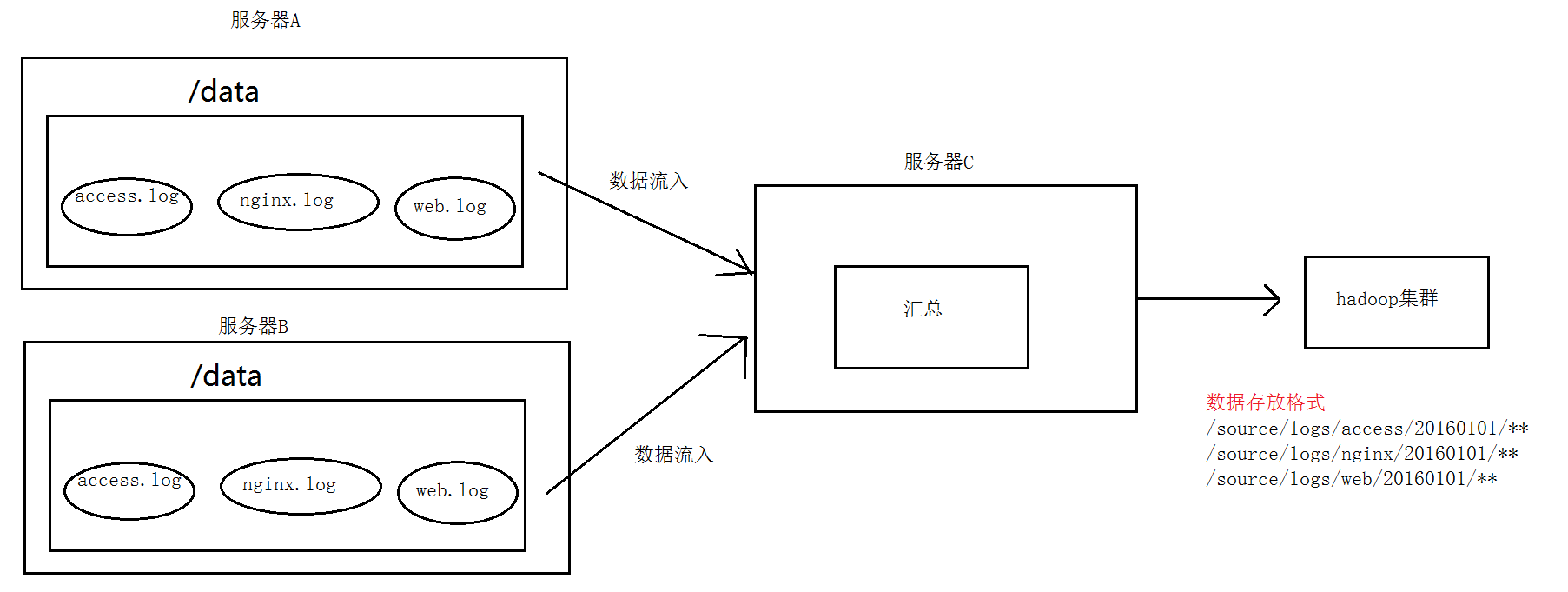
A、B两台日志服务机器实时生产日志主要类型为access.log、nginx.log、web.log
现在要求:
把A、B 机器中的access.log、nginx.log、web.log 采集汇总到C机器上然后统一收集到hdfs中。
但是在hdfs中要求的目录为:
/source/logs/access/20160101/**
/source/logs/nginx/20160101/**
/source/logs/web/20160101/**
2. 场景分析
3. 数据流程处理分析
4. 实现
服务器A对应的IP为 192.168.200.102
服务器B对应的IP为 192.168.200.103
服务器C对应的IP为 192.168.200.101
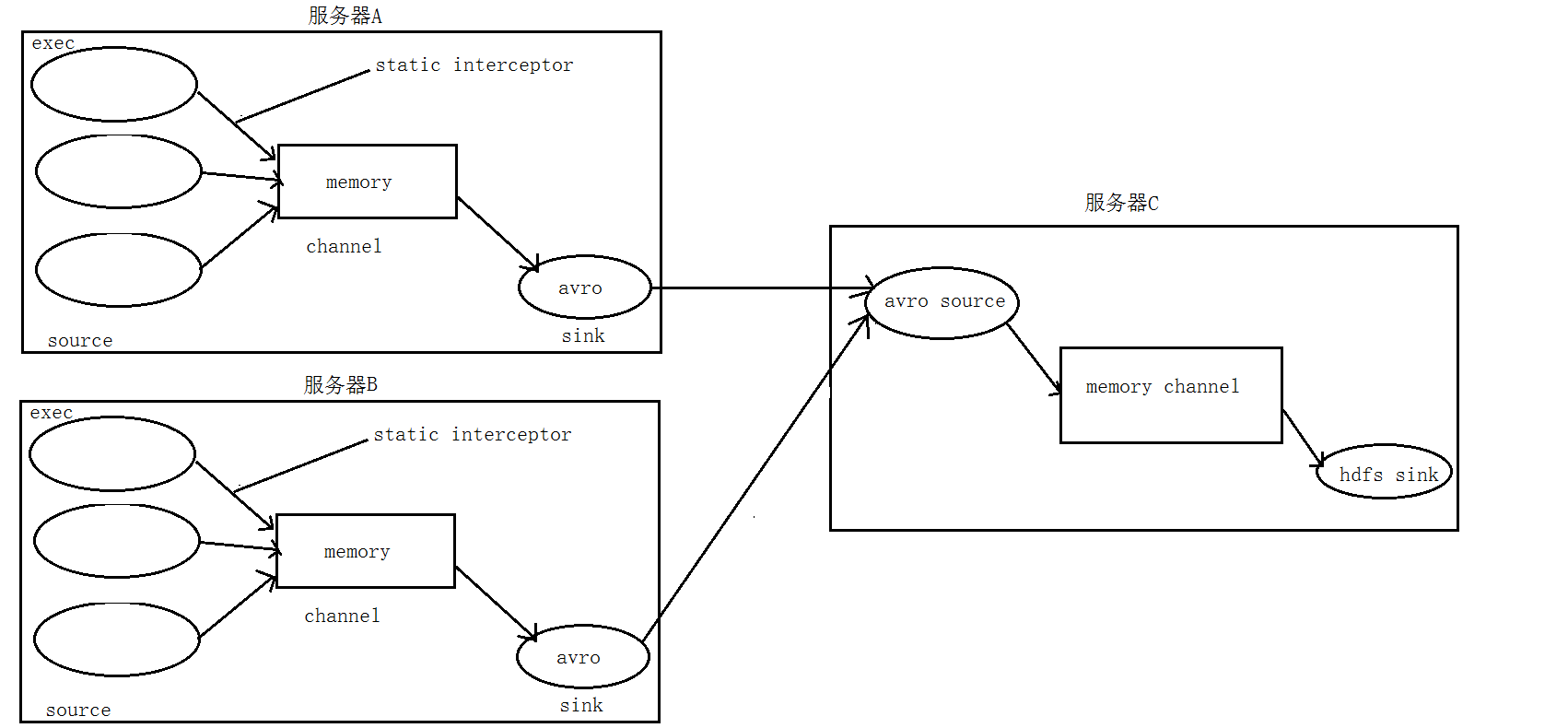
① 在服务器A和服务器B上的$FLUME_HOME/conf 创建配置文件 exec_source_avro_sink.conf 文件内容为
    exec_source_avro_sink.conf  文件内容为

# Name the components on this agent

a1.sources = r1 r2 r3

a1.sinks = k1

a1.channels = c1

# Describe/configure the source

a1.sources.r1.type = exec

a1.sources.r1.command = tail -F /root/data/access.log

a1.sources.r1.interceptors = i1

a1.sources.r1.interceptors.i1.type = static

##  static拦截器的功能就是往采集到的数据的header中插入自己定## 义的key-value对

a1.sources.r1.interceptors.i1.key = type

a1.sources.r1.interceptors.i1.value = access

a1.sources.r2.type = exec

a1.sources.r2.command = tail -F /root/data/nginx.log

a1.sources.r2.interceptors = i2

a1.sources.r2.interceptors.i2.type = static

a1.sources.r2.interceptors.i2.key = type

a1.sources.r2.interceptors.i2.value = nginx

a1.sources.r3.type = exec

a1.sources.r3.command = tail -F /root/data/web.log

a1.sources.r3.interceptors = i3

a1.sources.r3.interceptors.i3.type = static

a1.sources.r3.interceptors.i3.key = type

a1.sources.r3.interceptors.i3.value = web

# Describe the sink

a1.sinks.k1.type = avro

a1.sinks.k1.hostname = 192.168.200.101

a1.sinks.k1.port =

# Use a channel which buffers events in memory

a1.channels.c1.type = memory

a1.channels.c1.capacity =

a1.channels.c1.transactionCapacity =

# Bind the source and sink to the channel

a1.sources.r1.channels = c1

a1.sources.r2.channels = c1

a1.sources.r3.channels = c1

a1.sinks.k1.channel = c1
② 在服务器C上的$FLUME_HOME/conf 创建配置文件 avro_source_hdfs_sink.conf 文件内容为
#定义agent名, source、channel、sink的名称

a1.sources = r1

a1.sinks = k1

a1.channels = c1

#定义source

a1.sources.r1.type = avro

a1.sources.r1.bind = 0.0.0.0

a1.sources.r1.port =

#添加时间拦截器

a1.sources.r1.interceptors = i1

a1.sources.r1.interceptors.i1.type = org.apache.flume.interceptor.TimestampInterceptor$Builder

#定义channels

a1.channels.c1.type = memory

a1.channels.c1.capacity =

a1.channels.c1.transactionCapacity =

#定义sink

a1.sinks.k1.type = hdfs

a1.sinks.k1.hdfs.path=hdfs://192.168.200.101:9000/source/logs/%{type}/%Y%m%d

a1.sinks.k1.hdfs.filePrefix =events

a1.sinks.k1.hdfs.fileType = DataStream

a1.sinks.k1.hdfs.writeFormat = Text

#时间类型

a1.sinks.k1.hdfs.useLocalTimeStamp = true

#生成的文件不按条数生成

a1.sinks.k1.hdfs.rollCount =

#生成的文件按时间生成

a1.sinks.k1.hdfs.rollInterval =

#生成的文件按大小生成

a1.sinks.k1.hdfs.rollSize  =

#批量写入hdfs的个数

a1.sinks.k1.hdfs.batchSize =

flume操作hdfs的线程数(包括新建,写入等)

a1.sinks.k1.hdfs.threadsPoolSize=

#操作hdfs超时时间

a1.sinks.k1.hdfs.callTimeout=

#组装source、channel、sink

a1.sources.r1.channels = c1

a1.sinks.k1.channel = c1
③ 配置完成之后,在服务器A和B上的/root/data有数据文件access.log、nginx.log、web.log。先启动服务器C上的flume,启动命令
在flume安装目录下执行 :
bin/flume-ng agent -c conf -f conf/avro_source_hdfs_sink.conf -name a1 -Dflume.root.logger=DEBUG,console
然后在启动服务器上的A和B,启动命令
在flume安装目录下执行 :
bin/flume-ng agent -c conf -f conf/exec_source_avro_sink.conf -name a1 -Dflume.root.logger=DEBUG,console
5. 项目实现截图


大数据学习——flume日志分类采集汇总的更多相关文章
- 大数据学习——flume拦截器
flume 拦截器(interceptor)1.flume拦截器介绍拦截器是简单的插件式组件,设置在source和channel之间.source接收到的事件event,在写入channel之前,拦截 ...
- 大数据学习——flume安装部署
1.Flume的安装非常简单,只需要解压即可,当然,前提是已有hadoop环境 上传安装包到数据源所在节点上 然后解压 tar -zxvf apache-flume-1.6.0-bin.tar.gz ...
- 大数据学习路线,来qun里分享干货,
一.Linux lucene: 全文检索引擎的架构 solr: 基于lucene的全文搜索服务器,实现了可配置.可扩展并对查询性能进行了优化,并且提供了一个完善的功能管理界面. 推荐一个大数据学习群 ...
- 大数据学习系列之—HBASE
hadoop生态系统 zookeeper负责协调 hbase必须依赖zookeeper flume 日志工具 sqoop 负责 hdfs dbms 数据转换 数据到关系型数据库转换 大数据学习群119 ...
- 大数据学习之Hadoop快速入门
1.Hadoop生态概况 Hadoop是一个由Apache基金会所开发的分布式系统集成架构,用户可以在不了解分布式底层细节情况下,开发分布式程序,充分利用集群的威力来进行高速运算与存储,具有可靠.高效 ...
- 大数据(9) - Flume的安装与使用
Flume简介 --(实时抽取数据的工具) 1) Flume提供一个分布式的,可靠的,对大数据量的日志进行高效收集.聚集.移动的服务,Flume只能在Unix环境下运行. 2) Flume基于流式架构 ...
- 大数据学习day31------spark11-------1. Redis的安装和启动,2 redis客户端 3.Redis的数据类型 4. kafka(安装和常用命令)5.kafka java客户端
1. Redis Redis是目前一个非常优秀的key-value存储系统(内存的NoSQL数据库).和Memcached类似,它支持存储的value类型相对更多,包括string(字符串).list ...
- 大数据学习系列之七 ----- Hadoop+Spark+Zookeeper+HBase+Hive集群搭建 图文详解
引言 在之前的大数据学习系列中,搭建了Hadoop+Spark+HBase+Hive 环境以及一些测试.其实要说的话,我开始学习大数据的时候,搭建的就是集群,并不是单机模式和伪分布式.至于为什么先写单 ...
- 大数据学习系列之九---- Hive整合Spark和HBase以及相关测试
前言 在之前的大数据学习系列之七 ----- Hadoop+Spark+Zookeeper+HBase+Hive集群搭建 中介绍了集群的环境搭建,但是在使用hive进行数据查询的时候会非常的慢,因为h ...
随机推荐
- 贪心 Codeforces Round #297 (Div. 2) C. Ilya and Sticks
题目传送门 /* 题意:给n个棍子,组成的矩形面积和最大,每根棍子可以-1 贪心:排序后,相邻的进行比较,若可以读入x[p++],然后两两相乘相加就可以了 */ #include <cstdio ...
- 485 Max Consecutive Ones 最大连续1的个数
给定一个二进制数组, 计算其中最大连续1的个数.示例 1:输入: [1,1,0,1,1,1]输出: 3解释: 开头的两位和最后的三位都是连续1,所以最大连续1的个数是 3.注意: 输入的数组只包 ...
- KEIL软件仿真死在等待外部晶振起振
这是由于是Debug里面的设置有问题 主要是下面2项设置 Dialog DLL默认是DCM3.DLL Parameter默认是-pCM3 应改为 Dialog DLL默认是DARMSTM.DLL Pa ...
- AJPFX简述Scanner类的特点
hasNextInt() :判断是否还有下一个输入项,其中Xxx可以是Int,Double等.如果需要判断是否包含下一个字符串,则可以省略Xxx nextInt(): 获取下一个输入项. ...
- Git之删除分支
目录 删除本地分支 删除远程分支 删除本地分支: git branch -d dev [git branch -参数 本地分支名称] 删除远程分支: git push origin --delete ...
- 责任链模式和php实现
职责链模式(又叫责任链模式): 包含了一些命令对象和一些处理对象,每个处理对象决定它能处理那些命令对象,它也知道应该把自己不能处理的命令对象交下一个处理对象,该模式还描述了往该链添加新的处理对象的方法 ...
- Spring-aop(一)
写一个计算类,计算前后需要打印日志. interface ArithmeticCalculator { public int add(int i, int j); public int sub(int ...
- ES6学习笔记(9)----Symbol
参考书<ECMAScript 6入门>http://es6.ruanyifeng.com/ Symbol1.symbol:Symbol是javascript的第七种原始数据类型,代表独一无 ...
- mongodb多条件查询总结
根据两字段乘积过滤查询分页数据 db.cron.aggregate([{$project:{_id:,AppID:,result:{$add:["$endlottery",&quo ...
- Redis学习笔记(四)集合进阶
1.组合与关联多个集合 差集: SDIFF key1 [key2...](返回存在于key1但不存在其他集合中的元素) SDIFFSTORE destination key1 [key2...](将存 ...