
Unity初级案例——贪吃蛇
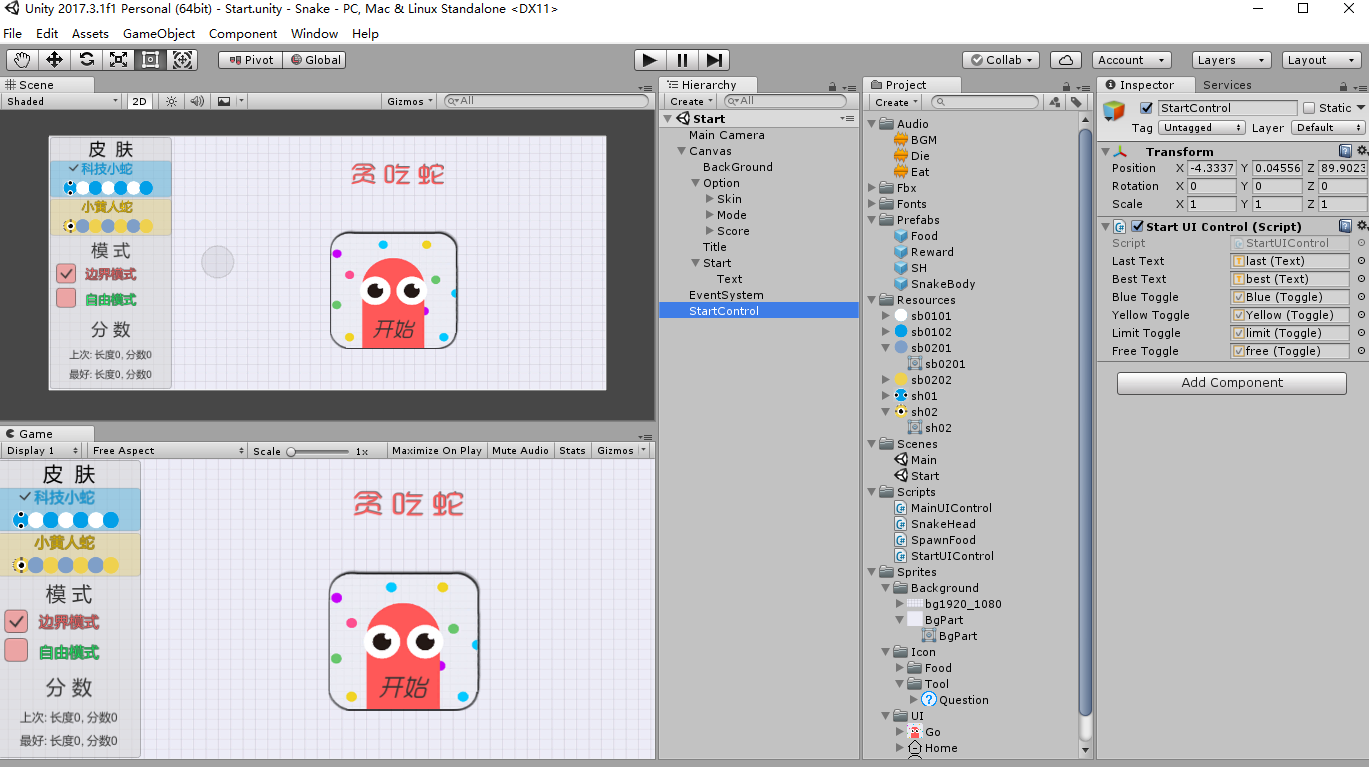
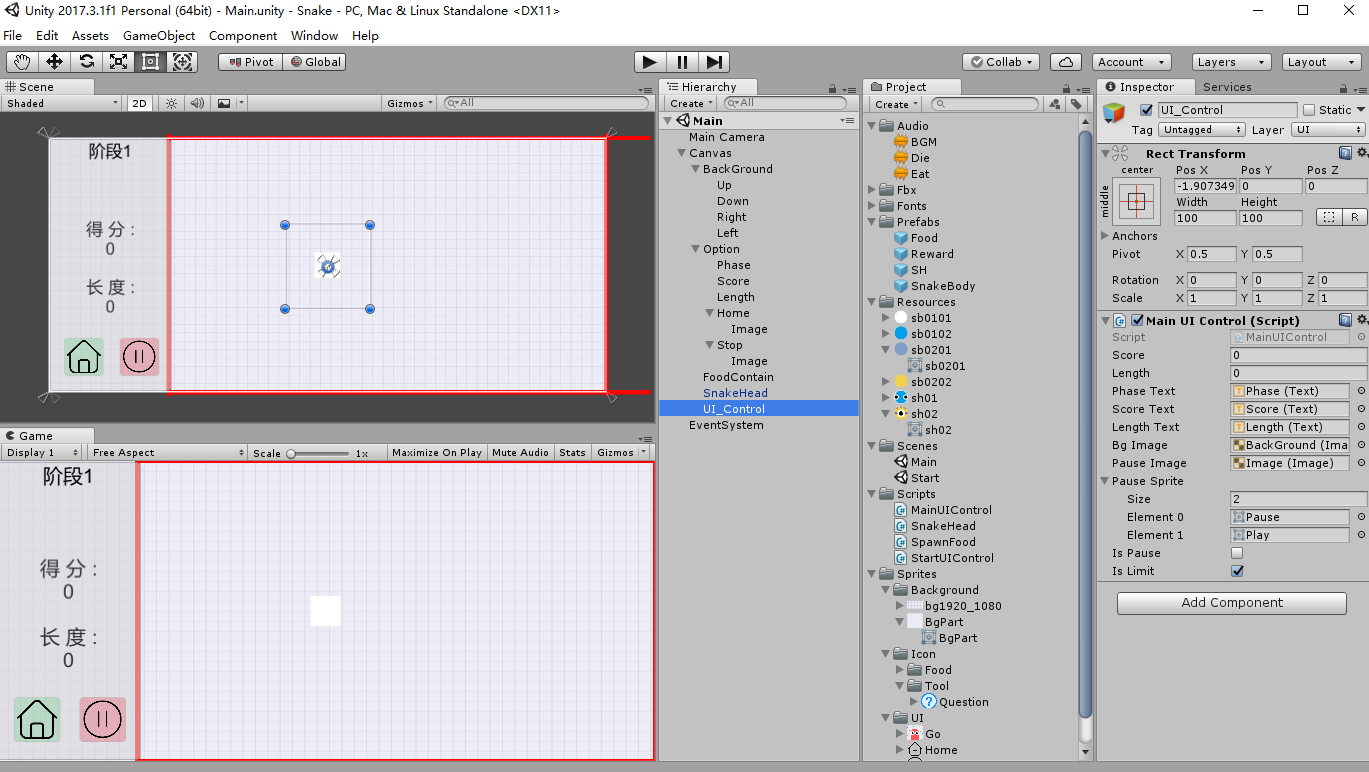
 using System.Collections;

 using System.Collections.Generic;

 using UnityEngine;

 using UnityEngine.UI;

 public class MainUIControl : MonoBehaviour {

     private static MainUIControl _instance;

     public static MainUIControl instance

     {

         get

         {

             return _instance;

         }

     }

     public int score = ;

     public int length = ;

     public Text phaseText;

     public Text scoreText;

     public Text lengthText;

     public Image bgImage;    //背景颜色

     public Image pauseImage;

     public Sprite[] pauseSprite;    //暂停图标的icon

     private Color tempColor;

     public bool isPause=false;      //暂停

     public bool isLimit = true;     //边界模式

     void Awake()

     {

         _instance = this;

     }

     //启动边界设置判断

      void Start()

     {

         if(PlayerPrefs.GetInt("limit",)==)

         {

             isLimit = false;

             //遍历bgImage下的子物体

             foreach(Transform t in bgImage.gameObject.transform)

             {

                 t.gameObject.GetComponent<Image>().enabled = false;

             }

         }

     }

     private void Update()

     {

         switch(score/)

         {

             case :

             case :

                 bgImage.color = bgImage.color;

                 phaseText.text = "阶段1";

                 break;

             case :

                 //把Html里颜色的十六进制值解析

                 ColorUtility.TryParseHtmlString("#CCFFDBFF", out tempColor);

                 bgImage.color = tempColor;

                 phaseText.text = "阶段2";

                 break;

             case :

                 ColorUtility.TryParseHtmlString("#EBFFCCFF", out tempColor);

                 bgImage.color = tempColor;

                 phaseText.text = "阶段3";

                 break;

             case :

                 ColorUtility.TryParseHtmlString("#FFF3CCFF", out tempColor);

                 bgImage.color = tempColor;

                 phaseText.text = "阶段4";

                 break;

             default:

                 ColorUtility.TryParseHtmlString("#FFDACCFF", out tempColor);

                 bgImage.color = tempColor;

                 phaseText.text = "无尽模式";

                 break;

         }

     }

     // UI更新

     public void UpdateUI(int s=,int l=)

     {

         score += s;

         length += l;

         scoreText.text = "得分:\n" + score;

         lengthText.text = "长度:\n" + length;

     }

     //暂停

     /*

       Edit -> Project Settings -> Input -> Submit -> Alt Positive Button

       把spce去掉,否则摁下Space和Enter会导致按键冲突

     */

     public void Pause()

     {

         isPause = !isPause;     //状态取反

         if(isPause)

         {

             Time.timeScale = ;

             pauseImage.GetComponent<Image>().sprite = pauseSprite[];

         }

        else

         {

             Time.timeScale = ;

             pauseImage.GetComponent<Image>().sprite = pauseSprite[];

         }

     }

     //回到开始界面(需把此方法绑定到Home按钮的Button组件上)

     //先把两个场景放入File -> Build Settings

     public void Home()

     {

         //加载index[0]的场景(开始界面)

         UnityEngine.SceneManagement.SceneManager.LoadScene();

         //这里有个bug,摁下Home按钮回到主界面后,虽然勾选的是“边界模式”但是点“开始”后还是自由模式

         //一定要再次点击边界模式后才会正常

         //因此这里设置为摁Home返回后默认选择界限模式

         StartUIControl limit = new StartUIControl();

         limit.LimitMode(true);

     }

 }
MainUIControl
 using System.Collections;

 using System.Collections.Generic;

 using UnityEngine;

 using UnityEngine.UI;

 public class StartUIControl : MonoBehaviour

 {

     public Text lastText;           //上一次分数

     public Text bestText;           //最好分数

     public Toggle blueToggle;       //蓝色蛇

     public Toggle yellowToggle;     //黄色蛇

     public Toggle limitToggle;      //边界模式

     public Toggle freeToggle;       //自由模式

     //在开始界面显示保存的成绩

     void Awake()

     {

         lastText.text = "上次:长度" + PlayerPrefs.GetInt("lastl", ) + ",分数" + PlayerPrefs.GetInt("lasts", );

         bestText.text = "最好:长度" + PlayerPrefs.GetInt("bestl", ) + ",分数" + PlayerPrefs.GetInt("bests", );

     }

     //开始时选择

     private void Start()

     {

         if(PlayerPrefs.GetString("sh","sh01")=="sh01")

         {

             BlueSnake(true);

         }

         else

         {

             YellowSnake(true);

         }

         if(PlayerPrefs.GetInt("limit",)==)

         {

             LimitMode(true);

         }

         else

         {

             FreeMode(true);

         }

     }

     //选择蓝色蛇

     public void BlueSnake(bool isOn)

     {

         if(isOn)

         {

             PlayerPrefs.SetString("sh", "sh01");

             PlayerPrefs.SetString("sb01", "sb0101");

             PlayerPrefs.SetString("sb02", "sb0102");

         }

     }

     //选择黄色蛇

     public void YellowSnake(bool isOn)

     {

         if (isOn)

         {

             PlayerPrefs.SetString("sh", "sh02");

             PlayerPrefs.SetString("sb01", "sb0201");

             PlayerPrefs.SetString("sb02", "sb0202");

         }

     }

     //边界模式

     public void LimitMode(bool isOn)

     {

         if(isOn)

         {

             PlayerPrefs.SetInt("limit", );

             PlayerPrefs.SetInt("free", );

         }

     }

     //自由模式

     public void FreeMode(bool isOn)

     {

         if (isOn)

         {

             PlayerPrefs.SetInt("free", );

             PlayerPrefs.SetInt("limit", );

         }

     }

     //加载游戏场景(需把此方法绑定到Start按钮的Button组件上)

     public void StartGame()

     {

         UnityEngine.SceneManagement.SceneManager.LoadScene();

     }

 }
StartUIControl
 using System.Collections;

 using System.Collections.Generic;

 using UnityEngine;

 using UnityEngine.UI;

 //using System.Linq;      //List.Last()

 public class SnakeHead : MonoBehaviour

 {

     public List<Transform> bodyList = new List<Transform>();        //蛇身

     public float Speed=0.2f;

     public int step = ;        //移动步长

     private int x;          //x,y是移动增量值

     private int y;

     private Vector3 shPos;

     private bool isDie = false;

     public AudioClip dieClip;       //死亡声音

     public AudioClip eatClip;       //吃食物声音

     public GameObject dieEffect;

     public Transform canvas;        //存放蛇身prefabs

     public GameObject bodyPrefab;

     public Sprite[] bodySprites = new Sprite[];        //蛇身颜色奇偶

     private void Awake()

     {

         canvas = GameObject.Find("Canvas").transform;

         //在Project项目下创建Rescoures(一定不能拼错)文件夹然后把所需素材放进去

         //通过Rescources.Load(string path)方法加载此文件夹下的资源

         //由于这里是放在根目录所以不需要加Rescource/及文件扩展名

         //把黄色图片赋给蛇头

         gameObject.GetComponent<Image>().sprite= Resources.Load<Sprite>(PlayerPrefs.GetString("sh","sh02"));

         //把图片赋给蛇身

         bodySprites[] = Resources.Load<Sprite>(PlayerPrefs.GetString("sb01", "sb0201"));

         bodySprites[] = Resources.Load<Sprite>(PlayerPrefs.GetString("sb02", "sb0202"));

     }

     private void Start()

     {

         //重复调用Move方法,通过更改Speed来实现移动速度的变化

         InvokeRepeating("Move", , Speed);

         //开始时,蛇先往上走

         x = ;

         y = step;

     }

     //上下左右移动,空格加速

     private void Update()

     {

         //暂停时不能控制

         //死亡时不能控制

         //空格键控制加速

         if(Input.GetKeyDown(KeyCode.Space)&&MainUIControl.instance.isPause==false && isDie == false)

         {

             CancelInvoke();

             InvokeRepeating("Move", , Speed/2f);

         }

         if (Input.GetKeyUp(KeyCode.Space) && MainUIControl.instance.isPause == false && isDie == false)

         {

             CancelInvoke();

             InvokeRepeating("Move", , Speed);

         }

         //禁止直接反向移动

         if (Input.GetKey(KeyCode.W) && y!=-step && MainUIControl.instance.isPause == false && isDie == false)

         {

             gameObject.transform.localRotation = Quaternion.Euler(, , );     //蛇头角度

             x = ;

             y = step;

         }

         if (Input.GetKey(KeyCode.S) && y != step && MainUIControl.instance.isPause == false && isDie == false)

         {

             gameObject.transform.localRotation = Quaternion.Euler(, , );

             x = ;

             y = -step;

         }

         if (Input.GetKey(KeyCode.A) && x != step && MainUIControl.instance.isPause == false && isDie == false)

         {

             gameObject.transform.localRotation = Quaternion.Euler(, , );

             x = -step;

             y = ;

         }

         if (Input.GetKey(KeyCode.D) && x != -step && MainUIControl.instance.isPause == false && isDie == false)

         {

             gameObject.transform.localRotation = Quaternion.Euler(, , -);

             x = step;

             y = ;

         }

     }

     //蛇身生成

     void Grow()

     {

         //这里设置为零点播放,实际效果和Camera位置有关【MainCamera(0,0,-10)】(因为AudioListener组件挂在摄像机上)

         AudioSource.PlayClipAtPoint(eatClip, Vector3.zero);     //播放吃食物声音

         int index = (bodyList.Count %  == ) ?  : ;     //判断蛇身颜色奇偶

         //此处设置坐标后prefab还是按照其本身的坐标生成,并不会改变,原因未知

         //所以只能直接改动prefab的坐标

         GameObject body = Instantiate(bodyPrefab,canvas); //生成在屏幕外

         body.GetComponent<Image>().sprite = bodySprites[index];

         body.transform.SetParent(canvas,false);

         bodyList.Add(body.transform);

     }

     //蛇头以及蛇身节点的移动

     void Move()

     {

         shPos =  gameObject.transform.localPosition;

         //Ugui本身的canvas的scale有一个缩放值,用position会是它的实际坐标,因此用localposition获得子类物体的本地坐标

         gameObject.transform.localPosition = new Vector3(shPos.x + x, shPos.y + y, shPos.z);

         //方法一:把蛇身最后一个元素插入到蛇头位置

         /*

          if(bodyList.Count>0)

         {

             bodyList.Last().localPosition = shPos;

             bodyList.Insert(0, bodyList.Last());

             bodyList.RemoveAt(bodyList.Count - 1);

         }

        */

         //方法二:从后往前,移动到上一个节点

         for (int i=bodyList.Count-;i>=;i--)

         {

             bodyList[i].localPosition = bodyList[i - ].localPosition;

         }

         bodyList[].localPosition = shPos;

     }

     //死亡

     void Die()

     {

         AudioSource.PlayClipAtPoint(dieClip,new Vector3(,,-));     //播放死亡声音

         CancelInvoke();

         isDie = true;

         Instantiate(dieEffect);

         //记录死亡时的长度与分数,键&值

         PlayerPrefs.SetInt("lastl", MainUIControl.instance.length);

         PlayerPrefs.SetInt("lasts", MainUIControl.instance.score);

         //记录最高分

         if(PlayerPrefs.GetInt("bests",)<MainUIControl.instance.score)

         {

             PlayerPrefs.SetInt("bestl", MainUIControl.instance.length);

             PlayerPrefs.SetInt("bests", MainUIControl.instance.score);

         }

         StartCoroutine(GameOver());    //调用协程,2秒后重开

     }

     //协程

     //等待t秒后重开场景

     IEnumerator GameOver(float t)

     {

         yield return new WaitForSeconds(t);

         UnityEngine.SceneManagement.SceneManager.LoadScene();      //重新加载场景

     }

     //食物生成与销毁

     //蛇身碰撞

     private void OnTriggerEnter2D(Collider2D collision)

     {

         //食物

         //也可以写成collision.gameObject.CompareTag("Food")

         if(collision.tag=="Food")

         {

             Destroy(collision.gameObject);

             MainUIControl.instance.UpdateUI();      //加分

             Grow();

             //控制奖励随机生成

             SpawnFood.instance.MakeFood((Random.Range(, ) < )?true:false);

         }

         //碰到蛇身死

         else if(collision.tag=="Body")

         {

             Die();

         }

         //奖励

         else if(collision.tag=="Reward")

         {

             Destroy(collision.gameObject);

             MainUIControl.instance.UpdateUI(Random.Range(,)*);     //随机加分

             Grow();

         }

        // 自由/边界 模式

         else

         {

             //出框传送

             if (MainUIControl.instance.isLimit)

             {

                 Die();

             }

             else

             {

                 //偏移量根据实际界面大小来设置

                 switch (collision.name)

                 {

                     case "Up":

                         transform.localPosition = new Vector3(transform.localPosition.x, -transform.localPosition.y + , transform.localPosition.z);

                         break;

                     case "Down":

                         transform.localPosition = new Vector3(transform.localPosition.x, -transform.localPosition.y - , transform.localPosition.z);

                         break;

                     case "Left":

                         transform.localPosition = new Vector3(-transform.localPosition.x + , transform.localPosition.y, transform.localPosition.z);

                         break;

                     case "Right":

                         transform.localPosition = new Vector3(-transform.localPosition.x + , transform.localPosition.y, transform.localPosition.z);

                         break;

                 }

             }

         }

     }

 }
SnakeHead
 using System.Collections;

 using System.Collections.Generic;

 using UnityEngine;

 using UnityEngine.UI;

 public class SpawnFood : MonoBehaviour

 {

     //static静态类可通过类名直接访问,无需再实例化对象

     private static SpawnFood _instance;

     public static SpawnFood instance

     {

         get

         {

             return _instance;

         }

     }

      void Awake()

     {

         _instance = this;

     }

     public int yLimit = ;

     public int xLimit = ;

     public int xOffSet = ;

     public GameObject rewardPrefab;

     public GameObject foodPrefab;

     public Sprite[] foodSprites;        //食物icon

     private Transform foodContain;

     private void Start()

     {

         foodContain = GameObject.Find("FoodContain").transform;

         MakeFood(false);

     }

     //生成食物

     public void MakeFood(bool isReward)

     {

         int index = Random.Range(, foodSprites.Length);

         GameObject food = Instantiate(foodPrefab);

         food.GetComponent<Image>().sprite = foodSprites[index];     //赋予icon

         food.transform.SetParent(foodContain,false);

         int x = Random.Range(-xLimit + xOffSet, xLimit);

         int y = Random.Range(-yLimit, yLimit);

         food.transform.localPosition = new Vector3(x*, y*, );

         //生成奖励

         if (isReward)

         {

             GameObject reward = Instantiate(rewardPrefab);

             reward.transform.SetParent(foodContain, false);

             x = Random.Range(-xLimit + xOffSet, xLimit);

             y = Random.Range(-yLimit, yLimit);

             reward.transform.localPosition = new Vector3(x * , y * , );

         }

     }

 }
SpawnFood
Unity初级案例——贪吃蛇的更多相关文章
- JS高级---案例贪吃蛇,把封装的函数移动到js文件中
案例贪吃蛇,把封装的函数移动到js文件中 <!DOCTYPE html> <html lang="en"> <head> <meta ch ...
- Unity 3D游戏-贪吃蛇类游戏源码:重要方法和功能的实现
贪吃蛇类游戏源码 本文提供全流程,中文翻译.Chinar坚持将简单的生活方式,带给世人!(拥有更好的阅读体验 -- 高分辨率用户请根据需求调整网页缩放比例) 1 头部移动方式 2 生成 Shit 道具 ...
- Unity 3D 之贪吃蛇 Text 心得 & Audio
当我们需要在游戏街面上增加文本时, 我们就需要用到Text 组件 注意: 当文本的长度或者宽度不够时,字体将无法显示. 因为是面对组件编程,所以每一个组件的component都可以同过GetCompo ...
- js面向对象案例 贪吃蛇
食物对象 (function () { //map:所在的父盒子,obj自身的一些属都具有默认值 function Food(map, obj) { obj = obj || {}; //没有则使用默 ...
- 从零开始学 Web 之 JavaScript 高级(一)原型,贪吃蛇案例
大家好,这里是「 从零开始学 Web 系列教程 」,并在下列地址同步更新...... github:https://github.com/Daotin/Web 微信公众号:Web前端之巅 博客园:ht ...
- unity像素贪吃蛇
[ 星 辰 · 别 礼 ] 设计过程: 首先,在之前玩坏控制台做的那个c#贪吃蛇之后,我以为做unity会很简单,但事实比较不如人意...拖了好几天.因为过程中遇到一些问题 蛇身的移动,还是用列表,将 ...
- JS高级---案例:贪吃蛇小游戏
案例:贪吃蛇小游戏 可以玩的小游戏,略复杂,过了2遍,先pass吧 先创建构造函数,再给原型添加方法.分别创建食物,小蛇和游戏对象. 食物,小蛇的横纵坐标,设置最大最小值,运动起来的函数,按上下左右键 ...
- 初级练手项目——用Python一步一步实现“智能”贪吃蛇!
贪吃蛇作为一款经典的小游戏,想必大家一定并不陌生,今天我们就来用Python来设计与实现贪吃蛇游戏,回味一下童年的快乐.快跟着小编来看看吧! 基本环境配置 ●版本:Python3 ●系统:Wind ...
- Unity经典游戏教程之:贪吃蛇
版权声明: 本文原创发布于博客园"优梦创客"的博客空间(网址:http://www.cnblogs.com/raymondking123/)以及微信公众号"优梦创客&qu ...
随机推荐
- vlc源码分析(四) 调用libts接收TS流
代码分析前,先要了解TS流基本概念:TS流之基本概念. VLC解析TS流是通过libts库来分离的,libts库使用libdvbpsi库来解TS表.VLC使用模块加载机制来加载libts库,具体调用的 ...
- C++11之std::future和std::promise
为什么C++11引入std::future和std::promise?C++11创建了线程以后,我们不能直接从thread.join()得到结果,必须定义一个变量,在线程执行时,对这个变量赋值,然后执 ...
- nRF5 SDK for Mesh(八) Exploring Mesh APIs using light switch example,使用 灯开关 案例探索BLE mesh 的APIS
Exploring Mesh APIs using light switch example The light switch example is meant to showcase the API ...
- C#中HttpWebRequest的用法详解(转载)
1.HttpWebRequest和HttpWebResponse类是用于发送和接收HTTP数据的最好选择.2.命名空间:System.Net3.HttpWebRequest对象不是利用new关键字创建 ...
- java核心技术-多线程之线程内存模型
对于每一种编程语言,理解它的内存模型是理所当然的重要.下面我们从jvm的内存模型来体会下java(不限java语言,严格来讲是JVM内存模型,所有JVM体系的变成语言均适用)的内存模型. 堆: 就是我 ...
- SVN搭建(linux 7)
第一步:通过yum命令安装svnserve,命令如下: >yum -y install subversion 此命令会全自动安装svn服务器相关服务和依赖,安装完成会自动停止命令运行 若需查看s ...
- javascript的执行机制—Event Loop
既然今天要谈的是javascript的事件循环机制,要理解事件循环,首先要知道事件循环是什么. 我们先从一个例子来看一下javascript的执行顺序. <script> setTimeo ...
- PHP+jQuery实现双击修改table表格
<td signs="name"> <input type="text" disabled="disabled" read ...
- ubuntu 安装linux 下vmVMware tools 步骤及问题解决
一. 菜单栏 “虚拟机” ——> “设置 ” 使用linux.so镜像文件 此文件在vmware workstation 的安装目录.并且打开CD/DVD的连接. 二.终端 ...
- spring定时任务注解@Scheduled的记录
spring 定时任务@Scheduled 转自https://www.cnblogs.com/0201zcr/p/5995779.html 1.配置文件 <?xml version=" ...