
springboot成神之——spring jdbc的使用
本文介绍spring jdbc的使用
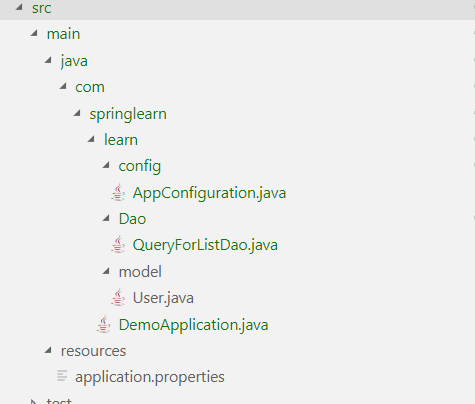
目录结构
pom配置
<dependency>

    <groupId>org.springframework.boot</groupId>

    <artifactId>spring-boot-starter-web</artifactId>

</dependency>

<dependency>

	<groupId>mysql</groupId>

	<artifactId>mysql-connector-java</artifactId>

	<scope>runtime</scope>

</dependency>
properties配置
spring.datasource.url=jdbc:mysql://localhost:3306/mydb?useUnicode=true&characterEncoding=UTF-8&zeroDateTimeBehavior=convertToNull&allowMultiQueries=true&useSSL=false&allowPublicKeyRetrieval=true

spring.datasource.username=root

spring.datasource.password=123

spring.datasource.driver-class-name=com.mysql.jdbc.Driver

server.tomcat.uri-encoding=UTF-8

server.port=8888
model层User类
package com.springlearn.learn.model;

public class User{

    private Integer id;

    private String name;

    private Integer age;

    private String sex;

    public User(Integer id, String name, Integer age, String sex) {

        this.id = id;

        this.name = name;

        this.age = age;

        this.sex = sex;

    }

    public Integer getId() {

        return id;

    }

    public String getName() {

        return name;

    }

    public Integer getAge() {

        return age;

    }

    public String getSex() {

        return sex;

    }

    public void setId(Integer id) {

        this.id = id;

    }

    public void setName(String name) {

        this.name = name;

    }

    public void setAge(Integer age) {

        this.age = age;

    }

    public void setSex(String sex) {

        this.sex = sex;

    }

}
Dao层QueryForListDao
        /**

         * 第一种用法

         *      List<String> list = this.getJdbcTemplate().queryForList(sql, String.class)

         *

         * 第二种用法

         *      List<Map<String, Object>> list = this.getJdbcTemplate().queryForList(sql);

         *      for (Map<String, Object> item : users) {

         *          System.out.println("UserName: " + item.get("name") + "Age: " + item.get("age") + "Sex: " + item.get("sex"));

         *      }

         *

         * 第三种用法

         *      SqlRowSet rowset = this.getJdbcTemplate().queryForRowSet(sql, new Object[]{3},new int[]{Types.INTEGER});

         *

         *      SqlRowSet rowset = listdao.getUsersList();

         *      while(rowset.next()) {

         *          System.out.println("UserName: " + rowset.getString("name") + "Age: " + rowset.getInt("age") + "Sex: " + rowset.getString("sex"));

         *      }

         *

         * 第四种方式

         *      rowmapper的使用,在我的文章 https://www.cnblogs.com/ye-hcj/p/9618588.html#mapper%E5%B1%82 已经讲过

         *

         * 第五种方式

         *      String sql = "select * from test where id=?;";

         *

         *      RowCallbackHandler handler = new RowCallbackHandler(){

         *

         *          @Override

         *          public void processRow(ResultSet rs) throws SQLException {

         *              System.out.println("id:" + rs.getInt("id") + "UserName: " + rs.getString("name") + "Age: " + rs.getInt("age") + "Sex: " + rs.getString("sex"));

         *          }

         *      };

         *

         *      this.getJdbcTemplate().query(sql, handler, 3);

         *

         *      listdao.getUsersList();

         *

         * 第六种方式,如下

         *

         * 第七中方式,queryForObject 用法和上面类似

         */

package com.springlearn.learn.Dao;

import java.sql.ResultSet;

import java.sql.SQLException;

import java.sql.Types;

import java.util.ArrayList;

import java.util.List;

import java.util.Map;

import javax.sql.DataSource;

import com.springlearn.learn.model.User;

import org.springframework.beans.factory.annotation.Autowired;

import org.springframework.dao.DataAccessException;

import org.springframework.jdbc.core.ResultSetExtractor;

import org.springframework.jdbc.core.RowCallbackHandler;

import org.springframework.jdbc.core.support.JdbcDaoSupport;

import org.springframework.jdbc.support.rowset.SqlRowSet;

import org.springframework.stereotype.Repository;

@Repository

public class QueryForListDao extends JdbcDaoSupport{

    @Autowired

    public QueryForListDao(DataSource dataSource) {

        this.setDataSource(dataSource);

    }

    class ListResultSetExtractor implements ResultSetExtractor<List<User>>{

        @Override

        public List<User> extractData(ResultSet rs) throws SQLException, DataAccessException {

            List<User> list = new ArrayList<User>();

            while(rs.next()) {

                list.add(new User(rs.getInt("id"), rs.getString("name"), rs.getInt("age"), rs.getString("sex")));

            }

            return list;

        }

    }

    public List<User> getUsersList() {

        String sql = "select * from test where id=?;";

        ListResultSetExtractor ls = new ListResultSetExtractor();

        List<User> list = this.getJdbcTemplate().query(sql, ls, 2);

        return list;

    }

}
config层AppConfiguration
package com.springlearn.learn.config;

import javax.annotation.Resource;

import javax.sql.DataSource;

import org.springframework.beans.factory.annotation.Autowired;

import org.springframework.context.EnvironmentAware;

import org.springframework.context.annotation.Bean;

import org.springframework.context.annotation.ComponentScan;

import org.springframework.context.annotation.Configuration;

import org.springframework.context.annotation.Primary;

import org.springframework.context.annotation.PropertySource;

import org.springframework.core.env.Environment;

import org.springframework.jdbc.datasource.DriverManagerDataSource;

@Configuration

@ComponentScan(basePackages = "com.springlearn.learn.*")

@PropertySource("classpath:application.properties")

public class AppConfiguration{

    @Autowired

    private Environment env;

    @Primary

    @Bean(name="dataSource")

    public DataSource dataSource() {

        DriverManagerDataSource dataSource = new DriverManagerDataSource();

        dataSource.setDriverClassName(env.getProperty("spring.datasource.driver-class-name"));

        dataSource.setUrl(env.getProperty("spring.datasource.url"));

        dataSource.setUsername(env.getProperty("spring.datasource.username"));

        dataSource.setPassword(env.getProperty("spring.datasource.password"));

        return dataSource;

    }

}
程序入口DemoApplication
package com.springlearn.learn;

import java.util.List;

import java.util.Map;

import com.springlearn.learn.Dao.QueryForListDao;

import com.springlearn.learn.config.AppConfiguration;

import com.springlearn.learn.model.User;

import org.springframework.context.ApplicationContext;

import org.springframework.context.annotation.AnnotationConfigApplicationContext;

import org.springframework.jdbc.support.rowset.SqlRowSet;

public class DemoApplication {

	public static void main(String[] args) {

		ApplicationContext context = new AnnotationConfigApplicationContext(AppConfiguration.class);

        QueryForListDao listdao = (QueryForListDao)context.getBean(QueryForListDao.class);

        List<User> list = listdao.getUsersList();

        for (User user : list) {

            System.out.println("id:" + user.getId()+ "UserName: " + user.getName() + "Age: " + user.getAge() + "Sex: " + user.getSex());

        }

	}

}
springboot成神之——spring jdbc的使用的更多相关文章
- springboot成神之——spring boot,spring jdbc和spring transaction的使用
本文介绍spring boot,spring jdbc和spring transaction的使用 项目结构 依赖 application model层 mapper层 dao层 exception层 ...
- springboot成神之——spring文件下载功能
本文介绍spring文件下载功能 目录结构 DemoApplication WebConfig TestController MediaTypeUtils 前端测试 本文介绍spring文件下载功能 ...
- springboot成神之——spring的文件上传
本文介绍spring的文件上传 目录结构 配置application DemoApplication WebConfig TestController 前端上传 本文介绍spring的文件上传 目录结 ...
- springboot成神之——ioc容器(依赖注入)
springboot成神之--ioc容器(依赖注入) spring的ioc功能 文件目录结构 lang Chinese English GreetingService MyRepository MyC ...
- springboot成神之——springboot入门使用
springboot创建webservice访问mysql(使用maven) 安装 起步 spring常用命令 spring常见注释 springboot入门级使用 配置你的pom.xml文件 配置文 ...
- springboot成神之——mybatis和mybatis-generator
项目结构 依赖 generator配置文件 properties配置 生成文件 使用Example 本文讲解如何在spring-boot中使用mybatis和mybatis-generator自动生成 ...
- springboot成神之——application.properties所有可用属性
application.properties所有可用属性 # =================================================================== # ...
- springboot成神之——springboot+mybatis+mysql搭建项目简明demo
springboot+mybatis+mysql搭建项目简明demo 项目所需目录结构 pom.xml文件配置 application.properties文件配置 MyApplication.jav ...
- springboot成神之——swagger文档自动生成工具
本文讲解如何在spring-boot中使用swagger文档自动生成工具 目录结构 说明 依赖 SwaggerConfig 开启api界面 JSR 303注释信息 Swagger核心注释 User T ...
随机推荐
- Ubuntu 18.04 编译 ijkplayer
Ubuntu 18.04 编译 ijkplayer 1. 配置安装源 https://mirrors.tuna.tsinghua.edu.cn/help/ubuntu 2. 配置好安装源后,安装一些组 ...
- 解决Oracle数据库IP地址改变创建数据库的问题
方案一 查了相关的资料后才知道,只要修改安装Oracle的目录下面的listener.ora和tnsnames.ora里面的内容即可.看图看图 修改什么内容呢?看图看图. 就是HOST地址改一下就可 ...
- LeetCode OJ:Reverse Linked List II(反转链表II)
Reverse a linked list from position m to n. Do it in-place and in one-pass. For example:Given 1-> ...
- 使用jmeter做web接口测试
接口测试概述 定义 API testing is a type of software testing that involves testing application programming in ...
- 持久层框架:MyBatis 3.2(2)
每个MyBatis应用程序主要都是使用SqlSessionFactory实例的,一个SqlSessionFactory实例可以通过SqlSessionFactoryBuilder获得.SqlSessi ...
- Java 三大特征之--多态
http://www.cnblogs.com/chenssy/p/3372798.html
- 神奇的TextField(1)
先看一大段测试代码,每个小方法的注释行是输出结果. private var text_content:TextField; private function textFieldDemo():void{ ...
- 【操作系统】总结五(I/O管理)
输入输出管理本章主要内容: I/O管理概述(I/O控制方式.I/O软件层次结构)和I/O核心子系统(I/O调度概念.局速缓存与缓冲区.设备分配与回收.假脱机技术(SPOOLing)). 5.1 I/O ...
- 圆方树总结 [uoj30]Tourists
圆方树总结 所谓圆方树就是把一张图变成一棵树. 怎么变啊qaq 这里盗一张图 简单来说就是给每一个点双新建一个点,然后连向这个点双中的每一个点.特殊的,把两个点互相连通的也视作一个点双. 我们把原来就 ...
- DispatcherServlet的处理流程
前言 上一篇介绍了SpringMVC的启动过程,DispatcherServlet作为一个前端控制器,分发处理http请求 1.DispatcherServlet流程图 具体流程: 1. 用户发请求- ...