
springboot成神之——spring的文件上传
本文介绍spring的文件上传
目录结构
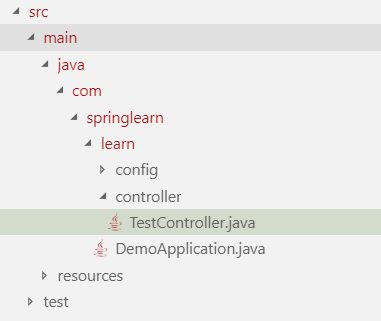
配置application
spring.servlet.multipart.max-file-size=5MB

spring.servlet.multipart.max-request-size=5MB
DemoApplication
package com.springlearn.learn;

import org.springframework.boot.SpringApplication;

import org.springframework.boot.autoconfigure.SpringBootApplication;

@SpringBootApplication

public class DemoApplication {

	public static void main(String[] args) {

		SpringApplication.run(DemoApplication.class, args);

	}

}
WebConfig
package com.springlearn.learn.config;

import org.springframework.context.annotation.Configuration;

import org.springframework.web.servlet.config.annotation.CorsRegistry;

import org.springframework.web.servlet.config.annotation.WebMvcConfigurer;

@Configuration

public class WebConfig implements WebMvcConfigurer {

    @Override

    public void addCorsMappings(CorsRegistry registry) {

        registry.addMapping("/**").allowedOrigins("*").allowedMethods("GET", "POST", "PUT", "DELETE").allowedOrigins("*")

        .allowedHeaders("*");

    }

}
TestController
package com.springlearn.learn.controller;

import java.io.BufferedOutputStream;

import java.io.File;

import java.io.FileOutputStream;

import javax.servlet.http.HttpServletRequest;

import javax.servlet.http.HttpServletResponse;

import com.springlearn.learn.DemoApplication;

import org.springframework.web.bind.annotation.RequestMapping;

import org.springframework.web.bind.annotation.RequestMethod;

import org.springframework.web.bind.annotation.RequestParam;

import org.springframework.web.bind.annotation.ResponseBody;

import org.springframework.web.bind.annotation.RestController;

import org.springframework.web.multipart.MultipartFile;

@RestController

public class TestController {

    @ResponseBody

    @RequestMapping(value = "/UploadTest", method = RequestMethod.POST)

    public String AuthTest(@RequestParam("file") MultipartFile files, HttpServletRequest request, HttpServletResponse response) {

        String filePath = DemoApplication.class.getResource("").getPath() + "imgupload";

        // Client File Name

        String name = files.getOriginalFilename();

        System.out.println("Client File Name = " + name);

        if (name != null && name.length() > 0) {

            try {

                // Create the file at server

                File serverFile = new File(filePath + File.separator + name);

                BufferedOutputStream stream = new BufferedOutputStream(new FileOutputStream(serverFile));

                stream.write(files.getBytes());

                stream.close();

                System.out.println("Write file: " + serverFile);

            } catch (Exception e) {

                System.out.println("Error Write file: " + name);

            }

        }

        return "上传成功";

    }

}
前端上传
<!DOCTYPE html>

<html lang="en">

<head>

    <meta charset="UTF-8">

    <meta name="viewport" content="width=device-width, initial-scale=1.0">

    <meta http-equiv="X-UA-Compatible" content="ie=edge">

    <title>Document</title>

    <script src="https://unpkg.com/axios/dist/axios.min.js"></script>

    <script src="https://cdn.jsdelivr.net/npm/vue@2.5.17/dist/vue.js"></script>

    <link rel="stylesheet" href="//unpkg.com/iview/dist/styles/iview.css">

    <script src="//unpkg.com/iview/dist/iview.min.js"></script>

</head>

<body>

    <div id="app">

        <Upload

            :before-upload="handleUpload"

            action=""

        >

            <Button icon="ios-cloud-upload-outline">Upload files</Button>

        </Upload>

    </div>

    <script>

        new Vue({

            el: '#app',

            data: {

                visible: false

            },

            methods: {

                show: function () {

                    this.visible = true;

                },

                handleUpload(file) {

                    let param = new FormData();

                    param.append('file',file);

                    let config = {

                        headers:{'Content-Type':'multipart/form-data'}

                    };

                    debugger

                    axios.post('http://localhost:9001/UploadTest', param, config).then(function (response) {

                        console.log(response.data);

                    }).catch(function (error) {

                        console.log(error);

                    }).then(function () {

                    });

                    return false;

                }

            },

        })

    </script>

</body>

</html>
springboot成神之——spring的文件上传的更多相关文章
- spring实现文件上传(图片解析)
合抱之木,生于毫末,千里之行,始于足下,要想了解spring的文件上传功能,首先要知道spring是通过流的方式将文件进行解析,然后上传.那么是不是所有需要用的文件上传的地方都要写一遍文件解析器呢? ...
- SpringMVC系列(十一)把后台返回的数据转换成json、文件下载、文件上传
一.后台返回的数据转换成json 1.引入转换json需要的3个依赖 <!--json转换需要的依赖 begin --> <dependency> <groupId> ...
- spring boot文件上传、下载
主题:Spring boot 文件上传(多文件上传)[从零开始学Spring Boot]http://www.iteye.com/topic/1143595 Spring MVC实现文件下载http: ...
- Spring MVC 笔记 —— Spring MVC 文件上传
文件上传 配置MultipartResolver <bean id="multipartResolver" class="org.springframework.w ...
- Spring Boot 文件上传原理
首先我们要知道什么是Spring Boot,这里简单说一下,Spring Boot可以看作是一个框架中的框架--->集成了各种框架,像security.jpa.data.cloud等等,它无须关 ...
- Spring MVC文件上传教程 commons-io/commons-uploadfile
Spring MVC文件上传教程 commons-io/commons-uploadfile 用到的依赖jar包: commons-fileupload 1.3.1 commons-io 2.4 基于 ...
- 【Java Web开发学习】Spring MVC文件上传
[Java Web开发学习]Spring MVC文件上传 转载:https://www.cnblogs.com/yangchongxing/p/9290489.html 文件上传有两种实现方式,都比较 ...
- Spring mvc文件上传实现
Spring mvc文件上传实现 jsp页面客户端表单编写 三个要素: 1.表单项type="file" 2.表单的提交方式:post 3.表单的enctype属性是多部分表单形式 ...
- Strut2 和Spring MVC 文件上传对比
在Java领域中,有两个常用的文件上传项目:一个是Apache组织Jakarta的Common-FileUpload组件 (http://commons.apache.org/proper/commo ...
随机推荐
- 51nod-1526-贪心+Trie
题目链接在这 题目来源: CodeForces 基准时间限制:1 秒 空间限制:131072 KB 分值: 320 难度:7级算法题 收藏 关注 班里有n个同学.老师为他们选了n个笔名.现在要把这些笔 ...
- Nginx优化思路
对于高性能网站 ,请求量大,如何支撑? 1方面,要减少请求 对于开发人员----合并css, 背景图片, 减少mysql查询等. 2: 对于运维 nginx的expires ,利用浏览器缓存等,减少查 ...
- WAF 强化学习
参考:https://github.com/duoergun0729/3book/tree/master/code/gym-waf 代码: wafEnv.py #-*- coding:utf-8 –* ...
- 【scala】应用程序和App特性
一.应用程序 要运行一个Scala对象,必须提供一个独立对象的名称.这个独立对象需要包含一个main方法,该方法接受一个Array[String]作为参数,结果类型为Unit. import Chec ...
- CSS:Tutorial one
1.Three Ways to Insert CSS External style sheet Internal style sheet Inline style External Style She ...
- 剑指offer--36.整数中1出现的次数(从1到n整数中1出现的次数)
暴力挨个数 ---------------------------------------------------------------------- 时间限制:1秒 空间限制:32768K 热度指 ...
- switch遇到0的问题
你是否经常有switch来代替if else?是否因为使用了switch,提高代码的执行效率而庆幸?好吧,你和我一样,但也许你没有遇到下面的问题. 这个小程序,会输出什么呢?会是'00'么? 结果 ...
- 【SQL查询】视图_view
转自:http://database.e800.com.cn/articles/2009/719/1248015564465_1.html 视图是从一个或几个基本表(或视图)导出的表.它与基本表不同, ...
- 使用 nvm 管理多版本 node
首先,使用下面的命令来安装 nvm $ curl -o- https://raw.githubusercontent.com/creationix/nvm/v0.33.2/install.sh | b ...
- CentOS给网站配置Https证书
1.在腾讯云申请域名的证书 2.配置文件 安装相应模块: yum install mod_ssl openssl 编辑配置文件: cd /etc/httpd/conf.d vi jerryqi.con ...