
ASP.NET Core 2.2 基础知识(五) 环境
一.环境变量
系统启动时,会读取环境变量 ASPNETCORE_ENVIRONMENT ,并将该变量的值存储在 IHostingEnvironment.EnvironmentName 字段中.如:
新建一个 WebAPI 项目,修改 Configure 方法:
        public void Configure(IApplicationBuilder app, IHostingEnvironment env)

        {

            ......

            {

                app.Run(async context =>

                {

                    context.Response.ContentType = "text/plain;charset=utf-8";//没有这句话,中文会出现乱码.

                    await context.Response.WriteAsync($"当前环境 : {env.EnvironmentName}");

                });

            }

            ......

        }
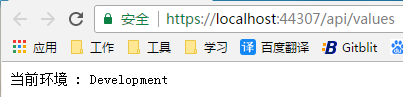
ASPNETCORE_ENVIRONMENT 可以设置为任意值,但是 ASP.NET Core 框架只支持 3 个值:
Development
Staging
Production
如果没有设置该变量的值,则默认 Production
那么问题来了,在哪里设置呢?
方法一 : launchSettings.json
打开上例创建的 WebAPI 项目的 launchSettings.json 文件:
{

  "$schema": "http://json.schemastore.org/launchsettings.json",

  "iisSettings": {

    "windowsAuthentication": false,

    "anonymousAuthentication": true,

    "iisExpress": {

      "applicationUrl": "http://localhost:53476",

      "sslPort":

    }

  },

  "profiles": {

    //部署到IIS时,会读取该节点的设置.

    "IIS Express": {

      "commandName": "IISExpress",

      "launchBrowser": true,

      "launchUrl": "api/values",

      "environmentVariables": {

        //"ASPNETCORE_ENVIRONMENT": "Development"

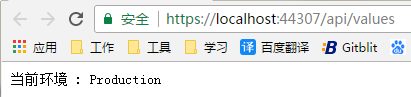
        "ASPNETCORE_ENVIRONMENT": "Production" //我们修改为 "Production" 看效果

      }

    },

    //在控制台启动时,会读取该节点的设置

    "EnvironmentDemo1": {

      "commandName": "Project",

      "launchBrowser": true,

      "launchUrl": "api/values",

      "applicationUrl": "https://localhost:5001;http://localhost:5000",

      "environmentVariables": {

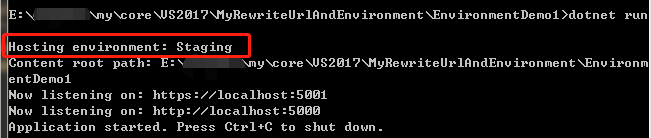
        "ASPNETCORE_ENVIRONMENT": "Staging" //我们修改为 "Staging" 看效果

      }

    }

  }

}
IIS下运行效果:
控制台运行效果:
二.基于环境的 Startup 类
当 ASP.NET Core 应用启动时,会在 Program 类中通过 Startup 类启动应用.
ASP.NET Core 提供了基于不同环境选择不同的 Startup 类的方法.但是类名有个约定,只能这样命名:
Startup{EnvironmentName}
EnvironmentName 为当前环境.
示例:
    /// <summary>

    /// 开发环境启动类

    /// </summary>

    public class StartupDevelopment

    {

        public void ConfigureServices(IServiceCollection services){}

        public void Configure(IApplicationBuilder app, IHostingEnvironment env){}

    }

    /// <summary>

    /// 模拟环境启动类

    /// </summary>

    public class StartupStaging

    {

        public void ConfigureServices(IServiceCollection services){}

        public void Configure(IApplicationBuilder app, IHostingEnvironment env){}

    }

    /// <summary>

    /// 生产环境启动类

    /// </summary>

    public class StartupProduction

    {

        public void ConfigureServices(IServiceCollection services){}

        public void Configure(IApplicationBuilder app, IHostingEnvironment env){}

    }
要让系统根据当前环境选择上述3个启动类中的一个,还需要修改调用方法.
默认的调用方法是这样的:
    public class Program

    {

        public static void Main(string[] args)

        {

            CreateWebHostBuilder(args).Build().Run();

        }

        public static IWebHostBuilder CreateWebHostBuilder(string[] args) => WebHost.CreateDefaultBuilder(args).UseStartup<Startup>();

    }
需要修改成:
        public static IWebHostBuilder CreateWebHostBuilder(string[] args)

        {

            var assemblyName = typeof(Startup).GetTypeInfo().Assembly.FullName;

            return WebHost.CreateDefaultBuilder(args).UseStartup(assemblyName);

        }
二.基于环境的 ConfigureServices 方法和 Configure 方法
上代码一目了然:
        public void ConfigureStaging(IApplicationBuilder app, IHostingEnvironment env)

        {

        }

        public void ConfigureStagingServices(IServiceCollection services)

        {

        }
ASP.NET Core 2.2 基础知识(五) 环境的更多相关文章
- ASP.NET Core 2.2 基础知识(十八) 托管和部署 概述
为了方便演示,以 .NET Core 控制台应用程序讲解. 我们新建一个控制台应用程序,安装 "Newtonsoft.Json" Nuget 包,然后右键点击该项目,选择" ...
- ASP.NET Core 2.2 基础知识(十二) 发送 HTTP 请求
可以注册 IHttpClientFactory 并将其用于配置和创建应用中的 HttpClient 实例. 这能带来以下好处: 提供一个中心位置,用于命名和配置逻辑 HttpClient 实例. 例如 ...
- ASP.NET Core 2.2 基础知识(六) 配置(内含MySql+EF)
先上一段代码,了解一下 .NET Core 配置数据的结构. 新建一个 控制台项目,添加一个文件 json.json ,文件内容如下: { "country": "cn& ...
- ASP.NET Core 2.2 基础知识(十六) SignalR 概述
我一直觉得学习的最好方法就是先让程序能够正常运行,才去学习他的原理,剖析他的细节. 就好像这个图: 所以,我们先跟着官方文档,创建一个 SignalR 应用: https://docs.microso ...
- ASP.NET Core 2.2 基础知识(十四) WebAPI Action返回类型(未完待续)
要啥自行车,直接看手表 //返回基元类型 public string Get() { return "hello world"; } //返回复杂类型 public Person ...
- ASP.NET Core 2.2 基础知识(十三) WebAPI 概述
我们先创建一个 WebAPI 项目,看看官方给的模板到底有哪些东西 官方给出的模板: [Route("api/[controller]")] [ApiController] pub ...
- ASP.NET Core 2.2 基础知识(十一) ASP.NET Core 模块
ASP.NET Core 应用与进程内的 HTTP 服务器实现一起运行.该服务器实现侦听 HTTP 请求,并在一系列请求功能被写到 HttpContext 时,将这些请求展现到应用中. ASP.NET ...
- ASP.NET Core 2.2 基础知识(十) Web服务器 - Kestrel
ASP.NET Core 应用与进程内的 HTTP 服务器实现一起运行.该服务器实现侦听 HTTP 请求,并在一系列请求功能被写到 HttpContext 时,将这些请求展现到应用中. ASP.NET ...
- ASP.NET Core 2.2 基础知识(九) 使用托管服务实现后台任务
在 ASP.NET Core 中,后台任务作为托管服务实现.托管服务是一个类,而且必须实现 IHostedService 接口,该接口定义了两个方法: StartAsync(CancellationT ...
随机推荐
- [ZJOI2005]沼泽鳄鱼 矩阵乘法
---题面--- 题解: 乍一看还是挺懵逼的.和HH去散步很像,思路也是类似的. 复制一段我在HH去散步的题解里面写的一段话吧: 考虑f[i][j]表示i和j是否右边相连,有为1,否则为0,那么f同时 ...
- 修改innodb_flush_log_at_trx_commit参数提升insert性能
最近,在一个系统的慢查询日志里发现有个insert操作很慢,达到秒级,并且是比较简单的SQL语句,把语句拿出来到mysql中直接执行,速度却很快. 这种问题一般不是SQL语句本身的问题,而是在具体的应 ...
- Java中文乱码问题(转)
解决JSP中文乱码问题 大家在JSP的开发过程中,经常出现中文乱码的问题,可能一至困扰着大家,现把JSP开发中遇到的中文乱码的问题及解决办法写出来供大家参考.首先了解一下Java中文问题的由来: Ja ...
- c++(类)构造函数、复制构造函数
复制构造函数是一种特殊的构造函数,它的作用是用一个已经存在的对象去初始化另一个对象.一般情况下不需要自行定义复制构造函数,系统默认提供一个逐个复制成员值的复制构造函数. 何时要使用呢? 1.将新对象初 ...
- Spring学习之路——单例模式和多例模式
在Spring中,bean可以被定义为两种模式:prototype(多例)和singleton(单例) singleton(单例):只有一个共享的实例存在,所有对这个bean的请求都会返回这个唯一的实 ...
- 【Foreign】染色 [LCT][线段树]
染色 Time Limit: 20 Sec Memory Limit: 256 MB Description Input Output Sample Input 13 0 1 0 2 1 11 1 ...
- bzoj4759 [Usaco2017 Jan]Balanced Photo
传送门:http://www.lydsy.com/JudgeOnline/problem.php?id=4759 [题解] 排序,从大到小插入,树状数组统计. # include <vector ...
- jQuery获取表格隐藏域与ajax请求数据结合显示详情
0.表格样式
- Windows 的GUID
GUID(全称:Globally Unique Identifier),是一种由算法生成的二进制长度为128位的数字标识符.GUID主要用于在拥有多个节点.多台计算机的网络或系统中.在理想情况下,任何 ...
- [ Python - 7 ] 简单的省份查询系统
主要是练习while 循环和 if 条件判断的使用 #!_*_coding:utf-8_*_ # Author: hkey def options(list): for i, v in enumera ...