
Beam编程系列之Apache Beam WordCount Examples(MinimalWordCount example、WordCount example、Debugging WordCount example、WindowedWordCount example)(官网的推荐步骤)
不多说,直接上干货!
https://beam.apache.org/get-started/wordcount-example/
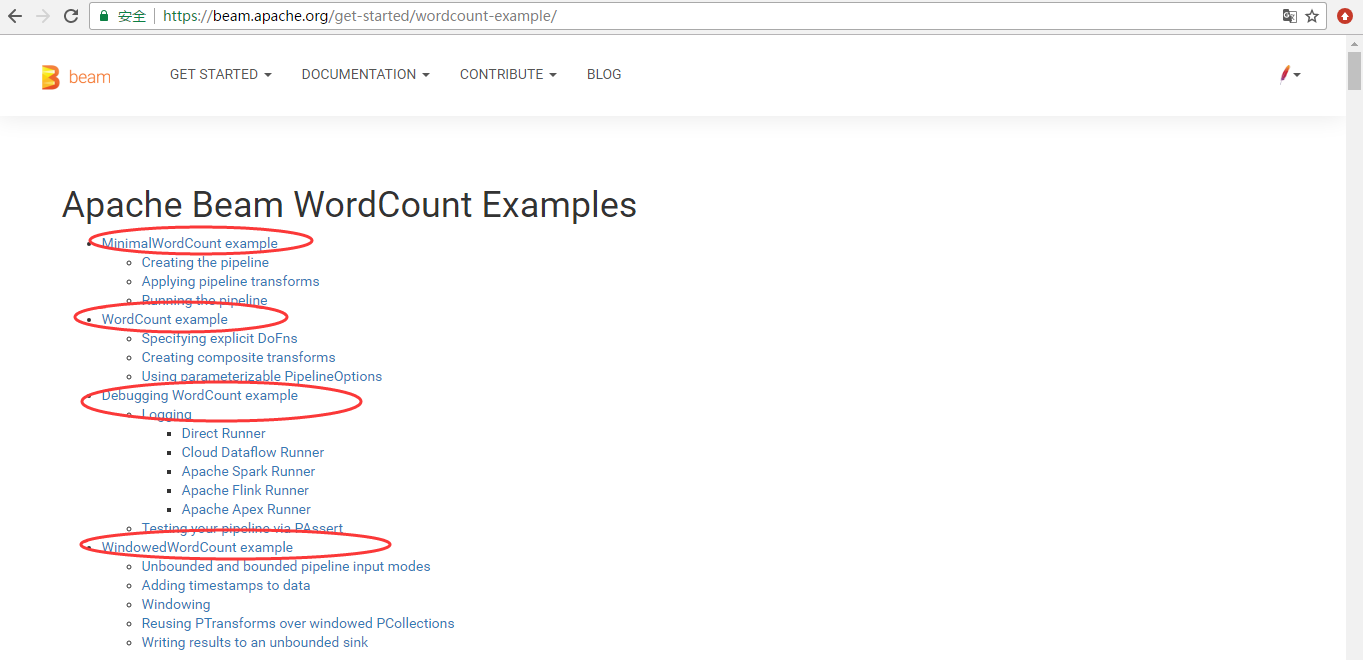
来自官网的:
The WordCount examples demonstrate how to set up a processing pipeline that can read text, tokenize the text lines into individual words, and perform a frequency count on each of those words. The Beam SDKs contain a series of these four successively more detailed WordCount examples that build on each other. The input text for all the examples is a set of Shakespeare’s texts.
Each WordCount example introduces different concepts in the Beam programming model. Begin by understanding Minimal WordCount, the simplest of the examples. Once you feel comfortable with the basic principles in building a pipeline, continue on to learn more concepts in the other examples.
- Minimal WordCount demonstrates the basic principles involved in building a pipeline.
- WordCount introduces some of the more common best practices in creating re-usable and maintainable pipelines.
- Debugging WordCount introduces logging and debugging practices.
- Windowed WordCount demonstrates how you can use Beam’s programming model to handle both bounded and unbounded datasets.
我这里仅以Minimal WordCount为例。
首先说明一下,为了简单起见,我直接在代码中显式配置指定PipelineRunner,示例代码片段如下所示:
PipelineOptions options = PipelineOptionsFactory.create();

options.setRunner(DirectRunner.class);
如果要部署到服务器上,可以通过命令行的方式指定PipelineRunner,比如要在Spark集群上运行,类似如下所示命令行:
spark-submit --class org.shirdrn.beam.examples.MinimalWordCountBasedSparkRunner -- --master spark://myserver:7077 target/my-beam-apps-0.0.1-SNAPSHOT-shaded.jar --runner=SparkRunner
下面,我们从几个典型的例子来看(基于Apache Beam软件包的examples有所改动),Apache Beam如何构建Pipeline并运行在指定的PipelineRunner上:
- WordCount(Count/Source/Sink)
我们根据Apache Beam的MinimalWordCount示例代码开始,看如何构建一个Pipeline,并最终执行它。 MinimalWordCount的实现,代码如下所示:
package org.shirdrn.beam.examples;

import org.apache.beam.runners.direct.DirectRunner;

import org.apache.beam.sdk.Pipeline;

import org.apache.beam.sdk.io.TextIO;

import org.apache.beam.sdk.options.PipelineOptions;

import org.apache.beam.sdk.options.PipelineOptionsFactory;

import org.apache.beam.sdk.transforms.Count;

import org.apache.beam.sdk.transforms.DoFn;

import org.apache.beam.sdk.transforms.MapElements;

import org.apache.beam.sdk.transforms.ParDo;

import org.apache.beam.sdk.transforms.SimpleFunction;

import org.apache.beam.sdk.values.KV;

public class MinimalWordCount {

    @SuppressWarnings("serial")

    public static void main(String[] args) {

        PipelineOptions options = PipelineOptionsFactory.create();

        options.setRunner(DirectRunner.class); // 显式指定PipelineRunner:DirectRunner(Local模式)

        Pipeline pipeline = Pipeline.create(options);

        pipeline.apply(TextIO.Read.from("/tmp/dataset/apache_beam.txt")) // 读取本地文件,构建第一个PTransform

                .apply("ExtractWords", ParDo.of(new DoFn<String, String>() { // 对文件中每一行进行处理(实际上Split)

                    @ProcessElement

                    public void processElement(ProcessContext c) {

                        for (String word : c.element().split("[\\s:\\,\\.\\-]+")) {

                            if (!word.isEmpty()) {

                                c.output(word);

                            }

                        }

                    }

                }))

                .apply(Count.<String> perElement()) // 统计每一个Word的Count

                .apply("ConcatResultKVs", MapElements.via( // 拼接最后的格式化输出(Key为Word,Value为Count)

                        new SimpleFunction<KV<String, Long>, String>() {

                    @Override

                    public String apply(KV<String, Long> input) {

                        return input.getKey() + ": " + input.getValue();

                    }

                }))

                .apply(TextIO.Write.to("wordcount")); // 输出结果

        pipeline.run().waitUntilFinish();

    }

}
Pipeline的具体含义,可以看上面代码的注释信息。下面,我们考虑以HDFS数据源作为Source,如何构建第一个PTransform,代码片段如下所示:
PCollection<KV<LongWritable, Text>> resultCollection = pipeline.apply(HDFSFileSource.readFrom(

        "hdfs://myserver:8020/data/ds/beam.txt",

        TextInputFormat.class, LongWritable.class, Text.class))
可以看到,返回的是具有键值分别为LongWritable、Text类型的KV对象集合,后续处理和上面处理逻辑类似。如果使用Maven构建Project,需要加上如下依赖(这里beam.version的值可以为最新Release版本0.4.0):
<dependency>

    <groupId>org.apache.beam</groupId>

    <artifactId>beam-sdks-java-io-hdfs</artifactId>

    <version>${beam.version}</version>

</dependency>
- 去重(Distinct)
去重也是对数据集比较常见的操作,使用Apache Beam来实现,示例代码如下所示:
package org.shirdrn.beam.examples;

import org.apache.beam.runners.direct.DirectRunner;

import org.apache.beam.sdk.Pipeline;

import org.apache.beam.sdk.io.TextIO;

import org.apache.beam.sdk.options.PipelineOptions;

import org.apache.beam.sdk.options.PipelineOptionsFactory;

import org.apache.beam.sdk.transforms.Distinct;

public class DistinctExample {

    public static void main(String[] args) throws Exception {

         PipelineOptions options = PipelineOptionsFactory.create();

         options.setRunner(DirectRunner.class); // 显式指定PipelineRunner:DirectRunner(Local模式)

         Pipeline pipeline = Pipeline.create(options);

         pipeline.apply(TextIO.Read.from("/tmp/dataset/MY_ID_FILE.txt"))

             .apply(Distinct.<String> create()) // 创建一个处理String类型的PTransform:Distinct

             .apply(TextIO.Write.to("deduped.txt")); // 输出结果

         pipeline.run().waitUntilFinish();

    }

}
- 分组(GroupByKey)
对数据进行分组操作也非常普遍,我们拿一个最基础的PTransform实现GroupByKey来实现一个例子,代码如下所示:
package org.shirdrn.beam.examples;

import org.apache.beam.runners.direct.DirectRunner;

import org.apache.beam.runners.direct.repackaged.com.google.common.base.Joiner;

import org.apache.beam.sdk.Pipeline;

import org.apache.beam.sdk.io.TextIO;

import org.apache.beam.sdk.options.PipelineOptions;

import org.apache.beam.sdk.options.PipelineOptionsFactory;

import org.apache.beam.sdk.transforms.DoFn;

import org.apache.beam.sdk.transforms.GroupByKey;

import org.apache.beam.sdk.transforms.MapElements;

import org.apache.beam.sdk.transforms.ParDo;

import org.apache.beam.sdk.transforms.SimpleFunction;

import org.apache.beam.sdk.values.KV;

public class GroupByKeyExample {

    @SuppressWarnings("serial")

    public static void main(String[] args) {

        PipelineOptions options = PipelineOptionsFactory.create();

        options.setRunner(DirectRunner.class); // 显式指定PipelineRunner:DirectRunner(Local模式)

        Pipeline pipeline = Pipeline.create(options);

        pipeline.apply(TextIO.Read.from("/tmp/dataset/MY_INFO_FILE.txt"))

            .apply("ExtractFields", ParDo.of(new DoFn<String, KV<String, String>>() {

                @ProcessElement

                public void processElement(ProcessContext c) {

                    // file format example: 35451605324179    3G    CMCC

                    String[] values = c.element().split("\t");

                    if(values.length == ) {

                        c.output(KV.of(values[], values[]));

                    }

                }

            }))

            .apply("GroupByKey", GroupByKey.<String, String>create()) // 创建一个GroupByKey实例的PTransform

            .apply("ConcatResults", MapElements.via(

                    new SimpleFunction<KV<String, Iterable<String>>, String>() {

                        @Override

                        public String apply(KV<String, Iterable<String>> input) {

                            return new StringBuffer()

                                    .append(input.getKey()).append("\t")

                                    .append(Joiner.on(",").join(input.getValue()))

                                    .toString();

                        }

            }))

            .apply(TextIO.Write.to("grouppedResults"));

        pipeline.run().waitUntilFinish();

    }

}
使用DirectRunner运行,输出文件名称类似于grouppedResults-00000-of-00002、grouppedResults-00001-of-00002等等。
- 连接(Join)
最后,我们通过实现一个Join的例子,其中,用户的基本信息包含ID和名称,对应文件格式如下所示:
    Jack

    Jim

    John

    Linda
另一个文件是用户使用手机的部分信息,文件格式如下所示:
    3G    中国移动

    2G    中国电信

    4G    中国移动
我们希望通过Join操作后,能够知道用户使用的什么网络(用户名+网络),使用Apache Beam实现,具体实现代码如下所示:
package org.shirdrn.beam.examples;

import org.apache.beam.runners.direct.DirectRunner;

import org.apache.beam.sdk.Pipeline;

import org.apache.beam.sdk.io.TextIO;

import org.apache.beam.sdk.options.PipelineOptions;

import org.apache.beam.sdk.options.PipelineOptionsFactory;

import org.apache.beam.sdk.transforms.DoFn;

import org.apache.beam.sdk.transforms.MapElements;

import org.apache.beam.sdk.transforms.ParDo;

import org.apache.beam.sdk.transforms.SimpleFunction;

import org.apache.beam.sdk.transforms.join.CoGbkResult;

import org.apache.beam.sdk.transforms.join.CoGroupByKey;

import org.apache.beam.sdk.transforms.join.KeyedPCollectionTuple;

import org.apache.beam.sdk.values.KV;

import org.apache.beam.sdk.values.PCollection;

import org.apache.beam.sdk.values.TupleTag;

public class JoinExample {

    @SuppressWarnings("serial")

    public static void main(String[] args) {

        PipelineOptions options = PipelineOptionsFactory.create();

        options.setRunner(DirectRunner.class);  // 显式指定PipelineRunner:DirectRunner(Local模式)

        Pipeline pipeline = Pipeline.create(options);

        // create ID info collection

        final PCollection<KV<String, String>> idInfoCollection = pipeline

                .apply(TextIO.Read.from("/tmp/dataset/MY_ID_INFO_FILE.txt"))

                .apply("CreateUserIdInfoPairs", MapElements.via(

                        new SimpleFunction<String, KV<String, String>>() {

                    @Override

                    public KV<String, String> apply(String input) {

                        // line format example: 35451605324179    Jack

                        String[] values = input.split("\t");

                        return KV.of(values[], values[]);

                    }

                }));

        // create operation collection

        final PCollection<KV<String, String>> opCollection = pipeline

                .apply(TextIO.Read.from("/tmp/dataset/MY_ID_OP_INFO_FILE.txt"))

                .apply("CreateIdOperationPairs", MapElements.via(

                        new SimpleFunction<String, KV<String, String>>() {

                    @Override

                    public KV<String, String> apply(String input) {

                        // line format example: 35237005342309    3G    CMCC

                        String[] values = input.split("\t");

                        return KV.of(values[], values[]);

                    }

                }));

        final TupleTag<String> idInfoTag = new TupleTag<String>();

        final TupleTag<String> opInfoTag = new TupleTag<String>();

        final PCollection<KV<String, CoGbkResult>> cogrouppedCollection = KeyedPCollectionTuple

                .of(idInfoTag, idInfoCollection)

                .and(opInfoTag, opCollection)

                .apply(CoGroupByKey.<String>create());

        final PCollection<KV<String, String>> finalResultCollection = cogrouppedCollection

                .apply("CreateJoinedIdInfoPairs", ParDo.of(new DoFn<KV<String, CoGbkResult>, KV<String, String>>() {

                @ProcessElement

                public void processElement(ProcessContext c) {

                    KV<String, CoGbkResult> e = c.element();

                    String id = e.getKey();

                    String name = e.getValue().getOnly(idInfoTag);

                    for (String opInfo : c.element().getValue().getAll(opInfoTag)) {

                      // Generate a string that combines information from both collection values

                      c.output(KV.of(id, "\t" + name + "\t" + opInfo));

                    }

                }

        }));

        PCollection<String> formattedResults = finalResultCollection

                .apply("FormatFinalResults", ParDo.of(new DoFn<KV<String, String>, String>() {

                  @ProcessElement

                  public void processElement(ProcessContext c) {

                    c.output(c.element().getKey() + "\t" + c.element().getValue());

                  }

                }));

         formattedResults.apply(TextIO.Write.to("joinedResults"));

         pipeline.run().waitUntilFinish();

    }

}
参考内容
- Apache Beam: The Case for Unifying Streaming API’s
- https://beam.apache.org/
- https://beam.apache.org/get-started/quickstart/
- https://beam.apache.org/get-started/beam-overview
- https://beam.apache.org/documentation/programming-guide/
- https://www.infoq.com/presentations/apache-beam
Apache Beam WordCount编程实战及源码解读
http://blog.csdn.net/dream_an/article/details/56277784
http://blog.csdn.net/qq_23660243/article/details/54614167
Beam编程系列之Apache Beam WordCount Examples(MinimalWordCount example、WordCount example、Debugging WordCount example、WindowedWordCount example)(官网的推荐步骤)的更多相关文章
- Beam编程系列之Python SDK Quickstart(官网的推荐步骤)
不多说,直接上干货! https://beam.apache.org/get-started/quickstart-py/ Beam编程系列之Java SDK Quickstart(官网的推荐步骤)
- Beam编程系列之Java SDK Quickstart(官网的推荐步骤)
不多说,直接上干货! https://beam.apache.org/get-started/beam-overview/ https://beam.apache.org/get-started/qu ...
- 1.1 Introduction中 Apache Kafka™ is a distributed streaming platform. What exactly does that mean?(官网剖析)(博主推荐)
不多说,直接上干货! 一切来源于官网 http://kafka.apache.org/documentation/ Apache Kafka™ is a distributed streaming p ...
- Beam概念学习系列之Pipeline Runners
不多说,直接上干货! https://beam.apache.org/get-started/beam-overview/ 在 Beam 管道上运行引擎会根据你选择的分布式处理引擎,其中兼容的 API ...
- Apache Beam WordCount编程实战及源码解读
概述:Apache Beam WordCount编程实战及源码解读,并通过intellij IDEA和terminal两种方式调试运行WordCount程序,Apache Beam对大数据的批处理和流 ...
- Apache Beam WordCount编程实战及源代码解读
概述:Apache Beam WordCount编程实战及源代码解读,并通过intellij IDEA和terminal两种方式调试执行WordCount程序,Apache Beam对大数据的批处理和 ...
- Apache Beam实战指南 | 手把手教你玩转KafkaIO与Flink
https://mp.weixin.qq.com/s?__biz=MzU1NDA4NjU2MA==&mid=2247492538&idx=2&sn=9a2bd9fe2d7fd6 ...
- Apache Beam,批处理和流式处理的融合!
1. 概述 在本教程中,我们将介绍 Apache Beam 并探讨其基本概念. 我们将首先演示使用 Apache Beam 的用例和好处,然后介绍基本概念和术语.之后,我们将通过一个简单的例子来说明 ...
- Apache Beam的架构概览
不多说,直接上干货! Apache Beam是一个开源的数据处理编程库,由Google贡献给Apache的项目,前不久刚刚成为Apache TLP项目.它提供了一个高级的.统一的编程模型,允许我们通过 ...
随机推荐
- LibreOJ 6003 魔术球 (最大流)
题解:每次加入两个点,对于和为平方数的两个值所对应的点建边,反正网络流可以跑残量网络,所以就没有什么关系了…… 代码如下: #include<cmath> #include<queu ...
- 十进制--->二进制(利用C++栈功能)
原创 十进制转二进制很简单,其中用到C++的栈功能就能更加方便! stack<int> s; //栈的定义,s已经被定义为一个栈 s.push(); //将20入栈 s.push(); s ...
- Oracle排序函數Rank
出口給報關行出貨的時候,同一票shipment中合併多個invoice跟packing,轉出到廠商的報關系統時候,出口報關的序號會將invoice的序號做自動增加. 因為wafer會有出口給其他外包做 ...
- [raspberry p3] suse wifi驱动加载
问题 raspberry pi3安装后发现wifi 启动不了, brcmf_sdio加载失败了,return error code为-110 处理方法 打开 /etc/dracut.conf.d/ra ...
- C# 中使用using的三种方法
1.using指令 using+命名空间,这种方法基本学习过C#的都用过,好处在于,写代码的时候不需要指定详细的命名空间 using System.Windows.Media; using Syste ...
- asp.net mvc 中通过url字符串获取controller和action
在项目中遇到需要通过url字符串获取controller和action的情况,百度了 一下找到了一个可以用的方法 ,在这里分享和记录一下 这个方法是在博客园的博问里看到的 原文地址是http://q. ...
- C# 继承(2)
接着上章: 代码如下- class NameList { public string Name { get; set; } public void ID() => Console.WriteLi ...
- Kotlin 函数
至于什么函数,在计算机里面就是一个密闭的执行程序的代码块(个人理解) 我们先来看看什么是函数 fun main(agrs : Array<String>) { println(" ...
- 移动端头部适配 meta基础知识
meta基础知识 H5页面窗口自动调整到设备宽度,并禁止用户缩放页面 <meta name="viewport" content="width=device-wid ...
- Java面向对象之多态(向上、向下转型) 入门实例
一.基础概念 多态: 重点是对象的多态性.某一事物的多种体现形态. 多态的作用: 1.提高了代码的扩展性,后期出现的功能,可以被之前的程序所执行. 2.不能使用子类特有的功能.只能使用覆盖父类的功能. ...