
flutter 路由动画
import 'package:flutter/material.dart';

import 'package:flutter_app/pages/FirstPage.dart';

void main() => runApp(MyApp());

class MyApp extends StatelessWidget {

  @override

  Widget build(BuildContext context) {

    return MaterialApp(

      title: 'Flutter Demo',

      theme: ThemeData(

        primarySwatch: Colors.green,  //定义主题风格    primarySwatch

      ),

      home: FirstPage(),

    );

  }

}
import 'package:flutter/material.dart';

import 'package:flutter_app/CustomRoute.dart';

import 'package:flutter_app/pages/SecondPage.dart';

class FirstPage extends StatelessWidget {

  @override

  Widget build(BuildContext context) {

    return Scaffold(

        backgroundColor: Colors.blue,

        appBar:AppBar(

          title:Text('FirstPage',style: TextStyle(fontSize: 36.0)),

          elevation: 0.0,

        ),

        body:Center(

          child: MaterialButton(

            child: Icon(

              Icons.navigate_next,

              color:Colors.white,

              size:64.0,

            ),

            onPressed: (){

              Navigator.of(context).push(

                  CustomRoute(SecondPage())); //使用自定义路由动画

            },

          ),

        )

    );

  }

}
import 'package:flutter/material.dart';

class SecondPage extends StatelessWidget {

  @override

  Widget build(BuildContext context) {

    return Scaffold(

        backgroundColor: Colors.pinkAccent,

        appBar: AppBar(

          title: Text('SecondPage',style:TextStyle(fontSize:36.0),),

          backgroundColor: Colors.pinkAccent,

          leading:Container(),

          elevation: 0.0,

        ),

        body:Center(

          child: MaterialButton(

            child: Icon(

                Icons.navigate_before,

                color:Colors.white,

                size:64.0

            ),

            onPressed: ()=>Navigator.of(context).pop(),

          ),

        )

    );

  }

}
import 'package:flutter/material.dart';

class CustomRoute extends PageRouteBuilder {

  final Widget widget;

  CustomRoute(this.widget)

      : super(

            transitionDuration: const Duration(seconds: 1),

            pageBuilder: (BuildContext context, Animation<double> animation1,

                Animation<double> animation2) {

              return widget;

            },

            transitionsBuilder: (BuildContext context,

                Animation<double> animation1,

                Animation<double> animation2,

                Widget child) {

              //缩放

//        return ScaleTransition(

//            scale:Tween(begin:0.0,end:1.0).animate(CurvedAnimation(

//                parent:animation1,

//                curve: Curves.fastOutSlowIn

//            )),

//            child:child

//        );

              //旋转+缩放路由动画

//        return RotationTransition(

//            turns:Tween(begin:0.0,end:1.0)

//                .animate(CurvedAnimation(

//                parent: animation1,

//                curve: Curves.fastOutSlowIn

//            )),

//            child:ScaleTransition(

//              scale:Tween(begin: 0.0,end:1.0)

//                  .animate(CurvedAnimation(

//                  parent: animation1,

//                  curve:Curves.fastOutSlowIn

//              )),

//              child: child,

//            )

//        );

              //左右滑动路由动画

//              return SlideTransition(

//                position: Tween<Offset>(

//                        begin: Offset(-1.0, 0.0), end: Offset(0.0, 0.0))

//                    .animate(CurvedAnimation(

//                        parent: animation1, curve: Curves.fastOutSlowIn)),

//                child: child,

//              );

        return FadeTransition(

          opacity: Tween(begin:0.0,end :1.0).animate(CurvedAnimation(

              parent:animation1,

              curve:Curves.fastOutSlowIn

          )),

          child: child,

        );

            });

}
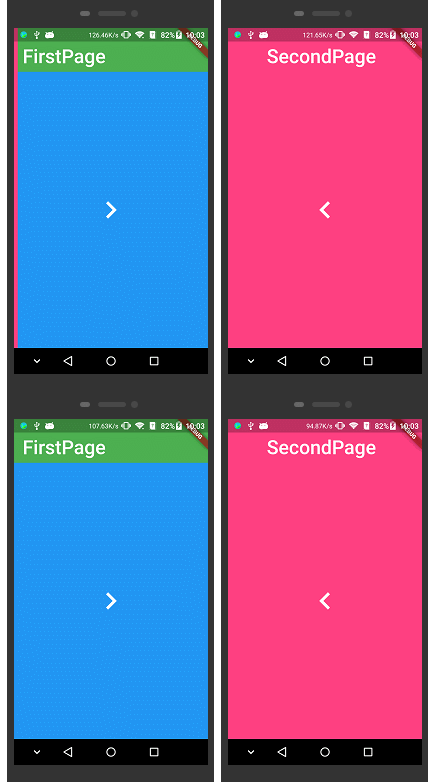
效果:
flutter 路由动画的更多相关文章
- Flutter路由的跳转、动画与传参(最简单)
跳转 命名路由 在文件构建时先设置路由参数: new MaterialApp( // 代码 routes: { "secondPage":(BuildContext context ...
- 20个Flutter实例视频教程-第05节: 酷炫的路由动画-1
视屏地址: https://www.bilibili.com/video/av39709290/?p=5 博客地址: https://jspang.com/post/flutterDemo.html# ...
- 20个Flutter实例视频教程-第06节: 酷炫的路由动画-2
博客地址: https://jspang.com/post/flutterDemo.html#toc-94f 视频地址: https://jspang.com/post/flutterDemo.htm ...
- Flutter酷炫的路由动画效果
现在Flutter的路由效果已经非常不错了,能满足大部分App的需求,但是谁不希望自己的App更酷更炫那,下面介绍几个酷炫的路由动画. 其实路由动画的原理很简单,就是重写并继承PageRouterBu ...
- 【Flutter 实战】动画序列、共享动画、路由动画
老孟导读:此篇文章是 Flutter 动画系列文章第四篇,本文介绍动画序列.共享动画.路由动画. 动画序列 Flutter中组合动画使用Interval,Interval继承自Curve,用法如下: ...
- Flutter路由跳转及参数传递
本文要介绍的知识点 用路由推出一个新页面 打开新页面时,传入参数 参数的回传 路由 做Android/iOS原生开发的时候,要打开一个新的页面,你得知道你的目标页面对象,然后初始化一个Intent或者 ...
- Angular动画——路由动画及高阶动画函数
一.路由动画 路由动画需要在host元数据中指定触发器.动画注意不要过多,否则适得其反. 内容优先,引导用户去注意到某个内容.动画只是辅助手段. 定义一个进场动画,一个离场动画. 因为进场动画和离场动 ...
- vue2借助animate.css实现路由动画效果
第一步: npm install animate.css --save 第二步:打开main.js import animate from 'animate.css' Vue.use(animate) ...
- Flutter路由_fluro引入配置和使用
Flutter本身提供了路由机制,作个人的小型项目,完全足够了.但是如果你要作企业级开发,可能就会把入口文件变得臃肿不堪.而再Flutter问世之初,就已经了企业级路由方案fluro. flutter ...
随机推荐
- python网络-静态Web服务器案例(29)
一.静态Web服务器案例代码static_web_server.py # coding:utf-8 # 导入socket模块 import socket # 导入正则表达式模块 import re # ...
- python开发笔记-python-numpy
一.Numpy概念 Numpy(Numerical Python的简称)是Python科学计算的基础包.它提供了以下功能: 除了为Python提供快速的数组处理能力,Numpy在数据分析方面还有另外 ...
- test20190814 NOIP2019 模拟题
二叉树 [问题描述] 从前有一棵二叉树,我们用如下方式来表示这棵二叉树. 如果一个节点没有儿子,我们用"0"来表示他. 如果一个节点有一个儿子,我们对它的表示以"1&qu ...
- notepad++ 调整行间距
在“设置”-“语言格式设置”里面,找到style里面的Line number margin一项,调整字体大小就可以调整左边标号的大小,然后文本内容的行间距即可任意调整.
- Python win32gui调用窗口到最前面
Python win32gui调用窗口到最前面 0要写一个轮询几个重要页面的程序,不停的在大屏上进行刷新,通过pywin32模块下的SetForegroundWindow函数调用时,会出现error: ...
- tensorflow API _ 2 (tf.app.flags.FLAGS)
tf.app.flags.FLAGS 的使用,主要是在用命令行执行程序时,需要传些参数,代码如下:新建一个名为:app_flags.py 的文件. #coding:utf-8 import tens ...
- PCL安装与配置
一.配置环境 1.win7 64位2.Visual Studio 2015 二 .准备工作 安装包准备: 移步:https://www.cnblogs.com/weiyouqing/p/8046387 ...
- 在idea中调试spark程序-配置windows上的 spark local模式
spark程序大致有如下运行模式: standalone模式:spark自带的模式 spark on yarn:利用hadoop yarn来做集群的资源管理 local模式:主要在测试的时候使用, 这 ...
- SpringBoot整合Gson(转)
第一步:移除jackson依赖 参考代码 <dependency> <groupId>org.springframework.boot</groupId> < ...
- PostgreSQL 输出 JSON 结果
PostGreSQL 从 9.2 开始增加对 JSON 的支持.9.5 已经支持多个 JSON 函数,见 http://www.postgres.cn/docs/9.5/functions-json. ...