
docker 安装nginx 配置目录挂载
nginx 的安装
mkdir /usr/local/docker

cd /usr/local/docker

docker run --name nginxtest -d nginx #运行一个测试的nginx

docker cp nginxtest:/etc/nginx ./ #把容器里的nginx的目录复制

docker rm -f nginxtest #删除测试的nginx-test
复制出来的nginx目录结构
#复制出来的nginx目录结构

[root@localhost docker]# tree nginx

nginx

├── conf.d

│   └── default.conf

├── fastcgi_params

├── koi-utf

├── koi-win

├── logs

│   ├── access.log

│   ├── error.log

│   ├── gin.haimait.com.access.log

│   ├── gin.haimait.com.error.log

│   ├── localhost.access.log

│   └── localhost.error.log

├── mime.types

├── modules -> /usr/lib/nginx/modules

├── nginx.conf

├── scgi_params

├── uwsgi_params

└── win-utf
运行mynginx容器
#运行mynginx 挂载到/wwwroot是为了保持容器和宿主机目录一致,以免配置时出错

docker run  \

--name mynginx \

-p 8081:80 \

-p 443:443 \

-v /etc/localtime:/etc/localtime:ro \

-v /wwwroot:/wwwroot \

-v $PWD/nginx:/etc/nginx \

-v $PWD/nginx/logs:/var/log/nginx \

--restart always \

-d nginx
编写默认的配置文件
vim $PWD/nginx/conf.d/default.conf
把内容换下面的内容
server {

    listen       80;

    server_name  localhost;

    access_log  /var/log/nginx/localhost.access.log;

    error_log   /var/log/nginx/localhost.error.log;

    # 配置前端静态文件目录

    location / {

        root  /wwwroot/html;

        index  index.html index.htm index.php;

    }

    #location ~ \.php$ {

    #    fastcgi_pass   myphp73-fpm:9000; #myphp73-fpm容器的名字

    #    fastcgi_index  index.php;

    #    fastcgi_param  SCRIPT_FILENAME $document_root$fastcgi_script_name;

    #    include        fastcgi_params;

    #}

    # 配置后台go服务api接口服务 代理到8877端口

    #location ~ ^/goadminapi/ {

    #    proxy_set_header   Host             $http_host;

    #    proxy_set_header   X-Real-IP        $remote_addr;

    #    proxy_set_header   X-Forwarded-For  $proxy_add_x_forwarded_for;

    #    proxy_set_header   X-Forwarded-Proto  $scheme;

    #    rewrite ^/goadminapi/(.*)$ /$1 break;

    #    proxy_pass  http://127.0.0.1:8877;

    #    }

}
配置一个域名也指向到/wwwroot/html目录 确定你的域名已经解析到服务器的ip上了
vim $PWD/nginx/conf.d/gin.haimait.com.conf
内容如下:
server {

    listen       80;

    server_name  gin.haimait.com;

    access_log  /var/log/nginx/gin.haimait.com.access.log;

    error_log   /var/log/nginx/gin.haimait.com.error.log;

    # 配置前端静态文件目录

    location / {

        root  /wwwroot/html;

        index  index.html index.htm index.php;

    }

    error_page   500 502 503 504  /50x.html;

    location = /50x.html {

        root   /usr/share/nginx/html;

    }

    #location ~ \.php$ {

    #    fastcgi_pass   myphp73-fpm:9000; #myphp73-fpm容器的名字

    #    fastcgi_index  index.php;

    #    fastcgi_param  SCRIPT_FILENAME $document_root$fastcgi_script_name;

    #    include        fastcgi_params;

    #}

    # 配置后台go服务api接口服务 代理到8877端口

    #location ~ ^/goadminapi/ {

    #    proxy_set_header   Host             $http_host;

    #    proxy_set_header   X-Real-IP        $remote_addr;

    #    proxy_set_header   X-Forwarded-For  $proxy_add_x_forwarded_for;

    #    proxy_set_header   X-Forwarded-Proto  $scheme;

    #    rewrite ^/goadminapi/(.*)$ /$1 break;

    #    proxy_pass  http://127.0.0.1:8877;

    #    }

}
重启nginx
docker restart mynginx
新建index.html
mkdir /wwwroot/html

vim  /wwwroot/html/index.html
内容如下:
hello nginx , html
测试
以下说明都已经配置成功了
[root@localhost ~]# curl localhost:8081

hello nginx , html

[root@localhost ~]# curl gin.haimait.com:8081

hello nginx , html
浏览器访问
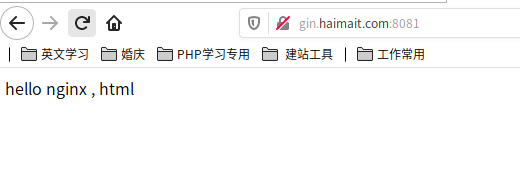
删除nginx容器重启容器,wwwroot里的内容也不会丢
到此已经完成安装
设置开机自动启动容器
在运行docker容器时可以加如下参数来保证每次docker服务重启后容器也自动重启:
docker run --restart=always CONTAINER ID
如果已经启动了则可以使用如下命令:
docker update --restart=always CONTAINER ID #设置启动nginx时自动启动
docker update --restart=no CONTAINER ID #设置启动nginx时不启动
[root@localhost www]# docker update --restart=always nginx

nginx
docker 安装nginx 配置目录挂载的更多相关文章
- docker安装MySQL8,目录挂载、配置用户名密码、忽略表名大小写、连接数、特殊字符、时区
原文:docker安装MySQL8,目录挂载.配置用户名密码.忽略表名大小写.连接数.特殊字符.时区 一.环境配置 1.系统:centos7.3 2.docker版本:Docker version 1 ...
- Linux docker 安装nginx 配置ssl证书
Linux docker 安装nginx 配置ssl证书 如果觉得样式不好:跳转即可 md文件复制过来有些样式会不一样) 原文地址:https://lifengying.site/archives/b ...
- 【转载】Docker 安装 Nginx 并个性化挂载配置文件 nginx.conf
首先,系统(3.8以上内核的linux)中安装好 Docker 这个运用程序.由于网络原因,我们下载一个Docker官方的镜像需要很长的时间,甚至下载失败.为此,阿里云容器镜像服务提供了官方的镜像站点 ...
- docker安装nginx并配置通过https访问
1. 下载最新的nginx的docker image docker pull nginx:latest 创建挂载路径 2.准备nginx需要的文件 nginx的配置文件 首先是nginx.conf文件 ...
- docker安装和配置nginx
配置nginx docker配置nginx 本机ip是192.168.0.200 docker pull nginx 配置nginx主机 vi /root/docker/nginx/nginx01.c ...
- 阿里云CentOS7.3服务器通过Docker安装Nginx
前言 小编环境: 阿里云CentOS7.3服务器 docker 下面分享一次小编在自己的阿里云CentOS7.3服务器上使用Docker来安装Nginx的一次全过程 温馨小提示: 如果只是希望单纯使用 ...
- Ubuntu Docker 安装和配置 GitLab CI 持续集成
相关文章: Ubuntu Docker 简单安装 GitLab 劈荆斩棘:Gitlab 部署 CI 持续集成 目的:在 Ubuntu 服务器上,使用 Docker 安装和配置 GitLab Runne ...
- Linux、Docker安装Nginx
Docker安装Nginx #docker images nginx #docker search nginx #docker pull nginx #docker run -it -p 8084:8 ...
- centos7下使用docker安装nginx
需要环境docker,此处不做介绍. 1. docker拉取官方nginx镜像 docker pull nginx 2. 等待下载完成后,我们就可以在本地镜像列表里查到 REPOSITORY 为 ng ...
- Docker实战 | 第三篇:Docker安装Nginx,实现基于vue-element-admin框架构建的项目线上部署
一. 前言 在上一文中 点击跳转 通过IDEA集成Docker插件实现微服务的一键部署,但 youlai-mall 是前后端分离的项目,除了后端微服务的部署之外,当然还少不了前端工程的部署.所以本篇讲 ...
随机推荐
- Tarjan 算法——图论学习笔记
Part.1 引入 在图论问题中,我们经常去研究一些连通性问题,比如: 有向图的联通性:传递闭包--Floyd 算法: 有向图连通性的对称性:强联通分量(SCC)--Tarjan 算法缩点: 无向图的 ...
- #轮廓线dp#洛谷 1879 [USACO06NOV]Corn Fields G
题目 分析 考虑状压dp在\(n\leq 21\)的情况下会TLE, 设\(dp[n][m][S]\)表示当前正在处理\((n,m)\)这个格子 并且轮廓线状态为\(S\)的方案数, 考虑可行状态最多 ...
- 【LGR-065】洛谷11月月赛 III Div.1
T1,T2,T3,T4 T1 基础博弈练习题 分析 首先区间长度为1的情况特判,偶数必胜,奇数必败 考虑倒推,如果最后一个位置为偶数那么该位置为必败局面,否则为必胜局面 因为先手到这个位置要减去1就会 ...
- #带权并查集#HDU 3038 How Many Answers Are Wrong
题目 有未知的\(n\)个数,有\(m\)组询问,形如区间和等于给定值, 问有多少条错误的询问,一旦错误忽略此条询问 \(n\leq 2*10^5,m\leq 4*10^4\) 分析 用带权并查集,记 ...
- ArkUI中的线程和看门狗机制
一.前言 本文主要分析ArkUI中涉及的线程和看门狗机制. 二.ArkUI中的线程 应用Ability首次创建界面的流程大致如下: 说明: • AceContainer是一个容器类,由前端.任务执行器 ...
- SpringCloud OpenFeign token中转
OpenFeign 的本质是调用指定服务的 Controller. 前后端分离项目,调用 Controller 是需要传递 token 的. OpenFeign 并不会自动携带 token 去访问 C ...
- openGauss/MogDB配置IPv6
openGauss/MogDB 配置 IPv6 openGauss/MogDB 支持多种网络接口,假如我们想在支持 IPv6 的网络上部署使用,只需简单操作即可,本文将介绍在 Centos 上如何配置 ...
- 喜报|HarmonyOS开发者社区连获业内奖项,持续深耕开发者生态
临近年末,各大平台陆续揭晓年度榜单,表彰了具备强大影响力与做出突出贡献的优秀项目与团队,而HarmonyOS开发者社区作为技术分享,学习和展示的平台,输出高质量技术文章百余篇,连续获得业内各大奖项, ...
- IntelliJ IDEA Community 无法启动 Spring Boot 项目的解决方案
菜单中依次选择 Run >Edit Configuration 在弹出窗口中,点击左上角的 +,选择 Maven 在 Name 中自定义一个名称,一般与项目名称相同 在 Run 下方的文本框中输 ...
- ef 查询生成语句的几种方式
前言 整理一下ef 如何查看生成sql 语句的,现在有ef core 了,统一整理一下. 正文 方式如下: 数据库监听 这是一种推荐方式,因为调试和代码分开,不会有影响. 然后连接: 然后可以进行一些 ...