
Apache常见配置
一、yum安装与配置
1.1安装:
[root@apache ~]# yum install http\* -y
[root@apache ~]# echo "test01" >>/var/www/html/index.html
[root@apache ~]# firewall-cmd --permanent --add-service=http
[root@apache ~]# firewall-cmd --reload
[root@apache ~]# systemctl enable httpd.service
[root@apache ~]# systemctl restart httpd.service
1.2测试验证:
[root@apache ~]# curl localhost:80
test01
[root@apache ~]#
二、配置虚拟主机
2.1创建内容:
[root@apache ~]# mkdir /srv/{default,example}/www -p
[root@apache ~]# echo "test02" > /srv/default/www/index.html
[root@apache ~]# echo "test03" > /srv/excample/www/index.html
2.2如果开了SELinux,需配置安全上下文:
[root@apache ~]# semanage fcontext -a -t 'httpd_sys_content_t' '/srv(/.*)?'
[root@apache ~]# restorecon -Rv /srv/
2.3添加配置文件
[root@apache ~]# vim /etc/httpd/conf.d/my.conf
输入:
<VirtualHost *:80>
DocumentRoot "/srv/default/www"
</VirtualHost>
<Directory "/srv/default/www">
Require all granted
</Directory>
2.4验证:
[root@apache ~]# systemctl restart httpd.service
[root@apache ~]# curl localhost:80
test02
[root@apache ~]#
2.5添加配置:
[root@apache ~]# vim /etc/httpd/conf.d/my.conf
<VirtualHost *:80>
DocumentRoot "/srv/default/www"
</VirtualHost>
<Directory "/srv/default/www">
Require all granted
</Directory>
<VirtualHost *:80>
ServerName www.test03.com 域名
ServerAlias test03 别名
DocumentRoot "/srv/example/www" 访问主页(默认进入index.html)
</VirtualHost>
<Directory "/srv/example/www">
Require all granted
</Directory>
2.6修改hosts:
[root@apache ~]# cat /etc/hosts
192.168.247.17 www.test03.com
192.168.247.17 test03
2.7测试验证:
[root@apache ~]# curl localhost:80
test02
[root@apache ~]#
[root@apache ~]# curl www.test03.com:80
test03
[root@apache ~]# curl test03:80
test03
[root@apache ~]#
三、控制访问
3.1添加配置:
[root@apache ~]# cat /etc/httpd/conf.d/my.conf
#<VirtualHost *:80>
#DocumentRoot "/srv/default/www"
#</VirtualHost>
#<Directory "/srv/default/www">
# Require all granted
#</Directory>
<VirtualHost *:80>
ServerName www.test03.com
ServerAlias test03
DocumentRoot "/srv/example/www"
</VirtualHost>
<Directory "/srv/example/www">
Require all granted
AllowOverride AuthConfig
</Directory>
3.2设置秘钥访问:
[root@apache ~]# cd /srv/example/www
[root@apache www]# vim .htaccess
输入:
AuthName testACL
Authtype Basic
AuthUserfile /srv/example/www/.htpasswd
require user tansk
3.3创建密码:
[root@apache www]# htpasswd -cm .htpasswd tansk
New password: (123456)
Re-type new password:(123456)
四、开启个人主页
(已关闭SELinux,否则需设置:setsebool -P httpd_enable_homedirs=on )
4.1修改配置:
[root@apache ~]# vim /etc/httpd/conf.d/userdir.conf
设置:
<IfModule mod_userdir.c>
UserDir public_html
</IfModule>
4.2创建主页内容
[root@apache ~]# chmod -R 755 /home/tansk/
[root@WWW ~]# su tansk
[tansk@WWW root]$ cd
[tansk@WWW ~]$ mkdir public_html
[tansk@WWW ~]$ echo "this is tansk home" > public_html/index.html
[tansk@WWW ~]$ exit
4.3测试验证:
[root@apache ~]# systemctl restart httpd.service
[root@apache ~]# curl http://192.168.247.17/~tansk/
this is tansk home
[root@apache ~]#
4.4给个人用户主页设置密码
使用htpasswd命令生成密码数据库,并将tansk用户加进去
[root@apache ~]# htpasswd -c /etc/httpd/passwd.txt tansk
New password: (123456)
Re-type new password: (123456)
Adding password for user tansk
[root@apache ~]#
4.5编辑httpd子配置文件
vim /etc/httpd/conf.d/userdir.conf
修改为:
<Directory "/home/*/public_html">
#AllowOverride FileInfo AuthConfig Limit Indexes
#Options MultiViews Indexes SymLinksIfOwnerMatch IncludesNoExec
#Require method GET POST OPTIONS
AllowOverride all
authuserfile "/etc/httpd/passwd.txt"
#提示信息
authname "tansk’s home"
authtype basic
#需要认证的用户
require user tansk
</Directory>
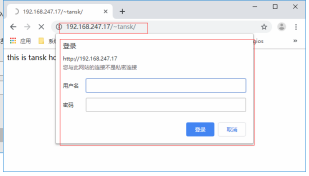
4.6登录验证
Apache常见配置的更多相关文章
- Httpd服务入门知识-Httpd服务常见配置案例之Apache的工作做状态status页面
Httpd服务入门知识-Httpd服务常见配置案例之Apache的工作做状态status页面 作者:尹正杰 版权声明:原创作品,谢绝转载!否则将追究法律责任. 一.status功能概述 status页 ...
- Apache安全配置方案
Apache安全配置方案 from:http://drops.wooyun.org/%e8%bf%90%e7%bb%b4%e5%ae%89%e5%85%a8/2727 apache的一些配置主要是通过 ...
- Httpd2.2常见配置及功能
Httpd 2.2常见配置 要配置http服务的配置文件,先备份一下,养成良好习惯,如果误操作导致http服务起不来,就可以将备份的主配置文件重新覆盖一下 httpd配置文件的组成:有三大部分组成,其 ...
- Apache + PHP配置
因工作需要,重新配置了Apache和PHP.想起当年曾经配置过,但是已经忘得差不多了.而且,也没有记录.从我个人来看,确实缺乏这样的训练,从国家教育体系来看,似乎也从未有过做科学记录的训练.中国的瓷器 ...
- Struts2常见配置(草稿)
Struts2框架配置文件加载的顺序(了解加载配置文件的顺序,重点掌握struts.xml配置文件) 1.Struts2框架的核心是StrutsPrepareAndExecuteFilter过滤器,该 ...
- Httpd服务入门知识-Httpd服务常见配置案例之虚拟主机
Httpd服务入门知识-Httpd服务常见配置案例之虚拟主机 作者:尹正杰 版权声明:原创作品,谢绝转载!否则将追究法律责任. 一.虚拟主机实现方案 1>.Apache httpd 有三种实现虚 ...
- Httpd服务入门知识-Httpd服务常见配置案例之ServerSignature指令选项
Httpd服务入门知识-Httpd服务常见配置案例之ServerSignature指令选项 作者:尹正杰 版权声明:原创作品,谢绝转载!否则将追究法律责任. 一.ServerSignature指令概述 ...
- Httpd服务入门知识-Httpd服务常见配置案例之实现用户家目录的http共享
Httpd服务入门知识-Httpd服务常见配置案例之实现用户家目录的http共享 作者:尹正杰 版权声明:原创作品,谢绝转载!否则将追究法律责任. 一.实现用户家目录的http共享前提 在配置家目录共 ...
- Httpd服务入门知识-Httpd服务常见配置案例之设定默认字符集
Httpd服务入门知识-Httpd服务常见配置案例之设定默认字符集 作者:尹正杰 版权声明:原创作品,谢绝转载!否则将追究法律责任. 一.查看生产环境中使用的字符集案例 1>.查看腾讯设置的默认 ...
随机推荐
- SpringCloud搭建注册中心与服务注册
上一篇文章<微服务注册中心原理,看这篇就够了!>介绍了注册中心的概念和原理,本文将介绍下利用Eureka搭建中心并注册服务到注册中心的过程. 本文目录 一.Eureka介绍二.搭建注册中心 ...
- Spring boot - 梳理 - 根本上说,Spring Boot项目只不过是一个普通的Spring项目,只是使用了Spring Boot的起步依赖和自动配置
根本上说,Spring Boot项目只不过是一个普通的Spring项目,只是使用了Spring Boot的起步依赖和自动配置
- Spring MVC-从零开始-web.xml中classpath和classpath* 有什么区别
web.xml中classpath和classpath* 有什么区别?classpath:只会到你的class路径中查找找文件;classpath*:不仅包含class路径,还包括jar文件中(cla ...
- Flask基础(04)-->相关配置参数
# 导入Flask from flask import Flask from flask import config # 创建Flask的应用程序 app = Flask(__name__) #=== ...
- 我的mongoDb之旅(二)
题序:上一回,咱们简单的操作了一些增减改查的操作,这一次,再来进行一场奇妙之旅 一.案例讲解 (1).字段有值与没值时的单条数据 第一条数据title这个字段(mysql用久了,习惯这么叫了)是没有数 ...
- jquery 全选,反选
<?php foreach ($contents as $item) { ?> <tr> <td><input name="qx" val ...
- v-text和v-html的区别
一.v-text 用于渲染普通文本,无论何时,绑定的数据对象上 msg属性发生了改变,插值处的内容都会更新. <span v-text="message"></s ...
- Django2.0入门:第一章、Django是啥
Django介绍 缘起 随着Python语言的兴起,越来越多的程序员开始转向这门语言的学习.在我们学习完Python基础之后,就可以选择利用Python这门语言进行Web应用开发.而众多Python ...
- 【Java】 读取Txt文件 处理数据
@RequestMapping("/importTxt") public String readTxtPoints(@RequestParam("file") ...
- Spring Cloud Feign 性能优化
#### 1.替换 tomcat 首先,把 tomcat 换成 undertow,这个性能在 Jmeter 的压测下,undertow 比 tomcat 高一倍 **第一步,pom 修改去除tomca ...