
ansible+playbook 搭建lnmp环境
用三台机器 做ansible+playbook 搭建lnmp环境
IP分配
ansible 主机192.168.202.132
lnmp第一台主机 192.168.202.131
lnmp第一台主机 192.168.202.133
1.1 ansible主机安装ansible
[root@localhost ~]# yum -y install ansible

已加载插件:fastestmirror

Loading mirror speeds from cached hostfile

 * base: mirror.jdcloud.com

 * extras: mirror.bit.edu.cn
1.2 ansible主机生成密钥设置免密码登录
[root@localhost ~]# ssh -keygen

Bad escape character 'ygen'.

[root@localhost ~]# ssh-keygen

Generating public/private rsa key pair.

Enter file in which to save the key (/root/.ssh/id_r

Created directory '/root/.ssh'.

Enter passphrase (empty for no passphrase):

Enter same passphrase again:

Your identification has been saved in /root/.ssh/id_

Your public key has been saved in /root/.ssh/id_rsa.

The key fingerprint is:

SHA256:snafmBirD5A4bkRNfs/yraWQ7BqJf4SKpLd0UO5yZyA rhost

The key's randomart image is:

+---[RSA 2048]----+

|   .             |

|  +              |

| . o..           |

|.. +. o          |

|o.E +..oS        |

|oo.*oo+o.        |

|+++o*+*..o       |

|+oo+o*.=++ .     |

| ..++++oo o      |

+----[SHA256]-----+

[root@localhost ~]# ssh-copy-id root@192.168.202.131

/usr/bin/ssh-copy-id: INFO: Source of key(s) to be i "/root/.ssh/id_rsa.pub"

The authenticity of host '192.168.202.131 (192.168.2can't be established.

ECDSA key fingerprint is SHA256:+YOuMKydPwvlPwXHq3Cgj6X6jdlupF1W3A.

ECDSA key fingerprint is MD5:33:f9:54:0f:ce:1e:53:96:96:29:e3:04:7c.

Are you sure you want to continue connecting (yes/no

/usr/bin/ssh-copy-id: INFO: attempting to log in wit key(s), to filter out any that are already installe

/usr/bin/ssh-copy-id: INFO: 1 key(s) remain to be in- if you are prompted now it is to install the new k

root@192.168.202.131's password:

Number of key(s) added: 1

Now try logging into the machine, with:   "ssh 'root202.131'"

and check to make sure that only the key(s) you wantdded.

[root@localhost ~]# ssh-copy-id root@192.168.202.133
1.3 ansible主机配置
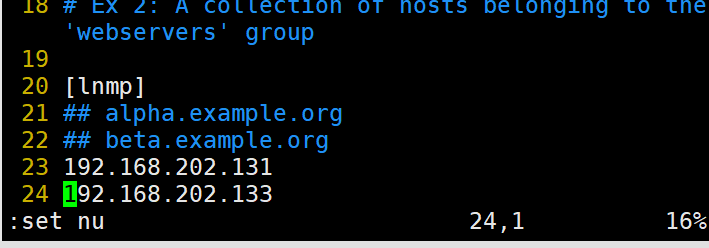
[root@localhost ~]# vim /etc/ansible/hosts

[lnmp]

192.168.202.131

192.168.202.133
如图:
1.4 编写ansible的playbook
---

        - hosts: lnmp

          tasks:

                - name: "安装需要的环境"

                  yum: name=gcc,gcc-c++,make,php,php-gd,php-mysql,php-fpm,pcre-devel,zlib-devel,mariadb,mariadb-server state=latest

                - name: "导入nginx包"

                  unarchive: src=nginx-1.16.1.tar.gz dest=/root

                - name: "编译安装"

                  shell: cd /root/nginx-1.16.1 && ./configure && make && make install

                - name: "分发配置文件"

                  copy: src=nginx.conf dest=/usr/local/nginx/conf/nginx.conf

                - name: "分发主界面"

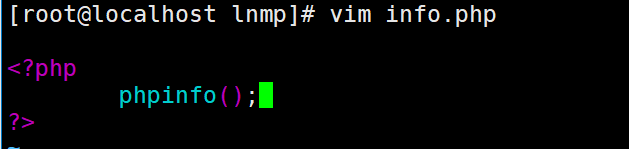
                  copy: src=info.php dest=/var/www/html/info.php

                - name: 启动nginx

                  shell: /usr/local/nginx/sbin/nginx

                - name: "启动mysql"

                  shell: systemctl restart mariadb

                - name: "启动php-fpm"

                  shell: systemctl restart php-fpm

                - name : "关闭防火墙"

                  shell: systemctl stop firewalld

                - name: "关闭selinux"

                  shell: setenforce 0

~
1.4.2 更改nginx的配置文件


1.4.3 分发一个php的测试界面
1.4.4 执行ansible-playbook


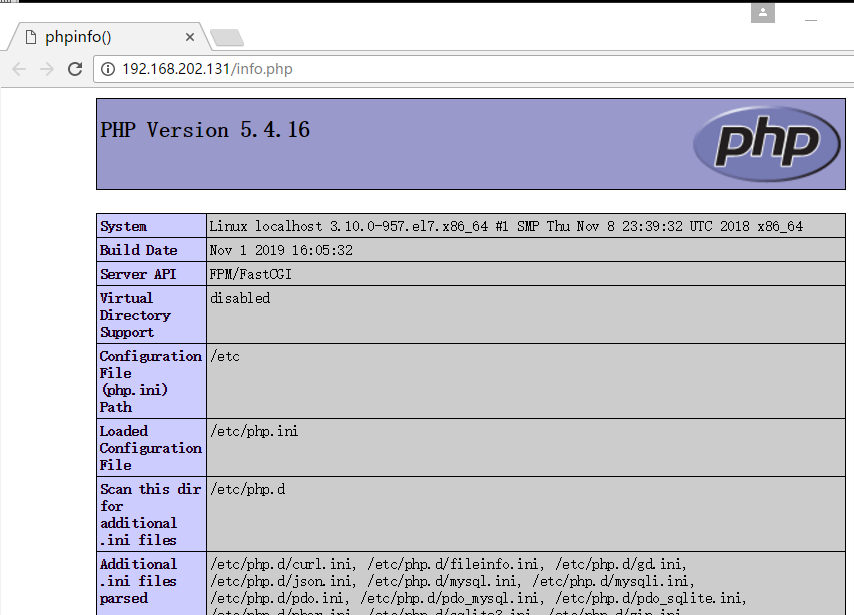
1.4.5 展示效果看看lnmp是否搭建成功
ansible+playbook 搭建lnmp环境的更多相关文章
- CentOS6.6搭建LNMP环境
CentOS6.6搭建LNMP环境 1.设置yum源,本地安装依赖包 1 yum -y install gcc gcc-c++ automake autoconf libtool make 2.下载依 ...
- Yum搭建LNMP环境(动、静、库分离)(week4_day5)--技术流ken
前言 本篇博客使用yum来搭建lnmp环境,将采用动态,静态以及数据库分开安装的方式即nginx,php,mysql.会被分开安装在不同的服务器之上,搭建出来一套lnmp环境,并部署wordpress ...
- [Linux] deepin15.8搭建LNMP环境
LAMP和LNMP LAMP==Linux+Apache+Mysql+PHP LNMP==Linux+Nginx+Mysql+PHP 安装nginx sudo apt install nginx 安装 ...
- CentOS 7 源码搭建LNMP环境
搭建 LNMP 环境 源码包版本 : CentOS Linux 7 nginx-1.15.1.tar.gz mysql-boost-5.7.21.tar.gz php-7.2.7.tar.gz ...
- Vmware搭建LNMP环境(Centos7+Nginx+Mysql+PHP7.1.8)
参考:1.Linux学习之CentOS(一)----在VMware虚拟机中安装CentOS 7(图文教程) 2.Centos7搭建LNMP环境 3.MySQL5.7修改默认root密码 4.CentO ...
- ubuntu通过apt-get方式搭建lnmp环境以及php扩展安装
v 一直是在用的lnmp的集成安装包搭建lnmp环境,因为工作需要需要安装ldap扩展,在网上怎么都找不到源码安装包,只能卸载掉原来的lnmp环境,用ubuntu的php5-ldap扩展, 在安装中遇 ...
- Mac下docker搭建lnmp环境 + redis + elasticsearch
之前在windows下一直使用vagrant做开发, 团队里面也是各种开发环境,几个人也没有统一环境,各种上线都是人肉,偶尔还会有因为开发.测试.生产环境由于软件版本或者配置不一致产生的问题, 今年准 ...
- WIN10 vagrant和virtualbox虚拟机和一键搭建lnmp环境配置thinkphp虚拟主机
版本:win10系统 virtualbox:5.1.26 vagrant :1.9.7 centos 7.0 xshell/git 首先下载好对应版本的软件 配置vagrant和virtualbox ...
- docker搭建lnmp环境(问题,资料,命令)
入门参考 http://www.runoob.com/docker/docker-install-nginx.html 十大常用命令玩转docker 1. #从官网拉取镜像 docker pull & ...
随机推荐
- Docker--Docker初体验
echo编辑整理,欢迎转载,转载请声明文章来源.欢迎添加echo微信(微信号:t2421499075)交流学习. 百战不败,依不自称常胜,百败不颓,依能奋力前行.--这才是真正的堪称强大!!! 先来接 ...
- 学习ES6笔记──工作中常用到的ES6语法
学习博客:https://segmentfault.com/a/1190000016068235
- 函数中this的指向
每个函数在被调用时都会自动取得两个特殊变量:this和arguments:内部函数在搜索这两个变量时,只会搜索到其活动对象为止,因此永远不可能直接访问外部函数中的这两个变量. f 1 var name ...
- 封装读取文件(node js)
我们都会简单的读取文件,今天我们就来讲一下用函数封装读取文件. 1.首先我们要先建好文件 2.我们在index.js里面写入代码: var http=require('http'); var fs=r ...
- NodeJS4-7静态资源服务器实战_缓存
浏览器发出一个请求,服务器解析出响应的结果返回给浏览器. 缓存是怎么工作的? 用户发起请求,浏览器检查本地是否存在缓存,如果第一次请求没有缓存,那就向服务器发起请求,服务器协商缓存的内容并且返回响应, ...
- [ASP.NET Core 3框架揭秘] 依赖注入[7]:服务消费
包含服务注册信息的IServiceCollection集合最终被用来创建作为依赖注入容器的IServiceProvider对象.当需要消费某个服务实例的时候,我们只需要指定服务类型调用IService ...
- java存储数据到本地txt文件中
java存储数据,方便打印日志等 1.会覆盖以前的数据 try { File writeName = new File("D:\\data.txt"); // 相对路径,如果没有则 ...
- Castle DynamicProxy基本用法(AOP)
本文介绍AOP编程的基本概念.Castle DynamicProxy(DP)的基本用法,使用第三方扩展实现对异步(async)的支持,结合Autofac演示如何实现AOP编程. AOP 百科中关于AO ...
- mysql如何处理高并发(转)
mysql高并发的解决方法有:优化SQL语句,优化数据库字段,加缓存,分区表,读写分离以及垂直拆分,解耦模块,水平切分等. 高并发大多的瓶颈在后台,在存储mysql的正常的优化方案如下: (1)代码中 ...
- python函数中参数的传递
Python唯一支持的参数传递方式是『共享传参』(call by sharing)多数面向对象语言都采用这一模式,包括Ruby.Smalltalk和Java(Java的引用类型是这样,基本类型按值传递 ...