
针对CCTV摄像头的扫描爆破工具 :Cameradar
针对CCTV摄像头的扫描爆破工具 :Cameradar

- 可以检测任何可访问的目标设备并扫描出开放的RTSP主机。
- 检测正在传输监控数据的设备型号。
- 内置字典自动化渗透爆破账号密码和目标流路径。
- 可以很方便的批量检测摄像头设备的弱口令。
- 可以自定义爆破的账密字典和目标流路径,可以检测的不同的摄像头设备来改变字典。
[root@localhost docker_test]# uname -a

Linux bogon 3.10.-.el7.x86_64 # SMP Fri Apr  :: UTC  x86_64 x86_64 x86_64 GNU/Linux

[root@localhost docker_test]#
[root@localhost docker_test]# yum update

Loaded plugins: fastestmirror, langpacks

Determining fastest mirrors

* base: mirrors.huaweicloud.com

* extras: mirrors.tuna.tsinghua.edu.cn

* updates: mirrors.huaweicloud.com

base                                                     | 3.6 kB     :

extras                                                   | 2.9 kB     :

updates                                                  | 2.9 kB     :

(/): base//x86_64/group_gz                              |  kB   :

(/): extras//x86_64/primary_db                          |  kB   :

(/): updates//x86_64/primary_db                         | 2.8 MB   :

(/): base//x86_64/primary_db                            | 6.0 MB   :
[root@localhost docker_test]# yum install -y yum-utils device-mapper-persistent-data lvm2

Loaded plugins: fastestmirror, langpacks

Loading mirror speeds from cached hostfile

* base: mirrors.huaweicloud.com

* extras: mirrors.tuna.tsinghua.edu.cn

* updates: mirrors.huaweicloud.com

Package yum-utils-1.1.-.el7.noarch already installed and latest version

Package device-mapper-persistent-data-0.8.-.el7.x86_64 already installed and latest version

Package :lvm2-2.02.-.el7_7..x86_64 already installed and latest version

Nothing to do
[root@localhost docker_test]# yum install docker-ce

Loaded plugins: fastestmirror, langpacks

Loading mirror speeds from cached hostfile

* base: mirrors.huaweicloud.com

* extras: mirrors.tuna.tsinghua.edu.cn

* updates: mirrors.huaweicloud.com

No package docker-ce available.

Error: Nothing to do

[root@localhost docker_test]#
在CentOS7.0上默认的源中没有docker的资源。(我这里安装的epel-release的源里也没有docker资源)
[root@localhost yum.repos.d]# pwd

/etc/yum.repos.d

[root@localhost yum.repos.d]# ls

CentOS-Base.repo       CentOS-fasttrack.repo  CentOS-Vault.repo

CentOS-CR.repo         CentOS-Media.repo      epel.repo

CentOS-Debuginfo.repo  CentOS-Sources.repo    epel-testing.repo
添加docker源。(可以看到添加docker源后,增加了一个yum源文件docker-ce.repo)
[root@localhost yum.repos.d]# yum-config-manager --add-repo https://download.docker.com/linux/centos/docker-ce.repo

Loaded plugins: fastestmirror, langpacks

adding repo from: https://download.docker.com/linux/centos/docker-ce.repo

grabbing file https://download.docker.com/linux/centos/docker-ce.repo to /etc/yum.repos.d/docker-ce.repo

repo saved to /etc/yum.repos.d/docker-ce.repo

[root@localhost yum.repos.d]# ls

CentOS-Base.repo       CentOS-fasttrack.repo  CentOS-Vault.repo  epel-testing.repo

CentOS-CR.repo         CentOS-Media.repo      docker-ce.repo

CentOS-Debuginfo.repo  CentOS-Sources.repo    epel.repo

[root@localhost yum.repos.d]#
查看仓库中所有docker版本。
[root@localhost yum.repos.d]# yum list docker-ce --showduplicates | sort -r

* updates: mirrors.huaweicloud.com

Loading mirror speeds from cached hostfile

Loaded plugins: fastestmirror, langpacks

* extras: mirrors.tuna.tsinghua.edu.cn

* epel: mirrors.tuna.tsinghua.edu.cn

docker-ce.x86_64            :19.03.-.el7                     docker-ce-stable

docker-ce.x86_64            :19.03.-.el7                     docker-ce-stable

docker-ce.x86_64            :19.03.-.el7                     docker-ce-stable

docker-ce.x86_64            :19.03.-.el7                     docker-ce-stable

.

.

.
安装docker社区免费版。
[root@localhost yum.repos.d]# yum install docker-ce

Loaded plugins: fastestmirror, langpacks

Loading mirror speeds from cached hostfile

* base: mirrors.huaweicloud.com

* epel: mirrors.tuna.tsinghua.edu.cn

* extras: mirrors.tuna.tsinghua.edu.cn

* updates: mirrors.huaweicloud.com

Resolving Dependencies

--> Running transaction check

---> Package docker-ce.x86_64 :19.03.-.el7 will be installed

--> Processing Dependency: container-selinux >= :2.74 for package: :docker-ce-19.03.-.el7.x86_64

--> Processing Dependency: containerd.io >= 1.2.- for package: :docker-ce-19.03.-.el7.x86_64

--> Processing Dependency: docker-ce-cli for package: :docker-ce-19.03.-.el7.x86_64

--> Running transaction check

---> Package container-selinux.noarch :2.107-.el7 will be installed

---> Package containerd.io.x86_64 :1.2.-3.2.el7 will be installed

---> Package docker-ce-cli.x86_64 :19.03.-.el7 will be installed

--> Finished Dependency Resolution

Dependencies Resolved

=======================================================================================

Package                Arch        Version                Repository             Size

=======================================================================================

Installing:

docker-ce              x86_64      :19.03.-.el7        docker-ce-stable        M

Installing for dependencies:

container-selinux      noarch      :2.107-.el7          extras                  k

containerd.io          x86_64      1.2.-3.2.el7         docker-ce-stable        M

docker-ce-cli          x86_64      :19.03.-.el7        docker-ce-stable        M

Transaction Summary

=======================================================================================

Install   Package (+ Dependent packages)

Total download size:  M

Installed size:  M
查看docker版本,启动docker
[root@localhost yum.repos.d]# docker version

Client: Docker Engine - Community

Version:           19.03.

API version:       1.40

Go version:        go1.12.10

Git commit:        9013bf583a

Built:             Fri Oct  ::

OS/Arch:           linux/amd64

Experimental:      false

Cannot connect to the Docker daemon at unix:///var/run/docker.sock. Is the docker daemon running?
启动docker
[root@localhost yum.repos.d]# systemctl start docker

[root@localhost yum.repos.d]# systemctl status docker

● docker.service - Docker Application Container Engine

   Loaded: loaded (/usr/lib/systemd/system/docker.service; disabled; vendor preset: disabled)

   Active: active (running) since Fri -- :: EST; 32s ago

     Docs: https://docs.docker.com

Main PID:  (dockerd)

    Tasks:

   Memory: 99.4M

   CGroup: /system.slice/docker.service

           └─ /usr/bin/dockerd -H fd:// --containerd=/run/containerd/containerd.sock

Nov  :: bogon dockerd[]: time="2019-11-08T03:31:54.384116486-05:00" level=info msg="ccResolverWrapper: s...e=grpc

Nov  :: bogon dockerd[]: time="2019-11-08T03:31:54.384130527-05:00" level=info msg="ClientConn switching...e=grpc

Nov  :: bogon dockerd[]: time="2019-11-08T03:31:54.416778226-05:00" level=info msg="[graphdriver] using ...rlay2"

Nov  :: bogon dockerd[]: time="2019-11-08T03:31:54.420853788-05:00" level=info msg="Loading containers: start."

Nov  :: bogon dockerd[]: time="2019-11-08T03:31:55.048703993-05:00" level=info msg="Default bridge (dock...dress"

Nov  :: bogon dockerd[]: time="2019-11-08T03:31:55.312303083-05:00" level=info msg="Loading containers: done."

Nov  :: bogon dockerd[]: time="2019-11-08T03:31:55.357432633-05:00" level=info msg="Docker daemon" commi...9.03.

Nov  :: bogon dockerd[]: time="2019-11-08T03:31:55.357497299-05:00" level=info msg="Daemon has completed...ation"

Nov  :: bogon dockerd[]: time="2019-11-08T03:31:55.394993466-05:00" level=info msg="API listen on /var/r....sock"

Nov  :: bogon systemd[]: Started Docker Application Container Engine.

Hint: Some lines were ellipsized, use -l to show in full.

[root@localhost yum.repos.d]#
[root@localhost yum.repos.d]# docker pull ullaakut/cameradar

Using default tag: latest

latest: Pulling from ullaakut/cameradar

9d48c3bd43c5: Pull complete

cc7766bf8751: Pull complete

a497a345880d: Pull complete

919b21ac9ea0: Pull complete

3f9aebbc778b: Pull complete

Digest: sha256:04bbc19c486584ccc12d8bca2bd07e24bb859b63c44e07c0c17e940ec8badc75

Status: Downloaded newer image for ullaakut/cameradar:latest
[root@localhost yum.repos.d]# docker images

REPOSITORY           TAG                 IMAGE ID            CREATED             SIZE

ullaakut/cameradar   latest              fe268aaf499c         weeks ago         .8MB

hello-world          latest              fce289e99eb9         months ago       .84kB

[root@localhost yum.repos.d]#
具体使用方法
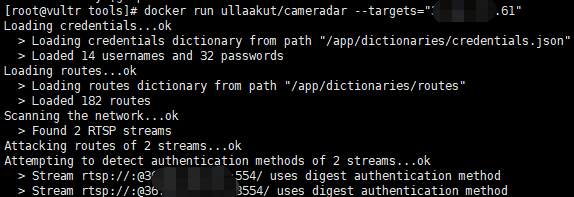
用法:

docker run -t -v /my/folder/with/dictionaries:/tmp/dictionaries \

           ullaakut/cameradar \

           -r "/tmp/dictionaries/my_routes" \

           -c "/tmp/dictionaries/my_credentials.json" \

           -t 172.19.124.0/
[root@localhost ~]# docker run  ullaakut/cameradar -t192.168.64.

Loading credentials...ok

  > Loading credentials dictionary from path "/app/dictionaries/credentials.json"

  > Loaded  usernames and  passwords

Loading routes...ok

  > Loading routes dictionary from path "/app/dictionaries/routes"

  > Loaded  routes

Scanning the network...ok

  > Found  RTSP streams

✖ unable to attack empty list of targets
我们可以查看该工具的源文件,可以看到它的密码只有 账密字典中有14个用户名和32个密码,路径字典中有182个路径。
[root@localhost cameradar]# ls

attack.go       cmd           Dockerfile  helpers.go         LICENSE          README.md        scan_test.go

attack_test.go  curl.go       examples    helpers_test.go    loaders.go       scan.go          summary.go

cameradar.go    curl_test.go  go.mod      images             loaders_test.go  scanner.go       summary_test.go

CHANGELOG.md    dictionaries  go.sum      ISSUE_TEMPLATE.md  models.go        scanner_test.go  tools

[root@localhost cameradar]# cd dictionaries/

[root@localhost dictionaries]# ls

credentials.json  routes

[root@localhost dictionaries]# head credentials.json

{

  "usernames": [

    "",

    "",

    "",

    "Admin",

    "admin",

    "admin1",

    "administrator",

    "Administrator",

[root@localhost dictionaries]# head routes

/live/ch01_0

/:/main

/usrnm:pwd/main

/video1

.AMP

/h264major

/stream1
[root@localhost tools]# ls

my_credentials.json  my_routes

[root@localhost tools]# vim my_credentials.json

{

  "usernames": [

    "",

    "",

    "",

    "Admin",

    "admin",

    "admin1",

    "administrator",

    "Administrator",

    "aiphone",

    "Dinion",

    "root",

    "service",

    "supervisor",

    "ubnt",

    "test",

    "ciby",

    "hello"

  ],

  "passwords": [

    "",

    "",

    "",

    "",

    "",

    "",

    "",

    "",

    "",

    "",

    "",

    "admin",

    "administrator",

    "aiphone",

    "camera",

    "fliradmin",

    "hikvision",

    "hikadmin",

    "ikwd",

    "jvc",

    "meinsm",

    "pass",

    "password",

    "reolink",

    "root",

    "service",

    "supervisor",

    "system",

    "toor",

    "tp-link",

    "ubnt",

    "wbox123",

    "test.com",

    "test1.com",

    "123.com"

  ]

}

[root@localhost tools]# head my_routes

/live/ch01_0

/:/main

/usrnm:pwd/main

/video1

.AMP

/h264major

/stream1
将我们本机的字典挂在到容器中,然后使用-c -r 参数来调用自定义的字典。
[root@localhost tools]# docker run -t -v /home/docker_test/tools:/tmp ullaakut/cameradar -c "/tmp/my_credentials.json" -r "/tmp/my_routes" -t 192.168.64.128

Loading credentials...ok

  > Loading credentials dictionary from path "/tmp/my_credentials.json"

  > Loaded  usernames and  passwords

Loading routes...ok

  > Loading routes dictionary from path "/tmp/my_routes"

  > Loaded  routes

Scanning the network...ok

  > Found  RTSP streams

✖ unable to attack empty list of targets
[root@localhost tools]# docker run -t -v /home/docker_test/tools:/tmp ullaakut/cameradar -c "/tmp/my_credentials.json" -r "/tmp/my_routes" -t "/home/docker_test/tools/target.txt"

Loading credentials...ok

  > Loading credentials dictionary from path "/tmp/my_credentials.json"

  > Loaded  usernames and  passwords

Loading routes...ok

  > Loading routes dictionary from path "/tmp/my_routes"

  > Loaded  routes

Scanning the network...ko

✖ error while scanning network: Unable to split netmask from target expression: "/home/docker_test/tools/target.txt"

WARNING: No targets were specified, so  hosts scanned
(这里报错了。未能拆分网络掩码,不懂go语言暂未解决)
[root@localhost tools]# docker run -t -v /home/docker_test/tools:/tmp ullaakut/cameradar -c "/tmp/my_credentials.json" -r "/tmp/my_routes" -t 192.168.64.0/

Loading credentials...ok

  > Loading credentials dictionary from path "/tmp/my_credentials.json"

  > Loaded  usernames and  passwords

Loading routes...ok

  > Loading routes dictionary from path "/tmp/my_routes"

  > Loaded  routes

Scanning the network...
5、其他参数
* “ -h”:显示用法信息

* “ -T,--2000ms timeout ”:(默认:)设置自定义超时值,在此之后应放弃没有答案的攻击尝试。在尝试扫描不稳定和慢速的网络时,建议增加该值;在快速可靠的网络中,建议减少该值。

* “ -d,-- debug ”:启用调试日志

* “ -v,-- verbose ”:启用详细的curl日志(不推荐用于大多数用途)

“ -s,--scan-speed”:(默认:)4设置自定义nmap发现预设以提高速度或准确性。如果您尝试扫描不稳定和慢速的网络,建议降低它,如果在性能良好且可靠的网络上,则建议增加它。您可能还希望将其保持在较低水平,以使发现变得隐秘。
针对CCTV摄像头的扫描爆破工具 :Cameradar的更多相关文章
- 基于nmap扫描结果的端口爆破工具:BrutesPray
大家搞内网或者C段渗透测试的时候可能遇到很多时候需要对大批的主机进行精确爆破,这时候BruteSpray就派上用场了. BruteSpray是一款基于nmap扫描输出的gnmap/XML文件.自动 ...
- PJzhang:经典子域名爆破工具subdomainsbrute
猫宁!!! 参考链接: https://www.waitalone.cn/subdomainsbrute.html https://www.secpulse.com/archives/5900.htm ...
- [原创]内网SSH密码爆破工具sshcrack(配合Cscan批量弱口令检测)
0x000 前言 sshcrack是一个命令行下的SSH密码爆破工具,适用于内渗中SSH密码检测 当然也可用于外网SSH密码爆破,支持Windows/Linux,其它系统未测.Tip1 0x001 目 ...
- PJzhang:lijiejie的敏感目录爆破工具BBScan
猫宁!!! 参考链接: https://www.freebuf.com/sectool/85729.html https://segmentfault.com/a/1190000014539449 这 ...
- 子域名收集之DNS字典爆破工具fierce与dnsdict6的使用
子域名收集之DNS字典爆破工具fierce与dnsdict6的使用 一.fierce 0.介绍 该工具是一个域名扫描综合性工具.它可以快速获取指定域名的DNS服务器,并检查是否存在区域传输(Zone ...
- Web应用类型扫描识别工具WhatWeb
Web应用类型扫描识别工具WhatWeb WhatWeb是一款Kali Linux预安装的Web扫描工具.它使用Ruby语言编写.该工具可以扫描网站,获取该网站的各类信息,如所使用的CMS.博客平 ...
- python 写的http后台弱口令爆破工具
今天来弄一个后台破解的Python小程序,哈哈,直接上代码吧,都有注释~~ 1 2 3 4 5 6 7 8 9 10 11 12 13 14 15 16 17 18 19 20 21 22 23 24 ...
- Python开发爆破工具
上一篇讲到了如何用Python开发字典,而当我们手里有了字典 就可以进一步去做爆破的任务了,可以用现成的工具,当然也可以自己写 接下来我就要一步一步来写爆破工具! 爆破MySQL: 想要爆破MySQL ...
- 更新 是 可用的 针对 安卓 软件开发包和工具 Updates are available for android software development packages and tools
作者:韩梦飞沙 Author:han_meng_fei_sha 邮箱:313134555@qq.com E-mail: 313134555 @qq.com 更新 是 可用的 针对 安卓 软件开发包和工 ...
随机推荐
- logback颜色
官网日志连接:https://logback.qos.ch/manual/layouts.html#coloring 举例 logging.pattern.console=%red(%d{yyyy-M ...
- Unity动态改变物体遮挡关系
在动态创建物体时,通常同父级下先创建的子物体会被后创建的遮挡,此时就需要我们用代码改变对象的层级. GameObject go;go.transform.SetAsLastSibling();//设置 ...
- redis安装及简单使用
前言 一般企业级开发,数据库用的都是关系型数据库Mysql.Oracle及SqlServer.无一例外,在开发过程中,我们都必须通过数据库驱动来连接到数据库,之后才可以完成对数据库的增删改查等业务.而 ...
- 利用 turtle库绘制简单图形
turtle库是python的基础绘图库,这个库被介绍为一个最常用的用来介绍编程知识的方法库,其主要是用于程序设计入门,是标准库之一,利用turtle可以制作很多复杂的绘图. turtle名称含义为“ ...
- web前端Vue+Django rest framework 框架 生鲜电商项目实战视频教程 ☝☝☝
web前端Vue+Django rest framework 框架 生鲜电商项目实战视频教程 web前端Vue+Django rest framework 框架 生鲜电商项目实战视频教程 学习 ...
- session与cookie,django中间件
0819自我总结 一.session与cookie 1.django设置session request.session['name'] = username request.session['age' ...
- Android 列表(ListView、RecyclerView)不断刷新最佳实践
本文微信公众号「AndroidTraveler」首发. 背景 在 Android 列表开发过程中,有时候我们的 Item 会有一些组件,比如倒计时.这类组件要求不断刷新,这个时候由于列表复用的机制,因 ...
- LeetCode初级算法--链表01:反转链表
LeetCode初级算法--链表01:反转链表 搜索微信公众号:'AI-ming3526'或者'计算机视觉这件小事' 获取更多算法.机器学习干货 csdn:https://blog.csdn.net/ ...
- 不吹不黑也不撕,我们就简简单单谈谈Vue
Vue在近两年中得到了快速的发展,17年初开始,市场上对Vue开发者的需求量越来越大,北京在招的前端职位中40%的岗位对Vue技能有要求,在杭州,虽然React仍然是主力框架,但是Vue使用的比例也在 ...
- unittest-A接口的返回结果作为B接口的入参(设置全局变量)
在A接口用例中设置全局变量: globals()["a"] = "用例A的返回结果" 在B接口用例中使用全局变量: b = globals()["a& ...