
python爬取新浪股票数据—绘图【原创分享】
目标:不做蜡烛图,只用折线图绘图,绘出四条线之间的关系。
注:未使用接口,仅爬虫学习,不做任何违法操作。
 """

     新浪财经,爬取历史股票数据

 """

 # -*- coding:utf-8 -*-

 import numpy as np

 import urllib.request, lxml.html

 from urllib.request import urlopen

 from bs4 import BeautifulSoup

 import re, time

 import matplotlib.pyplot as plt

 from datetime import datetime

 # 绘图显示中文设置

 plt.rcParams['font.sans-serif'] = ['SimHei']

 plt.rcParams['axes.unicode_minus'] = False

 # 公共模块,请求头信息

 def public(link):

     r = urllib.request.Request(link)

     ug = 'Mozilla/5.0 (Windows NT 6.1; WOW64) AppleWebKit/537.36 (KHTML, like Gecko) Chrome/49.0.2623.221 Safari/537.36 SE 2.X MetaSr 1.0'

     r.add_header('User-Agent', ug)

     cookie = "SUB=_2AkMsqZjif8NxqwJRmfkRxG7nZYpzyg_EieKa9Wk5JRMyHRl-yD83qkJatRB6Bym2DDqPE870e3uMsySIjHjrMbMNxNqk; " \

              "SUBP=0033WrSXqPxfM72-Ws9jqgMF55529P9D9WFXmxLGpAG5k05lCJw6qgYe; " \

              "SINAGLOBAL=172.16.92.24_1542789082.401113; " \

              "Apache=172.16.92.24_1542789082.401115; UOR=www.baidu.com,blog.sina.com.cn,; " \

              "ULV=1542789814434:1:1:1:172.16.92.24_1542789082.401115:; U_TRS1=000000d1.1f4d3546.5bf53673.955fa32e; " \

              "U_TRS2=000000d1.1f593546.5bf53673.736853cc; FINANCE2=661413ac85cadaab72ec7e3d842d6a3a; _s_upa=1"

     r.add_header("Cookie", cookie)

     html = urllib.request.urlopen(r, timeout=500).read()

     bsObj = BeautifulSoup(html, "lxml")  # 将html对象转化为BeautifulSoup对象

     return bsObj

 # 获取股票价格

 def shares_price(code, year, quarter):

     link = "http://money.finance.sina.com.cn/corp/go.php/vMS_MarketHistory/stockid/%s.phtml?year=%d&jidu=%d" % (code, year, quarter)

     bsObj = public(link)

     # print(bsObj)

     a = 0

     # date_list为日期列表,open_list为开盘价列表,high_list为最高价列表,close_list为收盘价列表,low_list为最低价列表

     price_list, date_list, open_list, high_list, close_list, low_list = [], [], [], [], [], []

     # 获取股票信息

     jpg_title = re.findall("(.*?\))", bsObj.title.text)

     prices_bs = bsObj.find_all(name='div', attrs={"align": 'center'})

     # 获取并处理价格信息

     for price_bs in prices_bs:

         # 去除空格

         price_bs_1 = price_bs.text.replace("\n\r\n\t\t\t", "")

         price_bs_2 = price_bs_1.replace("\t\t\t\n", "")

         # 6个字符串为一个列表

         if a != 6:

             price_list.append(price_bs_2)

             a = a + 1

         else:

             date_list.append(price_list[0])

             open_list.append(price_list[1])

             high_list.append(price_list[2])

             close_list.append(price_list[3])

             low_list.append(price_list[4])

             a = 0

             price_list = []

     # 删除列表头

     for b in (date_list, open_list, high_list, close_list, low_list):

         b.pop(0)

     # 全部倒序排列(由日期远到近,从左到右排列)

     for c in (date_list, open_list, high_list, close_list, low_list):

         c.reverse()

     return date_list, open_list, high_list, close_list, low_list, jpg_title

 # 输入股票代码,年份,季度

 code = ""

 year = ""

 quarter = 4

 # 以下为手动输入模式,因调试方便默认上面固定模式。

 # code = input("code:")  # 002925

 # year = input("year:")    # 2018

 # quarter = int(input("quarter:"))

 # 列表字符串转为数值date

 x = [datetime.strptime(d, '%Y-%m-%d').date() for d in shares_price(code, int(year), quarter)[0]]

 # 将爬取的数据(字符串)转化为浮点型

 open_list = [float(i) for i in shares_price(code, int(year), quarter)[1]]

 high_list = [float(i) for i in shares_price(code, int(year), quarter)[2]]

 close_list = [float(i) for i in shares_price(code, int(year), quarter)[3]]

 low_list = [float(i) for i in shares_price(code, int(year), quarter)[4]]

 # 线条设置

 plt.plot(x, open_list, label='open', linewidth=1, color='red', marker='o', markerfacecolor='blue', markersize=2)

 plt.plot(x, high_list, label='high', linewidth=1, color='green', marker='o', markerfacecolor='blue', markersize=2)

 plt.plot(x, close_list, label='close', linewidth=1, color='blue', marker='o', markerfacecolor='blue', markersize=2)

 plt.plot(x, low_list, label='low', linewidth=1, color='black', marker='o', markerfacecolor='blue', markersize=2)

 # 取数列最大数值与最小值做图表的边界值。

 plt.ylim(min(low_list)-1, max(high_list)+1)

 plt.gcf().autofmt_xdate()  # 自动旋转日期标记

 # 打印表头

 plt.xlabel('time')

 plt.ylabel('price')

 # shares_price(code, int(year), quarter)[5][0]为title中的股票名称与代码

 plt.title('gp_1_{0}.jpg'.format(shares_price(code, int(year), quarter)[5][0]))

 plt.legend()

 plt.show()
效果如下:
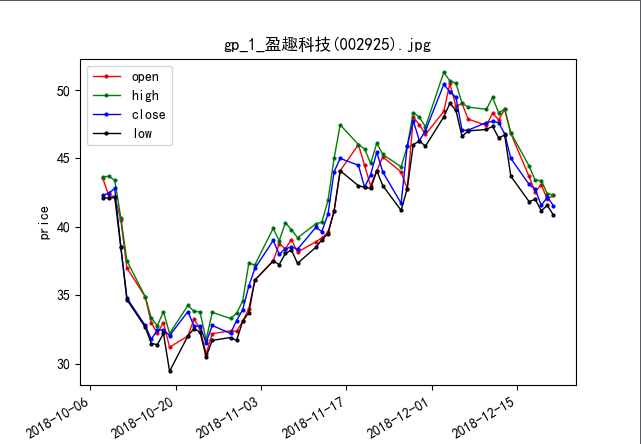
是不是有另一种看法的感觉?如:黑线下跌后向上的第一个大拐点为买入点。
python爬取新浪股票数据—绘图【原创分享】的更多相关文章
- Python抓取新浪新闻数据(二)
以下是抓取的完整代码(抓取了网页的title,newssource,dt,article,editor,comments)举例: 转载于:https://blog.51cto.com/2290153/ ...
- selenium+BeautifulSoup+phantomjs爬取新浪新闻
一 下载phantomjs,把phantomjs.exe的文件路径加到环境变量中,也可以phantomjs.exe拷贝到一个已存在的环境变量路径中,比如我用的anaconda,我把phantomjs. ...
- Python3:爬取新浪、网易、今日头条、UC四大网站新闻标题及内容
Python3:爬取新浪.网易.今日头条.UC四大网站新闻标题及内容 以爬取相应网站的社会新闻内容为例: 一.新浪: 新浪网的新闻比较好爬取,我是用BeautifulSoup直接解析的,它并没有使用J ...
- 利用python爬取58同城简历数据
利用python爬取58同城简历数据 利用python爬取58同城简历数据 最近接到一个工作,需要获取58同城上面的简历信息(http://gz.58.com/qzyewu/).最开始想到是用pyth ...
- 手把手教你使用Python爬取西刺代理数据(下篇)
/1 前言/ 前几天小编发布了手把手教你使用Python爬取西次代理数据(上篇),木有赶上车的小伙伴,可以戳进去看看.今天小编带大家进行网页结构的分析以及网页数据的提取,具体步骤如下. /2 首页分析 ...
- python爬取豆瓣电影信息数据
题外话+ 大家好啊,最近自己在做一个属于自己的博客网站(准备辞职回家养老了,明年再战)在家里 琐事也很多, 加上自己 一回到家就懒了(主要是家里冷啊! 广东十几度,老家几度,躲在被窝瑟瑟发抖,) 由于 ...
- 【转】Python爬虫:抓取新浪新闻数据
案例一 抓取对象: 新浪国内新闻(http://news.sina.com.cn/china/),该列表中的标题名称.时间.链接. 完整代码: from bs4 import BeautifulSou ...
- Python爬虫:抓取新浪新闻数据
案例一 抓取对象: 新浪国内新闻(http://news.sina.com.cn/china/),该列表中的标题名称.时间.链接. 完整代码: from bs4 import BeautifulSou ...
- Python 爬虫实例(7)—— 爬取 新浪军事新闻
我们打开新浪新闻,看到页面如下,首先去爬取一级 url,图片中蓝色圆圈部分 第二zh张图片,显示需要分页, 源代码: # coding:utf-8 import json import redis i ...
随机推荐
- Android多线程(一)
在Android应用的开发过程中,我们不可避免的要使用多线程,获取服务器数据.下载网络数据.遍历文件目录查找特定文件等等耗时的工作都离不开线程的知识.Android继承了Java的多线程体系,同时又实 ...
- Windows Vista 的历史地位
Windows Vista,这是一个不那么如雷贯耳的Windows名字,很多人甚至从来没有体验过这个操作系统.但是,Windows Vista刚刚推出时候所引起的话题性,恐怕是其后的Win7也难以与之 ...
- qt源码的submodules要怎么使用
请问我下载了submodules里面的源代码,怎么使用?http://download.qt.io/official_releases/qt/5.7/5.7.1/submodules/如下载了qweb ...
- ubuntu 14.04搭建tensorflow-gpu开发环境
一.安装nvidia显卡驱动 去navidia官网查看最新的驱动版本号:navidia官网:http://www.geforce.cn/drivers 找到显卡对应的驱动下载,例如下载的驱动为 NVI ...
- myeclipse2018的下载安装教程
首先注意事项!!!!!!! 在安装破解前是不可以打开软件的 jdk版本不能是10版本,1.8或1.9都可以 附上MyEclipse2018的百度云下载链接: 链接:https://pan.baidu. ...
- spring boot之actuator简介
当我们的开发工作进入尾声,部署上线之后,对于一个程序而言,可能才刚刚开始,对程序的运行情况的监控要伴随着整个生命周期. 如果这个工作由程序员自己来开发,也未尝不可,但本着不重复制造轮子的思想,我们尽量 ...
- sso和oauth2.0的简单了解学习
sso,单点登录,single sign on 缩写.sso多用于多个应用之间的切换,例如百度论坛.百度知道.百度云.百度文库等,在其中一个系统中登录,(登录有效期内)切换到另一个系统的时候,不必再次 ...
- List集合总结,对比分析ArrayList,Vector,LinkedList
前面已经写了三篇关于Java集合的文章,包括: Java集合 ArrayList原理及使用 再说Java集合,subList之于ArrayList Java集合 LinkedList的原理及使用 关于 ...
- Metasploit渗透测试
原创博客,转载请注出处! 学习笔记 参考书籍<Metasploit渗透测试指南(修订版)> 经过多日学习,初步掌握metasploit基本参数和使用方法,现进行渗透测试实践 靶机IP:16 ...
- kali 源文件 更改和使用 更新日期:2018.04.21
我的公众号,正在建设中,欢迎关注: 0x01 源文件格式: kali下常用的更新命令有: apt-get install update和apt-get install upgrade,update是下 ...