
docker-compose 快速部署Prometheus之服务端并监控ceph cluster 使用钉钉webhook 报警
现在环境是这样:
ceph 4台:
192.168.100.21 ceph-node1
192.168.100.22 ceph-node2
192.168.100.23 ceph-node3
192.168.100.25 ceph-node5
#已经部署好一个ceph cluster 集群 四个 osd 三个mon 没有使用块存储所有没有mod
监控服务端一台
192.168.100.26 Grafana 上面都是以容器部署了
Prometheus:
Grafana:
alertmanager:
prometheus-webhook-alert:
cAdvisor:
docker-compose 编排如下:
version: ""

networks:

    monitor:

        driver: bridge

services:

  prometheus:

    image: prom/prometheus

    container_name: prometheu

    hostname: prometheu

    restart: always

    volumes:

    - /Prometheus/config/prometheus.yml:/etc/prometheus/prometheus.yml

    - ./config/alertmanager-rule.yml:/etc/prometheus/alertmanager-rule.yml

    - /etc/localtime:/etc/localtime

    ports:

    - "9090:9090"

    networks:

    - monitor

  prometheus-webhook-alert:

    image: timonwong/prometheus-webhook-dingtalk:v0.3.0

    container_name: prometheus-webhook-alertmanagers

    hostname: webhook-alertmanagers

    restart: always

    volumes:

    - /etc/localtime:/etc/localtime

    ports:

    - "8060:8060"

    entrypoint: /bin/prometheus-webhook-dingtalk --ding.profile="webhook1=https://****#钉钉webhook自己去申请一个"

    networks:

    - monitor

  alertmanager:

    image: prom/alertmanager

    container_name: alertmanager

    hostname: alertmanager

    restart: always

    volumes:

      - ./config/alertmanager.yml:/etc/alertmanager/alertmanager.yml

      - /etc/localtime:/etc/localtime

    ports:

      - "9093:9093"

    networks:

      - monitor

  grafana:

    image: grafana/grafana

    container_name: grafana

    hostname: grafana

    restart: always

    volumes:

    - /etc/localtime:/etc/localtime

    - ./grafana-piechart:/var/lib/grafana/plugins/grafana-piechart-panel

    ports:

    - "3000:3000"

    networks:

    - monitor

  cadvisor:

    image: google/cadvisor:latest

    container_name: cadvisor

    hostname: cadvisor

    restart: always

    volumes:

    - /:/rootfs:ro

    - /var/run:/var/run:rw

    - /sys:/sys:ro

    - /var/lib/docker/:/var/lib/docker:ro

    - /etc/localtime:/etc/localtime

    ports:

    - "8080:8080"

    networks:

    - monitor
几处关键配置文件如下:
#普罗米修斯配置文件
cat ./config/prometheus.yml
# my global config

global:

  scrape_interval:     15s # Set the scrape interval to every  seconds. Default is every  minute.

  evaluation_interval: 15s # Evaluate rules every  seconds. The default is every  minute.

# Alertmanager configuration

alerting:

  alertmanagers:

  - static_configs:

    - targets: ["192.168.100.26:9093"]

# Load rules once and periodically evaluate them according to the global 'evaluation_interval'.

rule_files:

  - "alertmanager-rule.yml"

scrape_configs:

  # The job name is added as a label `job=<job_name>` to any timeseries scraped from this config.

  - job_name: 'prometheus'

    static_configs:

    - targets: ['192.168.100.26:9090']

  - job_name: 'cadvisor-1'

    static_configs:

    - targets: ['192.168.100.26:8080']

  - job_name: 'node-1'

    scrape_interval: 4s

    static_configs:

    - targets: ['192.168.100.26:9100']

  - job_name: 'cadvisor-2'

    static_configs:

    - targets: ['192.168.100.25:8080']

  - job_name: 'node-2'

    scrape_interval: 4s

    static_configs:

    - targets: ['192.168.100.25:9100']

  - job_name: 'ceph'

    scrape_interval: 4s

    static_configs:

    - targets: ['192.168.100.21:9128']
#监控报警组件 压制 合并 过滤配置文件 并配置webhook地址
cat ./config/alertmanager.yml
global:

  resolve_timeout: 5m

route:

  group_by: ['alertname']

  group_wait: 10s

  group_interval: 10s

  repeat_interval: 1h

  receiver: 'web.hook'

receivers:

- name: 'web.hook'

  webhook_configs:

  - url: 'http://192.168.100.26:8060/dingtalk/webhook1/send'

    send_resolved: true

inhibit_rules:

  - source_match:

      severity: 'critical'

    target_match:

      severity: 'warning'

    equal: ['alertname', 'dev', 'instance']
#监控报警规则配置文件
cat ./alertmanager-rule.yml
groups:

- name: ceph-rule

  rules:

  - alert: Ceph OSD Down

    expr: ceph_osd_down >

    for: 2m

    labels:

      product: Ceph测试集群

    annotations:

      Warn: "{{$labels.instance}}: 有{{ $value }}OSD,down: {{$labels}}"

      Description: "{{$labels.instance}}:有{{ $labels.osd }}当前状态为{{ $labels.status }}"

  - alert: 集群空间使用率

    expr: ceph_cluster_used_bytes / ceph_cluster_capacity_bytes *  >

    for: 2m

    labels:

      product: Ceph测试集群

    annotations:

      Warn: "{{$labels.instance}}:集群空间不足"

      Description: "{{$labels.instance}}:当前空间使用率为{{ $value }}"
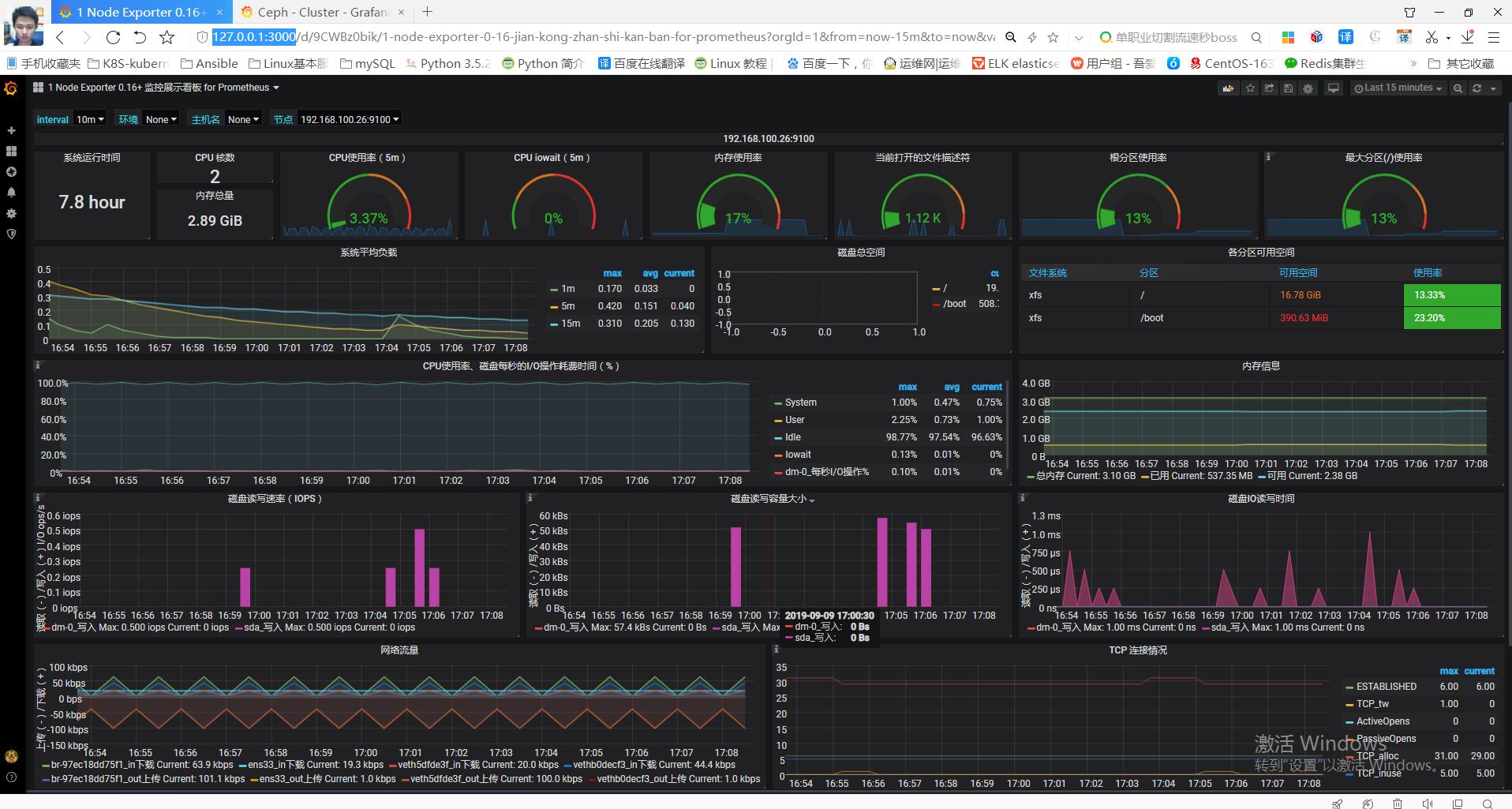
node-exporter: json模板下载 https://grafana.com/grafana/dashboards/10645
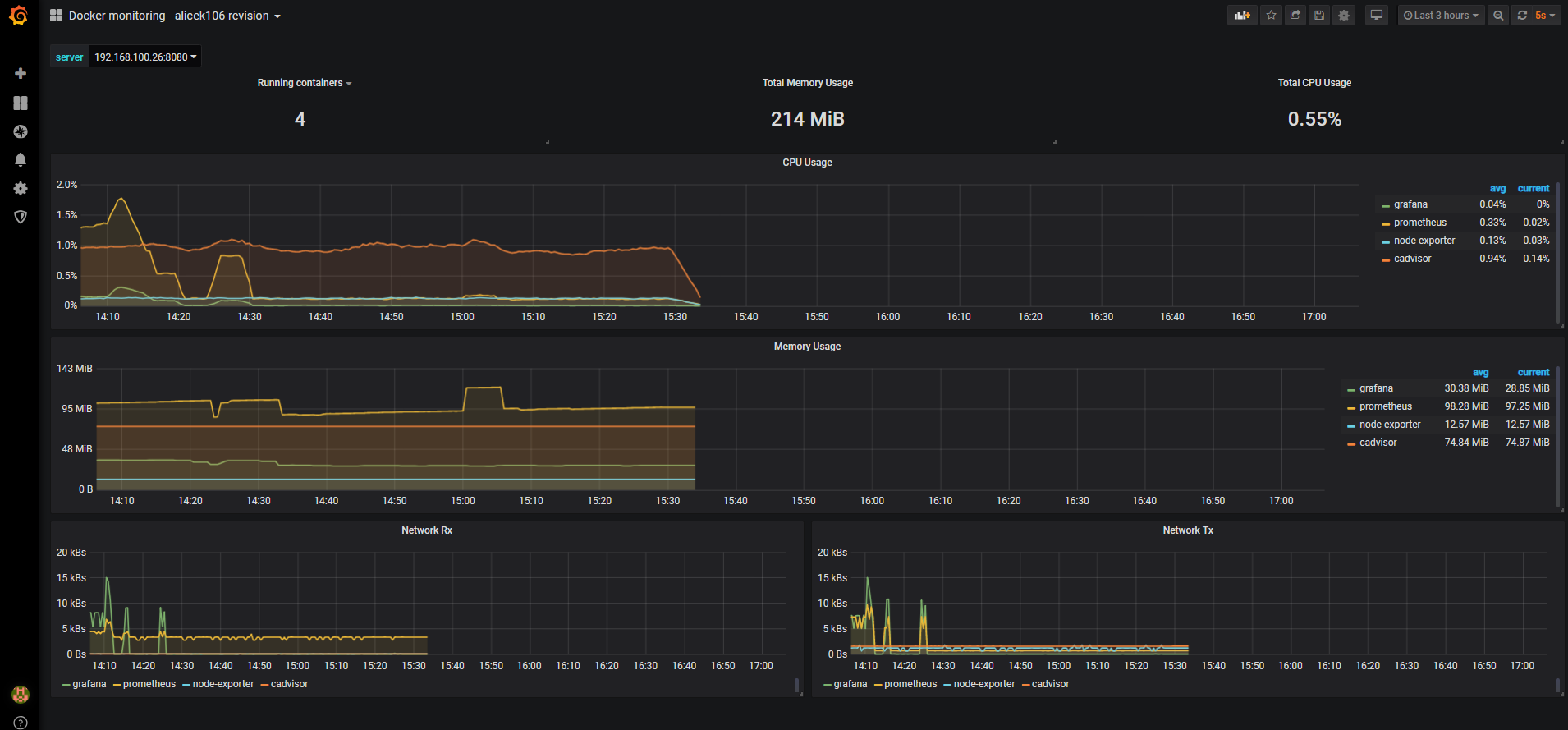
cadvisor: json模板下载: https://grafana.com/grafana/dashboards/3125
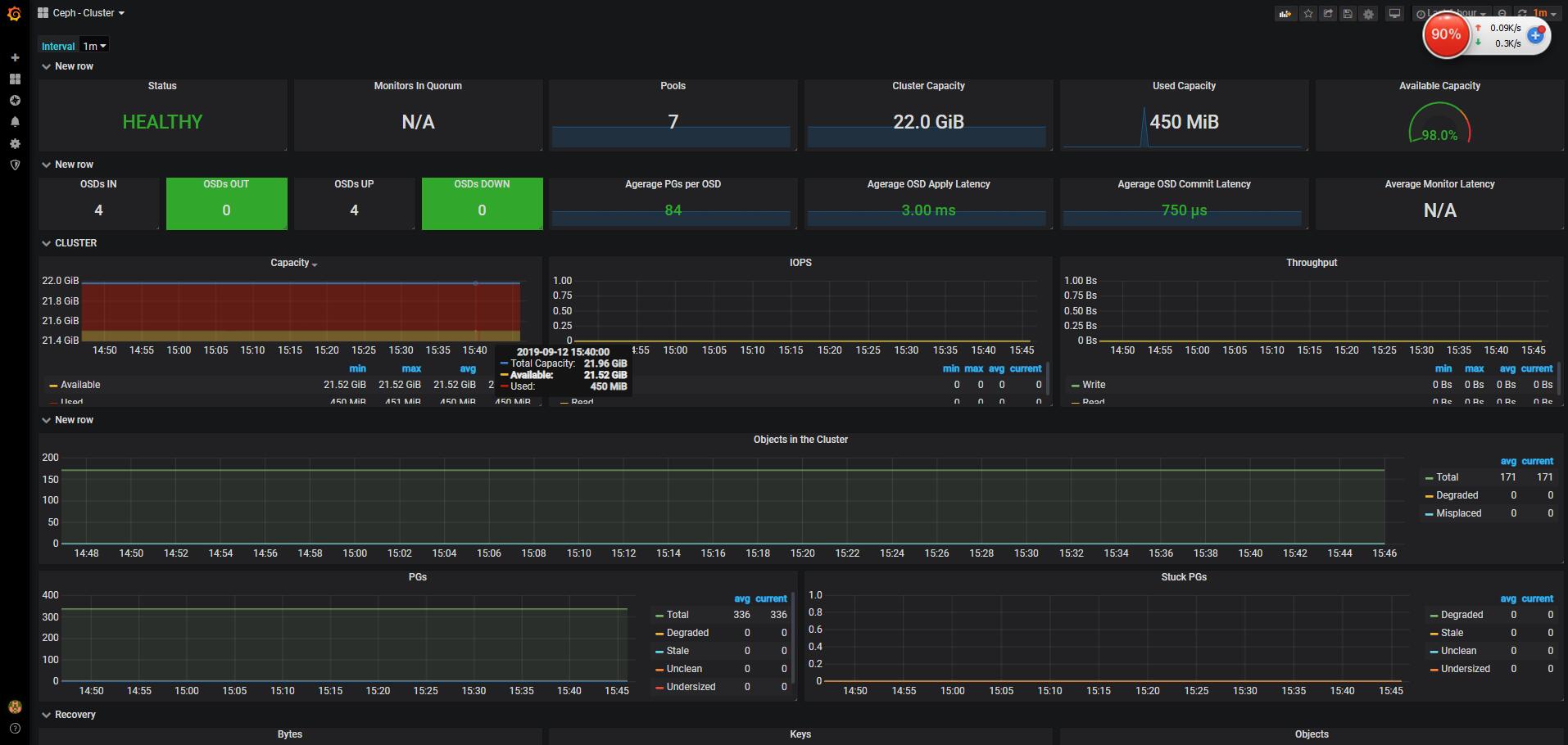
ceph cluster: json模板下载: https://grafana.com/grafana/dashboards/917%5D
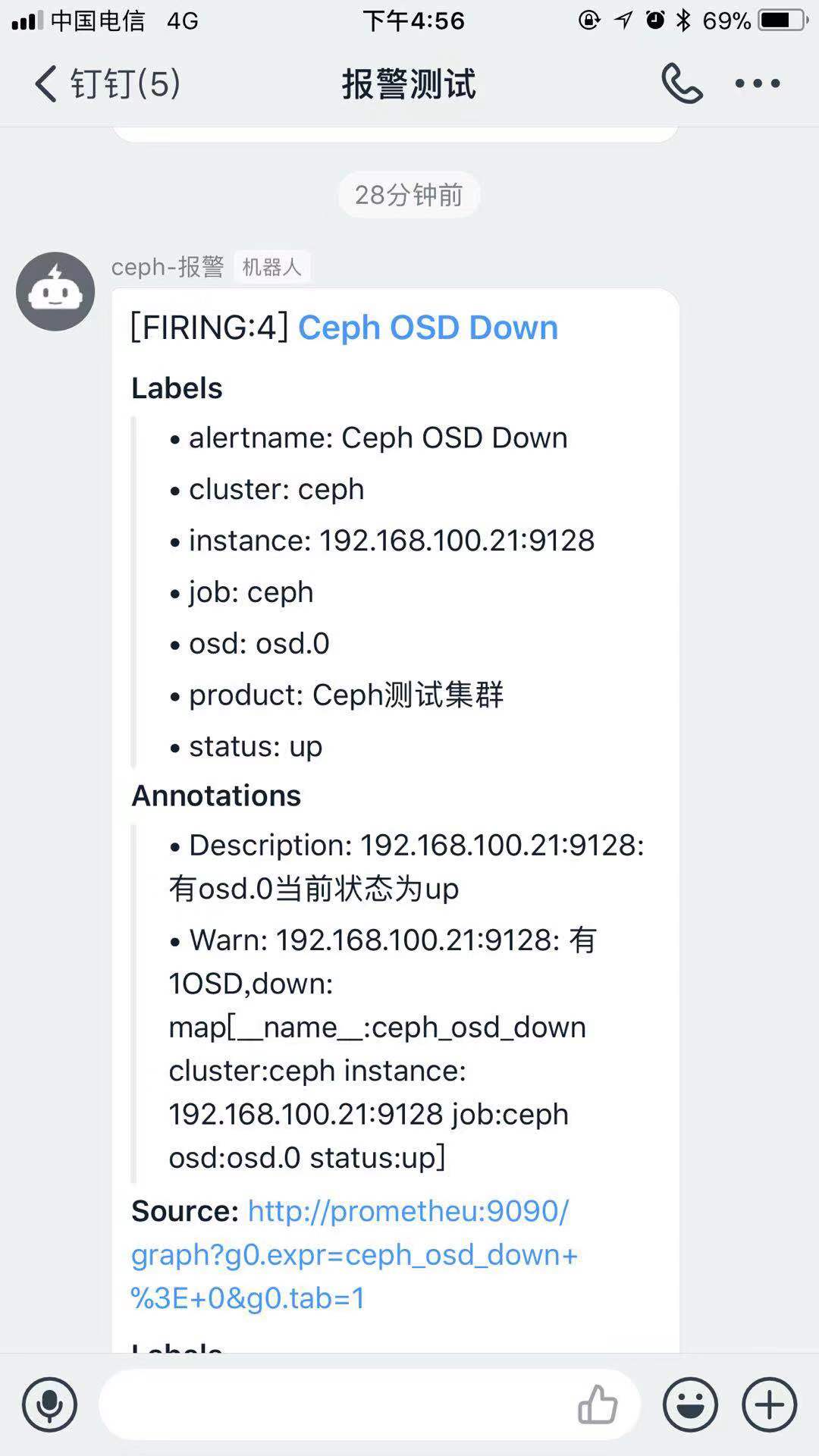
最后来一张完成 成果图
docker-compose 快速部署Prometheus之服务端并监控ceph cluster 使用钉钉webhook 报警的更多相关文章
- 使用 Docker Compose 快速构建 TiDB 集群
本文档介绍如何在单机上通过 Docker Compose 快速一键部署一套 TiDB 测试集群.Docker Compose 可以通过一个 YAML 文件定义多个容器的应用服务,然后一键启动或停止. ...
- 快速理解高性能HTTP服务端的负载均衡技术原理(转)
1.前言 在一个典型的高并发.大用户量的Web互联网系统的架构设计中,对HTTP集群的负载均衡设计是作为高性能系统优化环节中必不可少的方案.HTTP负载均衡的本质上是将Web用户流量进行均衡减压,因此 ...
- Docker Compose 一键部署LNMP
Docker Compose 一键部署LNMP 目录结构 [root@localhost ~]# tree compose_lnmp/ compose_lnmp/ ├── docker-compose ...
- Docker Compose 一键部署Nginx代理Tomcat集群
Docker Compose 一键部署Nginx代理Tomcat集群 目录结构 [root@localhost ~]# tree compose_nginx_tomcat/ compose_nginx ...
- Docker Compose 一键部署多节点爬虫程序
Docker Compose 一键部署多节点爬虫程序 目录结构 [root@localhost ~]# tree compose_crawler/ compose_crawler/ ├── cento ...
- 用Docker swarm快速部署Nebula Graph集群
用Docker swarm快速部署Nebula Graph集群 一.前言 本文介绍如何使用 Docker Swarm 来部署 Nebula Graph 集群. 二.nebula集群搭建 2.1 环境准 ...
- 通过 DynamicLinq 简单实现 N-Tier 部署下的服务端数据库通用分页
通过 DynamicLinq 简单实现 N-Tier 部署下的服务端数据库通用分页 YbSoftwareFactory 的 YbRapidSolution for WinForm 插件使用CSLA.N ...
- docker-compose 快速部署Prometheus,监控docker 容器, 宿主机,ceph -- cluster集群
话不多说上菜: 现在环境是这样: ceph 4台: 192.168.100.21 ceph-node1 192.168.100.22 ceph-node2 192.168.100.23 ceph ...
- 如何快速部署 Prometheus?- 每天5分钟玩转 Docker 容器技术(85)
上一节介绍了 Prometheus 的核心,多维数据模型.本节演示如何快速搭建 Prometheus 监控系统. 环境说明 我们将通过 Prometheus 监控两台 Docker Host:192. ...
随机推荐
- 到底是哪个“O”管理内部人员风险?
导读 俗话说,家和万事兴.与之相对的,家不睦则必自败.同理,如果缺乏明确的领导,内部人员风险管理项目或内部人威胁项目 (ITP) 也将走向失败. 俗话说,家和万事兴.与之相对的,家不睦则必自败.同理, ...
- Oracle的TO_CHAR()格式化数字为百分数的字符串
TO_CHAR(-0.926903249,'FM999999990.00') || '%' 说明: 1,(点号) :'99.99' : 点号,不要念为"句号",句号是个圆圈,点号只 ...
- linux文件的查找和检索
1)按文件属性查找 1)文件名: find + 查找的目录 + -name + "文件名" 文件名中可以使用通配符:*号表示多个,?号表示一个 2)文件大小: fin ...
- stack的使用-Hdu 1062
Text Reverse Time Limit: 2000/1000 MS (Java/Others) Memory Limit: 65536/32768 K (Java/Others)Tota ...
- 时间选择器UIDatePicker的使用
UIDatePicker的介绍 UIDatePicker这个类的对象让用户可以在多个车轮上选择日期和时间.iPhone手机上的‘时钟’应用程序中的时间与闹铃中便使用了该控件.使用这个控件时,如果你能配 ...
- 一个linuxk开发板的开发笔记
arm-fsl-linux-gnueabi开发笔记 //开发主机系统信息 $ lsb_release -a No LSB modules are available. Distributor ID:U ...
- Mybatis plus 插入数据时将自动递增的主键手动进行赋值设置
1.首先设置好实体类:将类型设置为 @TableId(type = IdType.INPUT) 2.在插入数据前将id赋值给实体类对象即可
- DCL和DQL
数据查询语言(DQL,Data Query Language) 主要是一些查询的sql语句. 语法 select * from test: 数据控制语言(DCL, Data Control Langu ...
- 开启Linux服务器vnc远程服务详细步骤
1.安装rpm包 ,如果没有这个包,请提前下载好,然后输入命令安装 yum localinstall /usr/local/tigervnc-server-1.1.0-24.el6.x86_64 ...
- 设计模式课程 设计模式精讲 18-2 迭代器模式coding
1 代码演练 1.1 代码演练1(迭代器模式演练) 1.2 代码使用场景 1 代码演练 1.1 代码演练1(迭代器模式演练) 需求: 课程管理:需要实现课程可进行增添,删除,并能够打印出课程列表. u ...